
Preview - HP Pavilion HDX Entertainment Notebook
HP's largest ever notebook, the Pavilion HDX Entertainment notebook with a 20.1-inch widescreen display has landed in our labs with a resounding thud that only 7kg of sleek metal and plastic will have. Find out more about this giant notebook in our preview.

Enter the Dragon
Summer - that time of the year when days become longer and warmer. It's also the cue for big budget, CGI-bloated Hollywood blockbuster movies to start flooding the cinemas. Getting into this spirit is a revitalized HP, fresh from its recent triumphs in the marketplace, with its latest, and biggest ever blockbuster of a notebook, a 20.1-inch wide creation with an appropriately Hollywood nickname - the Dragon. The actual name however is a more mundane and longwinded one, HP Pavilion HDX Entertainment Notebook PC and apparently, it's so new that HP has not yet christened it with a proper model name/number.
Following in the footsteps of rivals like Dell and Acer, which already have such unconventionally large 'notebooks' models available - we have previously reviewed the Dell XPS M2010 - HP is merely capitalizing on the trend of increasingly powerful, consumer desktop replacement notebooks that are larger than ever. Consumers are taking to 17-inch notebooks for their performance, widescreen displays and multimedia capabilities and manufacturers are convinced that taking a notch further to 20-inches and above is feasible for a certain select desktop replacement (DTR) user group.
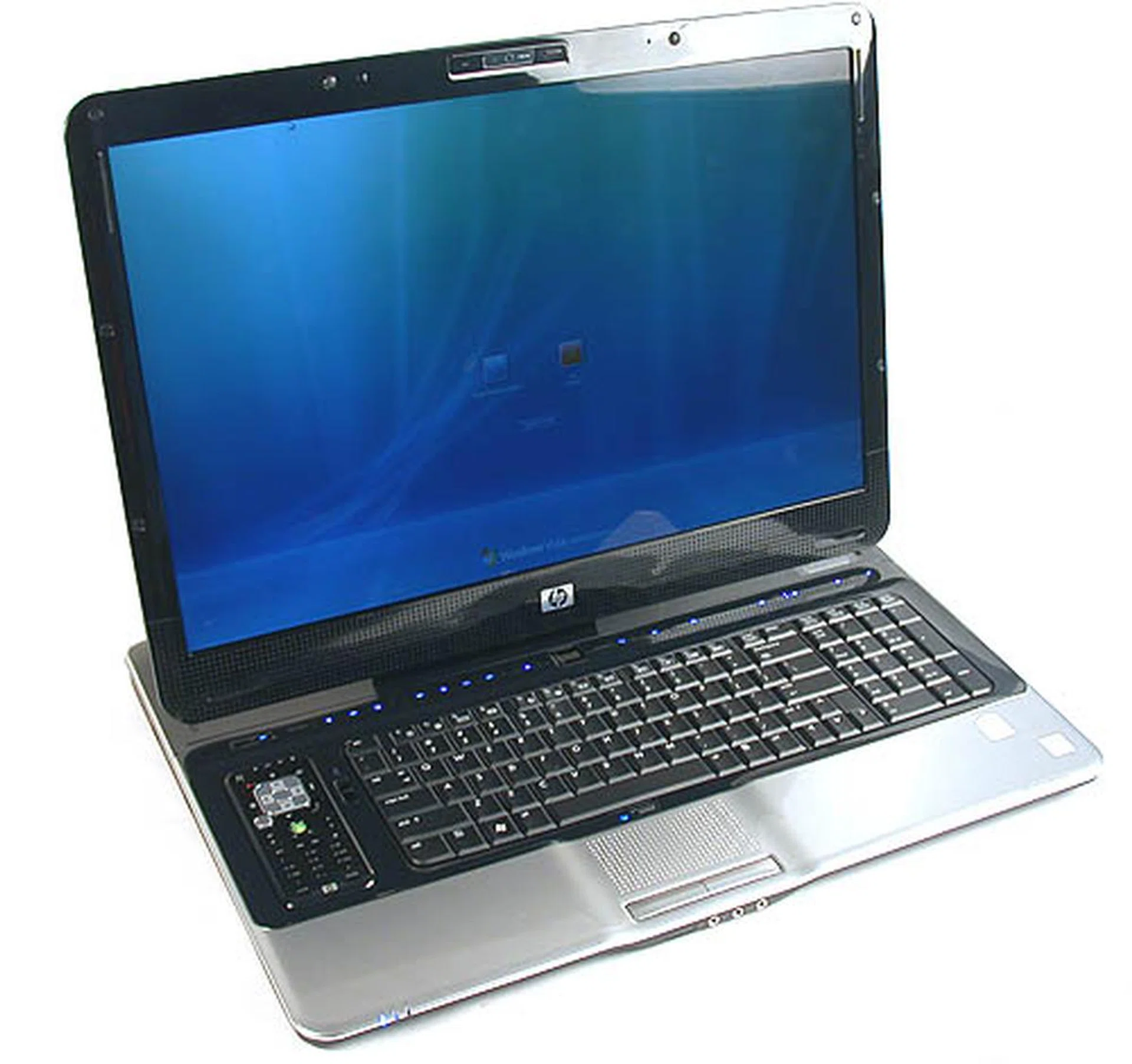
HP joins the mammoth notebook club with this impressively large 20.1-inch widescreen notebook, which they have dubbed the 'Dragon'
But with a bulk and weight that would have been unimaginable for a notebook a few years ago - the HP Pavilion HDX weighs around 7kg alone, excluding the substantial mass of its power adapter - would these machines fit the typical definition of a 'notebook' which has always been associated with portable computing machines? We'll find out with this preview of an engineering prototype of the HP Pavilion HDX. Since this is only a prototype, we were warned that some features and functions might not work properly. The specifications of this machine (the version for the Asia Pacific region) have also not been finalized at the moment so we will list the technical specifications relevant for this preview below. More likely than not, these specifications will be changed for the actual retail unit when it is available sometime in July.
Of Fingerprints, Features and Functionality
It cannot be denied that a piano black finish looks nice and glossy. In pictures, in movies, in display cases (and in fact, we are waiting to see if any of HP's new notebooks will make it into a Hollywood movie anytime soon, as they certainly have the glamour). But in reality, it quickly becomes a fingerprint magnet, which turns out to be the case with this HP notebook. Alas, this style seems to have taken off in a big way with notebook manufacturers and HP in particular has revamped its new consumer notebook series to have that black and silver gloss.
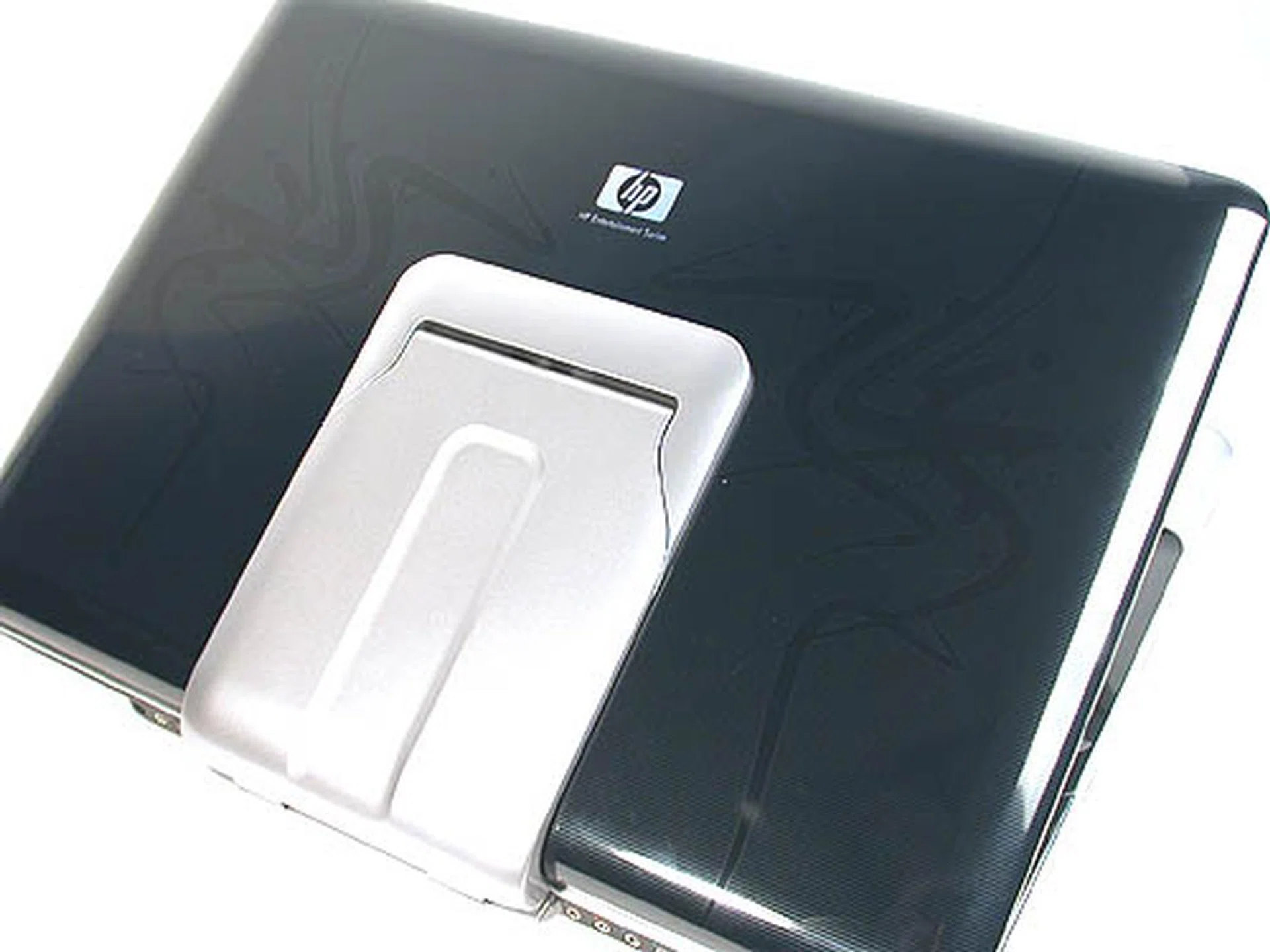
HP's unique imprint technology has been found in its new series of notebooks and this entertainment notebook has been tattooed with subtle stylistic curves that evoke an oriental dragon. Of course, having the 'Dragon' moniker helps to point us towards that interpretation. A large hinge keeps the heavy display attached to the main body of the notebook.
This distinctive notebook finish is actually known as the 'HP Imprint' and underneath that glossy finish is a unique inlaid design that could vary from one series to another. So unlike some other brands with similar 'tattoos' on their designs, the HP Imprint will not wear off from normal wear and tear. For the 'Dragon' notebook, the imprint is a stylish arrangement of curves that evokes the slim, long dragons of the Oriental persuasion, not the hulking brutes of Western mythology.
Unfortunately, the massive form factor of the HDX doesn't possess the grace of the Far East. Instead, imagine the size of a 20.1-inch widescreen LCD monitor and you should have the approximate dimensions of this notebook. The native resolution for this WSXGA+ display is also exactly like many desktop LCDs of its size - 1680 x 1050 - and comes with HP's Ultra Brightview technology. Together with its glossy finish, the display on the HDX is a delight, with bright and brilliant colors. So much so that one could almost forgive the fact that this is not a full HD panel offering a resolution of 1920 x 1200. When 17-inch notebooks from Sony and Toshiba are already equipped with full HD panels, the HDX does seem slightly inferior. To its credit, HP informed us that there will be a another iteration shortly after the official launch with such a full HD panel.
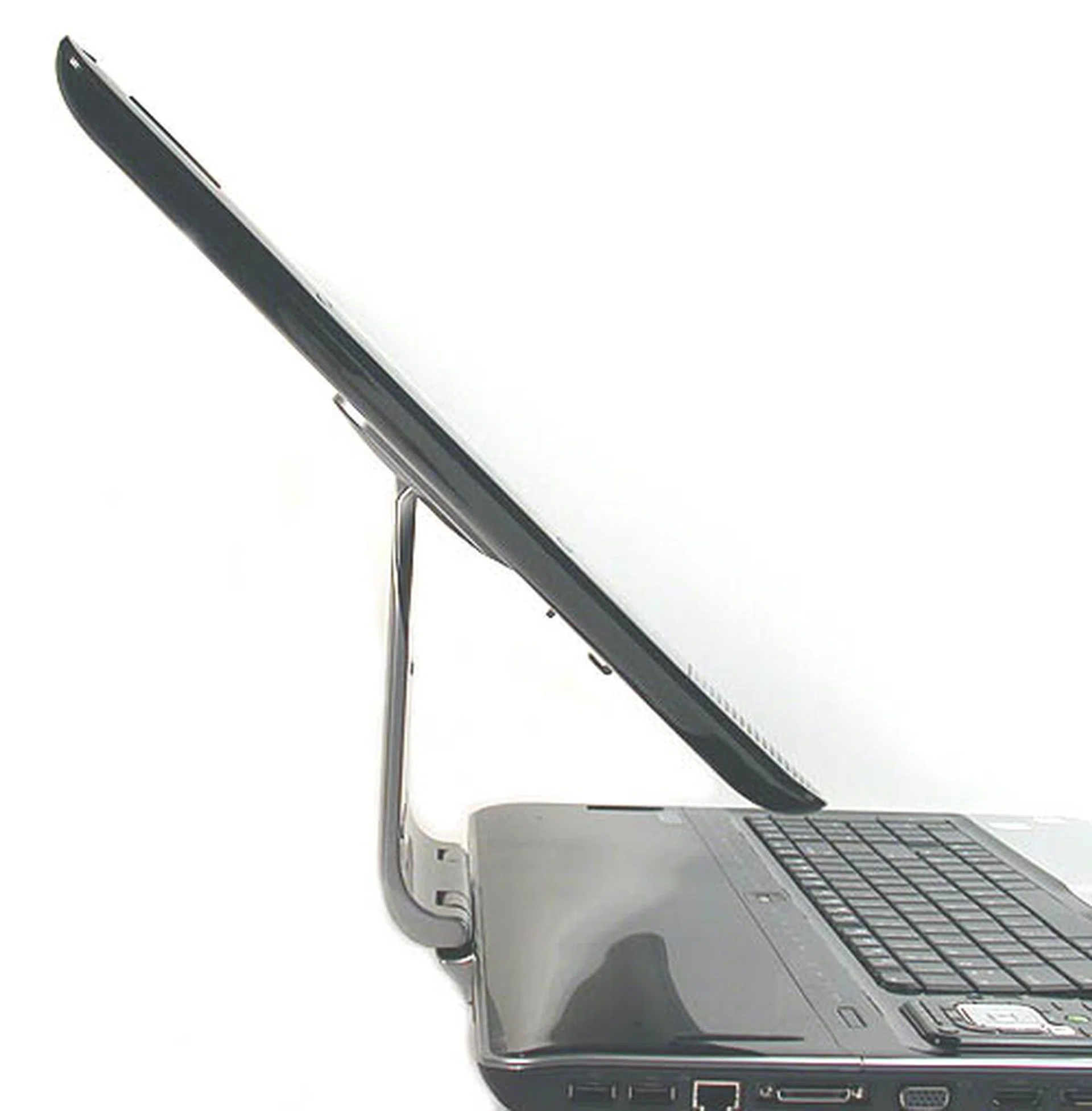
The maximum tilt and forward/back swivel possible on the HDX.
Like the Dell XPS M2010, a large hinge keeps the display attached to the body of the notebook but comparing the two, the HP does seem to be more limited in the amount of forward/back tilt movement available. Also, while the hinge on the Dell naturally 'transforms' into a carrying handle, there is no such handle on the HDX.
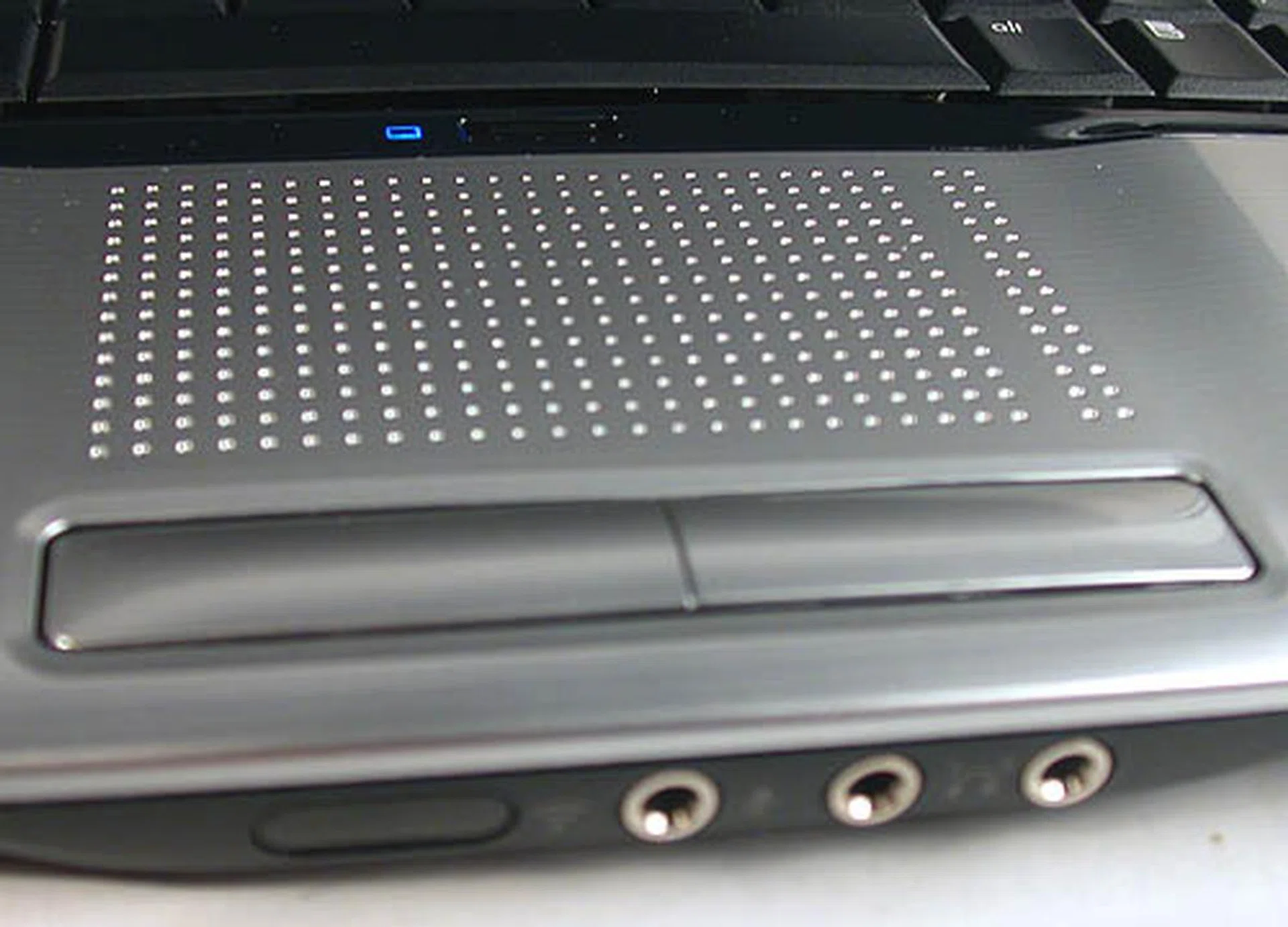
HP's braille-like touchpad. The headphones and microphone jacks are located at the front for easy access. Notice that there is no lock for the lid/display, though we must say the lid and hinge was stiff enough not to cause too much of a hassle, like swinging open at an inopportune time.
Hence it can be quite a chore bringing this 'notebook' around as we've tried. We carried it under our arm, with one hand wrapped around the hinge. There is no lock for the screen lid and although the hinge looks stiff enough not to swing open during transit, we weren't feeling too comfortable handling this big notebook. However, once the notebook is placed on the desk, the luxury of having a full sized keyboard starts to sink in. If not for the remote control dock on the left, there would have been space for an even more spacious keyboard layout. As it is now, you'll still find a decent Num Pad and a host of touch sensitive shortcut keys for various multimedia functions occupying a row above the standard keyboard.
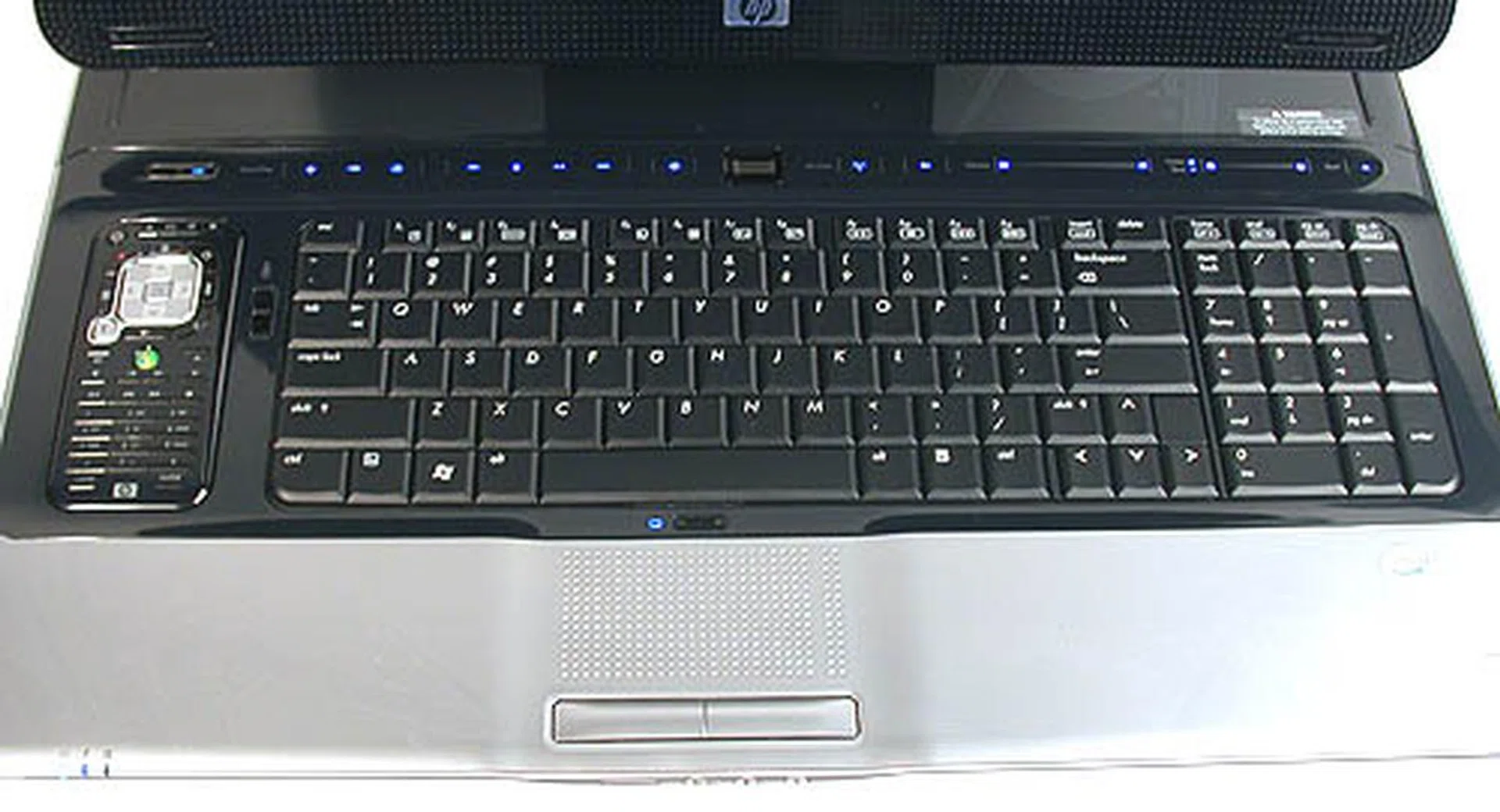
A practically full sized keyboard takes advantages of the extra amount of 'desk space' afforded by the large display. There's even a small dock for the remote on the left.
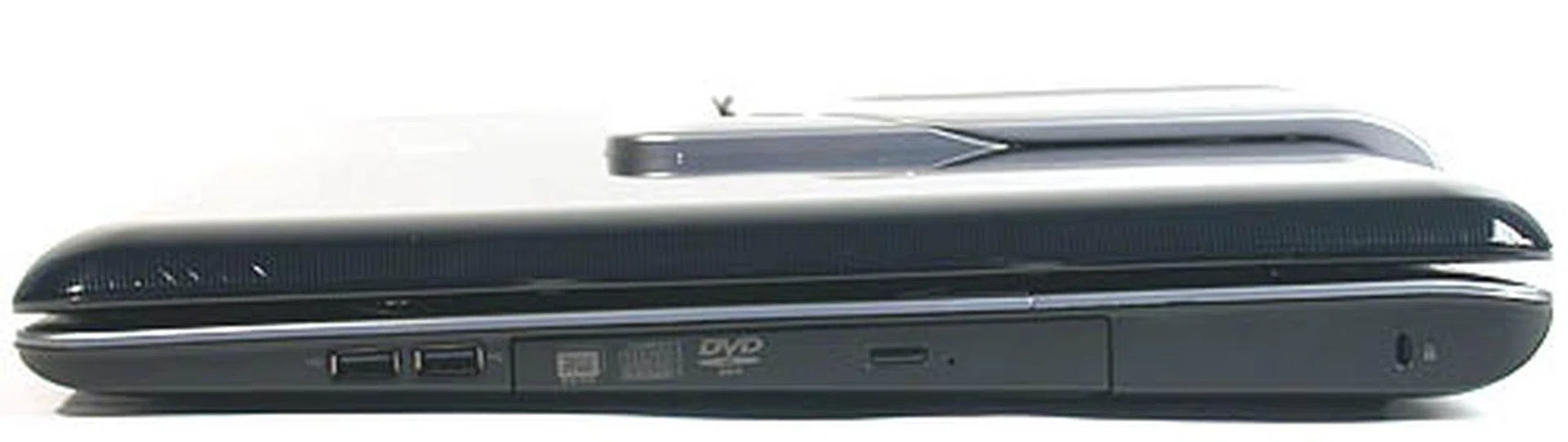
Two USB2.0 ports and the HD DVD drive on this side of the notebook. Our engineering sample does not have the HD DVD drive included and a typical Super Multi DVD burner replaces it. There's even a Kensington lock.
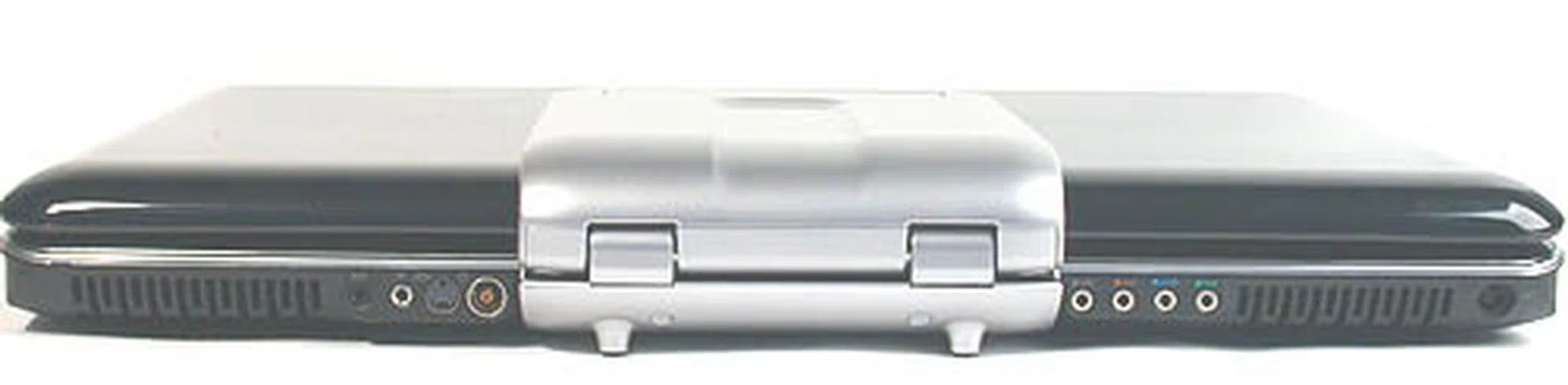
The audio outputs and the related outputs/inputs for the integrated, hybrid HDTV tuner are found at the rear.
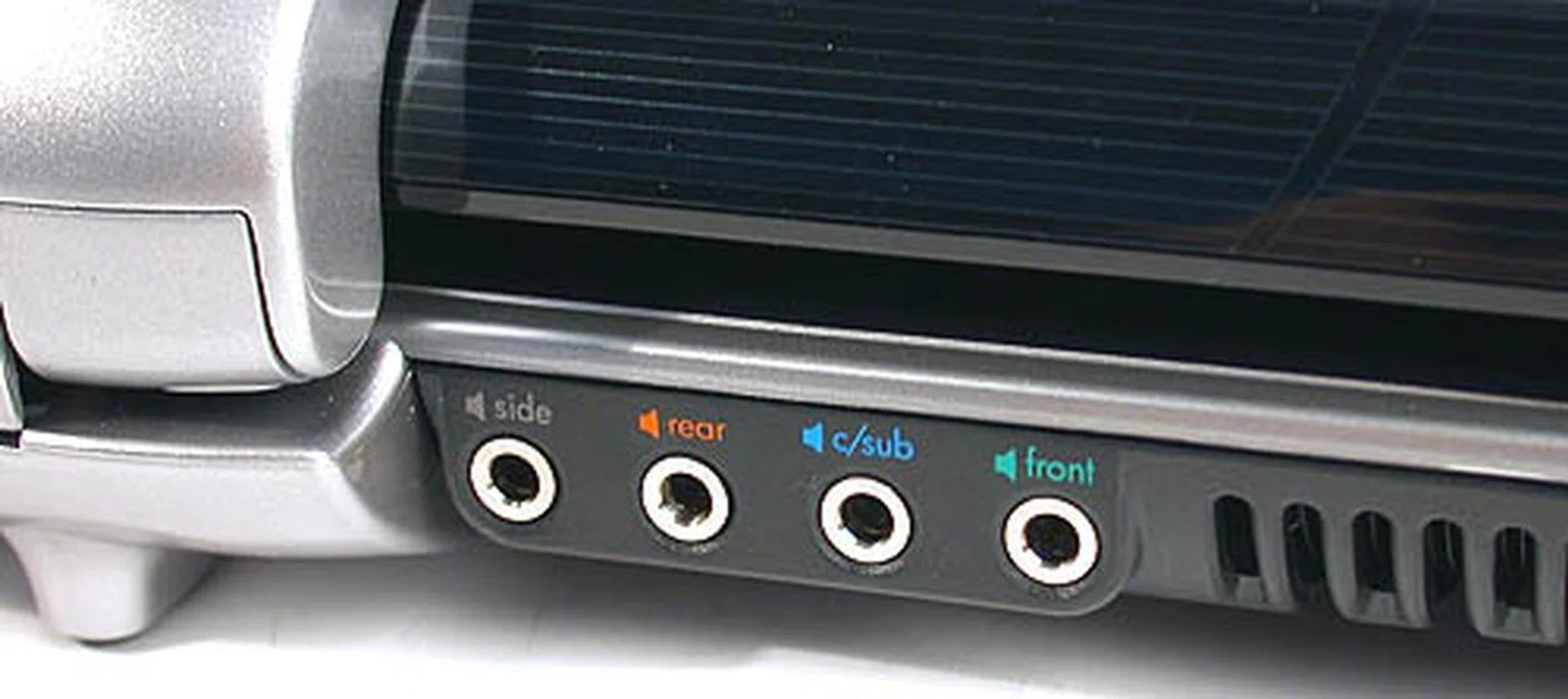
The various audio outputs on our review sample. Surprisingly, there is no digital SPDIF output.
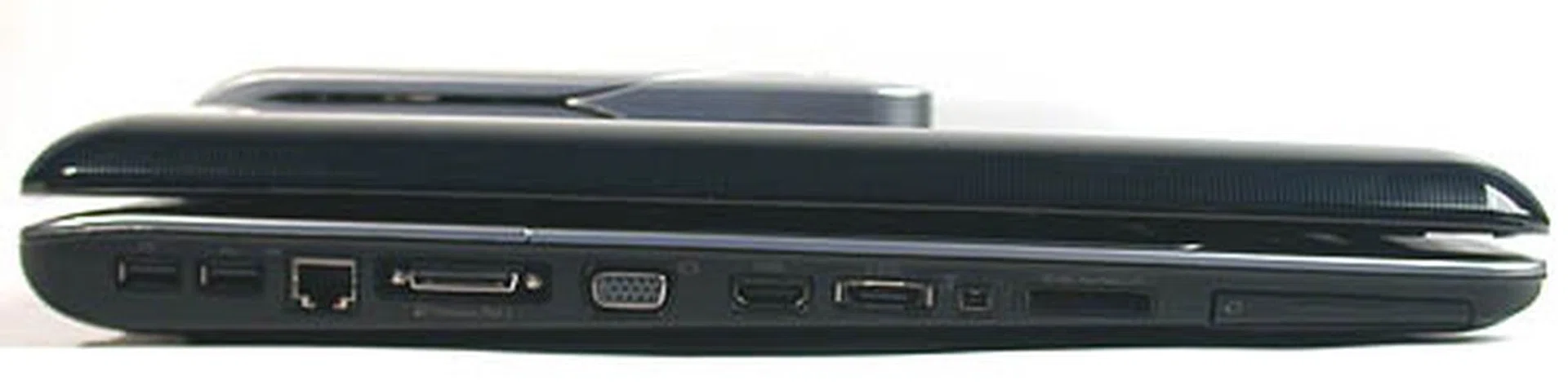
It's a continuous parade of I/O slots here, with 2 USB2.0, Ethernet, HP's proprietary expansion slot, VGA output, HDMI, eSATA, FireWire and ExpressCard slot. Also included is an integrated 5-in-1 digital media reader supporting the typical Flash memory formats.
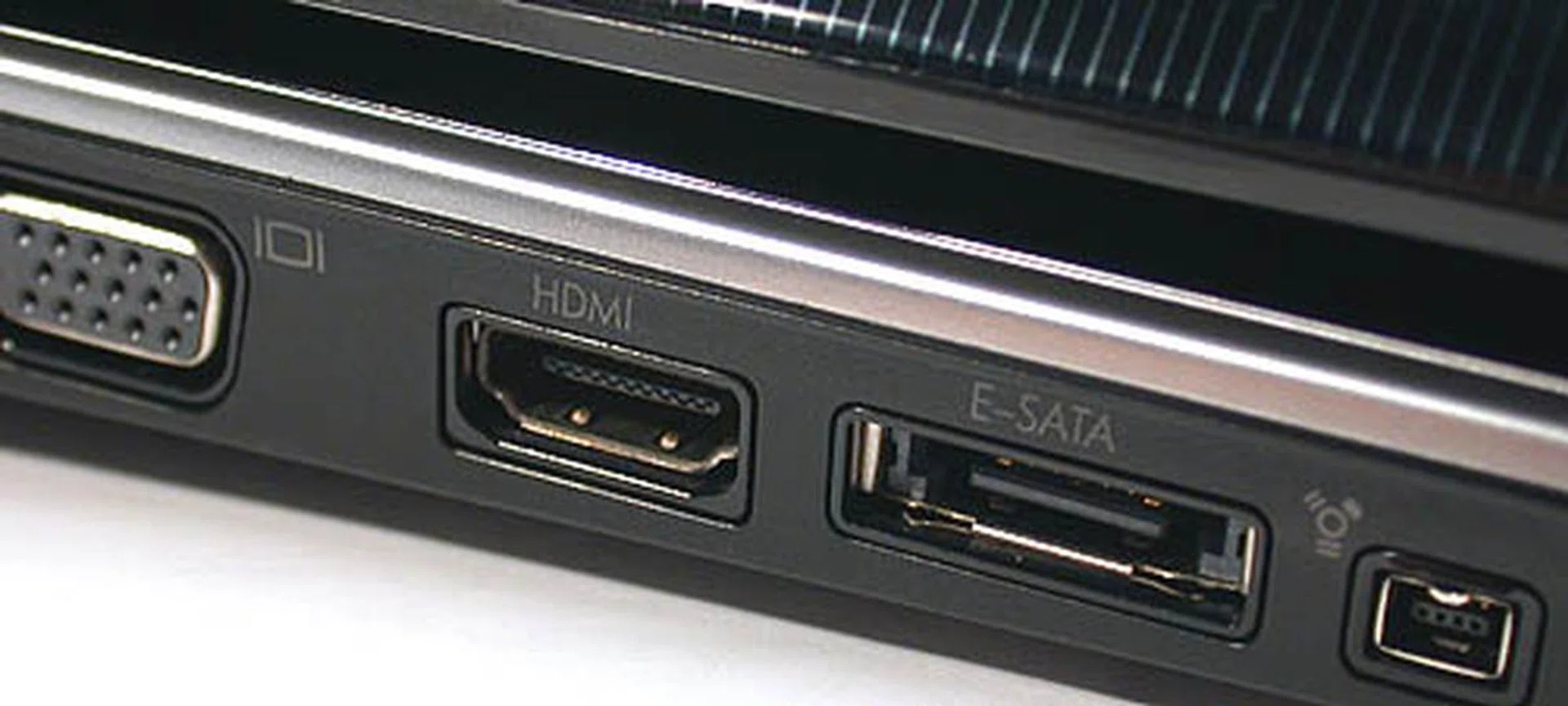
Not something that you'll see on most notebooks - HDMI and eSATA outputs.
These touch sensitive keys glow blue, though users can turn it off easily, as they will be quite distracting when viewing a movie in the dark for example. Some of the keys include standard favorites like volume control while others are shortcuts for HP's own multimedia application, QuickPlay, which enables users to access and play media without booting into the usual Windows operating system. This is implemented by having a custom Linux partition set aside for this purpose, estimated at around 1GB of disk space. However, this application did not seem to work as intended on the HDX and though we can't be sure of its accuracy, a Wikipedia entry on QuickPlay seems to validate our observation, with its claim that this application does not work properly with Windows Vista currently. It will still launch successfully, but only after Windows Vista has been booted, which defeats the main purpose of the application. Meanwhile we hope HP is working on an update to enable the ability on Windows Vista.
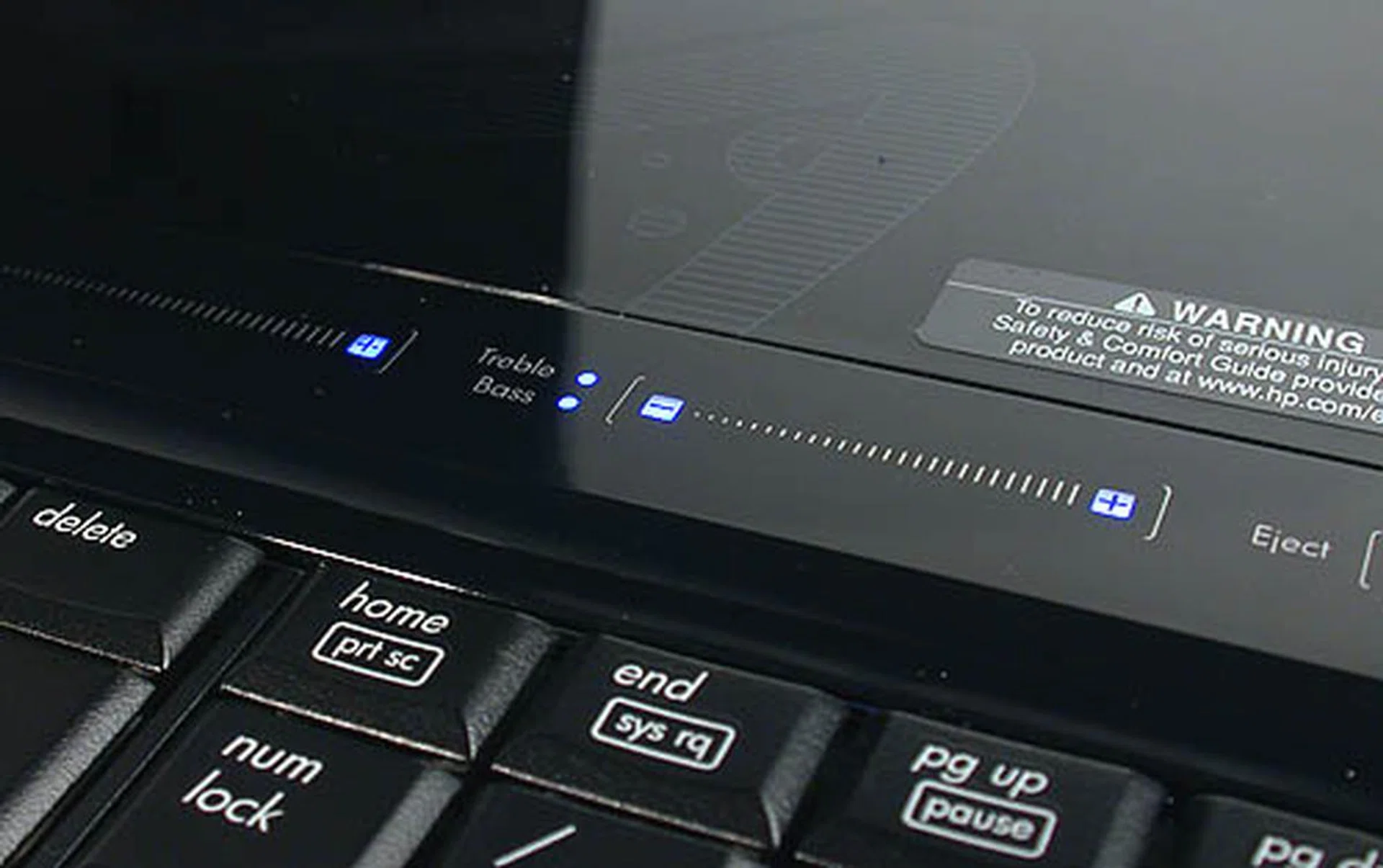
Besides the usual volume control, the subwoofer can be tweaked too through the controls here. To our dismay, this did not work on our engineering sample but of course we expect it to work flawlessly on the retail set.
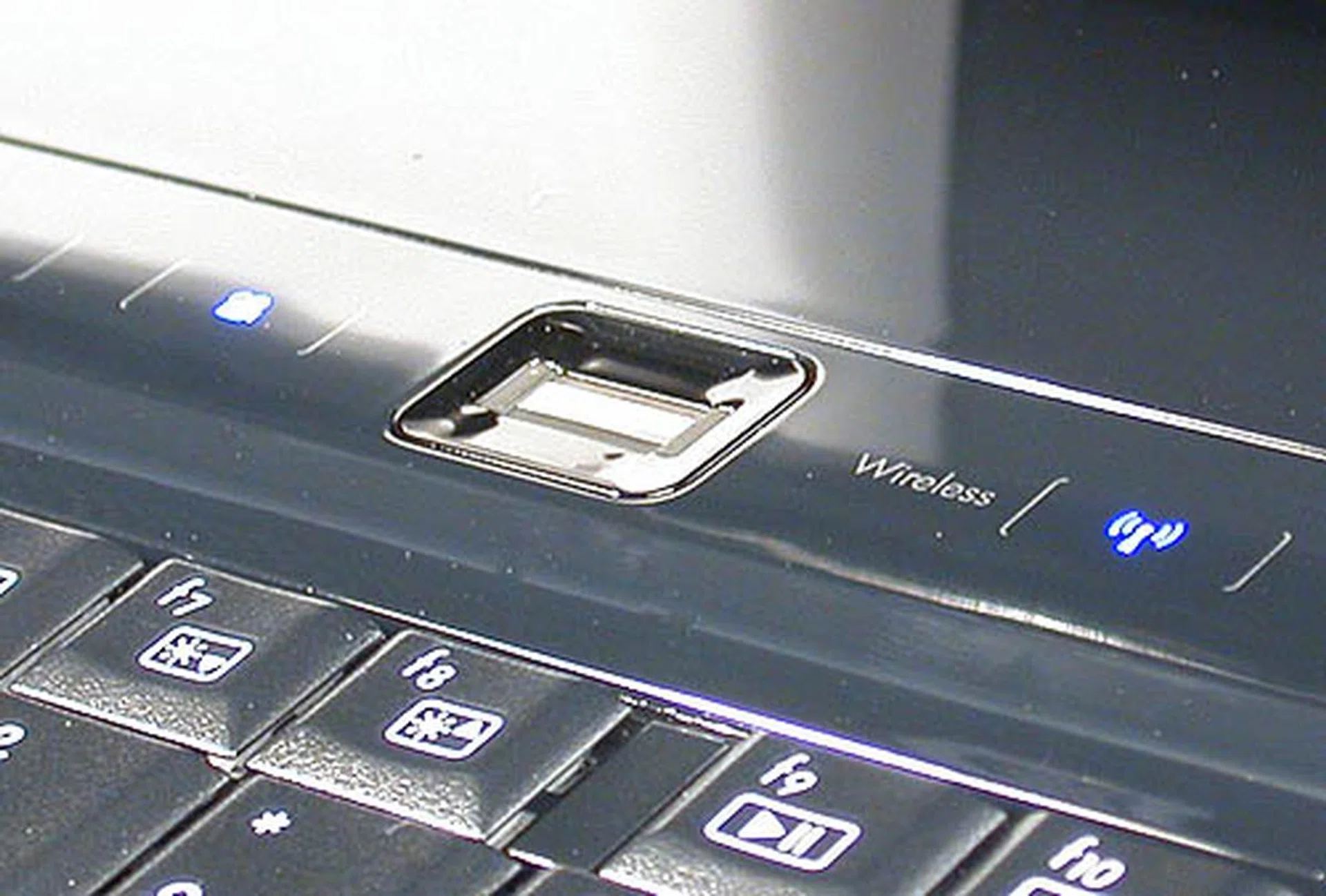
Fingerprint recognition has been integrated into the Windows Vista operating system used in the HDX. After a simple registration process, you can use it for a variety of authentication purposes for programs and account access.
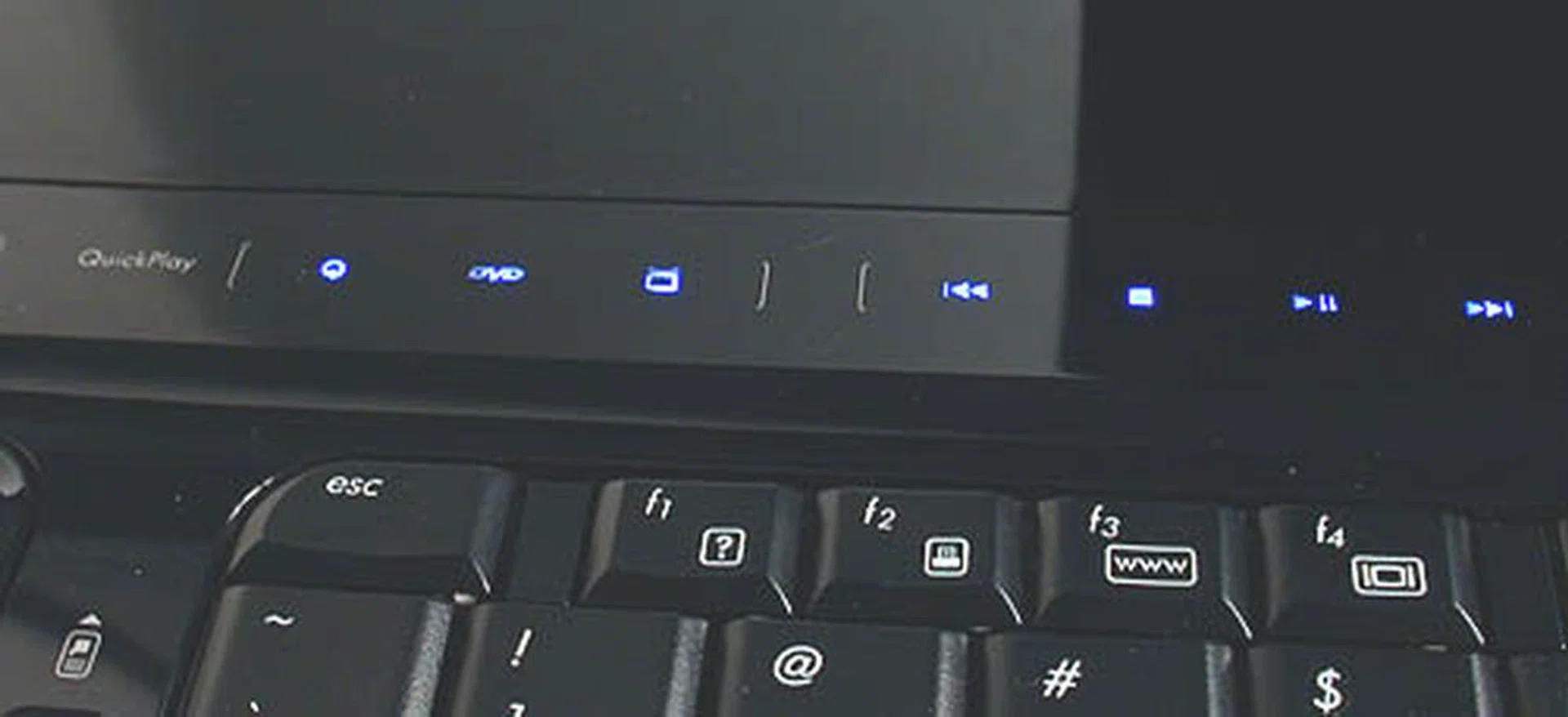
Like its name suggests, HP's QuickPlay allows easy and fast access to multimedia functions on the notebook. This has become a fixture in many multimedia notebooks from HP in recent times. These buttons are all touch sensitive.
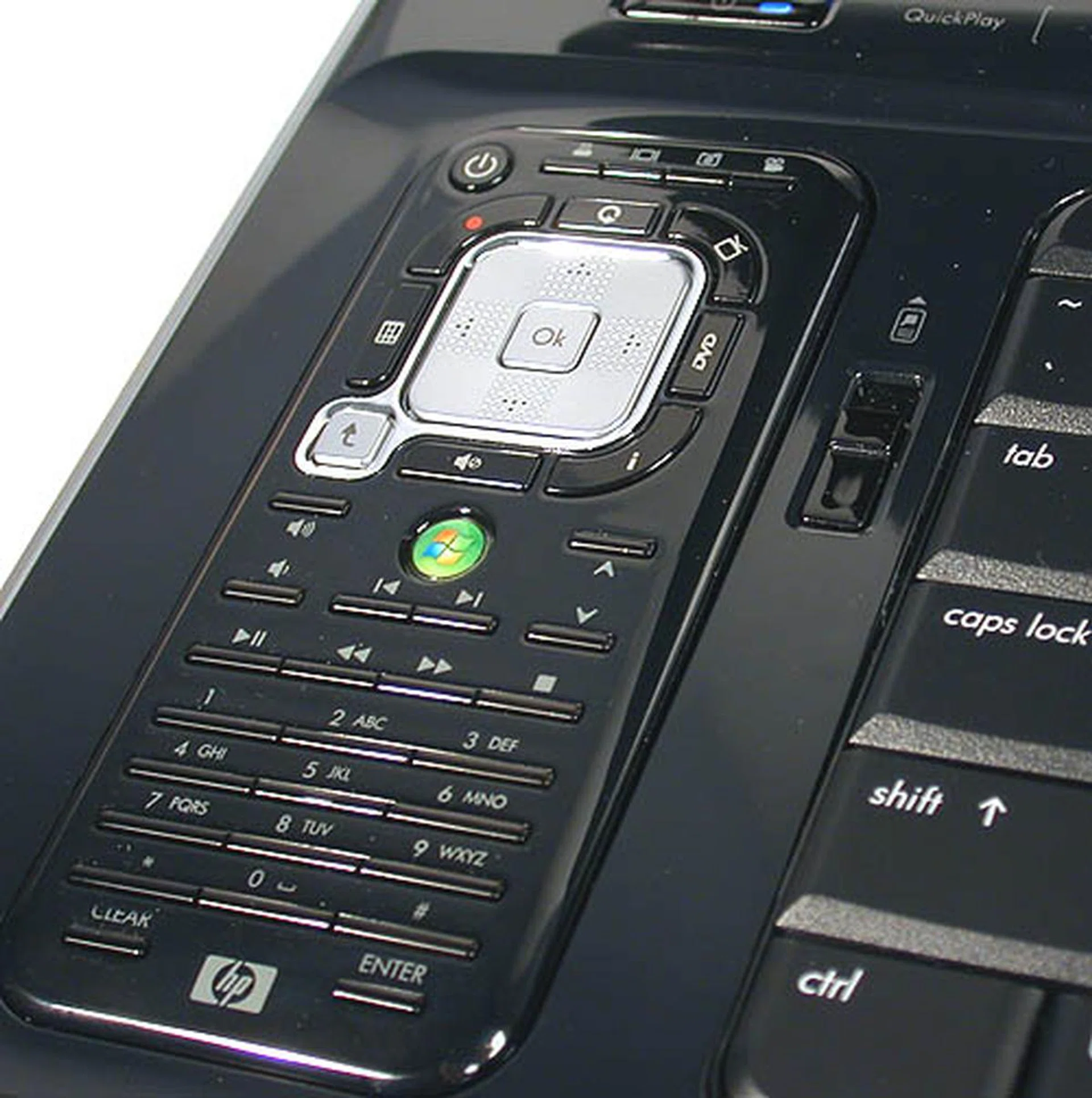
A remote dock for the small fancy remote control. It is still usable without popping it out from its cradle.
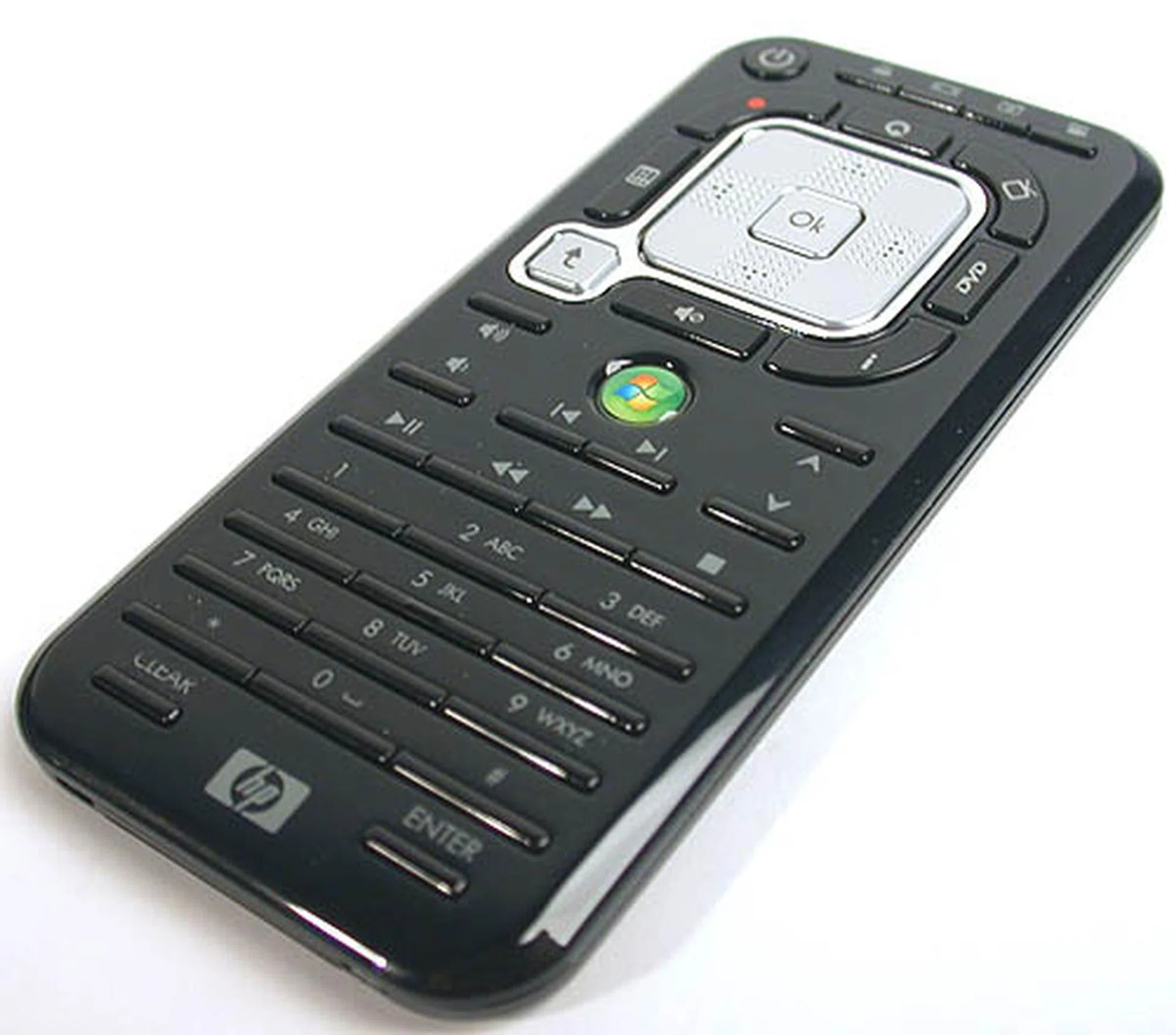
A streamlined form of the usual larger Windows Media Center remote, HP has added buttons for its own QuickPlay application. However, that could lead to confusion among users initially since both multimedia applications overlap in terms of functionality, especially now with some similar controls duplicated.
The remote control itself is not the easiest to get into. Although it's based on the Windows Media Center (WMC) remote, with keys that correspond to the various functions in the application, HP has also squeezed in custom keys for its QuickPlay application. The problem is that it may not be immediately obvious which keys are for which application, WMC or QuickPlay, especially since both have overlapping features that concentrate on digital media playback. The HP QuickPlay application was also strangely integrated into WMC, which can be quite jarring, since if you tried to click on any of the QuickPlay options within WMC, it will minimize WMC and open QuickPlay in full screen mode. As both applications are fundamentally similar, it doesn't seem like something that any user will usually do, particularly as more system resources are consumed.
What Lies Beneath
Beneath its disguise as a notebook computer, the HP Pavilion HDX is actually quite a powerful machine. It uses Intel's new Santa Rosa platform, which we have covered in some depth previously. Compared to the previous Napa platform, improvements include an increase in FSB to 800MHz, the use of Mobile 965 Express chipset with ICH8M Southbridge, wireless-N support and a new integrated graphics processor (GMA X3100). Processors for the Santa Rosa platform also use a different Socket P, though that should not matter to consumers. You can read more about the platform in the related links below.
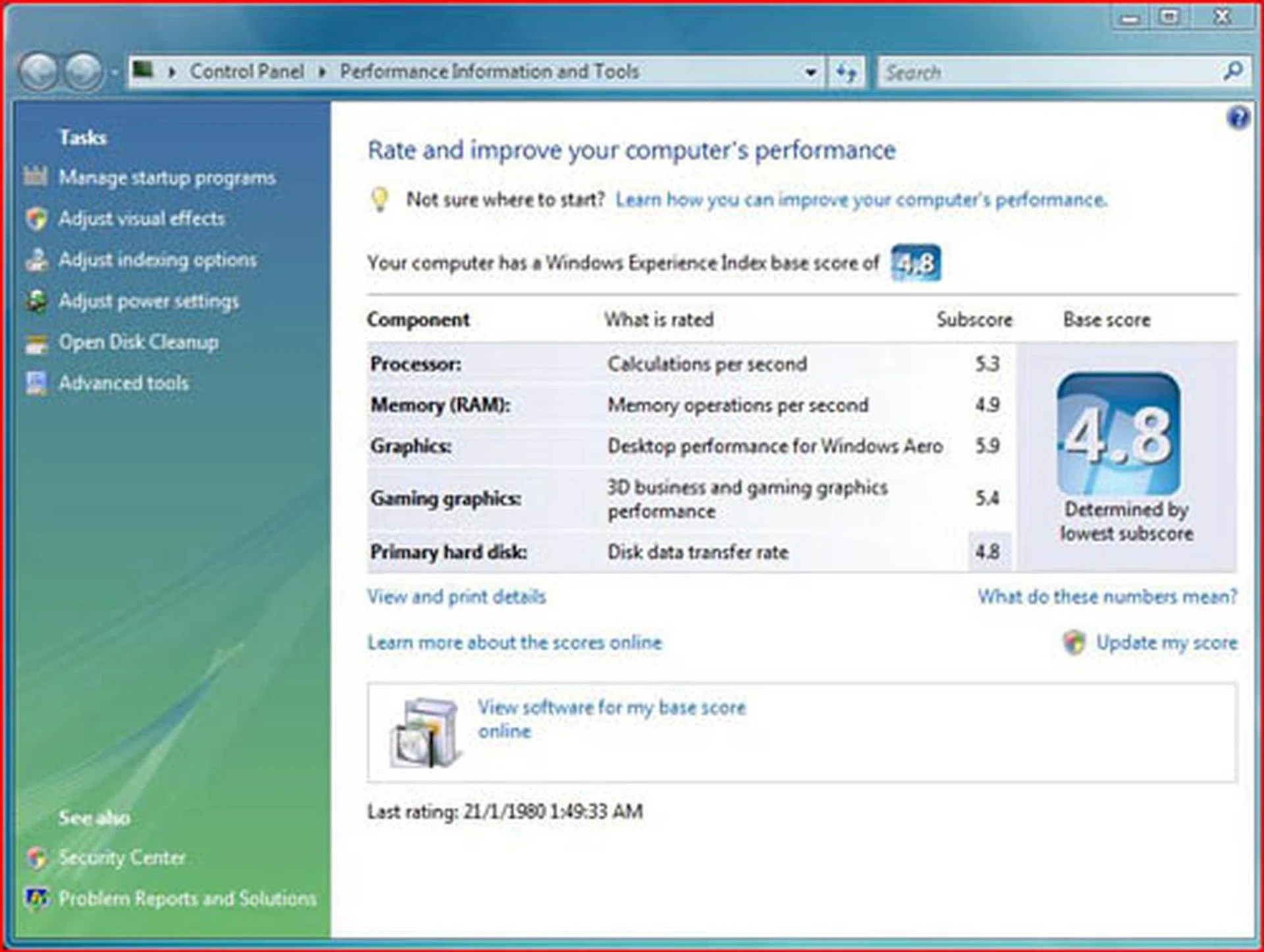
The 5400RPM hard drives turned out to be the weakest link in the system.
The Intel Core 2 Duo processor (Merom) on the HDX is rated at 2.4GHz (T7700) and has up to 4MB of L2 cache. Coupled with its 800MHz FSB, it is virtually the mobile equivalent of Intel's Conroe Core 2 Duo processor. Our preview unit also came with 2GB of DDR2-667 memory modules, upgradeable to 4GB in total. Santa Rosa's other new feature, Turbo Memory, which works in a similar fashion to Windows Vista's ReadyBoost technology, is unfortunately not found on this HP notebook.
Meanwhile, the graphics chipset used is the Mobility version of the mid-range DirectX 10 compliant Radeon HD 2600 XT from ATI, which has not been officially launched yet. It comes with 256MB of dedicated DDR3 graphics memory, with up to 1GB of video memory once shared system memory is factored in. More importantly, this graphics chipset will feature Avivo HD and its built-in video processor will ensure CPU and power savings during HD media playback.
This further accentuates the lack of either a Blu-ray or HD DVD drive on our preview unit, as we could not really test that aspect (HD playback) on this entertainment notebook. A multi format DVD writer is found instead. Again, this situation could be temporary as the final specifications for the HDX is quite likely to feature a HD DVD drive but that will obviously add to the cost. Other entertainment related features include the Altec Lansing speakers with a subwoofer, a hybrid analog/digital HDTV tuner for television viewing and a HDMI output so that your display can be directed to a proper HDTV display.
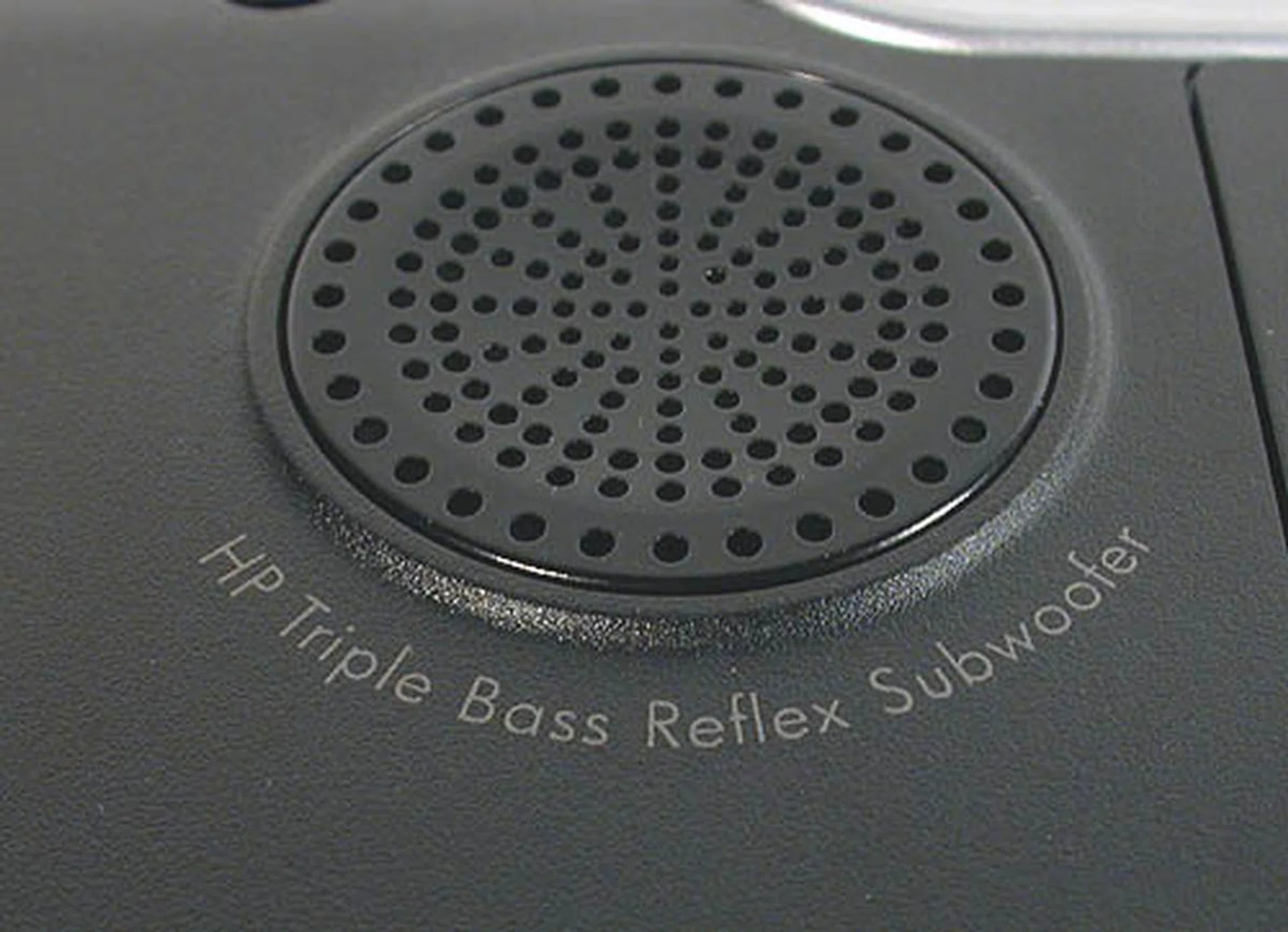
Despite the presence of this subwoofer at the bottom of the notebook from Altec Lansing, we felt that the bass on our unit could have been more tangible. Perhaps our prototype has not been tweaked properly yet but competitors like Toshiba and its Harmon Kardon speakers seems more compelling.
The only weakness we could find in the hardware specifications on the engineering sample has to be the two 5400RPM SATA hard drives. With 7200 RPM drives the standard among desktops, having anything slower will keep the HDX at an disadvantage when it comes to being a proper desktop replacement. Since Dell's XPS M2010 could have 7200RPM hard drives, we were a bit disappointed that the HP will not have such drives. Instead, the actual retail unit may even feature dual 4200RPM hard drives as an option, which would further drag the system. As it is now, starting up the HDX was extremely slow, taking roughly 2.5 minutes before the system was responsive. This is could probably be a reflection of its relatively unpolished state now and probably due to the large number of startup applications.
Battery life itself for the HDX is decent for a performance-oriented desktop replacement notebook. We tried to play a DVD at 50% screen brightness and moderate volume and the HDX's 9-cell Lithum-Ion battery lasted 1.5 hours before it ran out of power. All the other power options were set to performance mode for this short trial. Of course, we expect most users to be running on AC power for such a 'notebook', but it's quite pleasing to know that the battery life was not entirely hopeless.
Performance Benchmarks
Trying to find equivalent notebooks of its caliber to compare against turned out to be quite the task. In the end, we had to resort to using some numbers from our previous review of the Dell XPS M2010, since both are competing in the same 20.1-inch arena. Naturally, the newer HP came with better specifications for almost all the components. Then, there is also the difference in OS, with the Dell running Windows XP SP2 while the HP uses Windows Vista. Hence, these benchmark figures should be taken as a rough guide instead. We also managed to include a Santa Rosa notebook in the form of a brand new 17-inch Toshiba Qosmio G40-P730 but this too is an engineering sample. However, it is running Windows Vista too, so its numbers should be more indicative. Below are the specifications for the notebooks featured in the benchmarks:
Specifications/Notebook | HP Pavilion HDX (Engineering Prototype) | Toshiba G40-P730 (Engineering Prootype) | Dell XPS M2010 |
Processor | Core 2 Duo processor T7700 (2.4GHz) with 4MB L2 cache | Intel Core 2 Duo Processor T7700 (2.4GHz, 4MB L2 Cache) | Intel Core Duo T2600 (2.16GHz) with 2MB L2 cache |
Chipset | Intel PM965 | Intel PM965 | Intel PM945 |
FSB | 800MHz | 800MHz | 667MHz |
Memory | 2 x 1GB DDR2 | 2 x 2GB DDR2 | 2 x 1GB DDR2 |
HDD |
| 2 x Fujitsu 200GB SATA (MHV2200BT) - 4200RPM / 8MB Buffer | 2 x Hitachi 7K60 100GB SATA (HTS72101) - 7200RPM / 8MB Buffer |
Video | ATI Mobility Radeon HD 2600 XT | NVIDIA GeForce 8600M GT | ATI Mobility Radeon X1800 |
System Benchmarks
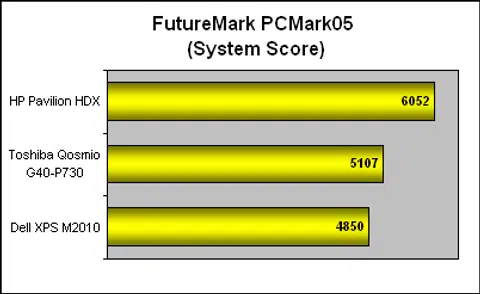
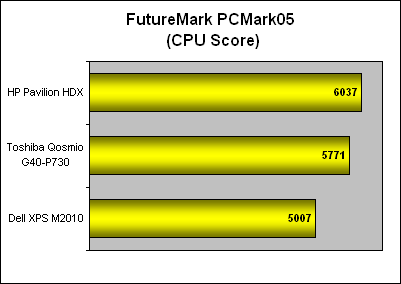
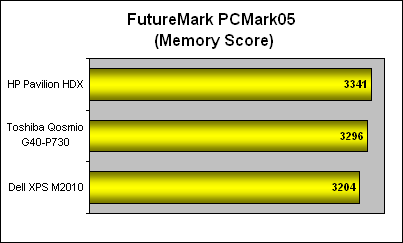
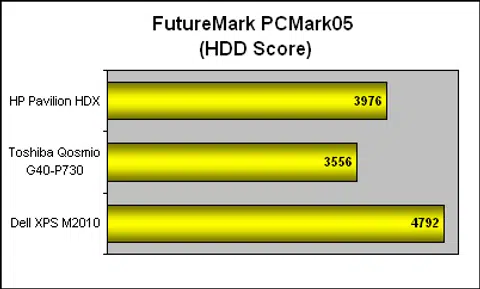
Not many mobile benchmarks work on Windows Vista at the moment, so we could only use PCMark05 as a general indicator. Overall, the HP Pavilion HDX topped our scores, with a significant lead over the Toshiba. As both notebooks use similar processors on the same platform and memory subsystem, it seems that the NVIDIA graphics on the Toshiba was the main reason why it fell behind in the overall system rating. Our scores reflect that, with the HP garnering only slight leads in the various subsections of the benchmark. This benchmark also showed the importance of having speedy hard drives as the 7200RPM drives on the Dell helped it to the top position for that category compared to its newer rivals.
Graphics Benchmarks
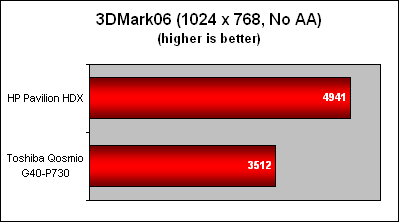
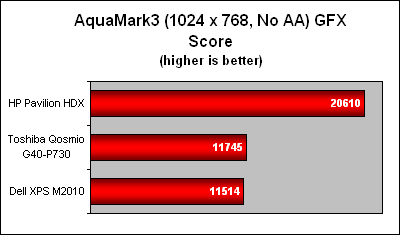
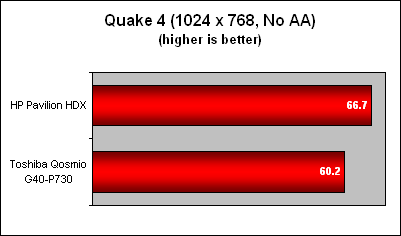
Here, we get a clearer picture of the difference in graphics performance between the two notebooks. No doubt, both are engineering samples, so the performance may not be ideal. Nevertheless, it does show a distinct advantage for the ATI chipset in the synthetic benchmarks though the frame rates for Quake 4 weren't that far apart. We'll have to wait till the final release versions of these notebooks to verify our current findings, but till then, it seems that ATI has an upper hand in the graphics department.
Final Thoughts
Although notebooks have generally been associated with mobility, it is perhaps not surprising that consumers are looking at bigger ones that can fulfill their needs. Speaking from experience, a large widescreen display increases productivity immensely and more users are concerned about this now. After all, the notebook population is expanding rapidly, as consumers abandon their dowdy desktops for more expensive but sleek notebooks. Not everyone will be enamored about mobility. To some, portability is a bonus rather than the most important requirement, as users want all the advantages offered by a desktop but with the caveat that it has the footprint and possibly the power savings of a notebook.
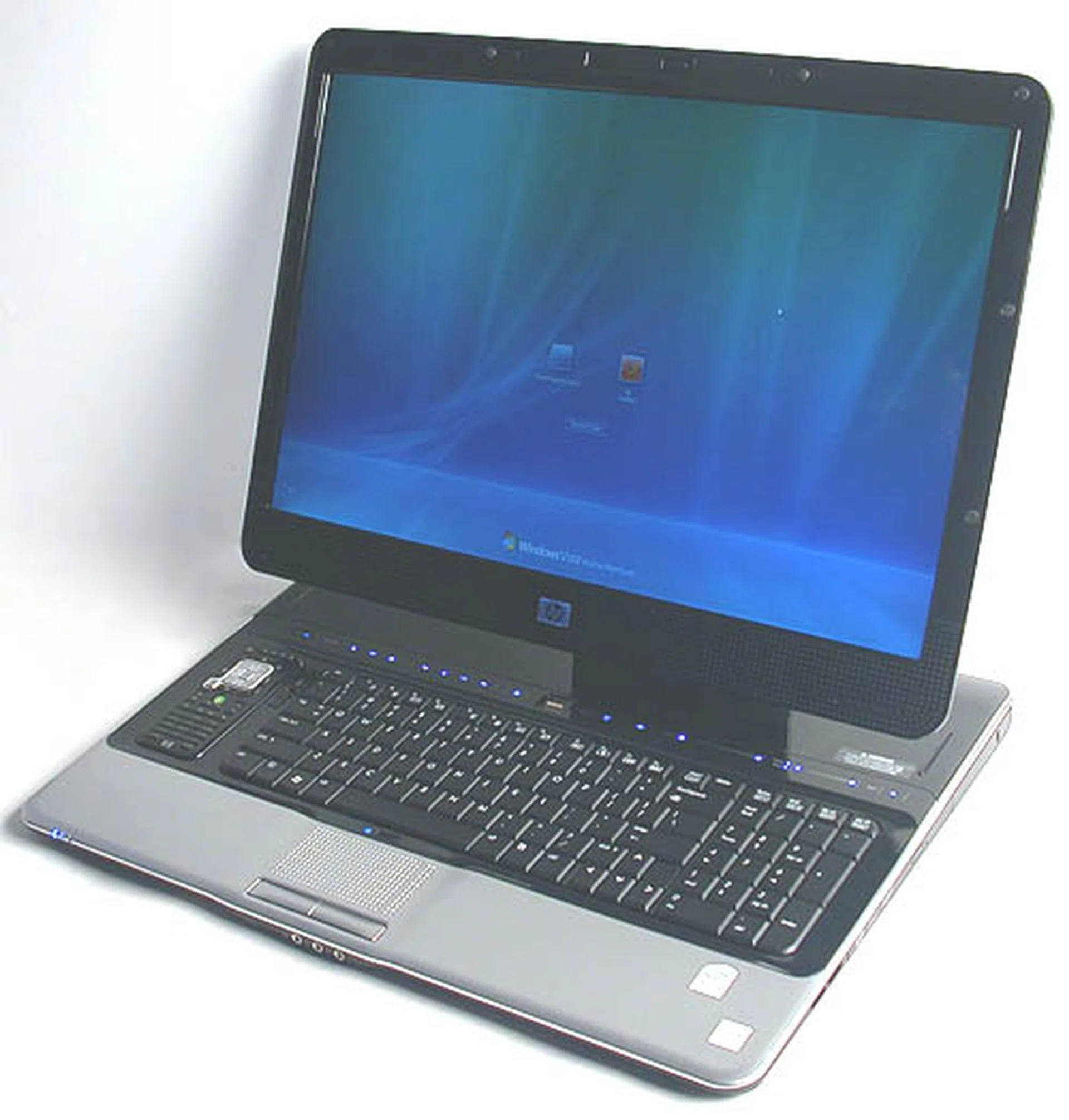
The HP Pavilion HDX does not exactly fit the time honored definition of a portable computer that is the notebook but it certainly offers more mobility options than the ordinary desktop. Given its performance and capabilities, this is a desktop in the form factor of a notebook, for those who like the elegance, integration and space savings of a notebook.
The HP Pavilion HDX Entertainment notebook is a desktop PC straitlaced into the form factor of a notebook. It is not easy to carry around with its weight and bulk and while not impossible, we would really not consider this a portable computer of any practical sort. However, the specifications, even the 'half-formed' ones found on our engineering prototype looks impressive, with the latest Intel Santa Rosa platform the foundation for all kinds of potential. Unlike our prototype unit, you can expect the retail versions to have options for a full HD panel or a HD DVD drive. Performance, particularly 3D graphics look decent with its mid-range Radeon HD 2600 XT chipset and there's the bonus of having Avivo HD present.
Implementation-wise, HP just about gets it right, from the choice of a HDTV tuner to having HDMI and eSATA outputs. The remote control is another nice touch, though the QuickPlay integration looks flaky at the moment and the remote itself may not be intuitive enough for beginners to get into quickly. The 20.1-inch UltraBright widescreen display looks great but we're still hoping for 1920 x 1200 native resolution in the final model. Even the battery life turned out to be better than expected. Only the hard drives look less than ideal, with HP still relying on notebook grade 4200 and 5400RPM drives in consideration, rather than the 7200RPM variety. In our opinion, HP should offer 7200RPM choices for consumers as it is the only component that is significantly inferior to a typical desktop.
As for the cost, we have picked up a few numbers online, which estimate it at around US$2500 onwards. Since the specifications for the Asia Pacific model have not been finalized, any talk of price is premature. However, we are not expecting it to be any cheaper. Instead of looking at the HDX as a notebook, one should consider it a powerful desktop machine, with the additional premium of it being in a notebook form factor. We'll be updating this once we get some confirmed details about the actual retail model but for now, the HP Pavilion HDX is certainly something to look out for in the desktop replacement class.
Our articles may contain affiliate links. If you buy through these links, we may earn a small commission.