
MSI P6N Diamond (NVIDIA nForce 680i SLI)
MSI's long awaited high end nForce 680i SLI motherboard, the P6N Diamond is finally available in the tradition of being better late than never. With onboard Creative X-Fi based audio, hardware RAID and a sweet price to go along, MSI actually delivers a late game Ace. Read on.

Introduction
Usually, when new or highly anticipated core logic chipsets are announced, motherboard manufacturers jump at the chance to release new feature products and ride the hype. However, the take up for NVIDIA's highly touted nForce 680i SLI hasn't seen the same level on enthusiasm. Mostly, this is due to its exorbitant pricing and we've noticed that the top end manufacturers have all taken their time in order to release a truly unique flagship product instead of cookie cutter reference designs.
ASUS played to the hearts of gamers with the Striker Extreme and Gigabyte went all out with the over-engineered GA-N680SLI-DQ6, which remains to date as the only motherboard to feature a quad Gigabit LAN solution. MSI announced that their top end P6N Diamond would be the first board to feature a Creative Sound Blaster X-Fi audio solution onboard, which generated quite a buzz among the gaming community. This was back in November 2006. With release dates pushed back time and again, most people only saw the first glimpse of the board at CeBIT this year.
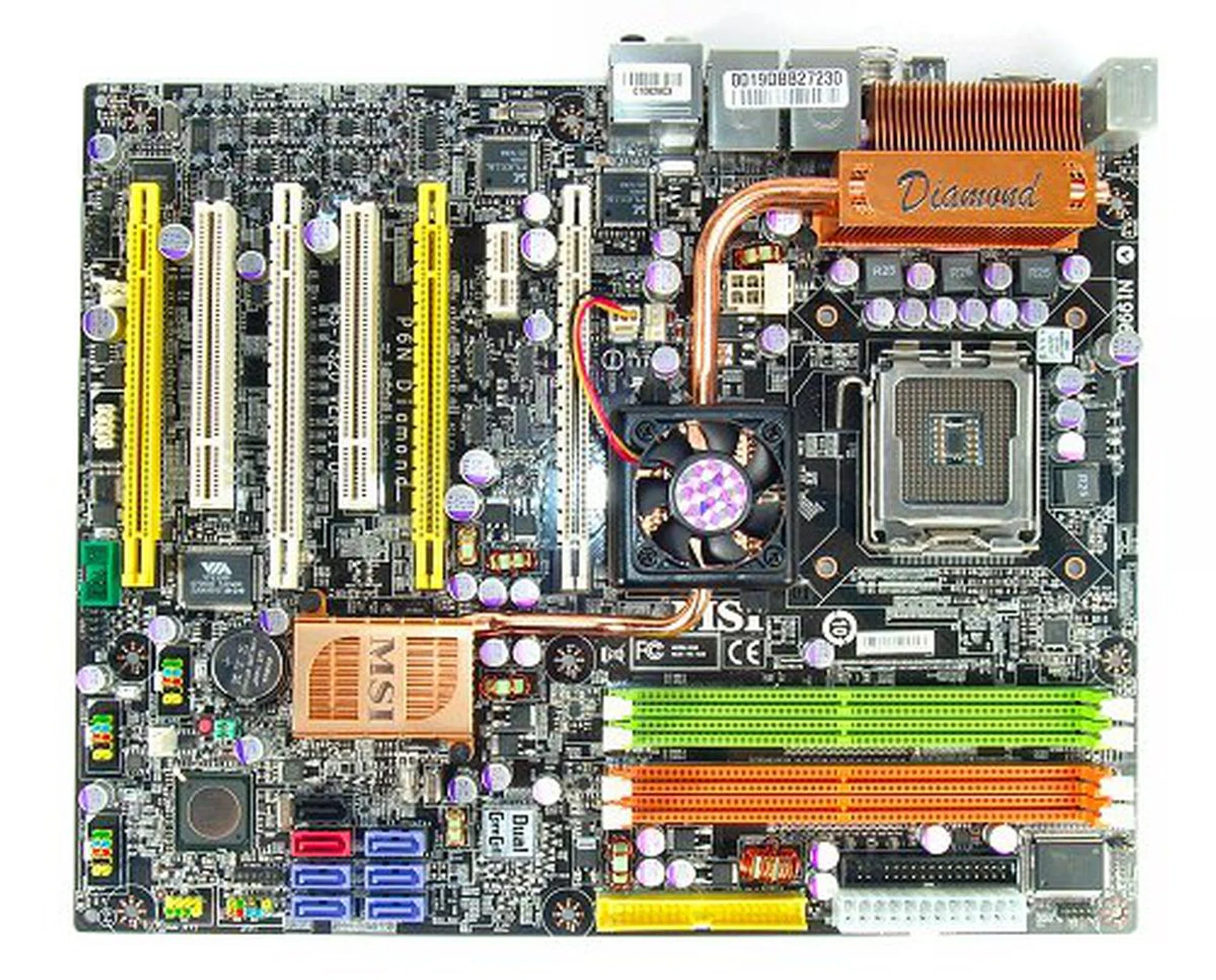
The MSI P6N Diamond motherboard.
The MSI P6N Diamond is finally here today, but with Intel's launch of their 3-Series chipset and their push towards DDR3 memory, MSI is seriously late to market their nForce 680i SLI solution. However, after getting to play with a production P6N Diamond, we have to say that it is still well worth the wait.
The MSI P6N Diamond comes with the following peripheral bundle:-
- 6 x SATA data cables
- 3 x SATA power converter cable
- 1 x 80-conductor Ultra ATA data cable
- 1 x floppy drive data cable
- MSI D-Bracket 2 (2 x USB 2.0 ports)
- FireWire Bracket (1 x FireWire port)
- SLI bridge
- I/O shield
- Driver CDs
- User's guide
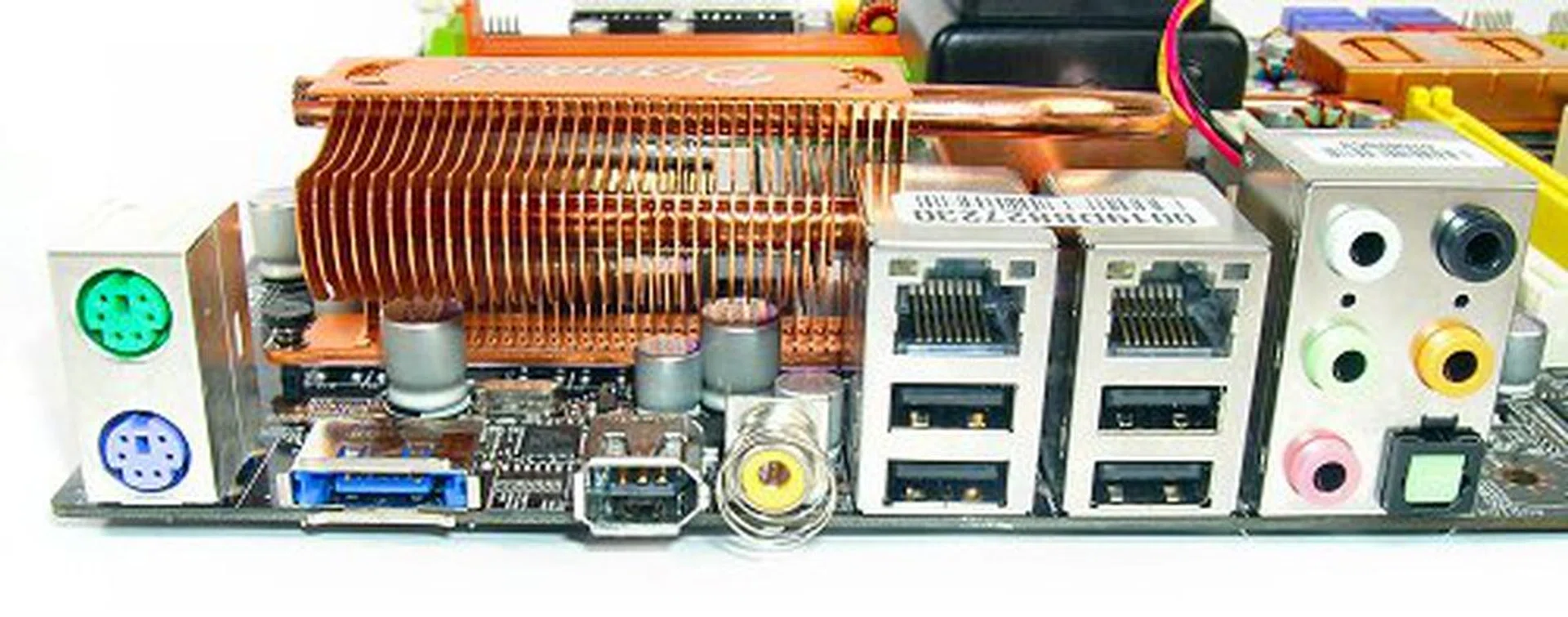
From left to right, legacy PS/2 keyboard and mouse ports, one dedicated eSATA, one FireWire-400, coaxial S/PDIF, two RJ-45 LAN, four USB 2.0 ports and analog surround audio block with optical S/PDIF.
Features
The main feature hyped by MSI for the P6N Diamond is the onboard X-Fi sound chip. However, the board comes with a few surprises that are not found on any of the current nForce 680i SLI boards available today.
First, let's cover some of the basics. When NVIDIA launched the nForce 680i SLI, the chipset became the first to officially support a 1333MHz FSB, which means that the P6N Diamond is still very much current and able to support the newest 1333MHz bus processors from Intel such as the Core 2 Duo E6850 and the Core 2 Extreme QX6850. MSI has yet to disclose compatibility results for 45nm Yorkfield or Wolfdale processors, but these should also be just a BIOS update away. The nForce 680i SLI may not support DDR3 memory too, but its advanced memory controller supports DDR2 up to 1200MHz as well as featuring NVIDIA's SLI Memory feature for Enhanced Performance Profile (EPP) memory modules. This should keep the P6N Diamond in contention till your next upgrade.
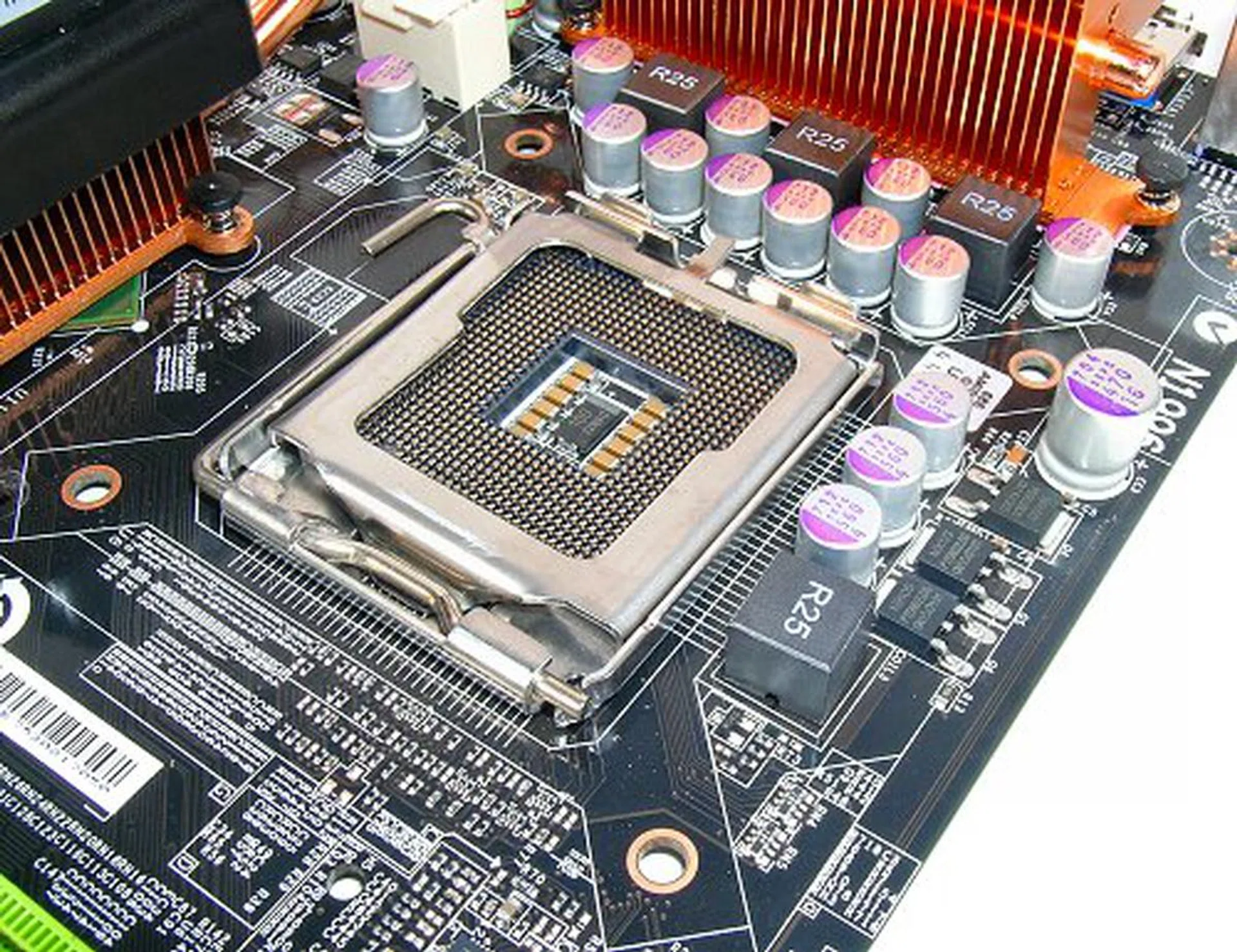
The nForce 680i SLI natively supports dual and quad-core processors and 1333MHz FSB, but MSI is still testing compatibility support for 45nm processors.
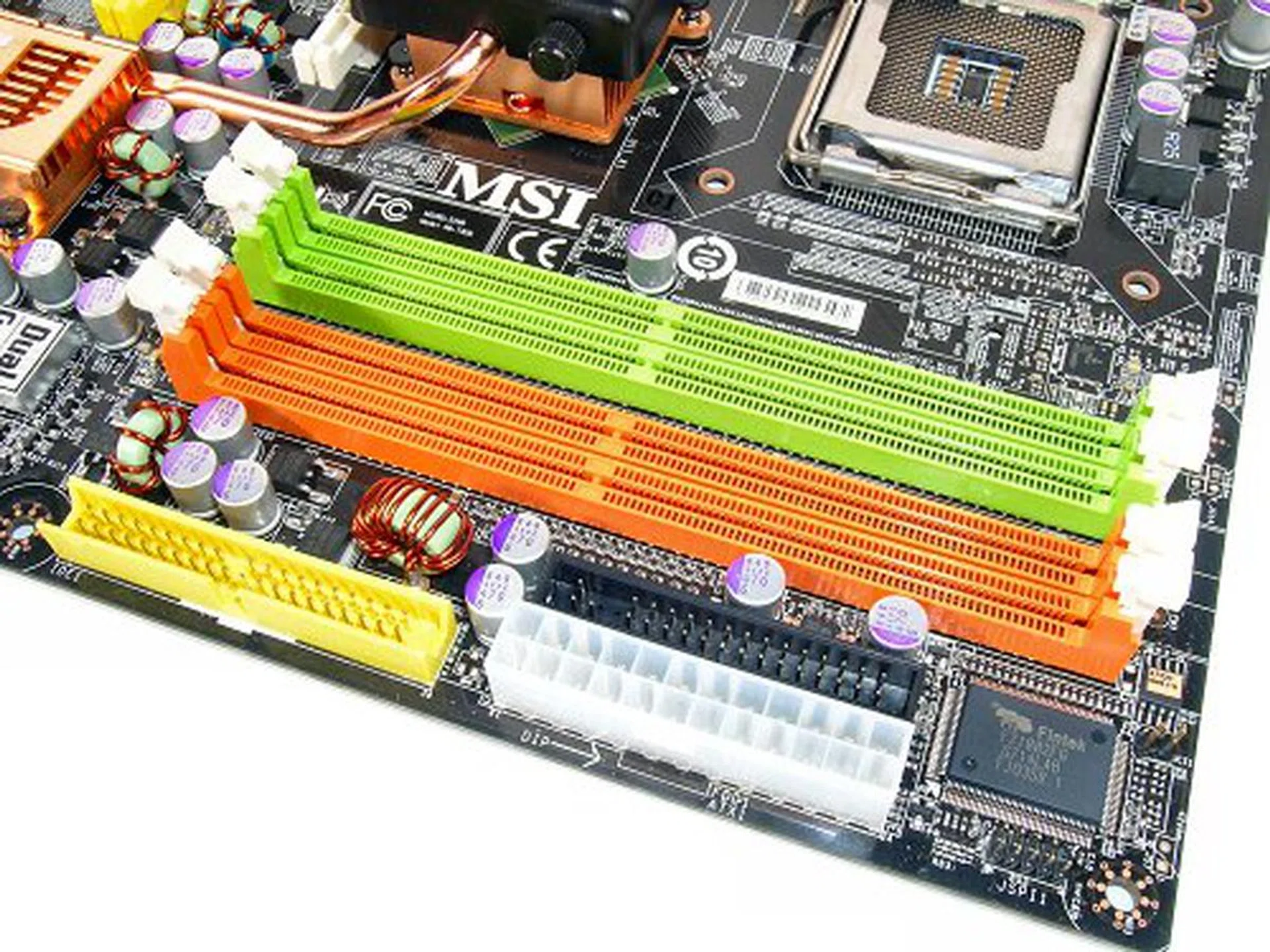
Four DDR2 DIMM slots that support DDR2 speeds up to 1200MHz and NVIDIA SLI memory gives DDR3 a run for its money.
Now, one of the major features of the nForce 680i SLI has been triple PCIe x16 slot support, but for the P6N Diamond, MSI takes advantage of the flexibility of NVIDIA's chipset design. If you look at the board properly, you will notice that it actually has four PCIe x16 slots instead of three, making it one of the rare few boards that can support quad SLI (the first board to feature four PCIe x16 slots was the Gigabyte GA-8N-SLI Quad Royal, but quad SLI support was not yet implemented in NVIDIA drivers then).
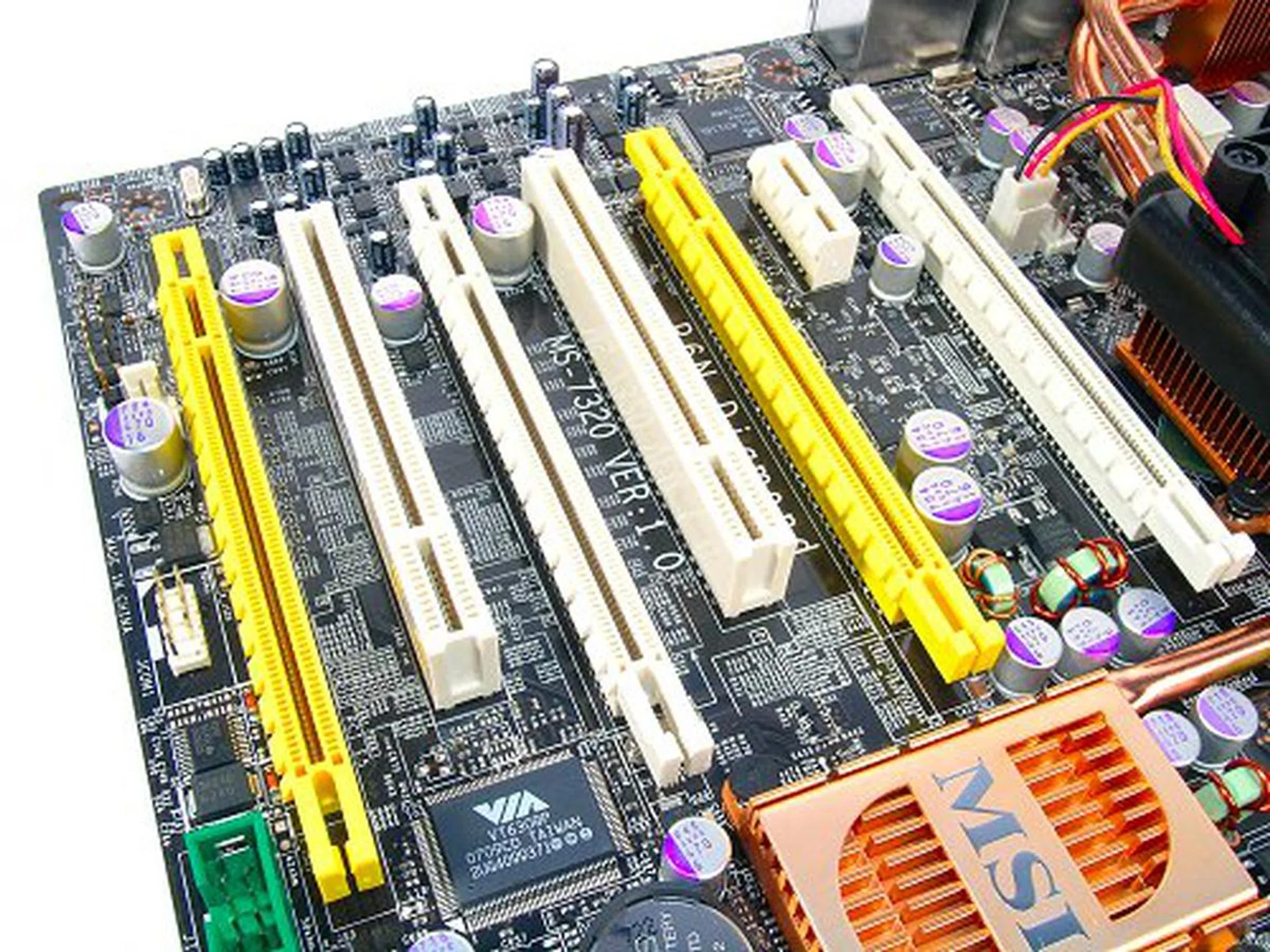
Four PCIe x16 slots for graphics card overload. The middle yellow slot is disabled by default though and only active in a four card configuration.
By default, the four slots work in this mode: x16, Nil, x16, x8. This is the normal three-slot configuration and the middle yellow slot is actually deactivated. However, in a four GPU configuration, the slots will take on an x8, x8, x16, x8 mode respectively. Taking apart the chipset cooler, the board is using an nForce 680i SLI SPP combined with a proper nForce 570 SLI (AMD variant) as the MCP to make the board work in dual SLI configurations. Some of you might not realize but this is the standard chipset configuration used to derive a nForce 680i motherboard.
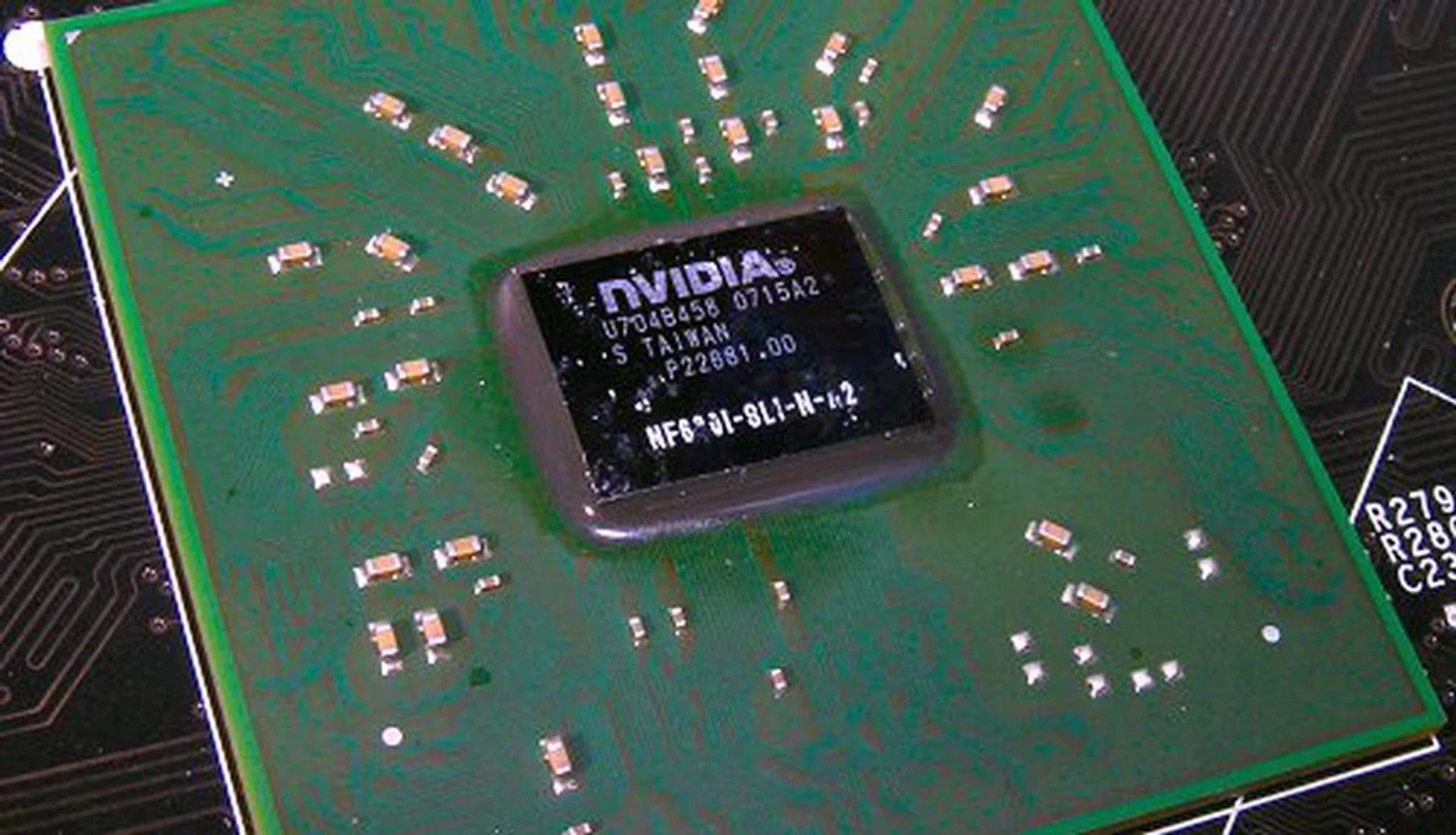
As a two-chip solution, the P6N Diamond features the NVIDIA nForce 680i SLI SPP in the position of the traditional Northbridge.
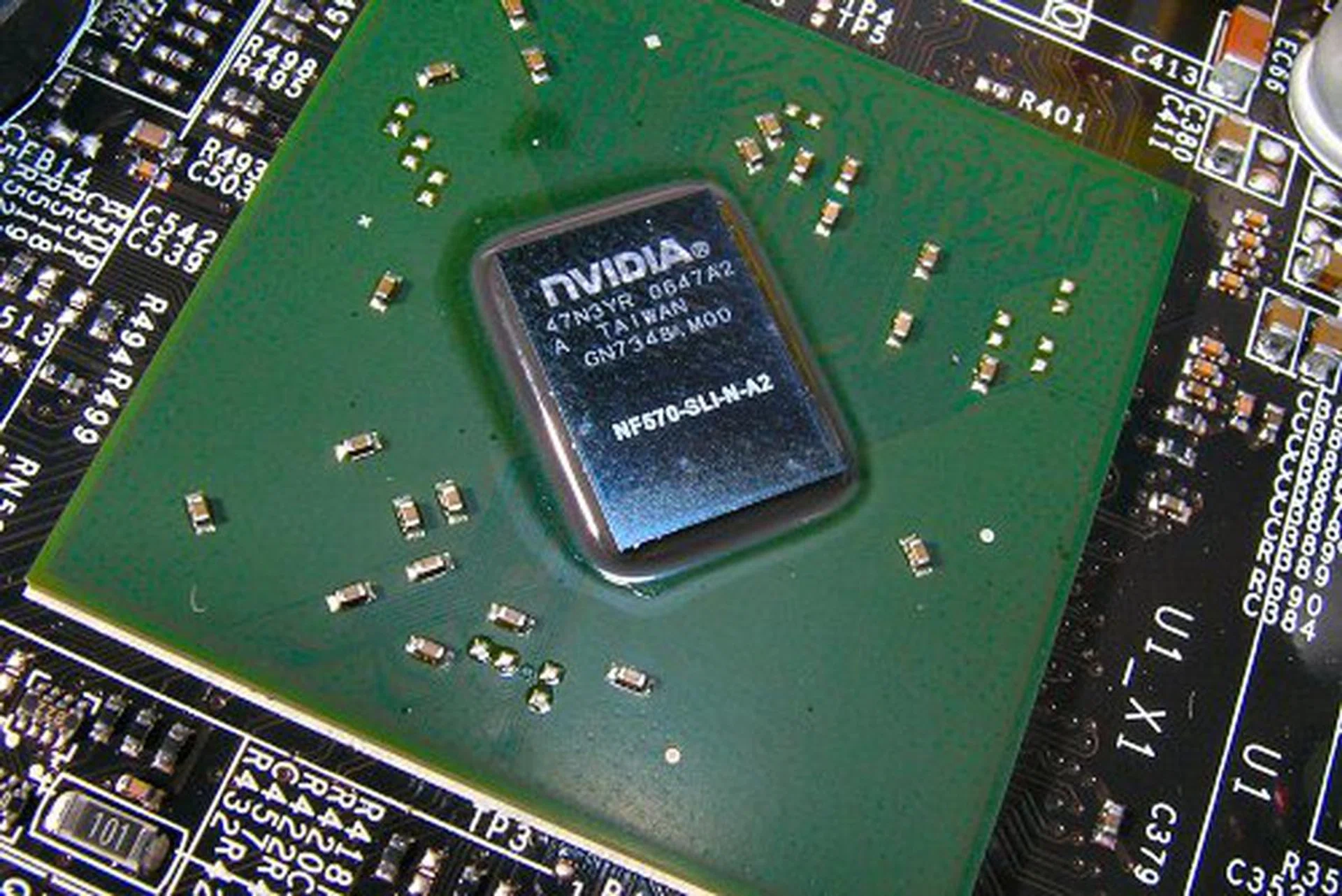
Southbridge MCP is actually an nForce 570 SLI chip (AMD variant).
Traditionally most other nForce 680i motherboards fix their PCIe lane configuration as in the primary PCIe x16 slot is obtained from the SPP, while the secondary PCIe x16 slot and the PCIe x8 slots are obtained from the MCP chip. So how did MSI manage their unique quad GPU slot configuration? If you dig the specs of the NVIDIA nForce 600 series chipset deep enough, you would find that the SPP used on the nForce 680i SLI is identical to that on the nForce 650i SLI -both use the same C55 chip. Since the nForce 650i SLI offers the end user to have single PCIe x16 lane or dual PCIe x8 lanes, this was MSI's key to enable the same on their P6N Diamond. And thus their quad GPU support.
Back to audio, MSI hopes to reach out to the gamers hungering for proper onboard solution that can fully support gaming audio features like EAX and other proprietary Creative technologies. Creative's ongoing claim for the X-Fi has also been higher fps in games through more powerful audio processing. Now before the celebration begins, we have to point out that the Sound Blaster X-Fi on board the P6N Diamond is a variation of the X-Fi Xtreme Audio, the low end part in the X-Fi lineup with a 108dB SNR. Compared with most HD Audio solutions today, the X-Fi Xtreme Audio is only slightly better technically. The anchor which it rests on is its better audio performance and proper gaming support. While users of Windows XP do not have anything to worry about, Vista users are at a disadvantage. This is because Alchemy, Creative's audio wrapper project that enables DirectSound3D effects for games in Vista currently does not support the X-Fi Xtreme Audio. Thus, if you're a Vista user, having the X-Fi onboard the P6N Diamond actually offers no advantage over regular HD Audio at present until Alchemy support is finally added.
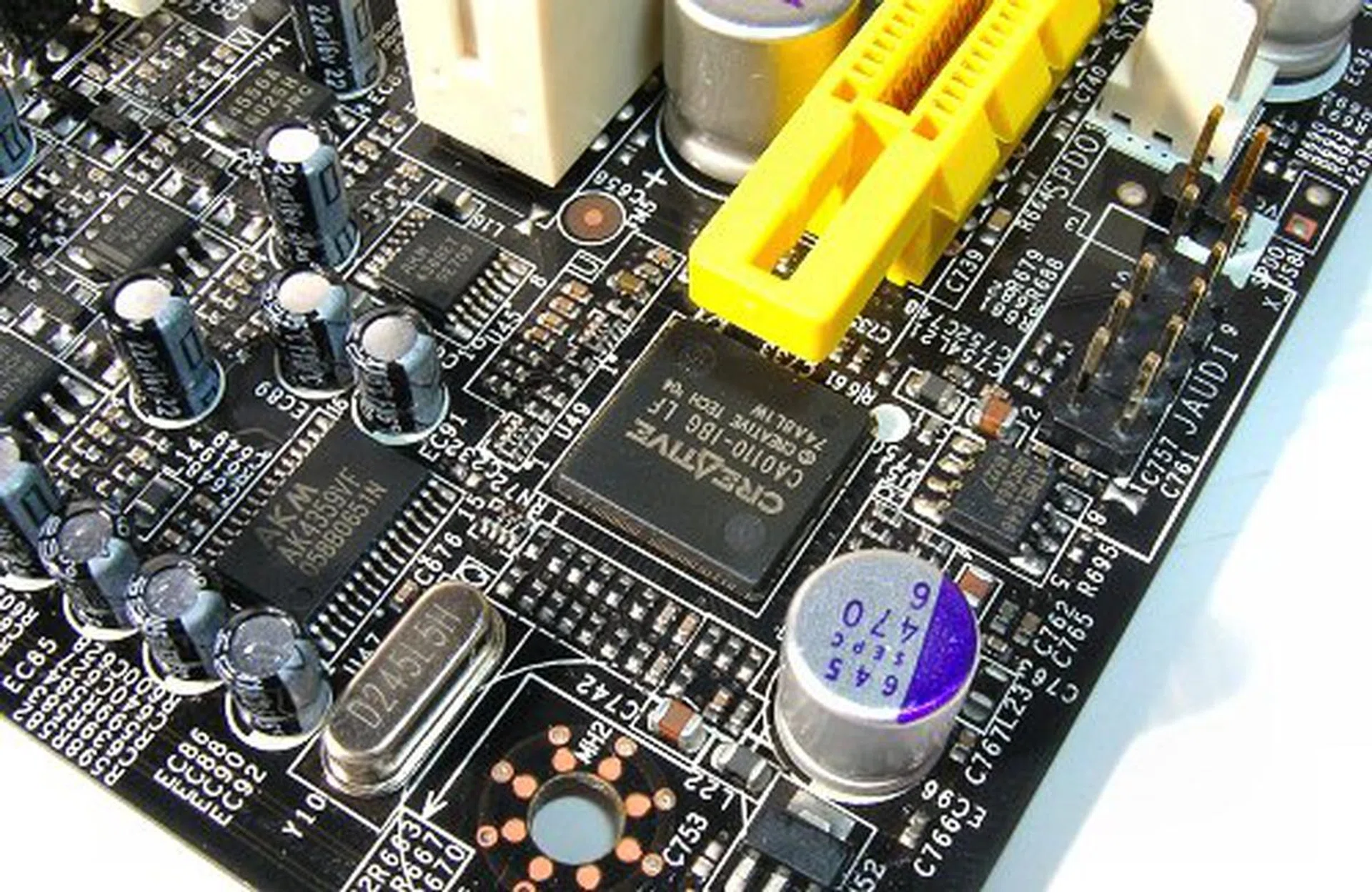
Onboard HD Audio has met its match with the P6N Diamond showing off its Creative Sound Blaster X-Fi Xtreme Audio.
The last major feature of the P6N Diamond is the presence of a Silicon Image SiI4723 SteelVine RAID processor. The only other board we've reviewed to feature this was the ASUS P5W DH Deluxe. The SiI4723 is a 1-port to 2-port SATA 3.0Gbps chipset that supports true hardware RAID 0 and RAID 1 (no messy drivers or configuration required!). While some may complain the limited RAID support, one must remember that this is just a consumer motherboard, and manufacturers probably believe that regular users would not have need for extreme RAID setups. At least the native SATA controller on the motherboard's chipset does allow up to RAID 5.
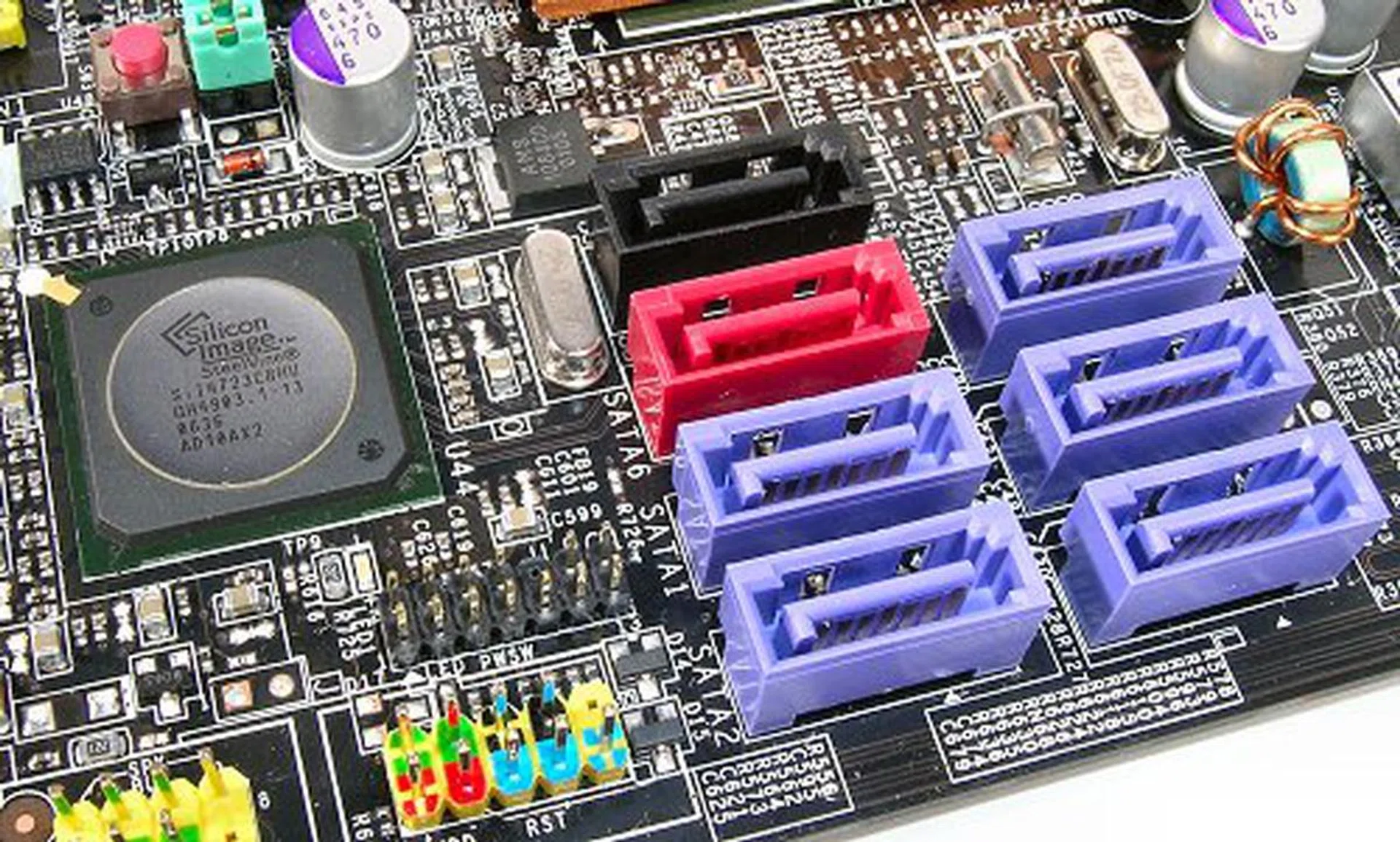
Silicon Image SteelVine RAID processor seen here makes use of one of the chipset SATA lanes for 2-port SATA RAID capability. The remaining five SATA connectors (in purple) can be used normally and support software RAID themselves up to RAID 5 through NVIDIA's MediaShield technology.
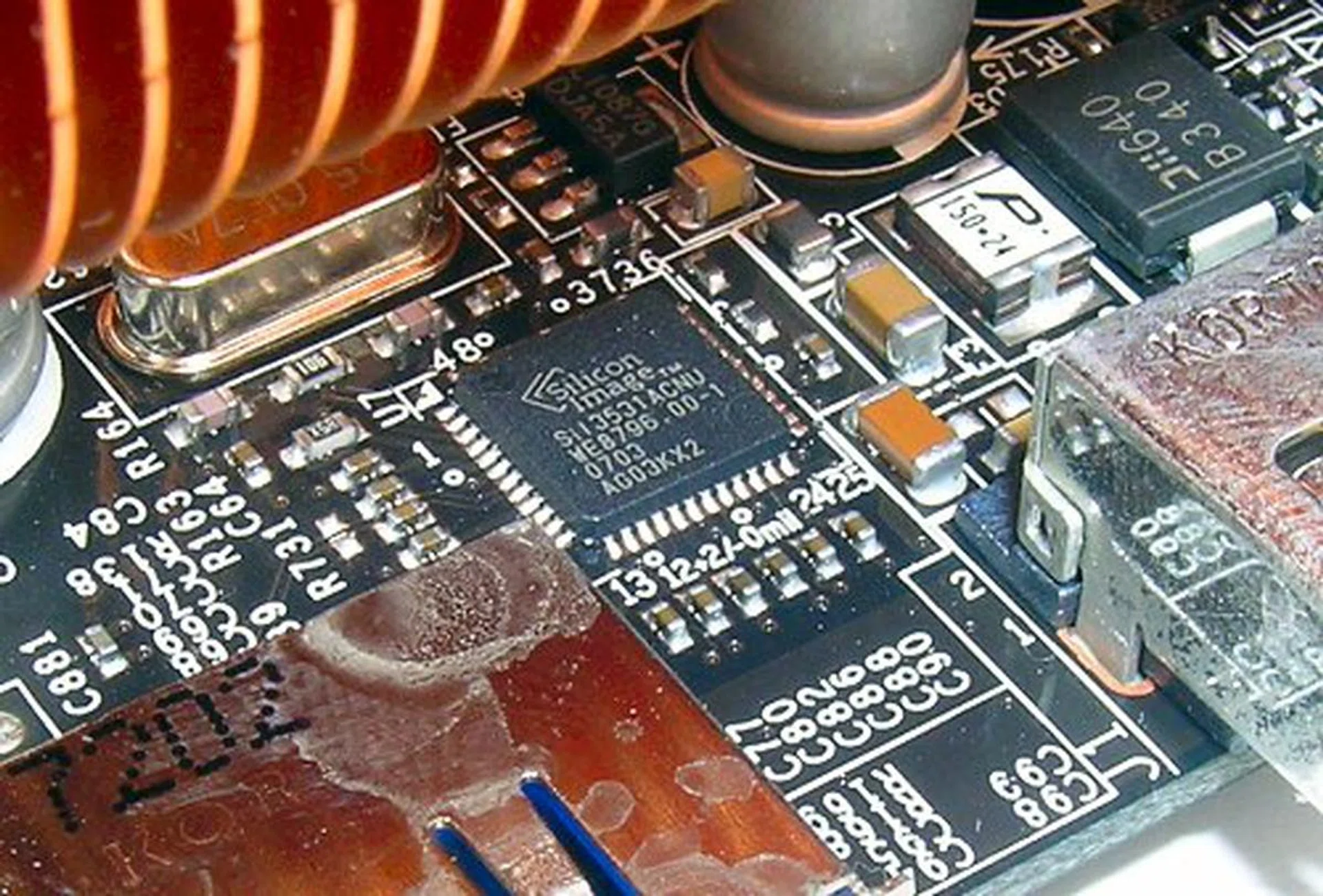
The rear eSATA connector is actually served by a dedicated Silicon Image SiI3531 controller separate from the rest of the internal SATA connectors.
Layout
The P6N Diamond employs a simple heat-pipe cooler for the chipset with a small footprint. This allows the board to accommodate all its expansion slots and still not look too cluttered. To compensate for reduced cooling capabilities, a fan was stuck onto the Northbridge block. While this raises up the noise level, users who purchase this board will most probably be hard core enthusiasts with plenty of other high-end components that require cooling as well so an extra hum here shouldn't be noticeable. If you need your quiet, the board works just fine without the fan, though we wouldn't recommend overclocking then.
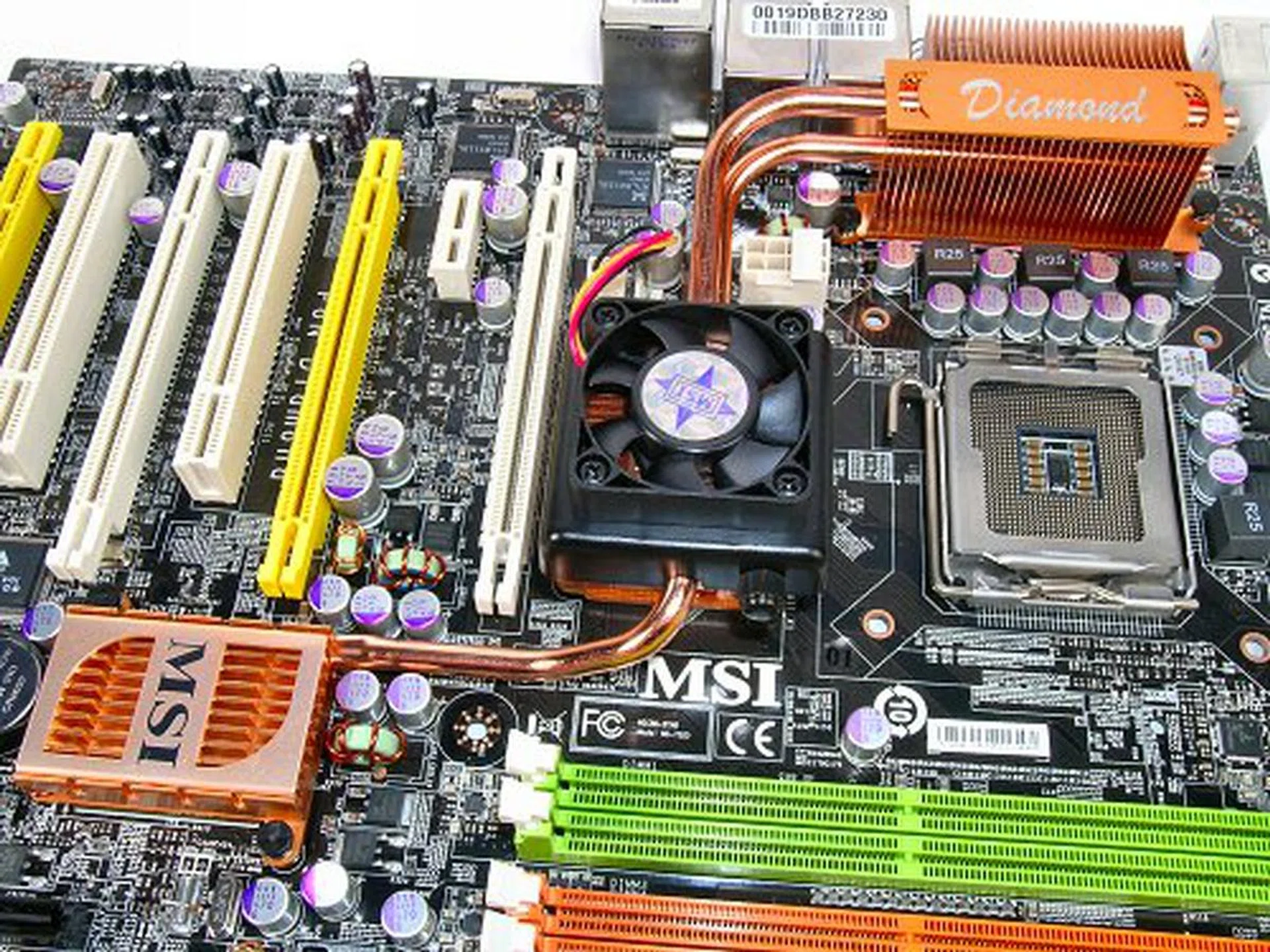
The P6N Diamond's slim heat-pipe cooling solution with added fan.
Overall, MSI did a very good job designing the P6N Diamond. Most of the connectors are low profile and out of the way. We didn't have any problem with installation or mounting. For such a feature-rich board, its layout has been methodically thought out.
Overclocking
- FSB Settings: 400MHz to 2500MHz (QDR)
- DDR2 Settings: 400MHz to 1400MHz
- PCIe Settings: 100MHz to 200MHz
- CPU Voltage Settings: +0.0125V to +0.3875V (in 0.0125V steps)
- Memory Voltage Settings: 1.80V to 2.80V (in 0.05V steps)
- NB Voltage Settings: 1.250V to 1.350V (in 0.025V steps)
- SB Voltage Settings: 1.50V to 1.70V (in 0.05V steps)
- FSB VTT Voltage Settings: 0% to 20% (in 2% steps)
- Multiplier Selection: Yes (unlocked CPUs only)
During our overclocking tests, we managed to push the board up to 475MHz, just shy of the 480MHz average we've come to expect making the P6N Diamond a capable overclocker, but not a really good one. The P6N Diamond, despite it being an nForce 680i SLI board, has a surprisingly light BIOS for overclocking. In fact, the options available are identical to what we last saw on the nForce 650i SLI based P6N SLI Platinum. Disturbingly, the board displayed a similar issue with the P6N SLI Platinum when overclocking with the Core 2 Extreme X6800. We encountered a gap between 425MHz to 460MHz where the board would either refuse to POST or would become extremely unstable. After 460MHz, everything seemed to become normal again and was even performing solidly at our final overclock of 475MHz.
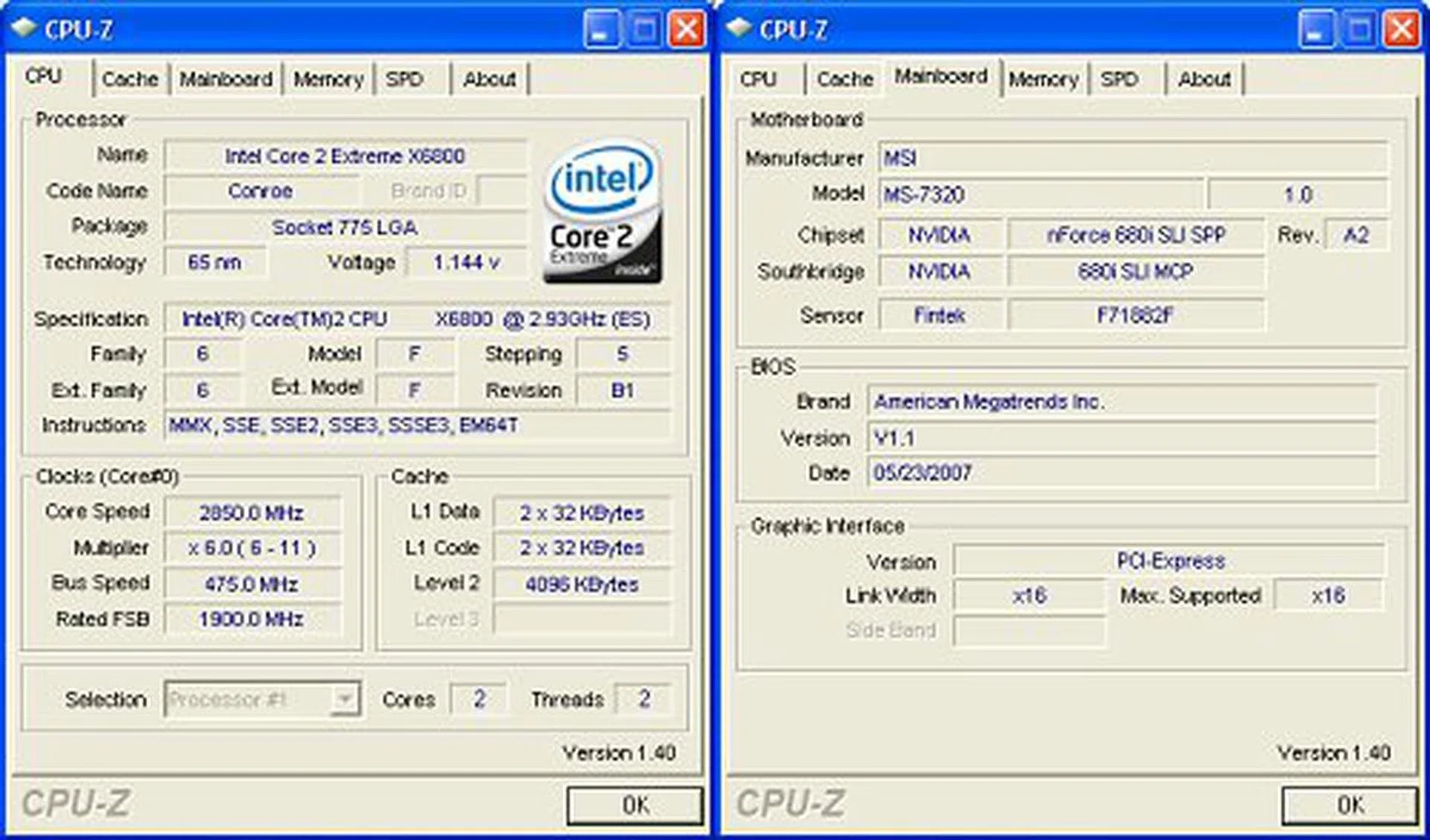
CPU-Z overclocking screenshot. Click for full sized image.
Test Setup
As a late comer into the market, some of our older benchmarks with the nForce 680i SLI no longer apply as we've since moved onto a newer test bed configuration for motherboard reviews. However, since the performance range of chipsets has not changed much, we will only compare the P6N Diamond against a small selection to gauge its standing. The boards include Foxconn's N68S7AA as the base nForce 680i SLI reference and the MSI P35 Platinum to find out how the P6N Diamond would perform in comparison to the newer P35 chipset today. Test bed configuration is listed below and used for all boards unless explicitly stated:-
- Intel Core 2 Extreme X6800 processor (2.93GHz)
- 2 x 1GB Kingston HyperX DDR2-800 @ 4-4-12 CAS 4.0
- Seagate Barracuda 7200.10 200GB SATA hard disk drive (one single NTFS partition)
- MSI GeForce 8600 GTS 256MB - with ForceWare 158.22 drivers
- NVIDIA nForce 9.53 driver set (nForce 680i SLI only)
- Intel INF 8.3.1.1013 and AHCI 7.5.0.1017 driver set (Intel P35 only)
- Microsoft Windows XP Professional with Service Pack 2 (and DirectX 9.0c)
Benchmarks
The following benchmarks will be run to determine the performance of the MSI P6N Diamond:-
- BAPco SYSmark 2004
- Futuremark PCMark05
- SPECviewperf 9.0
- Futuremark 3DMark06
- AquaMark3
Results - BAPco SYSmark 2004
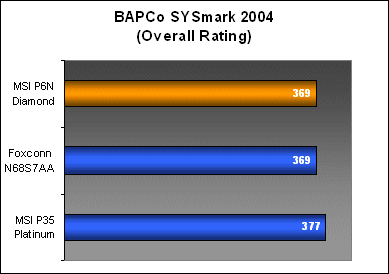
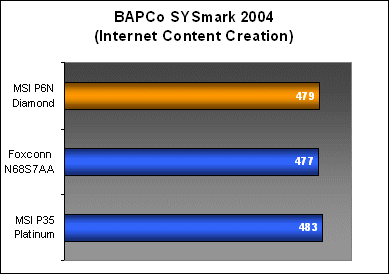
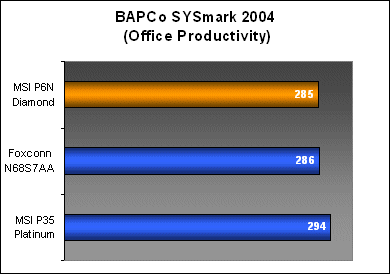
The P6N Diamond's performance worked out to be similar to the Foxconn in SYSmark 2004 overall as well as the two individual workloads. In this benchmark, the MSI P35 Platinum with Intel's newer P35 chipset showed a small improvement over both the nForce 680i SLI boards.
Results - Futuremark PCMark05
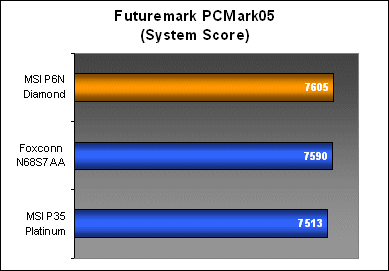
While SYSmark 2004 favored the P35, PCMark05 was more kind to the nForce 680i SLI. All boards managed similar CPU results, but the two nForce 680i SLI boards came out on top in the Memory and System workloads. Intel's ICH9R controller lightly edged out the nForce 680i SLI's MCP however in the HDD performance tests. The MSI P6N Diamond was again performing almost identically to our Foxconn N68S7AA reference board.
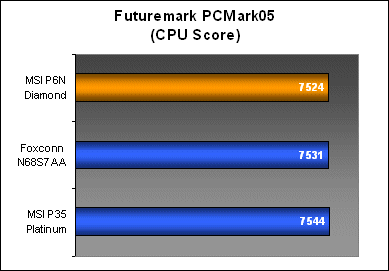
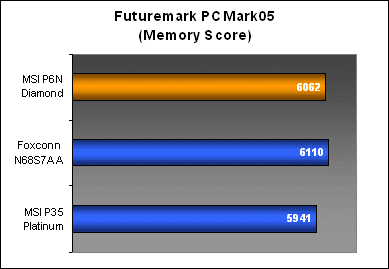
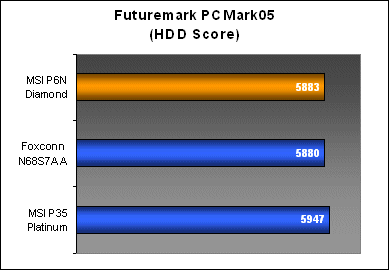
Results - SPECviewperf 9.0
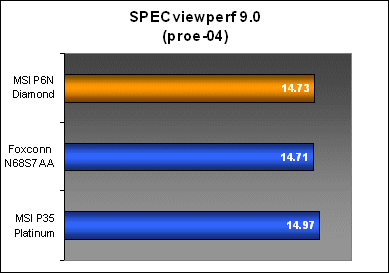
Interestingly, the P6N Diamond posted lower scores in the 3dsmax workload SPECviewperf 9.0, but scored comparatively with the Foxconn in the pro/ENGINEER tests. This difference points to an equal memory subsystem performance, but possibly slightly weaker graphics subsystem on the part of the P6N Diamond.
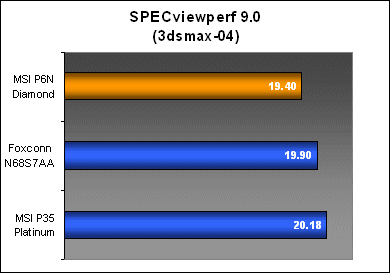
Results - Futuremark 3DMark06
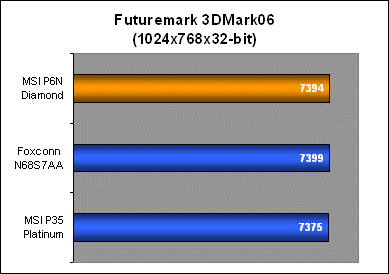
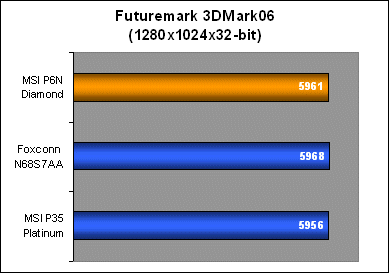
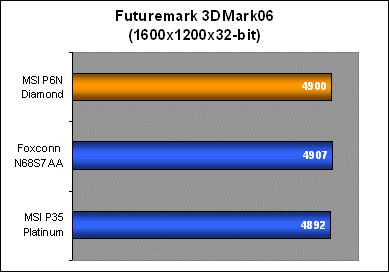
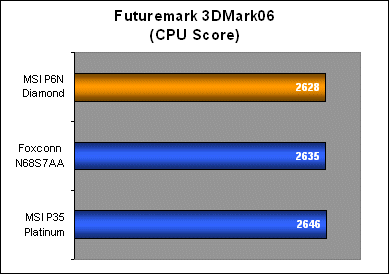
Gaming-wise, the P6N Diamond did not show any platform performance anomalies working out similar performance numbers with the rest of the boards in both the graphics and CPU scores for 3DMark06.
Results - AquaMark3
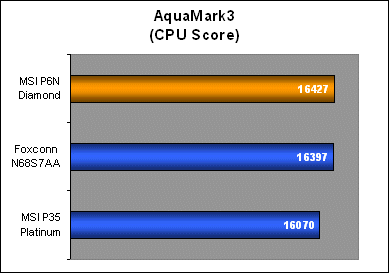
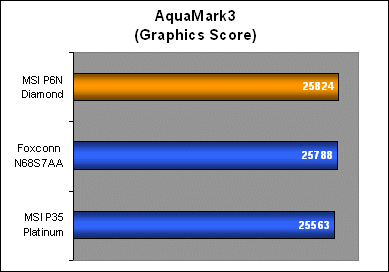
Results from AquaMark3 have similar trend to PCMark05, both the nForce 680i SLI boards show improved memory subsystem performance over the Intel chipset and despite the P6N Diamond having weaker OpenGL numbers in SPECviewperf, its 3D gaming scores compete head to head with the competition.
Conclusion
MSI must have known that such a late entry for the P6N Diamond would mean weaker sales, and it's not because of its positioning or price, but more of a question of age and support. With Intel new 3-Series chipsets flooding the market and the impending DDR3 migration, high-end enthusiasts purchasing any upgrades today will probably be leaning towards a DDR3 ready solution rather than be stuck with DDR2. Of course, the expensive pricing for the nForce 680i SLI doesn't make matters any easier to decide.
However, the MSI P6N Diamond is still an amazing motherboard because of the steps that MSI has done to make it stand out. It is very well engineered with useful technologies that will actually be of interest to its target users instead of just adding more of the same. Both the hardware RAID controller and Creative Sound Blaster X-Fi give real added value to the nForce 680i SLI, a chipset that already has it all. MSI's quad PCIe x16 slot implementation is also a very interesting move to get quad SLI working. DDR3 will also not be mainstream for a long time coming because of availability and performance, so the P6N Diamond is still an excellent choice for an enthusiast setup today.
Board performance matches up well with the average nForce 680i SLI, and while the P6N Diamond doesn't stand out, it doesn't disappoint either. While the P6N Diamond itself is a worthwhile investment as a motherboard, one of MSI's major shortcomings today is their inability to make real progress optimizing their software for performance and overclocking. Competitors like ASUS and Gigabyte have stepped up their game greatly over the past two years with BIOS-level improvements that improve user friendliness, response and intelligence to overclocking capability and disaster recovery. Small things like being able to save and flash BIOS images from the BIOS itself through USB devices, intuitive real-time setting displays and good overclock protection and recovery can really make or break one's overclocking experience.
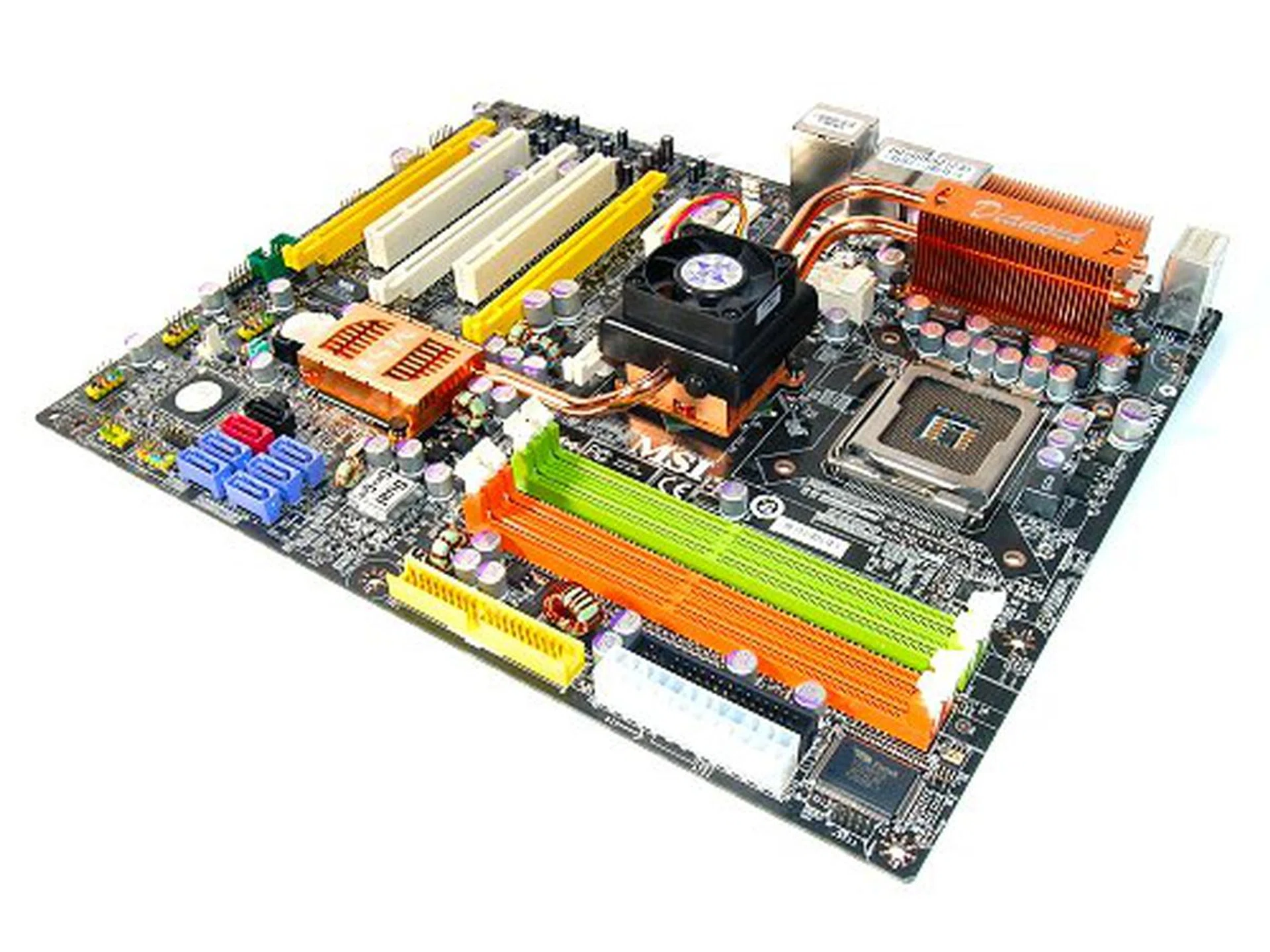
MSI took a long time engineering the P6N Diamond, but the wait was worthwhile and the board is a clear cut winner.
Usability of the P6N Diamond is still similar to the older P6N SLI Platinum, right down to BIOS options and quirks with overclocking, which means that MSI hasn't really spent time tweaking the BIOS between the two boards. There weren't even the usual options available for nForce 680i SLI specific features such as EPP toggling. This is one area that MSI has to really focus on in their high-end products to appeal more to enthusiasts and overclockers.
Bottom line, MSI still did a fantastic job on the P6N Diamond. Instead of focusing on the 'more features for the sake of more features' race with other boards, the P6N Diamond is one board that can actually claim to compliment the nForce 680i SLI. With a US$260 price tag, the MSI P6N Diamond is also one of the more affordable nForce 680i SLI boards in the market. Comparatively, both the ASUS Striker Extreme and Gigabyte GA-N680SLI-DQ6 are still retailing above the US$300 mark. You won't normally see a Most Value For Money award attached to any nForce 680i SLI board, with all these features and the price of a plain reference nForce 680i SLI, the MSI P6N Diamond is a clear cut winner.
Our articles may contain affiliate links. If you buy through these links, we may earn a small commission.