
Gigabyte GA-X48-DQ6 (Intel X48)
Gigabyte has refreshed their enthusiast motherboard lineup with the all new Intel X48 chipset. And if you thought only a select few have access to it, you'd be wrong. The GA-X48-DQ6 combines the X48 with good old DDR2 memory and introduces a new power saving feature as well. Read on.

Introduction
Most of our readers would be very familiar with Intel's 3-Series core logic chipsets, the P35 and its high-end sibling, the X38. However, soon after Intel launched their desktop Penryn processors last year, they also released a quiet update to the X38 chipset - the X48. Now, it seems to us that Intel has taken a stealthy approach to chipset announcements of late as there hasn't been any fanfare. And while the X48 chipset and motherboard product samples have been around since late September 2007, we're not really seeing these models updated on either Intel or their partners' websites.
Still, the X48 is real and its here. Initial rumors floating around the Net painted a picture that the X48 could be a special niche segment for the ultra-elite that removed DDR2 support, and instead would only support 1600MHz FSB with DDR3-1600 XMP memory, requiring a platform upgrade for the hardcore enthusiast.
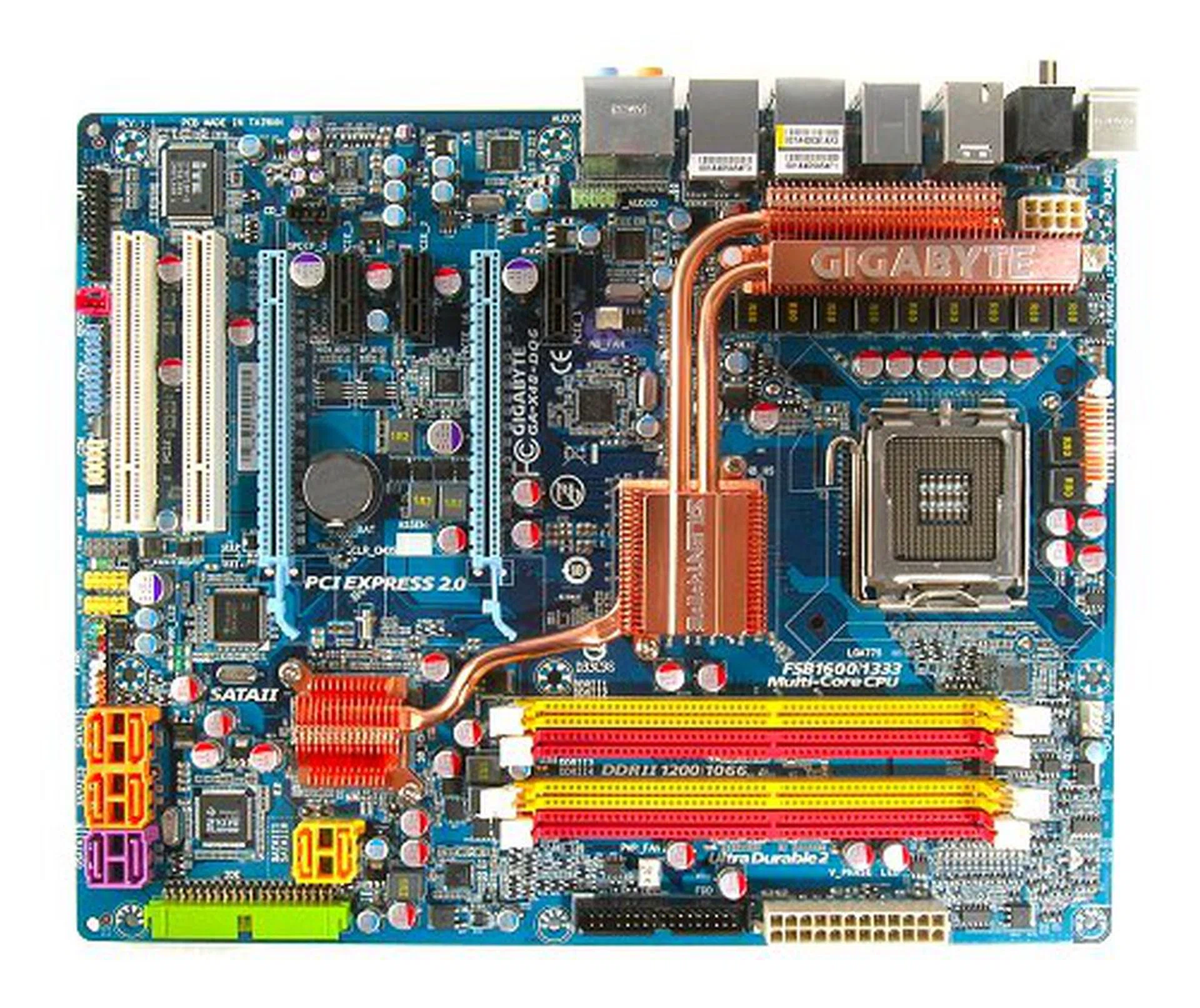
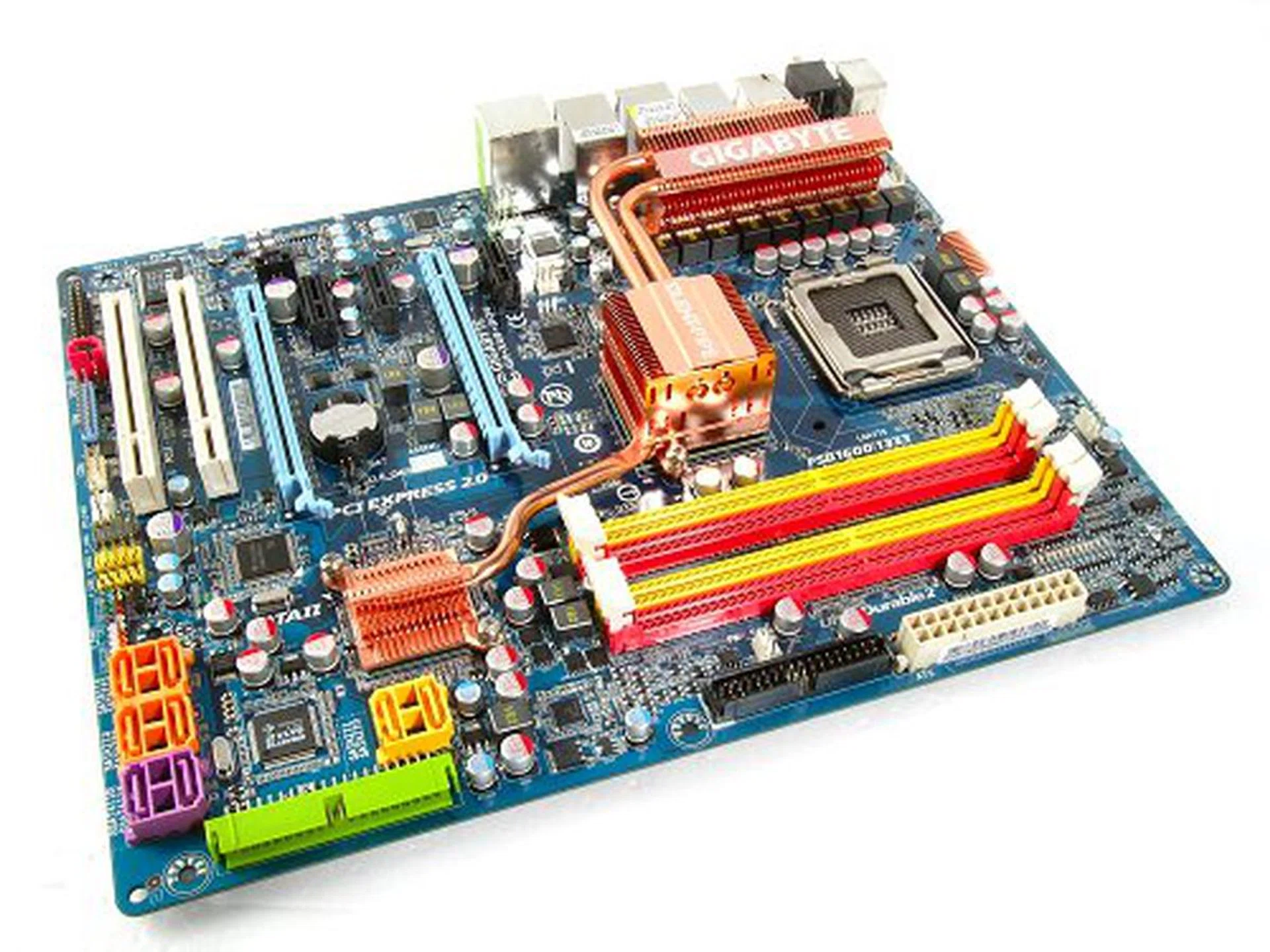
Gigabyte GA-X48-DQ6 motherboard.
However, the reality is that there isn't much to talk about, which explains the silent rollout. In a nutshell, the Intel X48 chipset is just the X38 with official support for native 1600MHz FSB. And the chipset was incidentally launched in conjunction with the very exclusive and limited Intel Core 2 Extreme QX9770, chip-zilla's first 1600MHz FSB processor. That's about it really. DDR2 support is still around as well, as is evident from the Gigabyte GA-X48-DQ6, one of the earliest X48 boards to have been spotted 'in-the-wild'.
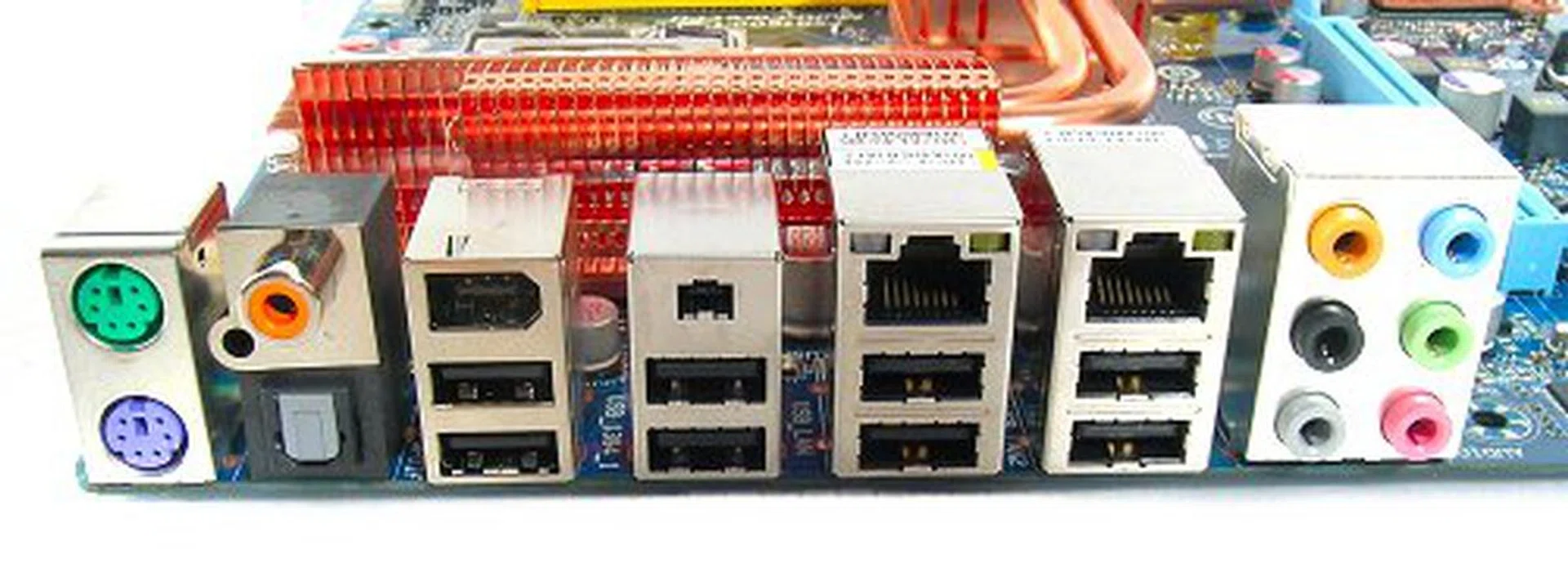
One of the most packed I/O panels on a motherboard with everything you every need, from digital and analaog audio, eight USB 2.0 ports, two LAN ports and even two different FireWire port sizes.
** Updated on 12th February 2008**
Dynamic Energy Saver
As the Intel X48 is pin-identical with the X38, it is no surprise that Gigabyte chose to directly plug it into their existing X38 DQ6 motherboard series. As a result, the GA-X48-DQ6 is a carbon copy of the GA-X38-DQ6 in all sense of the way, from its layout to its entire feature list. Hence, we shall not dwell upon what's already been said and done a long time ago. To read up on the virtues of the motherboard design and features, you can check our past reviews of the original Gigabyte as well as its DDR3 variant, the .
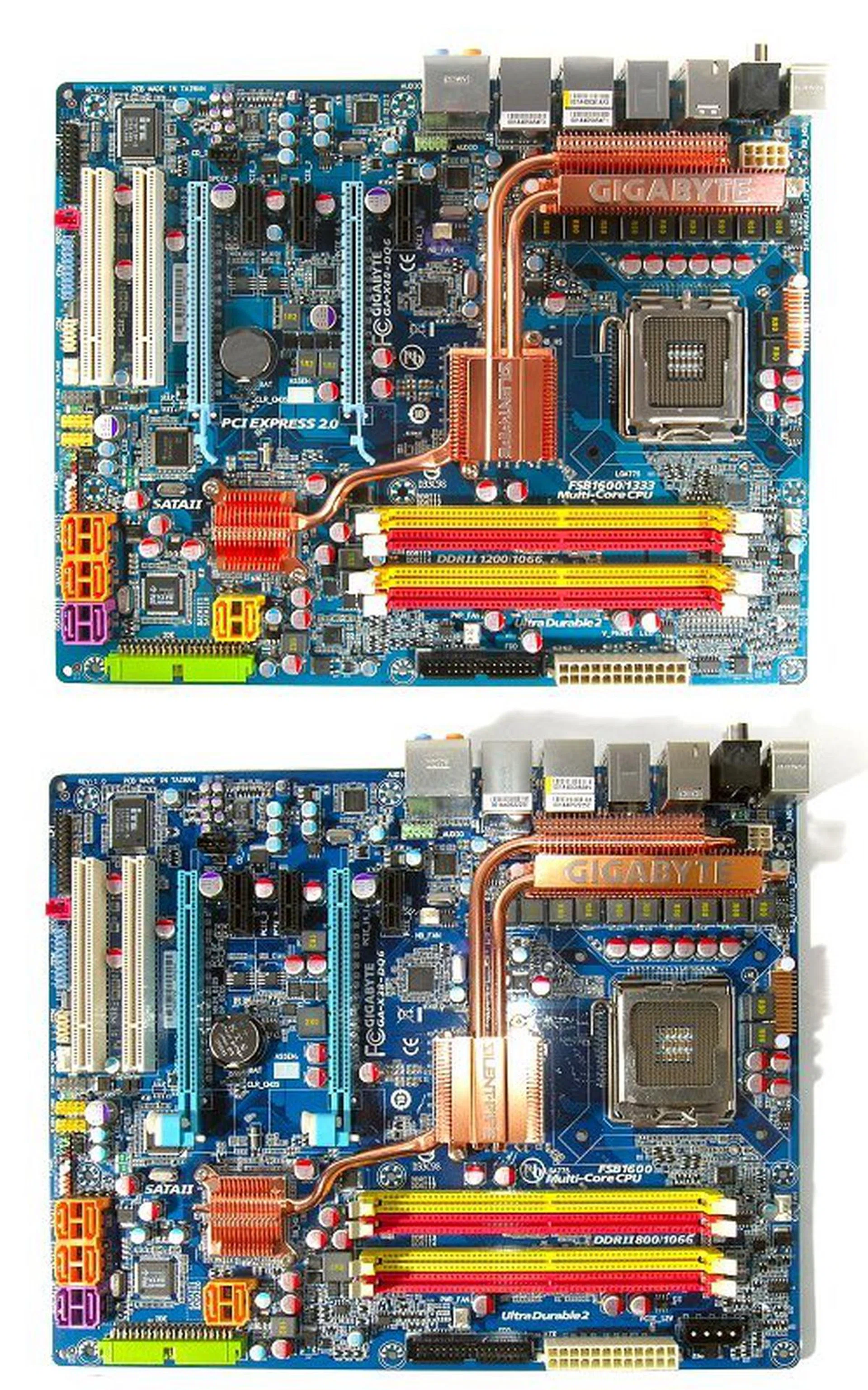
The Gigabyte GA-X38-DQ6 and GA-X48-DQ6 side by side. Can you tell which is which?
However, there is one significant addition to make its debut on the GA-X48-DQ6 (besides the chipset), and that is Gigabyte's new Dynamic Energy Saver (DES) technology. DES adds another level to Gigabyte's already burgeoning list of features on its Ultra Durable 2 and 6-Quad motherboard series. Claiming to deliver up to 70% more power savings and 20% better power efficiency than boards without this technology, DES actually works somewhat similar to ASUS' EPU , both of which rely upon clever software working hand-in-hand with a particular PWM chip. According to Gigabyte, activating DES allows the board to switch off unused power phases and thus increase the operating efficiency of the reaming active power phases. As you might have guessed, how many power phases active/deactivate is completely dependant on the system's loading level.
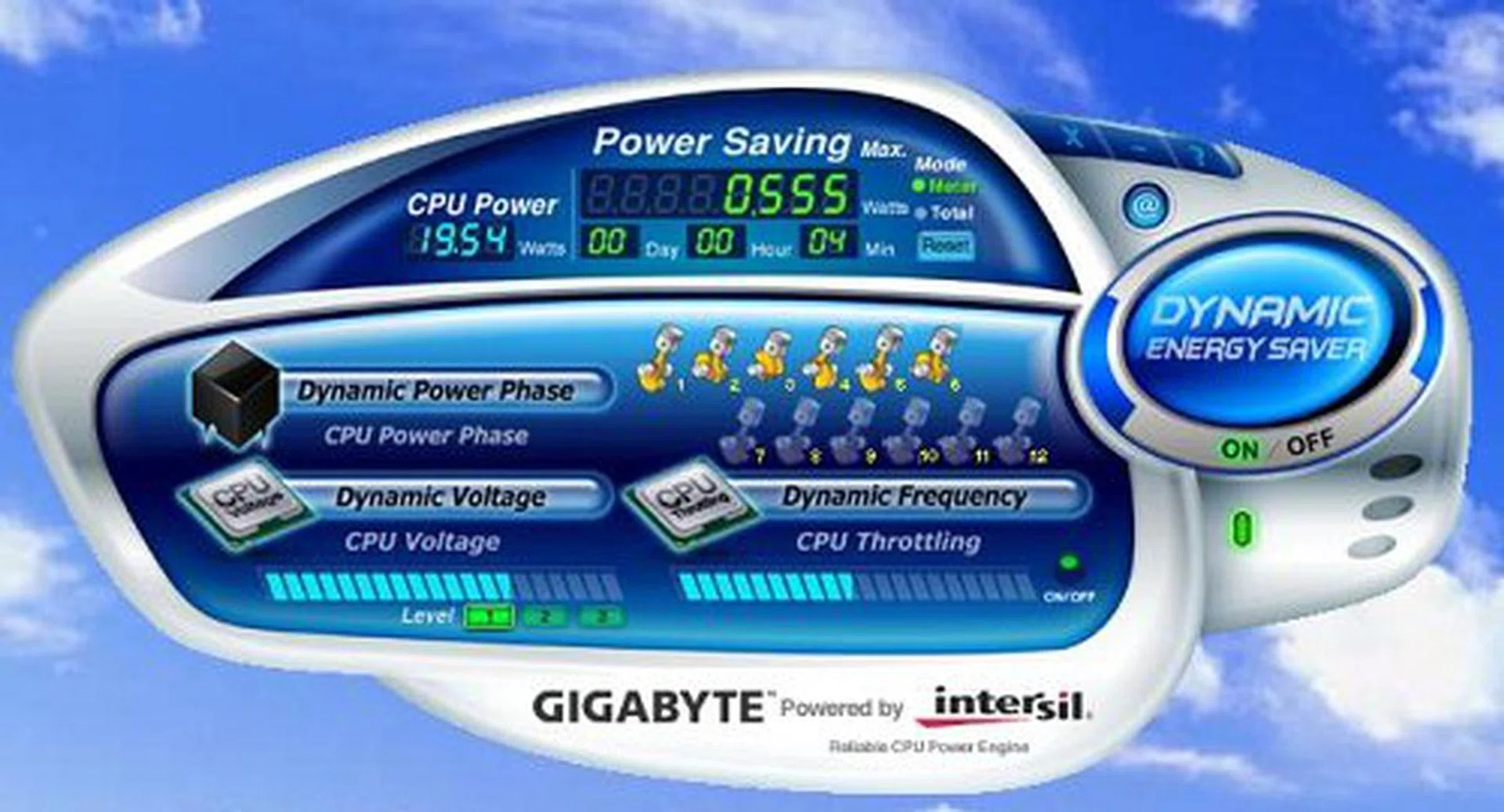
DES application GUI.
In order to activate DES, users will have to first install its Windows application drivers. Again, non-Windows users are left out of the equation. Installed, Gigabyte's DES GUI is simple enough, featuring a big 'Click Me' button to enable/disable the energy saver feature. There are your usual bars to show the status of performance/voltage throttling and even an energy meter that shows current CPU draw and power saved over time. Sadly, this meter resets itself every time the application is restarted. From our tests however, it would seem that there are actually some restrictions to its use. Firstly, DES can only be enabled on stock settings. This means that it is really quite useless for overclockers. Secondly, DES seems to work properly only when Intel's own CPU energy saving features are enabled, such as C1E.
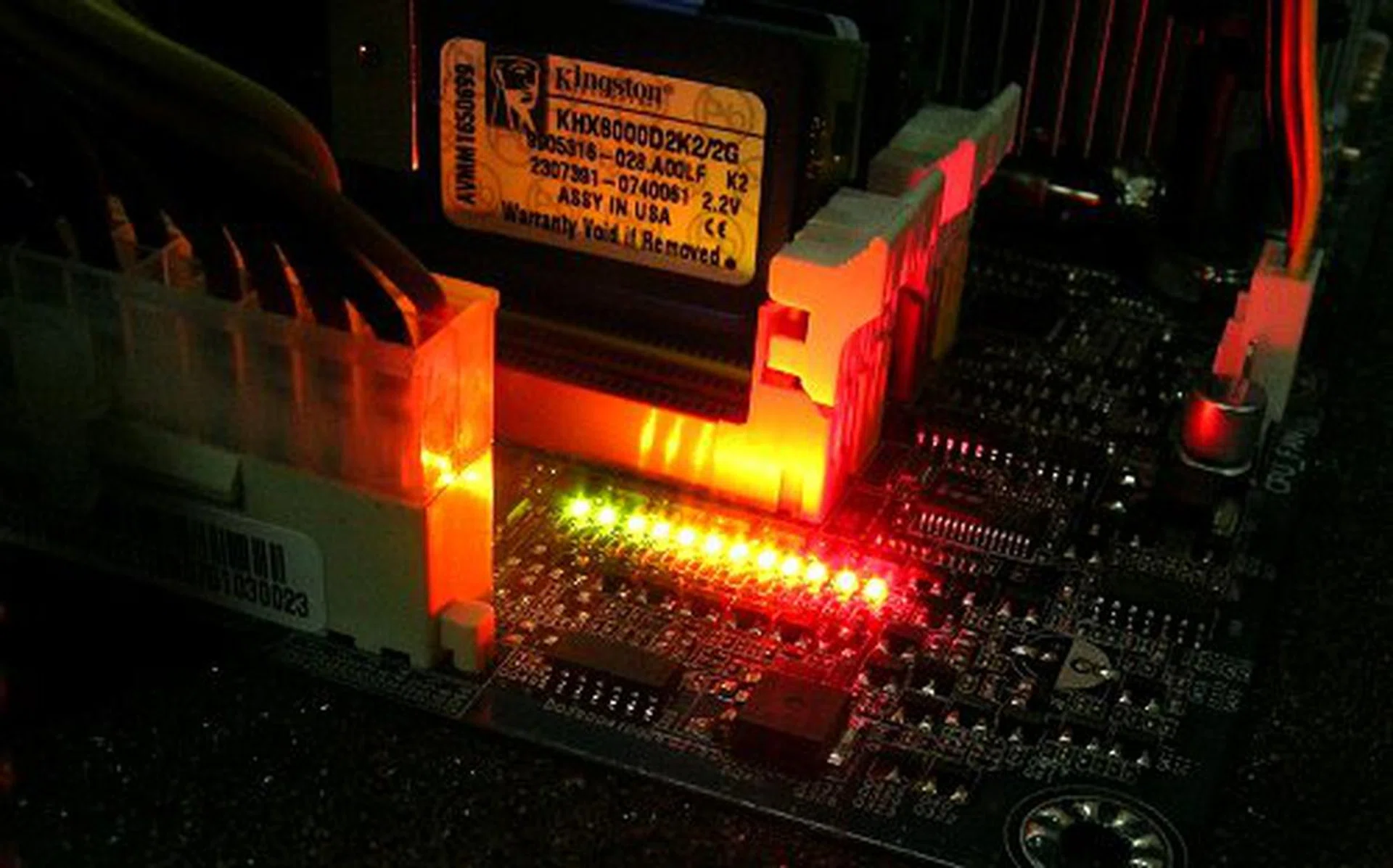
A new line of LEDs just below the RAM slots operate in conjunction with the DES software, giving you a visual indication of the number of active power phases, and hence your system performance load. Since Gigabyte's top-end boards are equipped with a 12-phase power regulation, there is an equivalent number of LEDs to represent them as well.
When C1E was disabled in the BIOS, DES wasn't able to perform throttling. And there wasn't any noticeable drop in power draw over time. This was verified through CPU-Z monitoring, as neither FSB, Memory or CPU speeds were changed during idle or full load. It could be that DES enforces even more strict power saving modes on the system, but with our limited time testing the board, we can't be conclusive of its relationship between DES and the native power features of the board and CPU. In any case, the issues we've encountered could also be a case of the early state of the DES software, which Gigabyte engineers have informed us that they've an updated version of the application that should resolve them.

Overclockers will not be able to use the DES features as it can only be enabled on stock FSB speeds.
We also noticed that Gigabyte is working with Intersil to develop DES. Intersil is one of the semiconductor companies that supplies the CPU vcore regulator ICs for Gigabyte boards. The GA-X48-DQ6 uses the ISL6327 controller, which we can probably surmise that any other boards with the same vcore controller might be able to use the DES functionality. But, again, this is speculation as Gigabyte would have definitely clamped down the software to only approved motherboards. Official word from Gigabyte is that some hardware modification is required as well to enable the DES software to control the PWM chip intelligently.
** Updated on 12th February 2008**
We've initially reported that DES was purely a software-only technology, but further discussions with the Gigabyte engineers have confirmed that like the competition, it's a combination of the right PWM controller modified to work in conjunction with their software interface. As such, the article has been updated above appropriately.
Overclocking
- FSB Settings: 100MHz to 700MHz
- DDR2 Settings: Auto, 2.0, 2.4, 2.5, 2.66, 3.0, 3.2, 3.33, 4.0 (FSB Strap Dependent)
- PCIe Settings: 90MHz to 150MHz
- CPU Voltage Settings: 0.51250V to 1.60000V (in 0.00625V steps), 1.60V to 2.35 (in 0.05V steps)
- Memory Voltage Settings: +0.05V to +1.55V (in 0.05V steps)
- PCIe Voltage Settings: +0.05V to +0.75V (in 0.05V steps)
- MCH Voltage Settings: +0.025V to +0.375V (in 0.025V steps)
- FSB Voltage Settings: +0.05V to +0.35V (in 0.05V steps)
- Multiplier Selection: Yes (unlocked CPUs only)
The BIOS of the GA-X48-DQ6 also remain largely the same from its predecessor, the GA-X38-DQ6. While Gigabyte has had time to refine a few options for better granularity, overclockers will be quite familiar with the options. The overclockability of the motherboard has not changed as well, and is still as high as before. In our tests, we managed to push the FSB up to 495MHz of rock solid performance. If you're the conservative type, the board is able to reach 480MHz, without any need to increase voltages. To reach 495MHz though, we had to boost the FSB voltage a tad higher than default. Still and excellent board for overclocking.
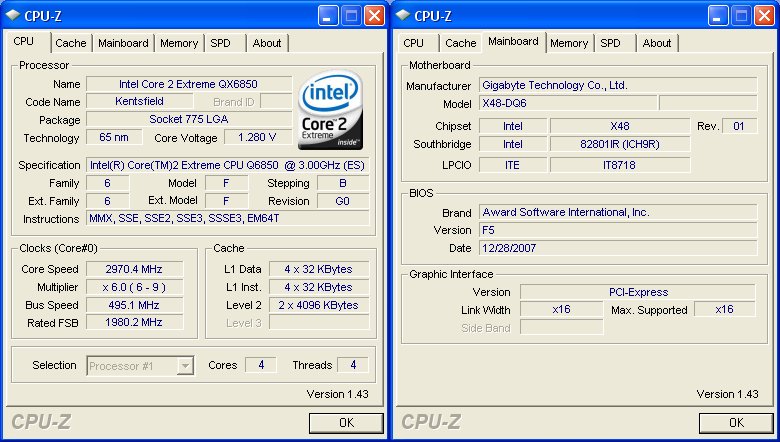
CPU-Z overclocking screenshot. Click for full sized image.
Test Setup
Considering its heritage, we will benchmark the Gigabyte GA-X48-DQ6 with its siblings, the GA-X38-DQ6, which shares its DDR2 configuration, as well as the GA-X38T-DQ6 just for good measure.
- Intel Core 2 Extreme QX6850 processor (3.00GHz)
- 2 x 1GB Kingston HyperX DDR2-800 @ 4-4-12 CAS 4.0 (For DDR2 boards)
- 2 x 1GB Kingston HyperX DDR3-1333 @ 7-7-20 CAS 7.0 (For DDR3 boards)
- Seagate Barracuda 7200.10 200GB SATA hard disk drive (one single NTFS partition)
- MSI GeForce 8600 GTS 256MB - with ForceWare 162.18 drivers
- Intel INF 8.3.1.1013 and AHCI 7.5.0.1017 driver set
- Microsoft Windows XP Professional with Service Pack 2 (and DirectX 9.0c)
Benchmarks
The following benchmarks will be run to determine the performance of the Gigabyte GA-X48-DQ6:-
- BAPco SYSmark 2004
- Futuremark PCMark05
- SPECviewperf 9.0
- AquaMark3
Results - BAPco SYSmark 2004
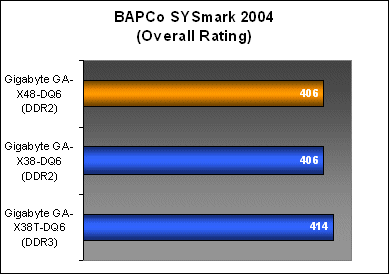
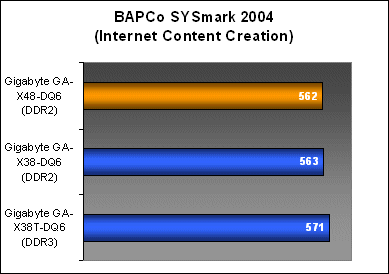
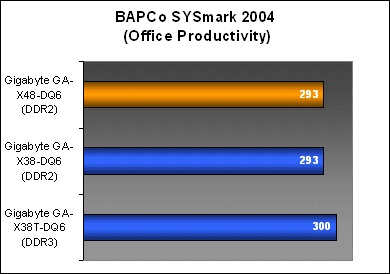
Just like we've expected, the GA-X48-DQ6 performs almost exactly like its predecessor. The X48 may have added 1600MHz FSB on its plate, but otherwise remains the same chipset we've already come to know.
Results - Futuremark PCMark05
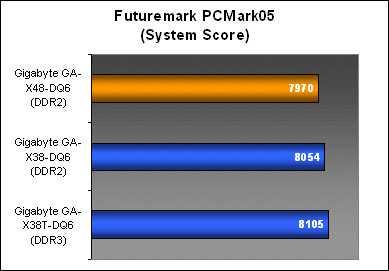
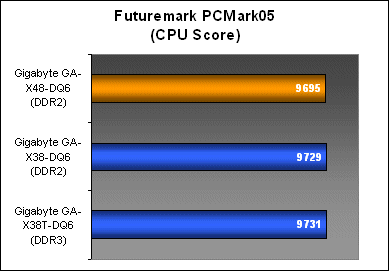
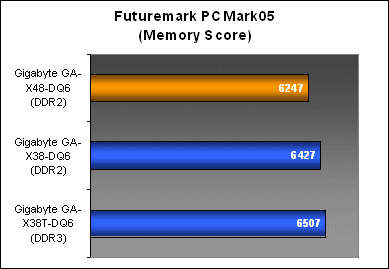
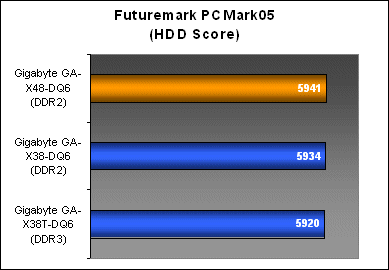
PCMark05 performance results also remain largely untouched among the GA-X48-DQ6 and GA-X38-DQ6, except for its memory subsystem scores where it seemed to perform slightly below the DDR2 average for Gigabyte's premium boards.
Results - SPECviewperf 9.0
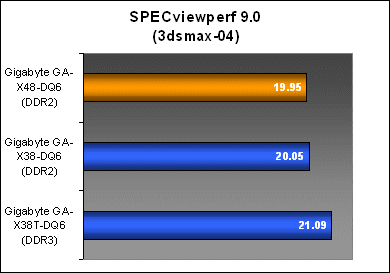
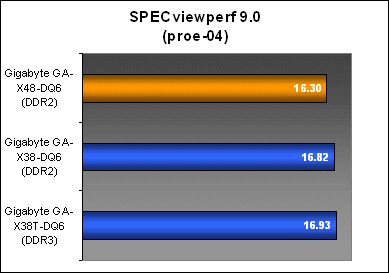
SPECviewperf 3dsmax results for the GA-X48-DQ6 matched up pretty well against its predecessor, though it did perform slightly below the X38 boards in workloads that were more memory intensive. Probably unnoticed in a real world environment, but you can see a slight drop in scores on pro/ENGINEER here.
Results - AquaMark3
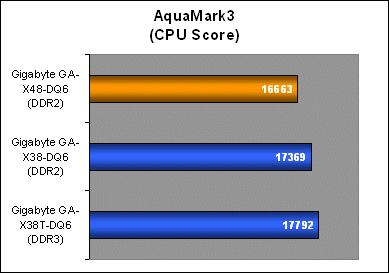
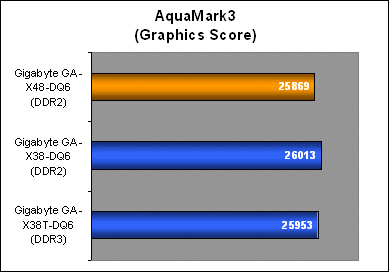
We see the similar performance hit even in AquaMark3 for its CPU subsystem workloads. Graphics-wise, the boards are pretty much on par, though it certainly seems that the GA-X48-DQ6 may be running more conservatively than the GA-X38-DQ6.
** Updated on 12th February 2008**
Conclusion
From the way Gigabyte has pushed for the X48 lineup refresh, it would seem that they are keen to replace their existing high-end X38 boards with the X48 (which is why Gigabyte's X38 boards are almost out of stock in the retail channel). Intel may have originally launched the chip for the sake of high-end enthusiast support, but there is no sense keeping both SKUs alive with no real benefit over the other. This is the reason why we're seeing a DDR2-based X48 board from Gigabyte. From what we've gathered, the GA-X38-DQ6, GA-X38T-DQ6 and GA-X38-DS5 will all be replaced by their respective X48 counterparts.
Performance-wise, as we can see, the X48 is identical to the X38 on most counts, but the GA-X48-DQ6 did seem to perform a little under the average that we'd have expected of it, especially in SPECviewperf and AquaMark3. The variance is still within bounds not to suspect anything amiss with the board, still if you're a current owner of a GA-X38-DQ6 board, there really isn't any reason for an upgrade.
The Gigabyte GA-X48-DQ6 is a worthy successor to the GA-X38-DQ6.
The only real newsworthy feature of the GA-X48-DQ6 is its Dynamic Energy Saver technology, a feature that Gigabyte is trying to hype up. And although the Gigabyte GA-X48-DQ6 debuts this technology onboard, it would seem that even older Gigabyte owners aren't left out. If you venture into Gigabyte's website, you'll notice that although the GA-X48-DQ6 debuts this technology onboard, you can use it with a list of existing motherboards with a simple BIOS update (that is if your board revision is compliant with the list of boards that Gigabyte has put up on their website here). The good news is DES is available to more compliant motherboards without additional cost. However, it would 'seem' that DES is mostly software since this feature is bound to Microsoft Windows users only.
All in all, the Gigabyte GA-X48-DQ6 is a very straightforward upgrade to the GA-X38-DQ6. And since the board will probably be replacing its predecessor, there is some value in there because of the updated chipset and new power saving features. For existing users, there is no need to go rushing out to swap your X38 for an X48 anytime soon. Your investment is still safe.
Our articles may contain affiliate links. If you buy through these links, we may earn a small commission.