
DFI LANParty JR P45-T2RS - The Mini Intel P45
Gather together LAN party-goers, for the Intel P45 platform gets a lot smaller with DFI's LANParty JR P45-T2RS, the first P45 motherboard to come in a mATX form factor. Is it the best choice for those intending to build a handy LAN gaming PC? Read on to find out how it stands.

The Micro P45
When one talks about mATX motherboards, it's almost a given that the motherboard comes with integrated graphics. The reason being that these motherboards are usually found in entry-level systems where cost is a major concern. Then there are the more niche applications for mATX PCs, like your home theater PC (HTPC), where size becomes the priority. However, given the low-power, low-noise requirements of these HTPCs, integrated graphics is always handy, especially since enthusiasts are usually not playing the latest PC games on these machines.
That just leaves a very, very niche scenario where one would need a mATX board without an option for integrated graphics - LAN gaming machines, or to be more specific, portable LAN PCs. For those LAN party enthusiasts who lug their own systems to such game gatherings, DFI has just the right solution with a mATX motherboard built around Intel's mainstream P45 chipset, the new LANParty JR P45-T2RS. It's the first Intel P45 motherboard that's in such modest dimensions and by now, we believe you should have a pretty good idea why.
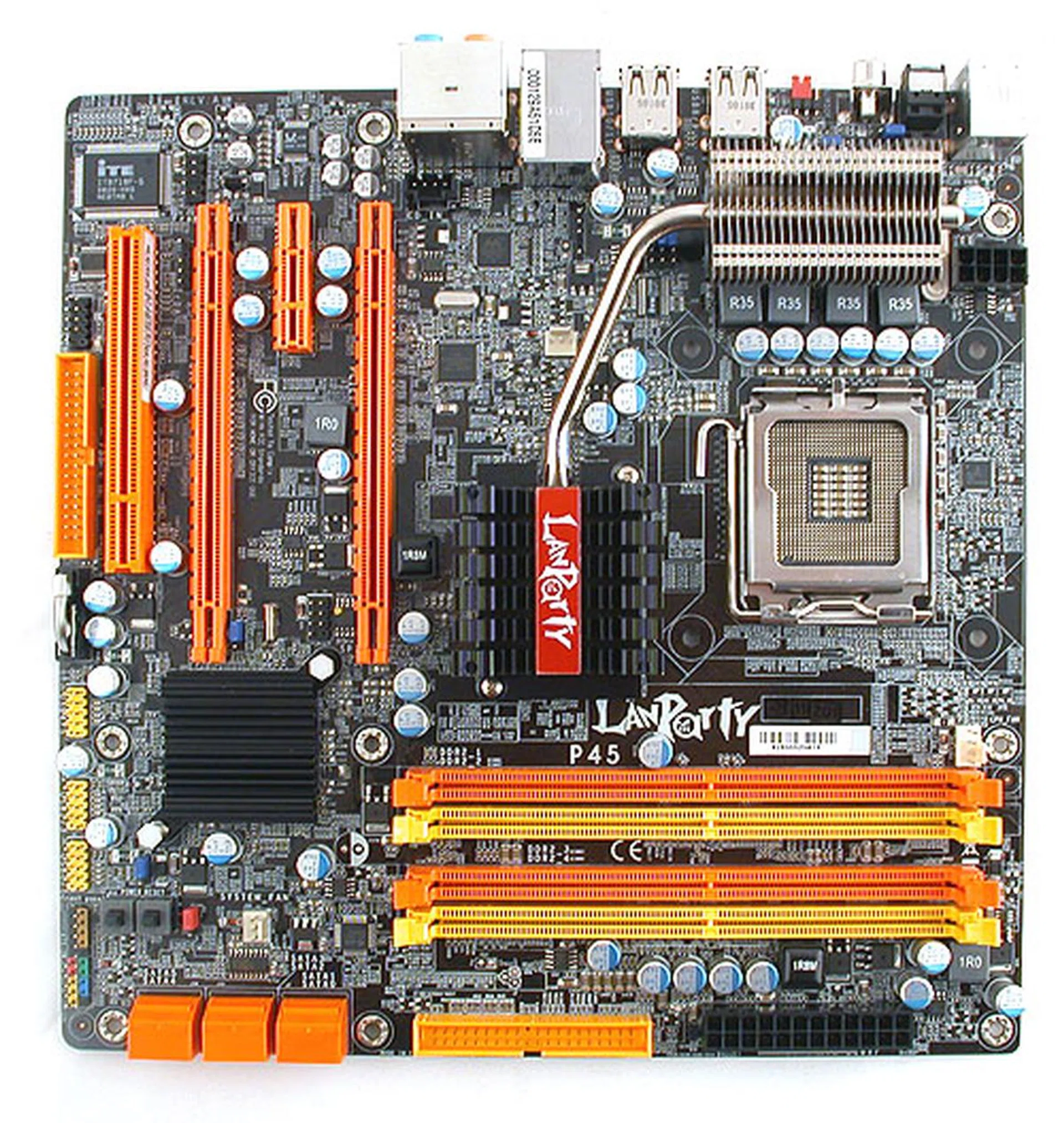
DFI has simply cut down the number of expansion slots to ensure that this boards fits the microATX form factor.
Before we check whether this board manages to keep up with its ATX sized rivals, the following contents were found in our retail package:-
- 2 x SATA data cables
- 1 x SATA power converter cable
- 1 x 80-conductor Ultra ATA data cable
- 1 x floppy drive data cable
- RAID driver diskette
- I/O shield
- Driver CD
- User manual
- Auto Boost System Installation Guide
Board Design and Layout
After the increasingly large heatsinks that we have seen on those higher-end enthusiast boards, the Intel P45 chipset has brought along much reduced heatsinks and this DFI is an excellent example of the relatively minimal cooling required for this chipset. The North and Southbridge heatsinks are all passively cooled and modest in size.
Unfortunately, despite its size, the Northbridge heatsink still managed to give us a rather negative impression. DFI situated this heatsink a bit too close to the CPU socket and with the fins of the heatsink angled slightly outwards and upwards, it was in contact with our CPU cooler, making it more difficult to remove the CPU cooler, since one of the CPU cooler mounting holes was very close to the Northbridge heatsink. We imagine that it could be even more of a hassle for those with larger CPU coolers.
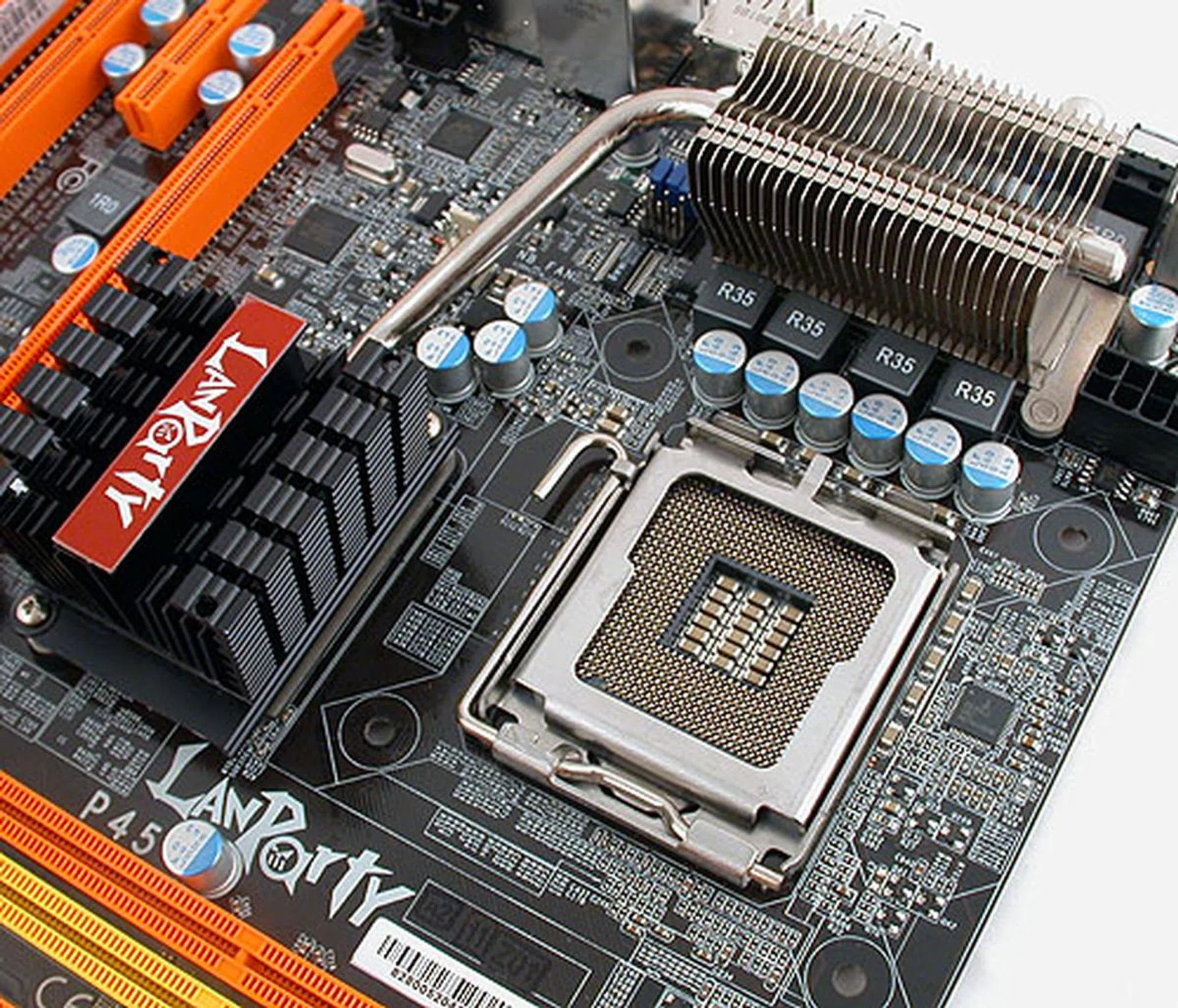
DFI states that it uses 4-phase digital PWM with solid Japanese-made capacitors (what else?) but we were more concerned about the proximity between the CPU socket and the Northbridge heatsink.
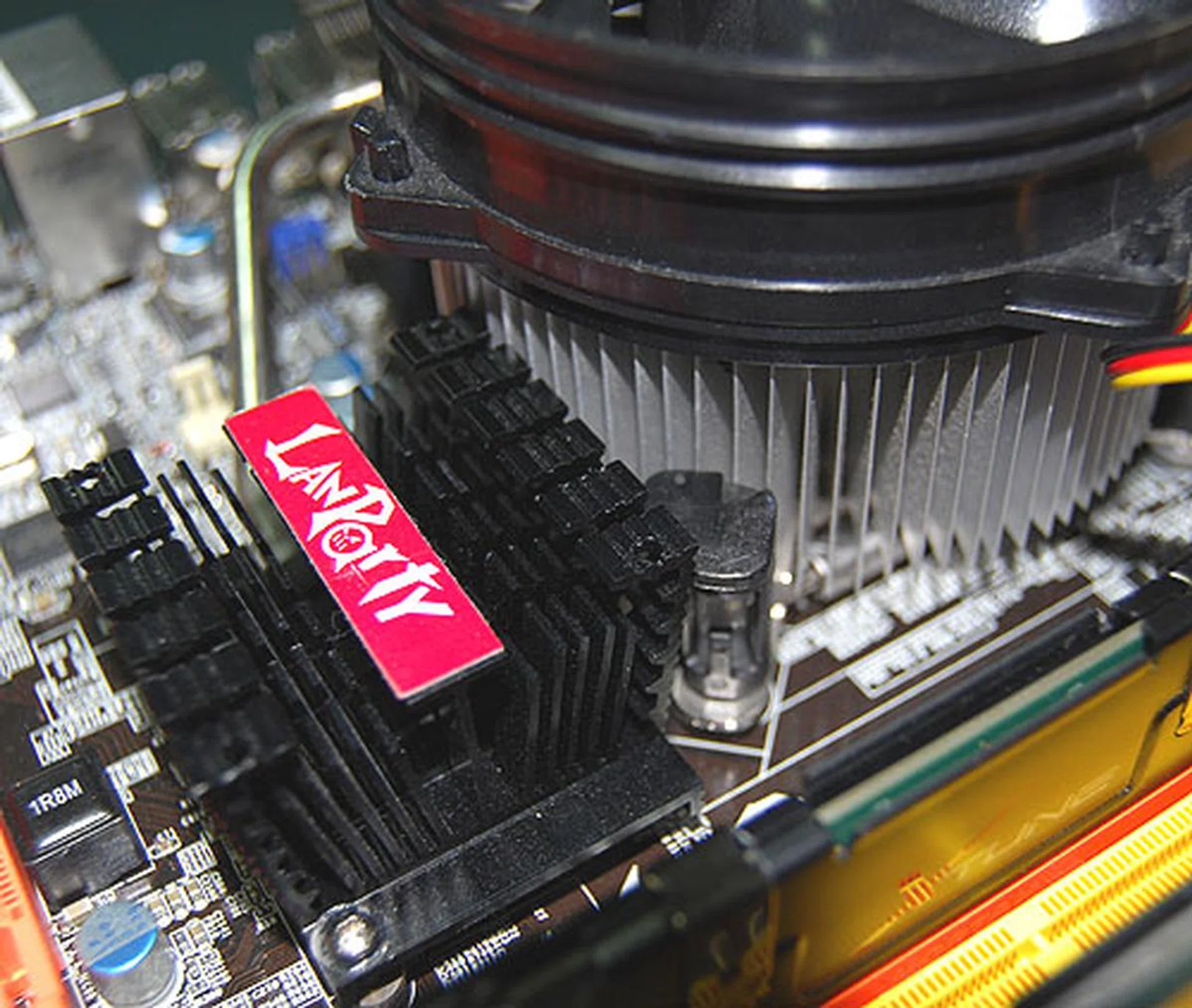
And indeed it was the case. There was virtually no space between the CPU heatsink and the Northbridge heatsink when installed. Both were practically in contact, making it slightly more difficult to remove the CPU fan.
Except for that potential pitfall, we found the layout of this DFI board to be on par with the competition. The SATA ports were all aligned to face outwards and cannot be blocked by longer graphics cards. The other connectors like the IDE, ATX power and floppy were all located at the edges of the board, along with other headers for USB, audio or the front panel. Even the CMOS battery was right at the edge for easy access.
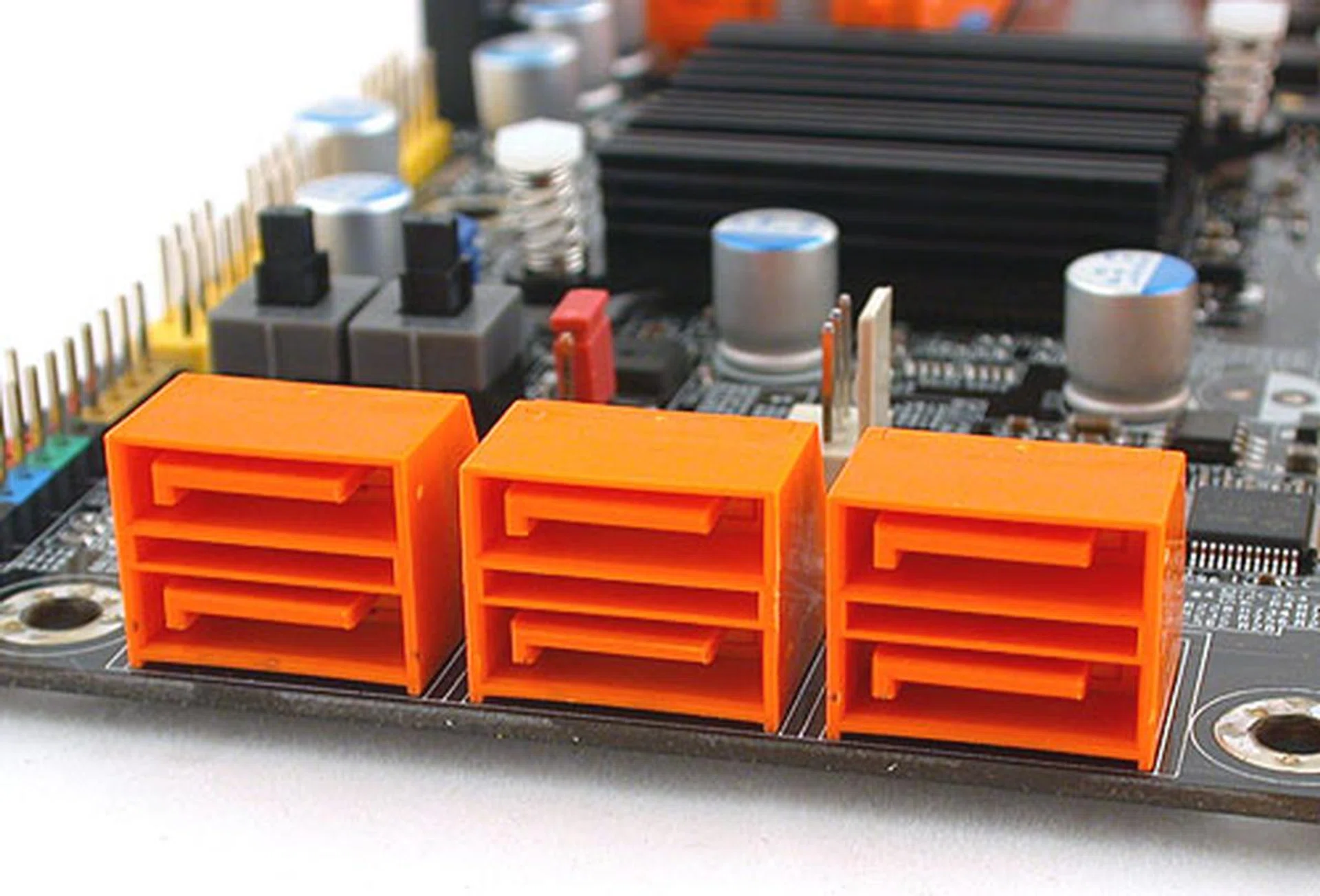
Six SATA 3.0Gbps ports are all you're going to find on this mATX board. DFI has not added any extra controllers to increase this number.
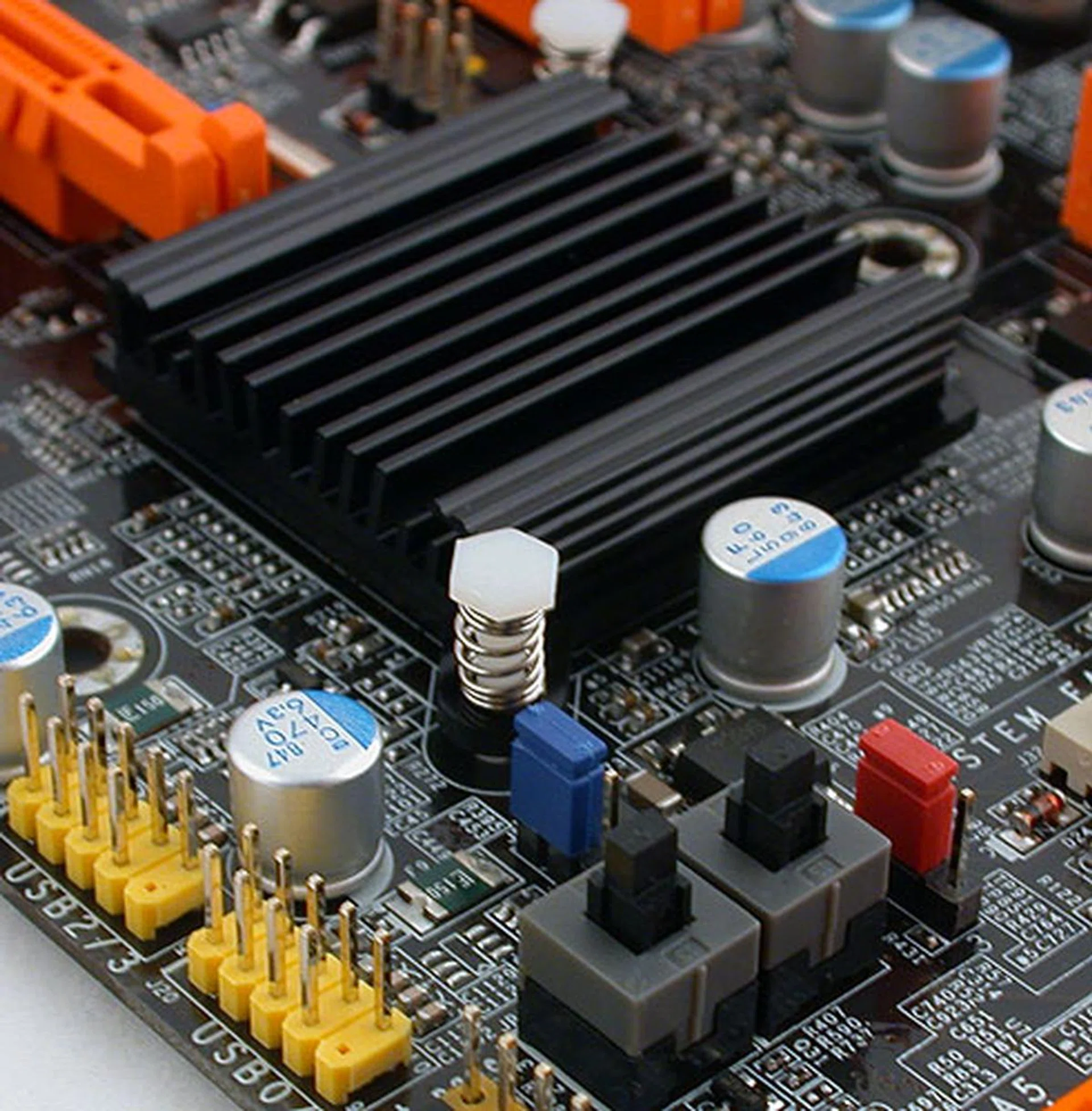
Onboard switches are quite common nowadays, especially from an enthusiast 'brand' like DFI. A Clear CMOS jumper is also conveniently located nearby so there's no need to hunt for that. The Southbridge passive heatsink is also quite modest in size.
Onboard power and reset buttons are as expected, found near the front panel connectors, together with a Clear CMOS jumper. Along with a similar jumper at the rear I/O panel, DFI has certainly made it very convenient for their target users, overclocking and gaming enthusiasts who may be constantly tweaking and tuning their systems.
In short, if not for that Northbridge heatsink, we would have given high marks for the layout of this board. It's not a deal breaker by any means but you should check whether your CPU cooler will be inconvenienced by this arrangement before buying,
Features
When it comes to the features that you'll find on this mATX board, expectations should be moderated to account for its space constraints. Although it does have all the important features of the Intel P45 chipset with a ICH10R Southbridge, some of the extras that are found on other P45 boards are removed. This means no FireWire, no extra SATA 3.0Gbps or e-SATA ports besides the standard six given by the Southbridge and no dual Gigabit LAN ports that so many vendors seem to be putting onto their 'mainstream' P45 boards.
You'll still get 8-channel HD audio thanks to a Realtek ALC885 CODEC, with both optical and coaxial S/PDIF outputs at the rear. Support for IDE and floppy devices is retained with the addition of two controller chips while the memory support is competitive, with 4 DIMM slots supporting up to 8GB DDR2-1066.
There's even CrossFireX support, with the two PCIe 2.0 x16 slots onboard splitting into a pair of x8 configurations when you install the appropriate graphics cards. However, while the P45 chipset supports either 1 x16 or 2 x8 for the PCIe lanes, depending on the number of graphics cards installed, this DFI LANParty JR is hardwired to only do 8 lanes for each slot, whether it's one or two graphics card installed. We suspect this could either be a cost cutting measure or the lack of PCB space to accommodate the digital switching circuits. Unfortunately, this will definitely affect the graphics bandwidth and hence the performance, something that we'll be exploring in our benchmarks next.
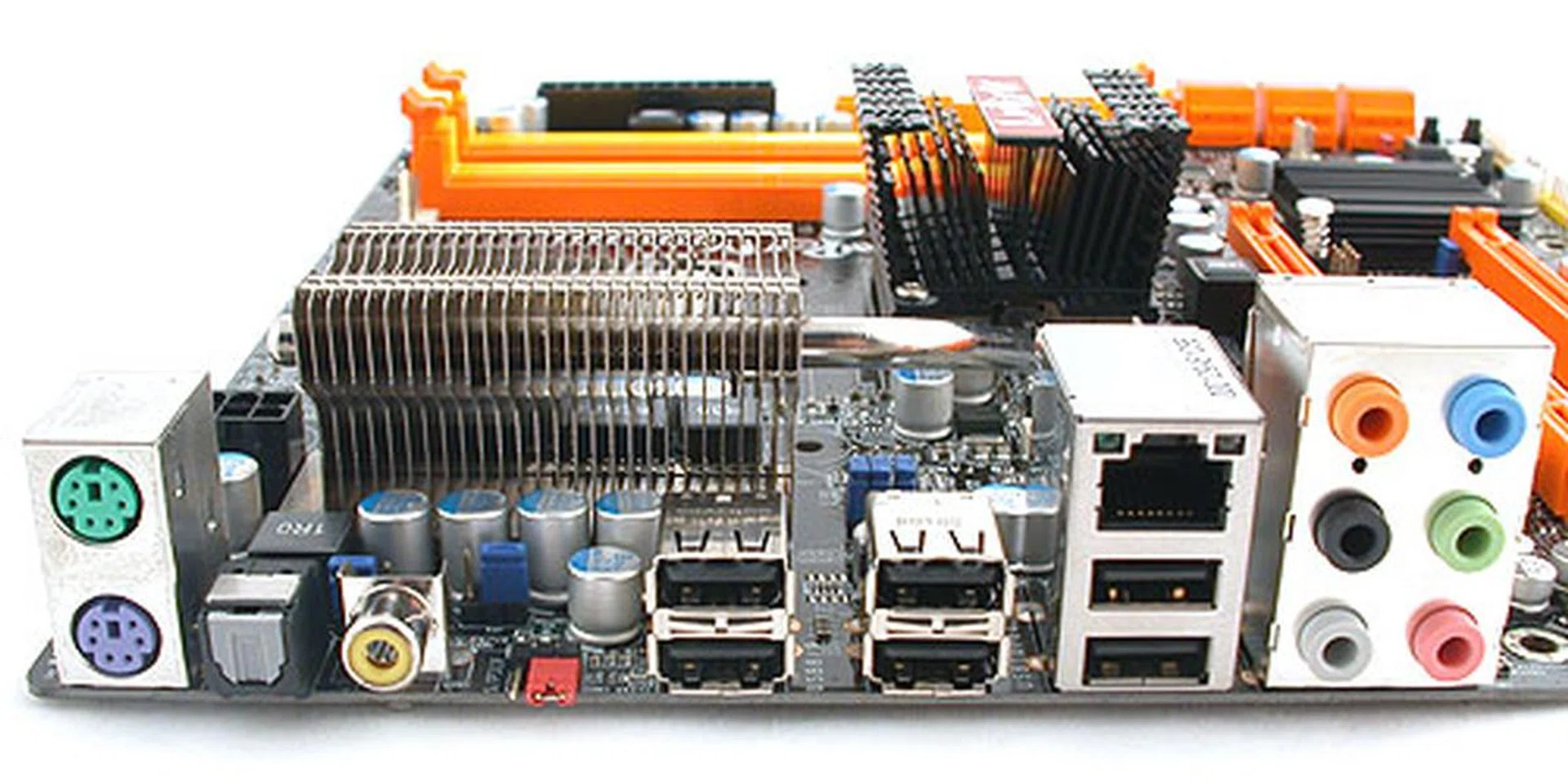
Despite its form factor, DFI has maintained a healthy number of rear outputs, with both coaxial and optical S/PDIF outputs along with six USB 2.0 ports and the usual keyboard/mouse, Gigabit LAN and audio connectors. There's also a Clear CMOS jumper at the back.
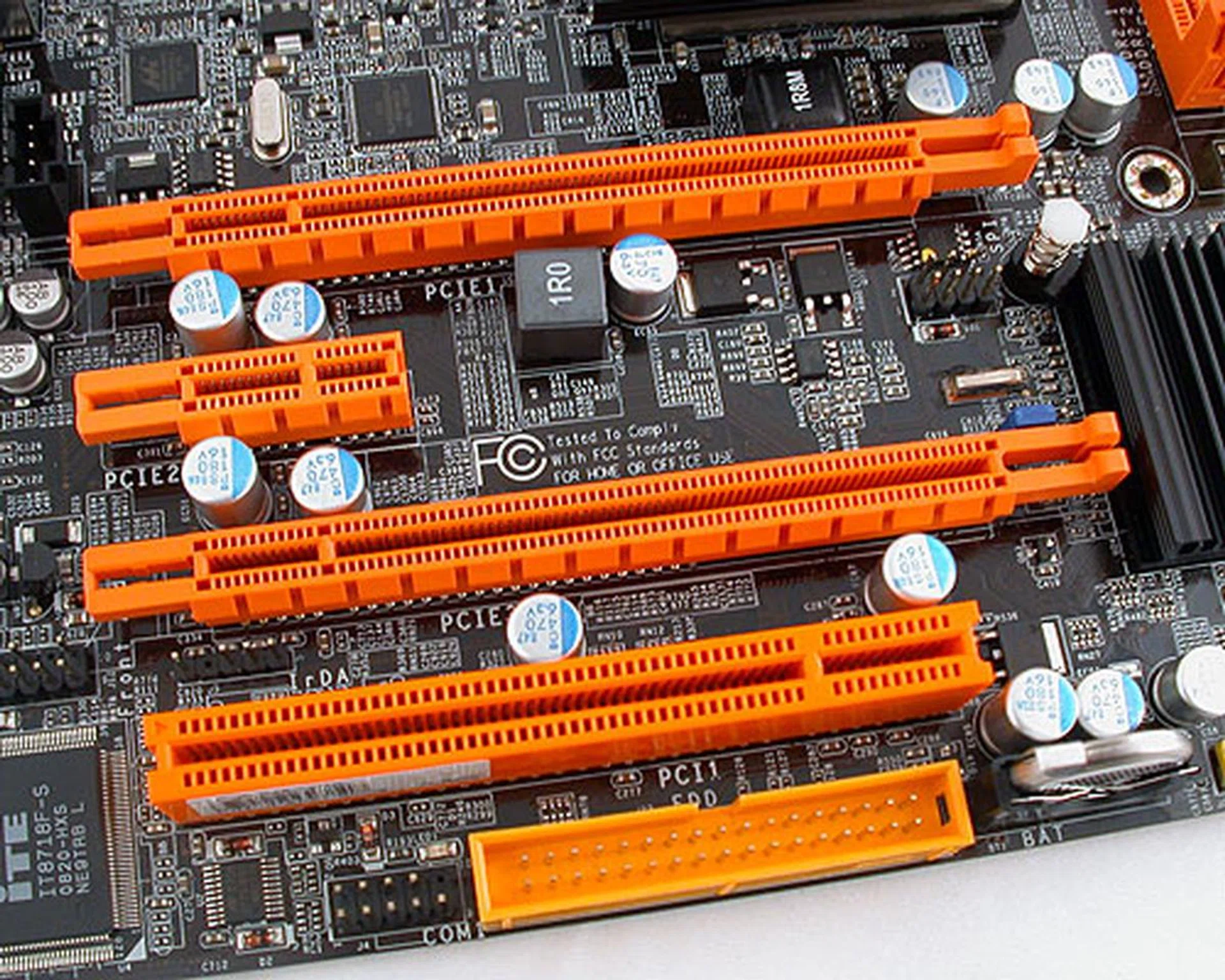
On paper, there are two PCIe 2.0 x16 slots supporting CrossFireX. However, even if you only have one graphics card installed, that single card will be running at x8 and not the x16 that's expected from the chipset. When you have two graphics cards however, you will get the usual pair of x8 configuration.
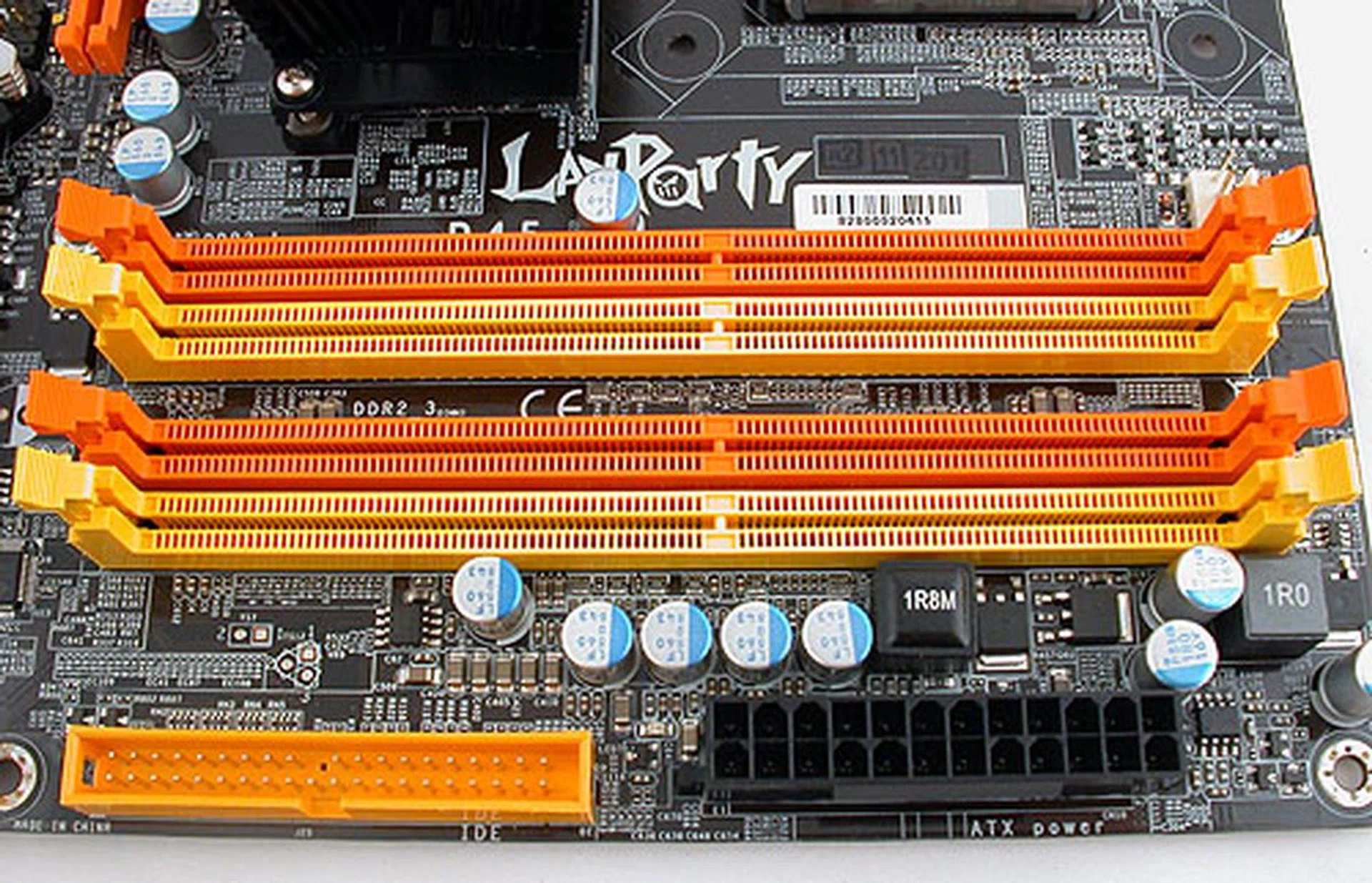
The typical 4 DIMM dual-channel slots supporting up to DDR2-1066. Users can install up to 8GB of memory on this board.
Finally, we mentioned earlier the Auto Boost System from DFI. This proprietary feature is found on DFI's recent mainstream motherboards, where presumably users need a holding hand when it comes to overclocking or they just want a quick convenient method of tweaking. Hence, DFI has introduced this. You can read about the in our previous review of another DFI P45 motherboard.
Overclocking
In the past, we have seen some complicated BIOS settings from DFI, mostly related to overclocking. Fortunately, the newer BIOS now have Easy and Advanced modes, with some of the more obscure settings hidden if you select the Easy mode. For the mainstream LANParty JR P45-T2RS, we found the Easy mode to be more than adequate for our needs and some of the options (which are similar to the DK P45-T2RS PLUS) are listed below:-
- FSB Settings: 200 to 999MHz
- DDR2 Settings: Auto, 200/667, 200/800, 266/667, 266/800, 333/667, 333/800, 400/800
- PCIe Settings: 100MHz to 250MHz
- CPU Voltage Settings: +12.5mV to 787.5mV (in 12.5mV steps)
- Memory Voltage Settings: 1.789V to 3.280V (in 0.23/0.24 steps)
- SB Core/CPU PLL Voltage Settings: 1.55V to 2.15V (in 0.20V steps)
- NB Core Voltage Settings: 1.1825V to 1.97V (in 0.0125V steps)
- CPU VTT Voltage Settings: 1.210V to 1.603V (in 0.011V steps)
- Multiplier Selection: Yes, 6 - 50 (CPU dependent)
Before testing, we updated the BIOS on the board to the latest J245D812 version and went on to our usual benchmarks. We also tried overclocking this board, reducing the CPU ratio to the minimum 6 to ensure that the CPU was not a bottleneck. With appropriate jolts to the voltages, we reached 480MHz for the FSB, which was one of the better results that we have gotten for this chipset and more than the 465MHz that we managed for the DFI LANParty DK P45-T2RS PLUS.
Test Setup
As before, our collated results so far for the Intel P45 chipset have included both DDR2 and DDR3 versions and we'll be comparing them to this DFI. While it's not ideal, we hence have three different configurations for the memory, with the Gigabyte GA-EP45-UD3P and DFI LANParty JR P45-T2RS using Aeneon memory at DDR2-1066, the DFI LANParty DK P45-T2RS PLUS running at DDR2-800 at a 4-4-4-12 timing (due to a lack of a proper DDR2-1066 multiplier) while of course the DDR3 based boards were using DDR3-1333.
To sum up the rest of the hardware configuration:-
- Intel Core 2 Extreme QX6850 processor (3.00GHz)
- 2 x 1GB Kingston HyperX DDR3-1333 @ 7-7-20 CAS 7.0 (for DDR3 motherboards)
- 2 x 1GB Aeneon DDR2-1066 @ 5-5-5-15 (for the Gigabyte GA-EP45-UD3P and DFI LANParty JR P45-T2RS)
- 2 x 1GB Kingston HyperX DDR2-1066@800 and @ 4-4-4-12 (for the DFI LANParty DK P45-T2RS PLUS)
- Seagate Barracuda 7200.10 200GB SATA hard disk drive (one single NTFS partition)
- MSI GeForce 8600 GTS 256MB - with ForceWare 162.18 drivers
- Intel INF 9.0.0.1007 and AHCI 8.0.0.1039 driver set
- Microsoft Windows XP Professional with Service Pack 2 (and DirectX 9.0c)
The following benchmarks will be used to determine the performance of the DFI LANParty DK P45-T2RS PLUS when compared to our previously tested Intel P45 boards:-
- BAPco SYSmark 2004 (with Patch 2)
- Futuremark PCMark05 (ver 120)
- SPECviewperf 9.0
- AquaMark3
Results - BAPco SYSmark 2004
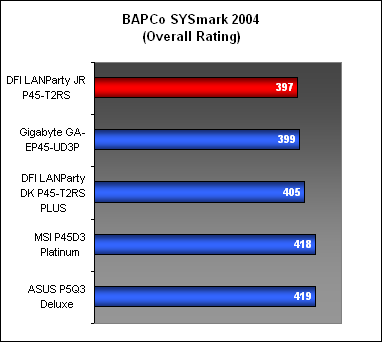
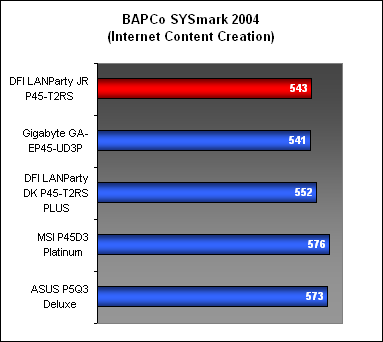
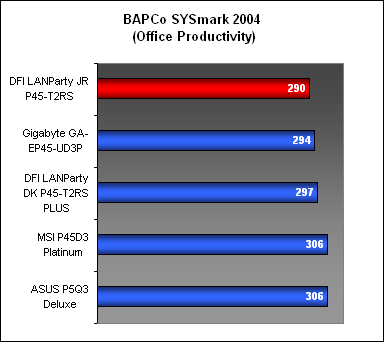
As usual, our first stop was BAPco's application suite benchmark, SYSmark 2004, which found the DFI JR to be slightly off the Gigabyte GA-EP45-UD3P in terms of the overall score. The DFI DK board, which had a faster memory timing scored the highest for the DDR2 boards and of course the DDR3 boards were way ahead of the others here.
Results - Futuremark PCMark05 Pro
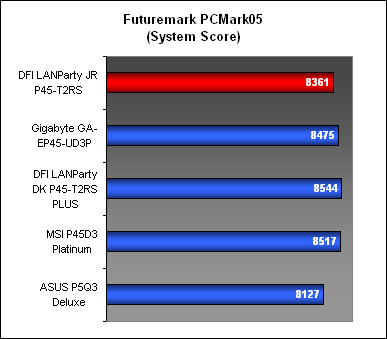
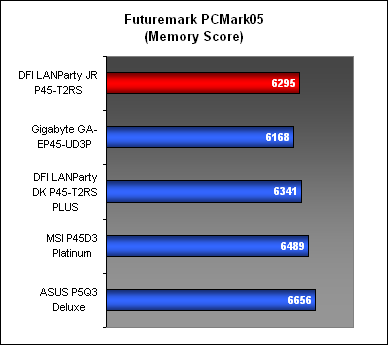
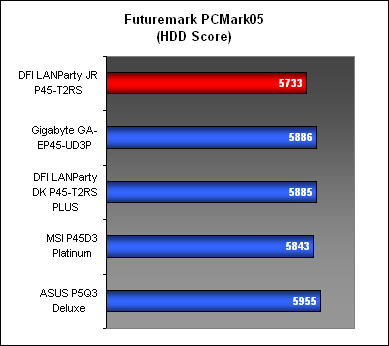
PCMark05 was another benchmark that tested the system as a whole. We start off with the CPU scores, which for the DFI JR, were right up there with the competition. It edged the Gigabyte UD3P in the memory segment, though the hard drive section was slightly disappointing. So what accounted for the fairly low overall system score that PCMark05 returned? Well, we don't usually test the graphics subsystem performance in PCMark05 but we believe that the lower bandwidth for the PCIe 2.0 slot on the DFI JR could be a reason. We'll know for sure in the next few benchmarks.

Results - SPECviewperf 9.0
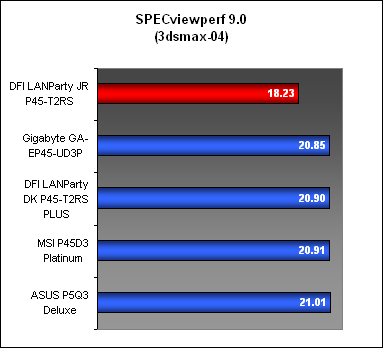
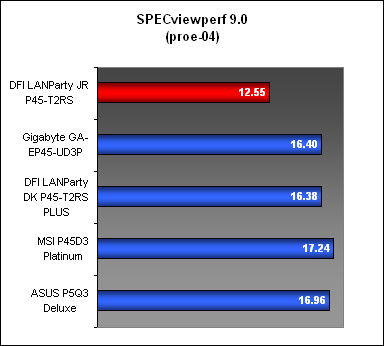
We looked at two of the test sets in SPECviewperf 9.0, 3dsmax and PRO/ENGINEER and the DFI JR was definitely far behind its rivals. As we had mentioned, the lower transfer rates from the x8 PCIe 2.0 graphics slot on this board could be the reason why its performance faltered in these more graphically taxing applications. Couple that with the already slight disadvantage that this DDR2-based board suffers when compared to the DDR3 boards and you'll get these results.
Results - AquaMark3
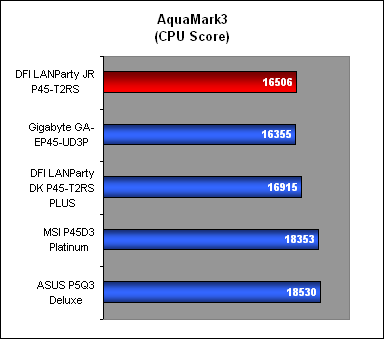
AquaMark3 helped to confirm our findings so far, with the DFI JR scores for the CPU comparable against the Gigabyte UD3P but when we looked at the graphics performance, it was about 5% slower. In terms of the frame rates for AquaMark3, the DFI JR was about 3 frames behind the Gigabyte, though one has to consider the context: both were scoring around 140 frames or more for this benchmark at the default setting.

Conclusion
DFI has always tried to appeal to the enthusiast segment with its products, especially those who enjoy overclocking as a hobby and by extension, gamers who desire the best performance while keeping to their budgets. That's exemplified by its LANParty branding for its motherboards, coupled with enthusiast friendly 'features' like ultraviolet light sensitive cables and motherboards. It's also evident from this latest board that uses Intel's latest mainstream P45 chipset but in a form factor that is squarely aimed at the frequent LAN party-goer.
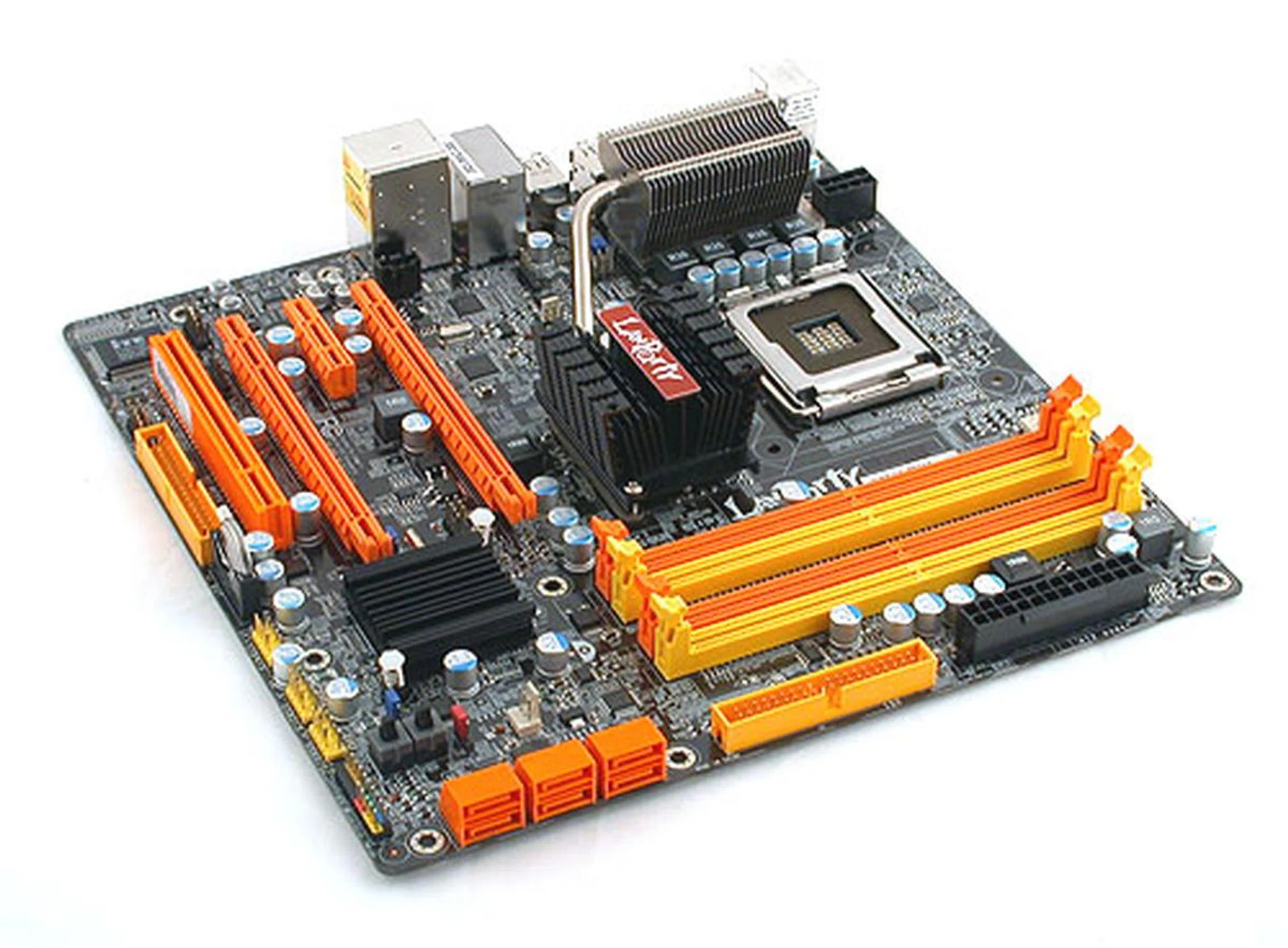
It may be a mATX board that promised the performance and features of the more powerful P45 chipset but alas this was not fully achieved due to the limited 8-lane configuration for the PCIe slot.
In which case then, the DFI LANParty JR looked promising in the beginning due to its form factor and features but is seriously hampered by its x8 PCIe 2.0 graphics slots. No doubt, for CrossFireX, you'll still be getting the expected pair of x8 slots but that means a single card configuration with the DFI JR will be taking a bandwidth penalty that could affect its performance in games. While our general system benchmark scores for this board were not affected significantly, games should take a bigger, direct hit. This is hence a big no-no for those LAN gamers who are the target audience.
The other grouse we had was the placement of the Northbridge heatsink, which we felt was just a too close to the CPU socket. Besides that, the layout was good and DFI did not sacrifice any other major P45 and ICH10R features due to the space constraints. The heatsinks onboard were warm to the touch but not scalding despite its small size and heat shouldn't be much of an issue, a plus point for a mATX board. We also got a nice amount of overclocking for the FSB on this board, which is some consolation for the lackluster graphics performance.
Finally, what's the value proposition for this motherboard? For having less features than the typical P45 board, you can expect to pay around US$149, which is a bit more costly than some models we saw that were slightly over US$100. Of course, those are full fledged motherboards and not the small mATX form factor. Therefore, this remains the main edge for DFI. They are the only vendor so far to offer a mATX board for this chipset though given what we have seen, it's a very niche segment and you'll probably not find many brands following. The average user would be better off looking at those with integrated GPUs, like NVIDIA's GeForce 9300/9400 mGPU. Unless you're planning specifically for a LAN party system with dual-GPUs in CrossFireX, we'll say give this a miss.
Our articles may contain affiliate links. If you buy through these links, we may earn a small commission.