
Dell XPS M1330 (Intel Santa Rosa)
The Dell XPS M1330 is proof that thin and light notebooks do not have to be underpowered. Running a full fledged Santa Rosa platform with a mobile GeForce 8 series GPU, the M1330 transcends notebook conventions and fuses everything you always wanted in an ultraportable into one sleek unit.

Introduction
Dell may be one of the top PC brands in the market today, but ask anyone about Dell notebooks and some of the most common replies you'll get will probably be "dull", "bland", "blocky" and "uninspiring". This has nothing to do with specifications or performance, but Dell has been using the same designs generation after generation and with the rise of lifestyle computing products from the likes of Apple, HP, Samsung and Sony, Dell's notebooks really do look archaic in comparison. Even Dell's acquisition of Alienware, a boutique PC brand, early last year did not seem to add any zest into their product line up. Instead, Dell has been experiencing a sluggish year, resulting in HP overtaking them in worldwide PC shipment numbers for the last quarter of 2006. Perhaps this has been a rude awakening for Dell, which has been languishing off their OEM-like approach to the consumer market for too long, but they've finally taken themselves to task with an overhaul of their Inspiron series into a younger, hipper and more attractive range.
However, if there is one notebook that will put a stop to critics, it will be the focus of this review - Dell's new XPS M1330 ultraportable. Combining stellar design and the performance oriented approach of the XPS line, the M1330 may very well be singularly responsible for lifting Dell out of their slump in the notebook market.
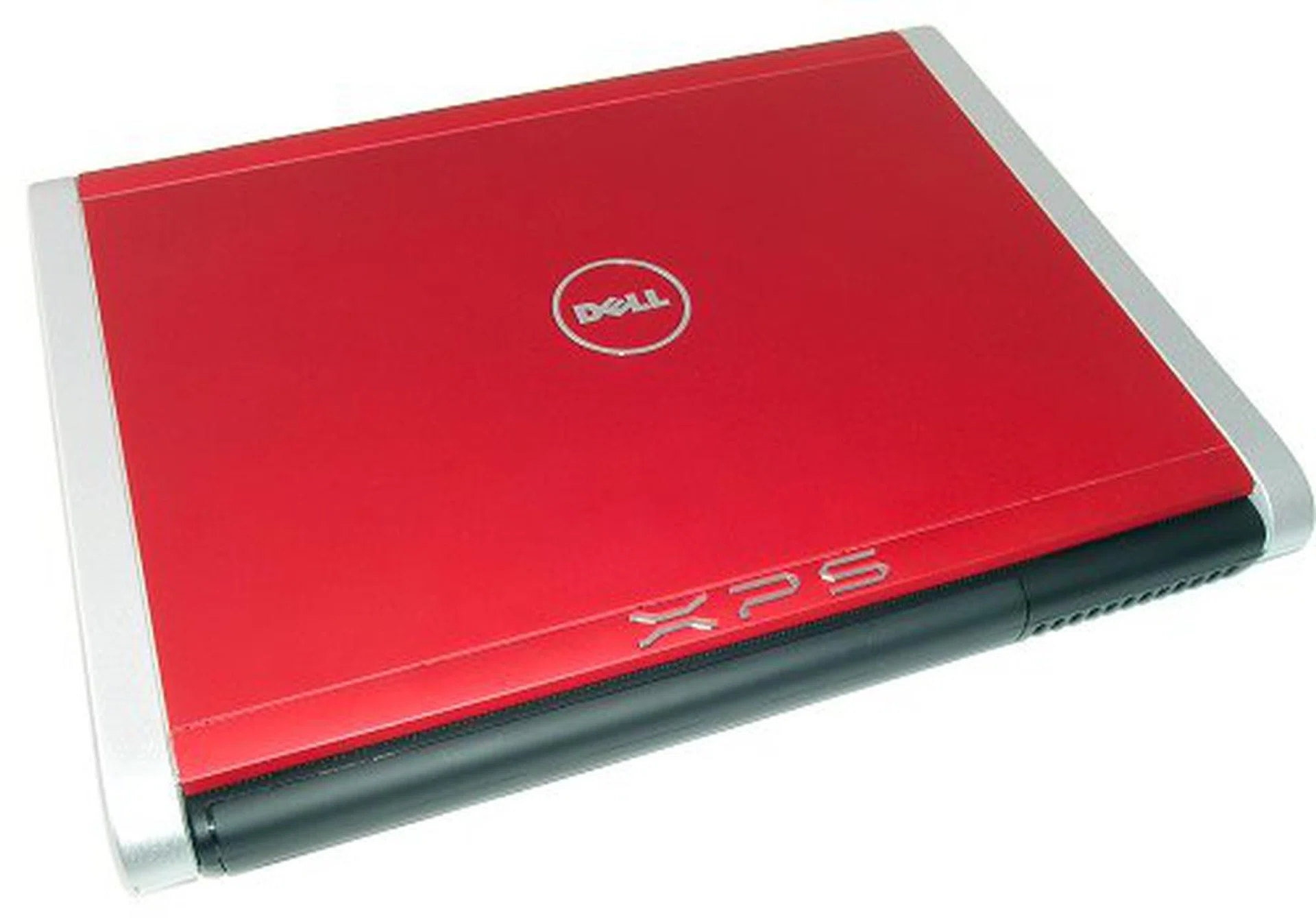
Brand new XPS, bold new look. The XPS M1330 is one of the best looking Dells in a while.

Front view of the M1330. You can see the audio jacks as well as the memory card reader to the right.
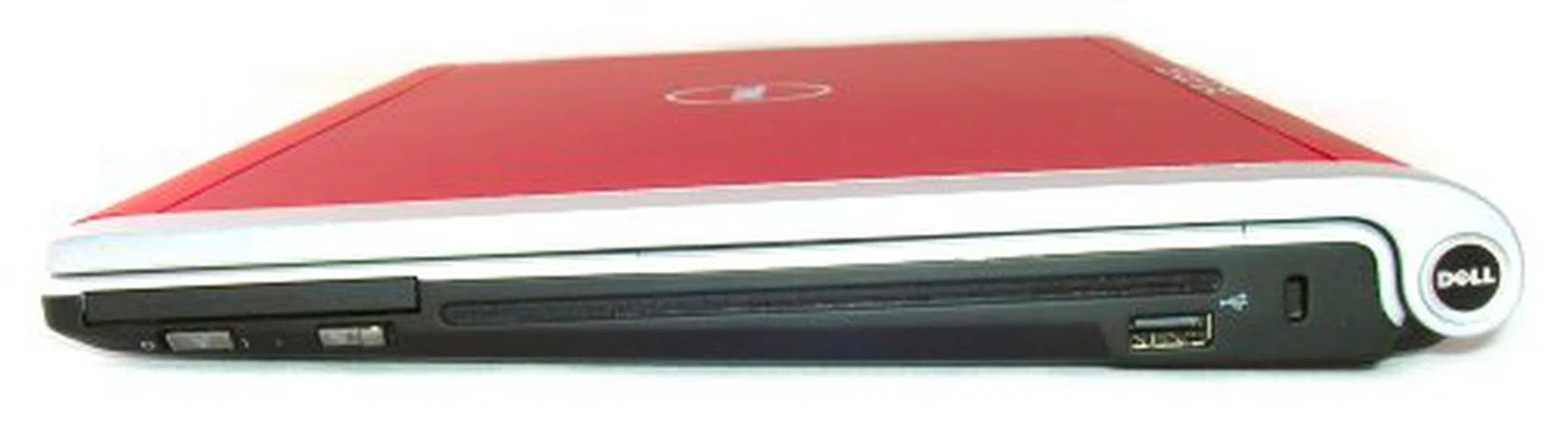
To the right, you have the slot loaded optical drive, WiFi locator button and one extra USB port. Notice the tight integration of the components making full use of available space.
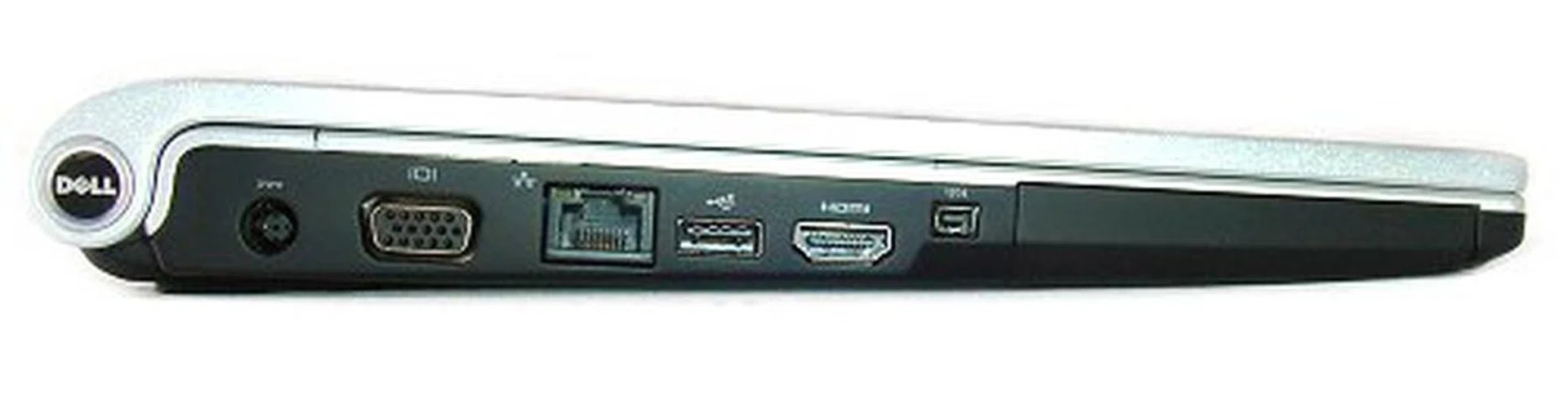
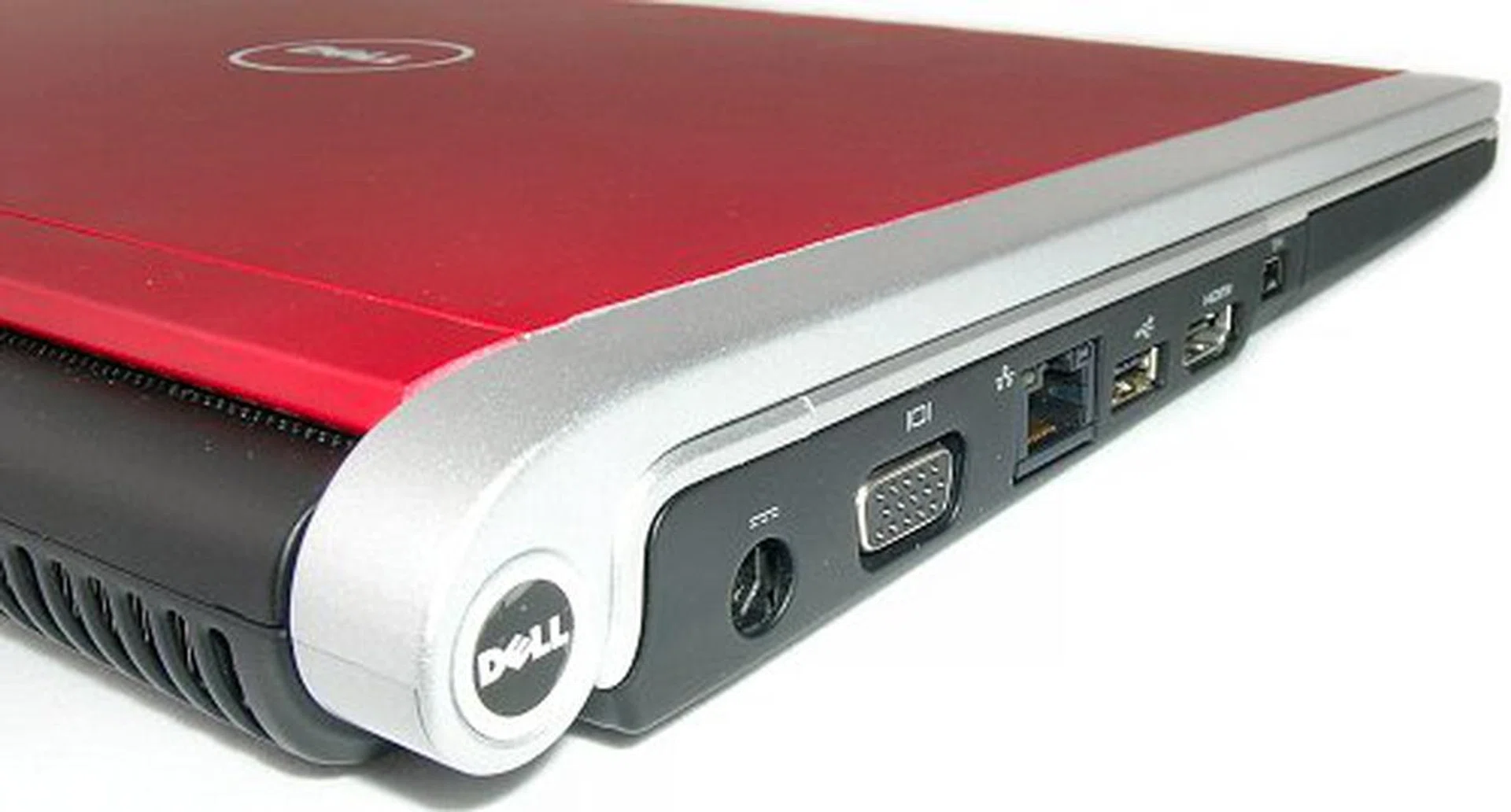
On the left, you have the I/O panel of the notebook including power since there is no space for any at the rear.

Rear view of the M1330. Battery back takes up the entire space, so there are no connectivity ports at the back. To the right, you should see the rear exhaust vent.
Among Dell's notebook products, their XPS lineup represents the performance segment and one of the most noteworthy to date has been the XPS M1210, a 12.1-inch ultraportable that boasted features you would not usually find in such a small notebook such as discreet graphics and integrated optical drive. The M1210 raised and set the bar on the performance that ultraportables are capable of and achieved a sort of cult status among its users. As the successor to the M1210, the new M1330 is the ultraportable re-envisioned - performance, style and form factor combined.
Judging a Book by its Cover
The design of the M1330 is immediately eye-catching with its sleek silhouette and impressive soft textured lid that is unlike anything Dell has ever come up before. Closed, the notebook has a streamlined teardrop-like outline and measures in at only 2.21cm thick at the front. Its magnesium allow body feels sturdy and lightweight, though its plastic sides are a dead giveaway even with metallic paint finish; the only part of the notebook that cheapens the whole premium feel of the M1330.
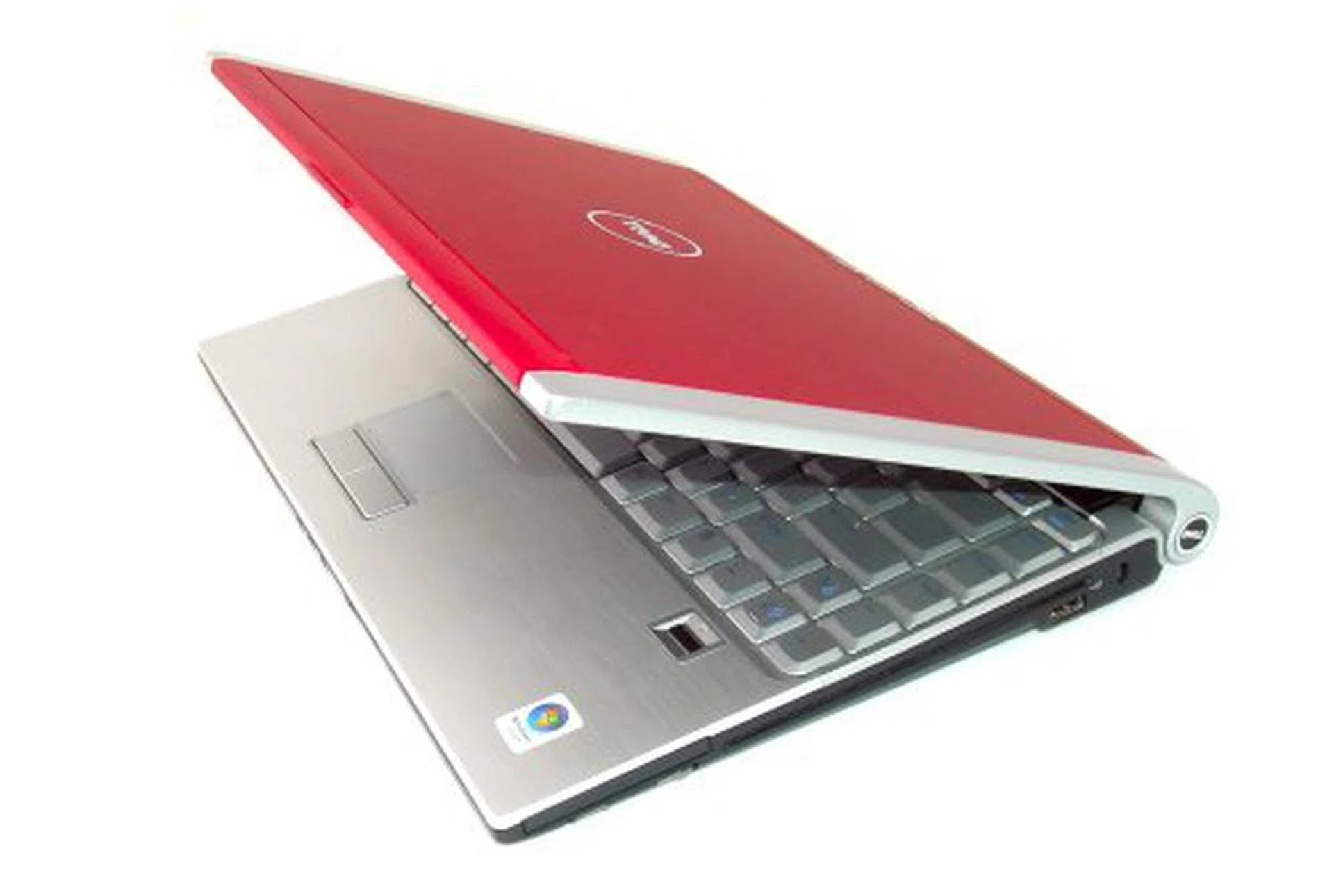
The allure of the M1330 is hard to beat.
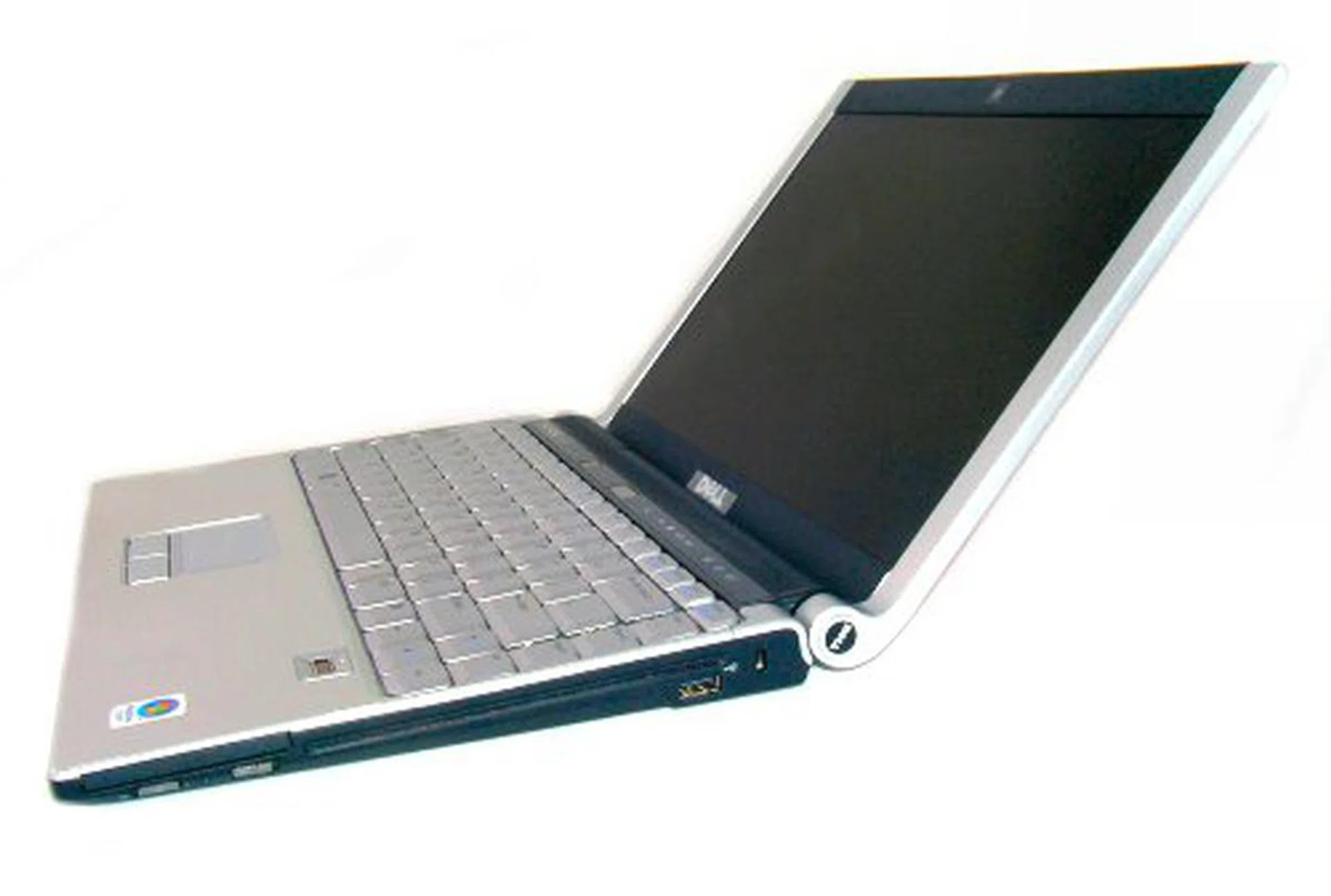
This is just how thin the M1330 is. The LED screen is 6mm in thickness and the body barely has room to fit the slot loaded DVD drive.
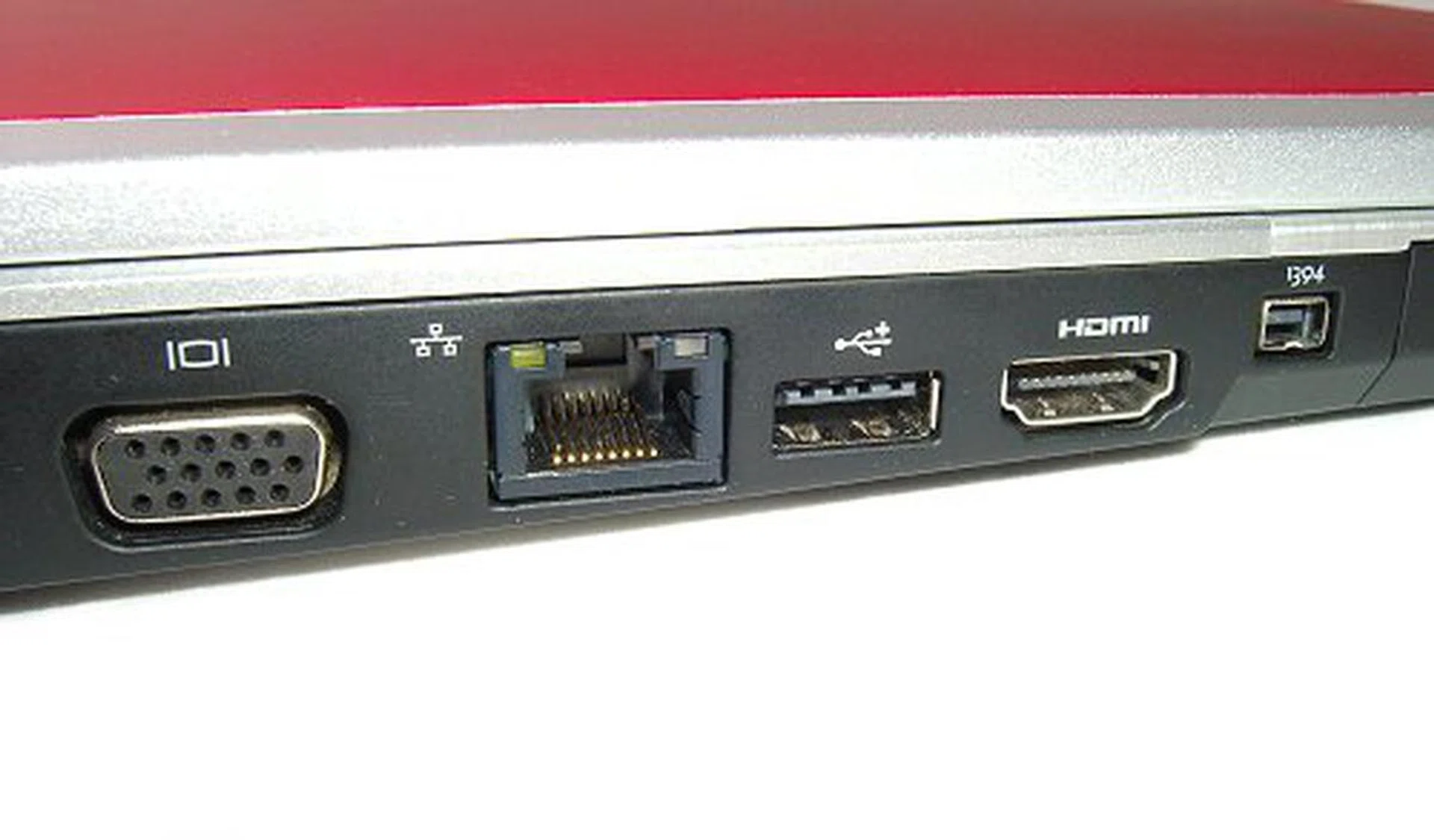
Connectivity ports are located to the left. These include a VGA port, LAN, USB 2.0, HDMI and one FireWire.
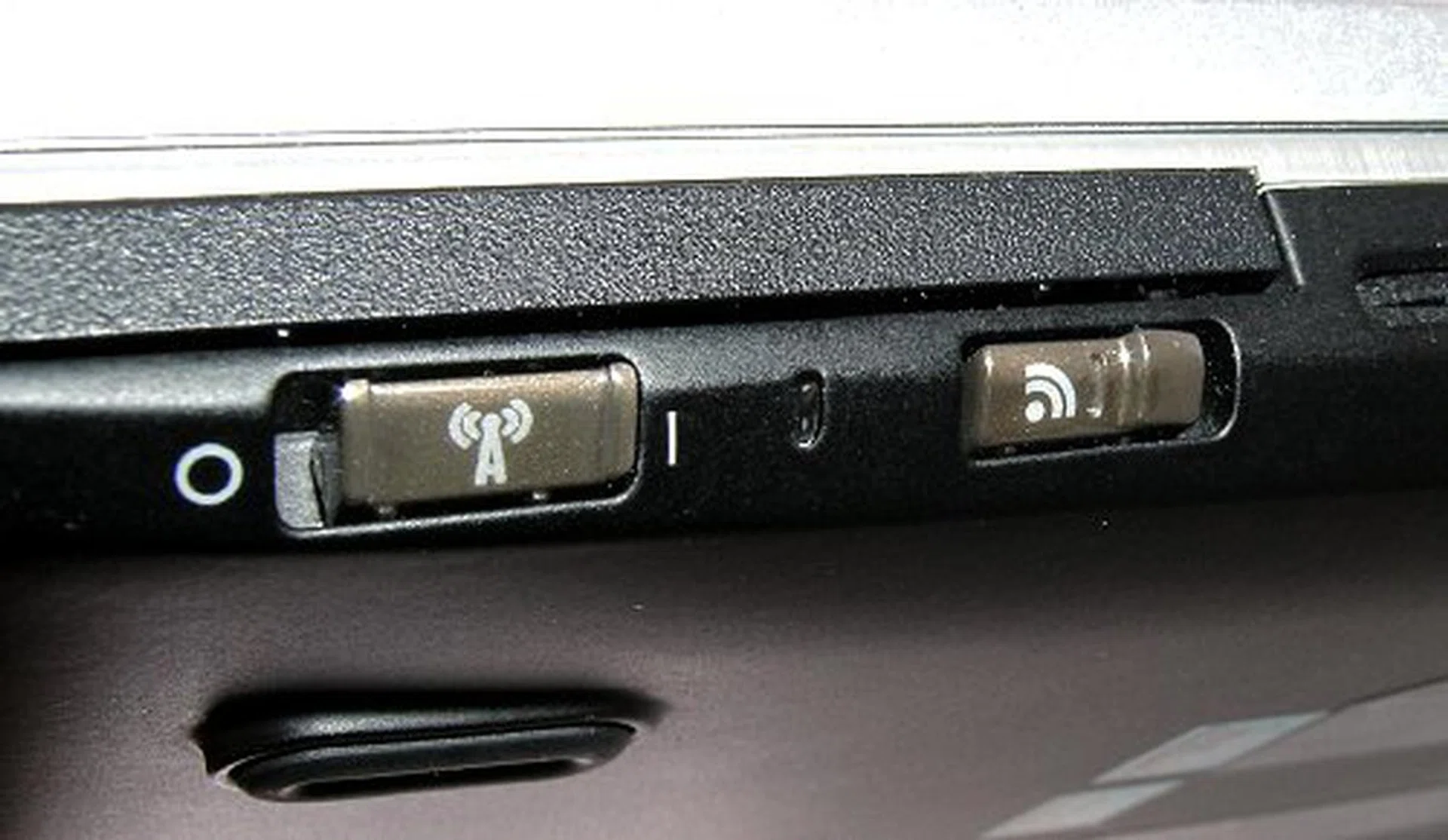
One button to activate it, one button to locate them all.
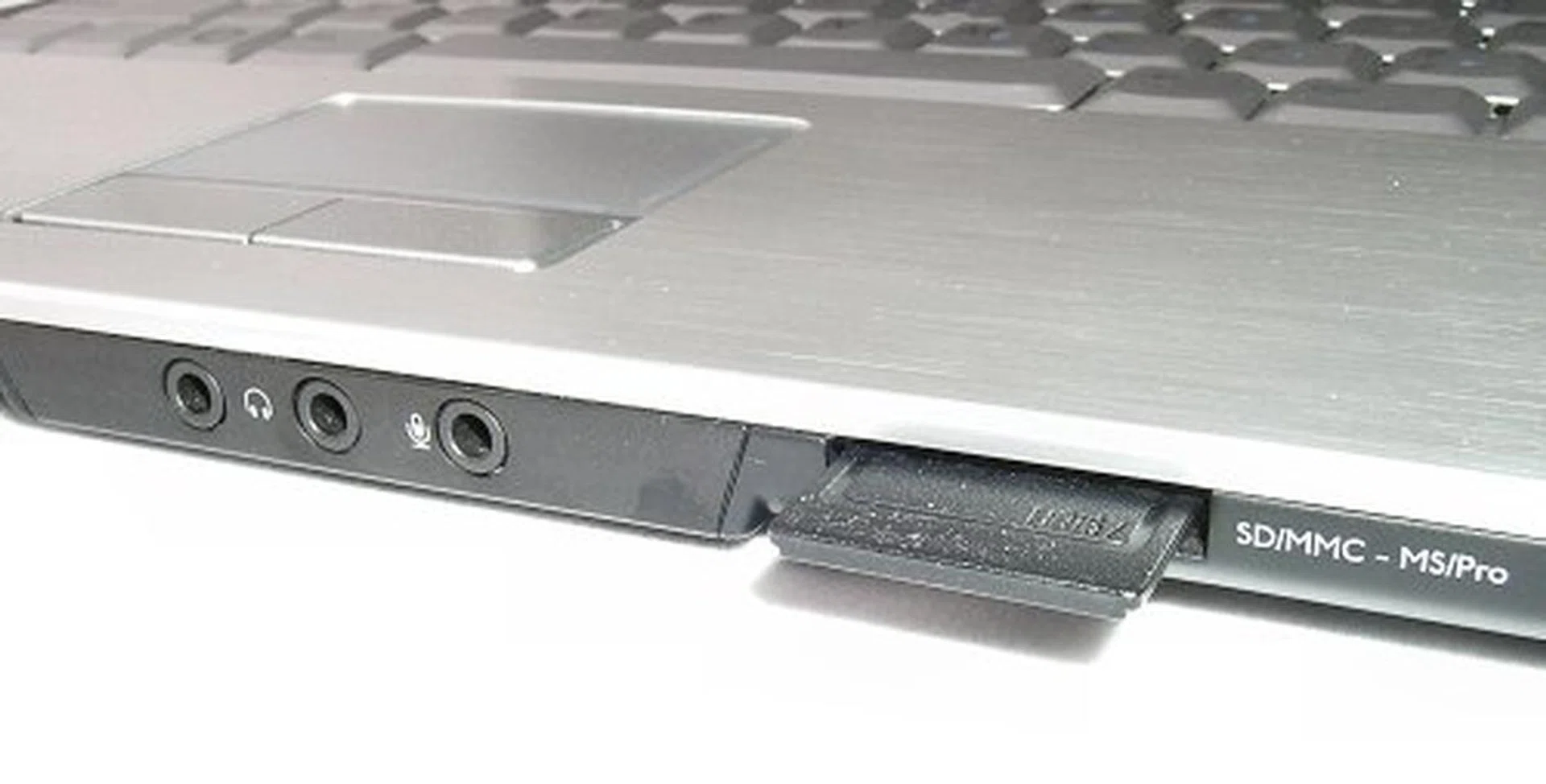
Audio jacks are smack in the middle on the front of the notebook, which is not entirely an optimal location to have connectors and wires dangling about if you ask us.
Opening Up
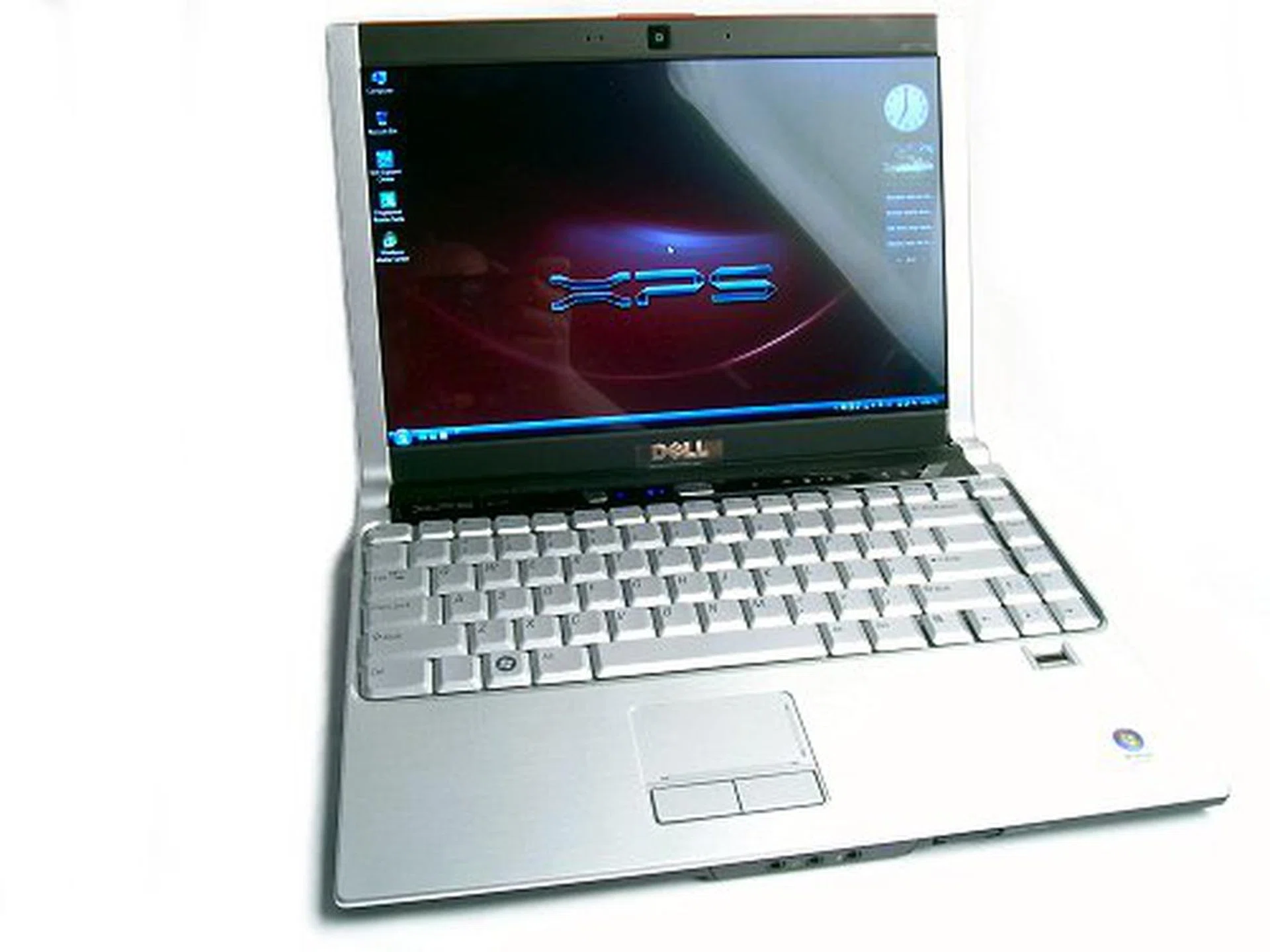
Opening the M1330 reveals more design goodies like the unique rounded hinge at the edges of its frame. A similar hinge design can be found on the new Sony Vaio TZ series and one of the advantages of this design is that it preserves the one-piece look of the lid. Inside, the M1330 sports a 13.3-inch WXGA LCD screen, up from the 12.1-inch of the M1210. Better yet, the M1330 can be configured to include a LED backlit screen instead of a regular CCFL lighted one. The benefits of an LED backlit LCD include a more uniform lighting across the screen, better overall contrast, longer lifespan and is thinner and lighter as well. The LED screen measures just 6mm in thickness and again, this helps keep the weight down on the M1330. As with most notebooks the M1330 comes with an integrated webcam. This time, there is a twist though. If you choose to have a regular WXGA screen, you get a 2MP camera. If you get the LED screen, you only get a VGA webcam. Still, the only good a fixed webcam is for conferencing and video calls and for this purpose, VGA will do just fine. The LED screen is one of the features that make the M1330 special and we highly recommend keeping this in your configuration.
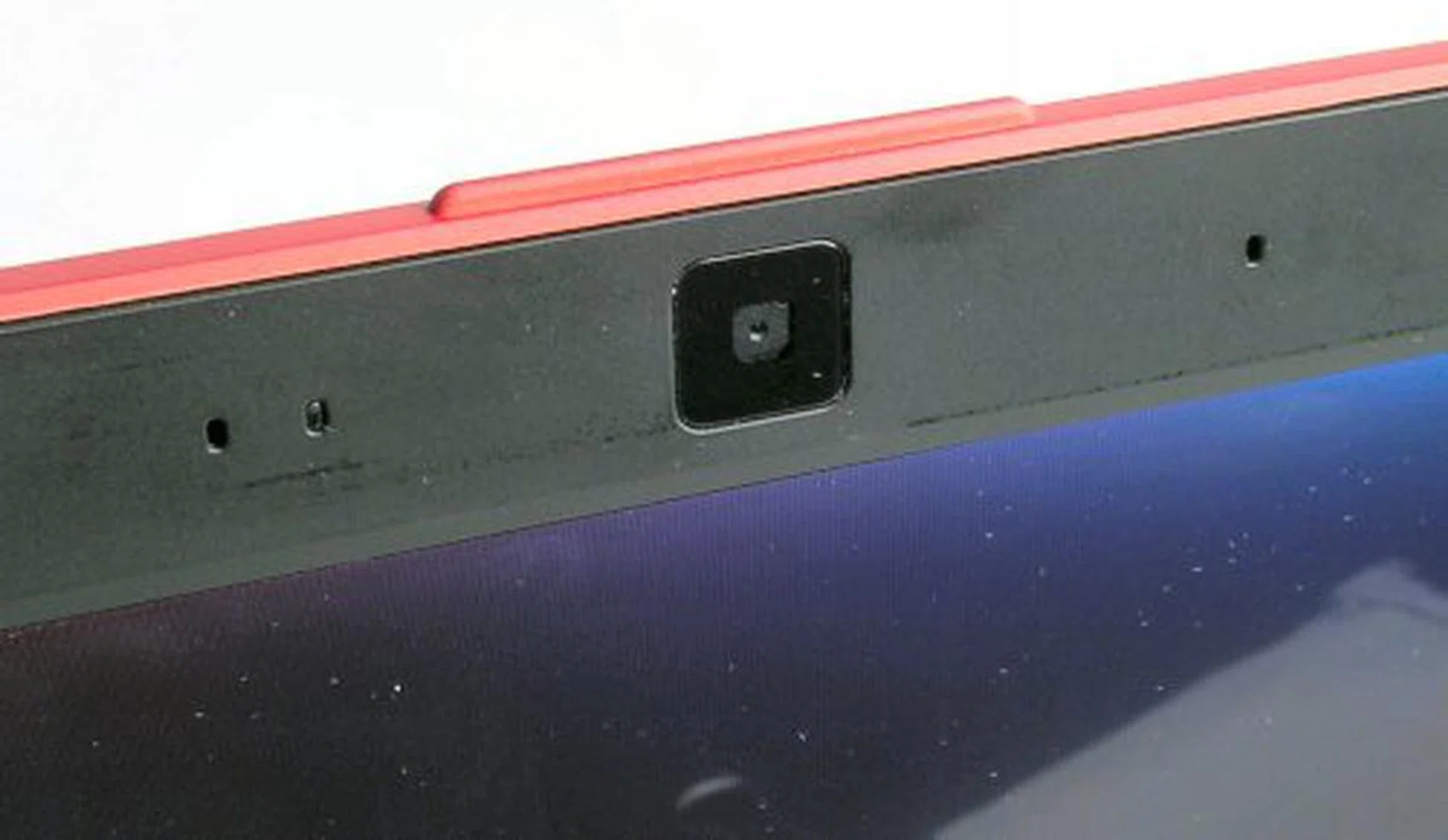
Fixed integrated webcam on the top of the lid. Comes with face tracking software and embedded array microphone set.
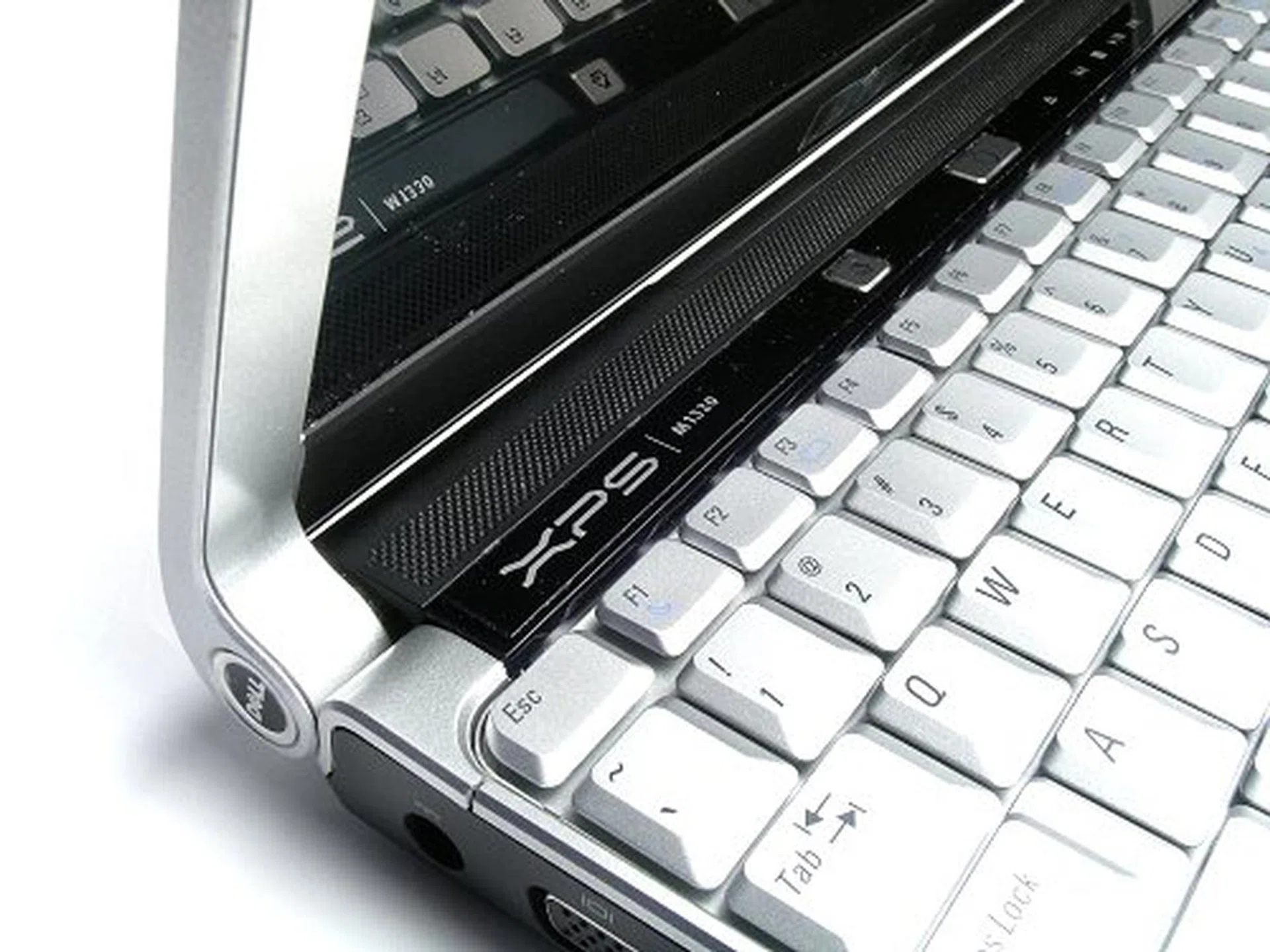
Stylish hinge design.
A sloping curve to the front makes for a more comfortable typing position.
The M1330 sports a brushed metal palm rest that is similar to the one on the BenQ Joybook S41 that we reviewed some time back. This gives a touch of class to the interior of the notebook, and we actually think the Dell has better synergy here with a color matching keyboard. However, like the plastic sides of the notebook, the metallic paint has a tacky look to it. Luckily, the M1330 features a full-sized keyboard that is well spaced and firm enough for a pretty comfortable typing experience. Besides the lack of a proper keypad, there shouldn't be any learning curve to get used to the M1330.
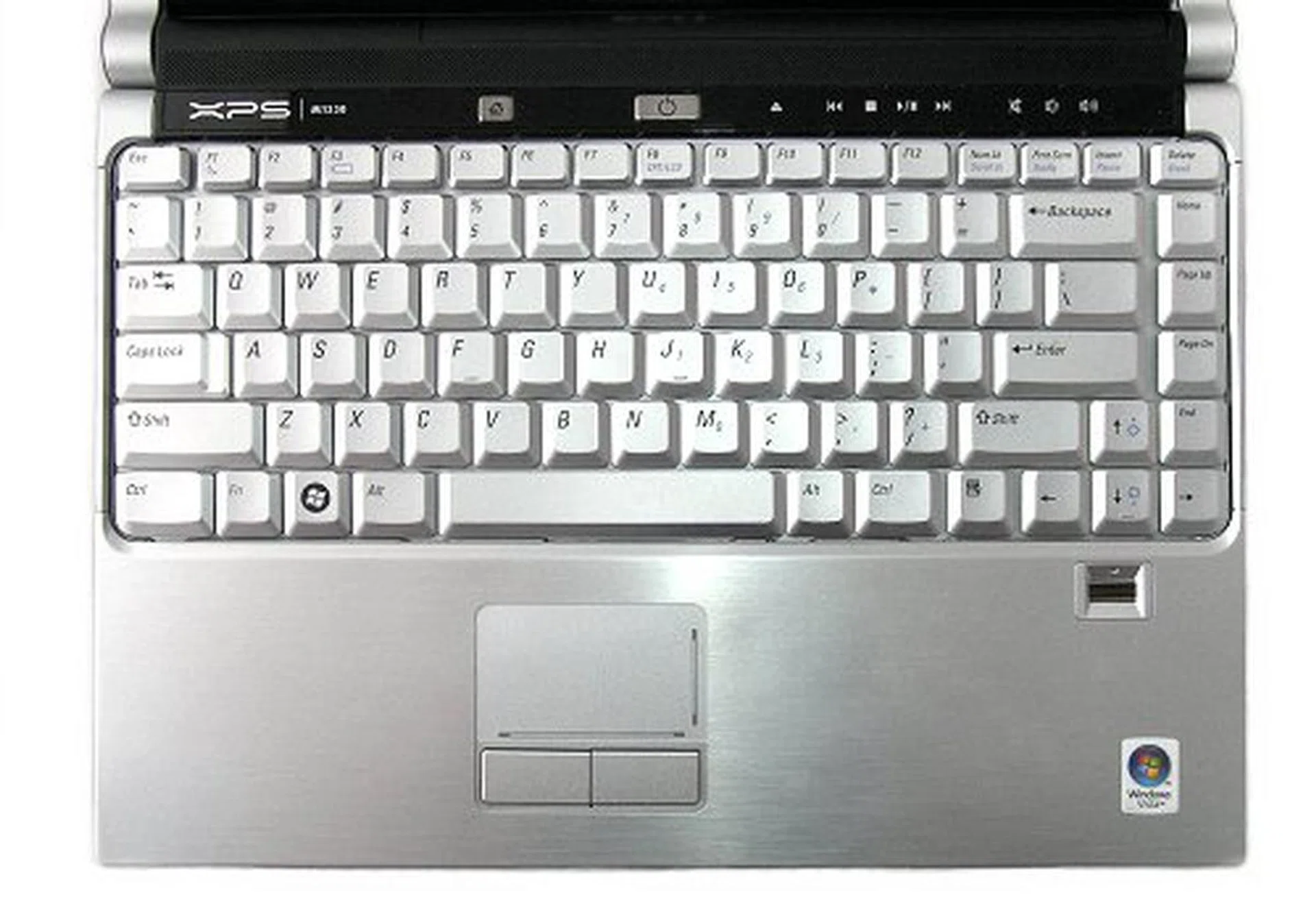
The M1330 has a matching color scheme for its palm rest and keyboard that looks great from far.
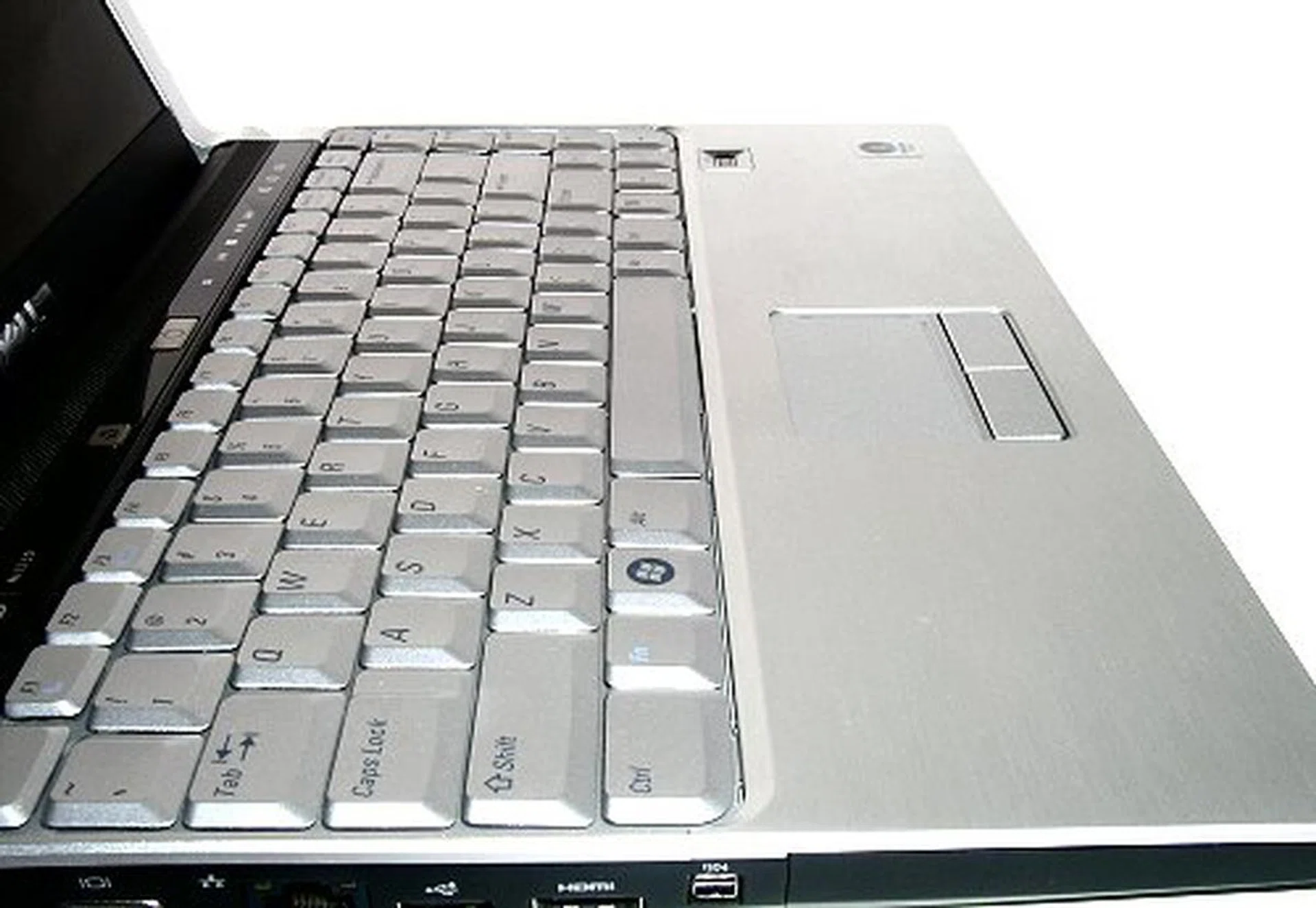
Side view of the keypad and palm rest.
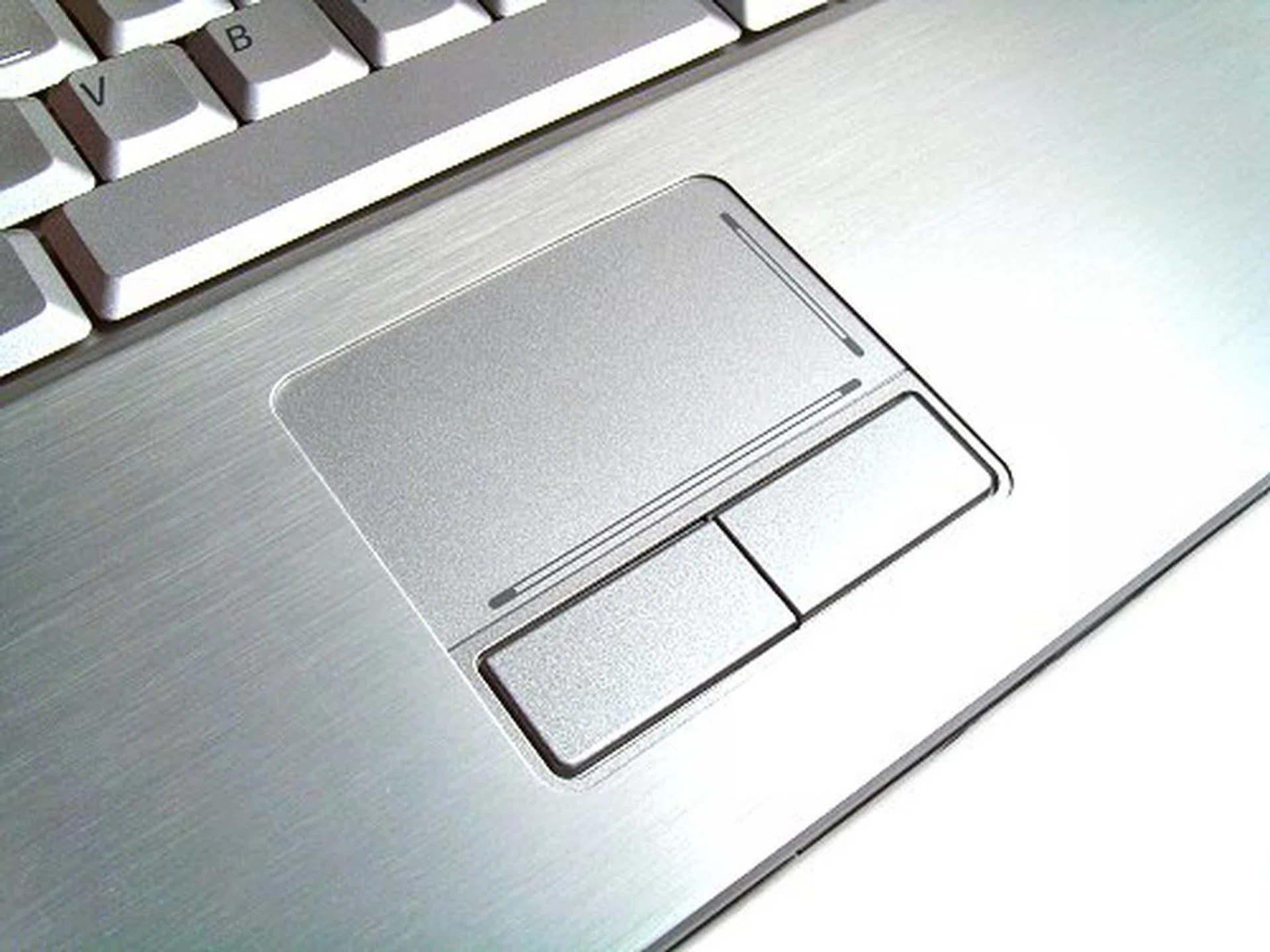
For such a large palm rest area, the touchpad is a little small. Sentitive, but small.
To the top of the keypad, you'll find the power button, a media center button and a series of touch sensitive media keys. The media center button launches Dell's Media Direct application, which is basically a front for Cyberlink's tools. Dell Media Direct is a default install for the M1330, which works out well if you get any other version of Vista, but if you configure for Vista Home Premium or Vista Ultimate, you'll probably want to use Windows Media Center instead. In this case, make sure to uncheck Dell Media Direct off your list or you'll end up with two media center applications. The media control buttons aren't too hot either. They light up on touch, which is pretty cool, but their use is limited. For one, there still aren't any fast forward/rewind buttons, just next/previous track. This means no scrolling of songs or video, one button just skips the whole file, or in the case of DVDs, jumps immediately to the next chapter. Secondly, the buttons are more or less limited to Microsoft and Dell's media applications only and may not work with your preferred player.
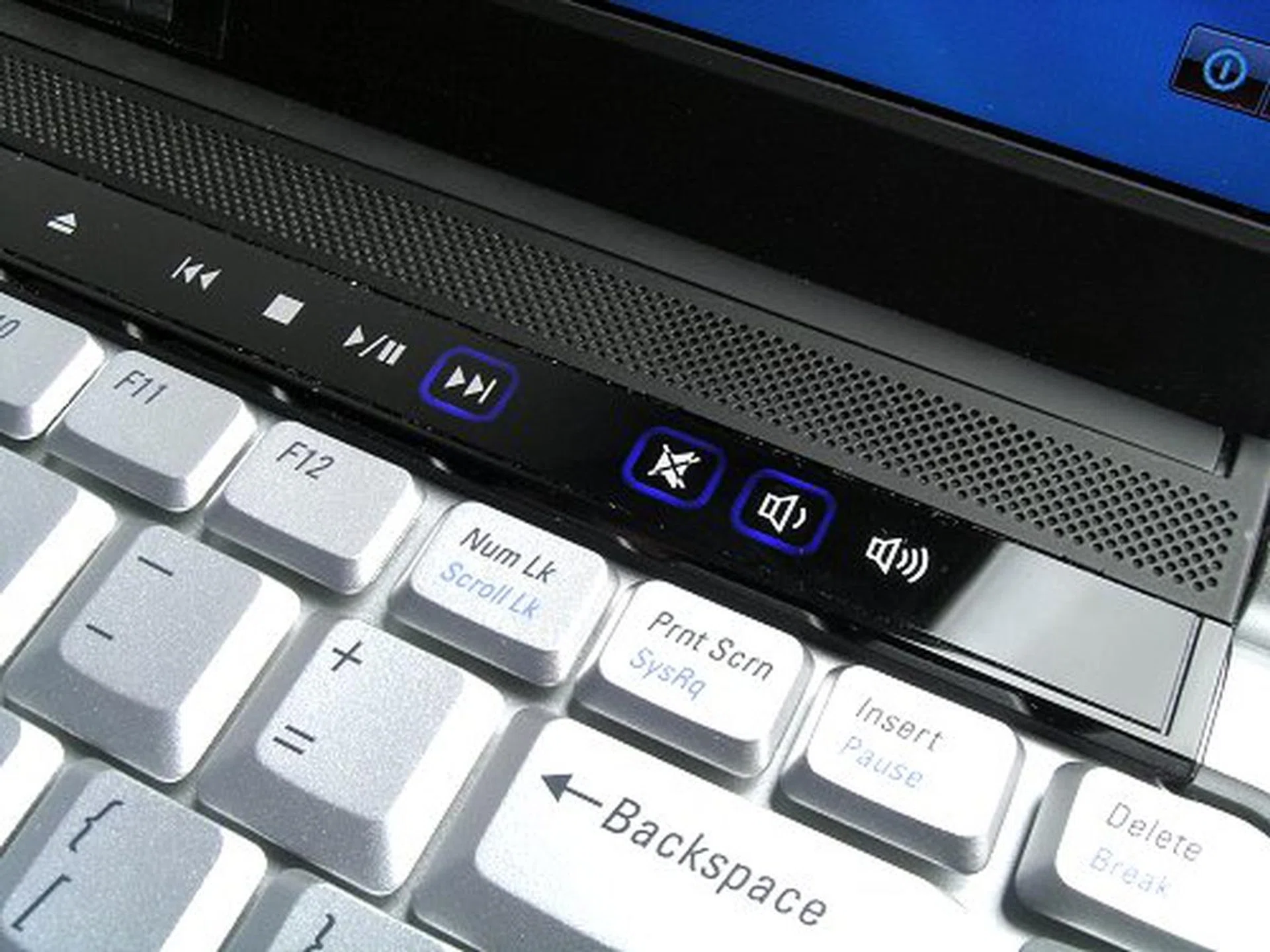
Glossy touch sensitive buttons to light up your life.
The largest problem with the M1330 in our opinion has to be the in-built speakers. Although we never had much expectations from a thin and light notebook, the sound coming from the M1330 was hollow, tinny and breaks up for anything with heavier bass notes even at half volume.
A Look Inside the M1330
The Dell XPS M1330 is based on Intel's latest Santa Rosa Centrino Duo platform, but like any Dell notebook, the M1330 is extremely configurable, so it is hard to pin down a specific performance category that it belongs to based on hardware alone. When Dell sent us an XPS M1330 for review, we expected the standard cookie-cutter configuration that greets you when you select it on Dell's website. However, we got one with the works instead. Our M1330 came with an Intel Core 2 Duo T7700 (2.4 GHz) processor, which is not even available yet as a selection on Dell's website. The highest processor you can choose for the M1330 at the moment is the T7500 (2.2GHz). As you might have guessed, this will definitely impact any performance benchmark we'd run on the M1330 and we highlighted this little 'oversight' to Dell. We were assured that Dell will be introducing the T7700 as a configurable option for the M1330 in the next few months, so we decided to continue with the review. Memory can be configured from 1GB to 4GB of DDR2-667 and our model came with Dell's recommended 2GB.
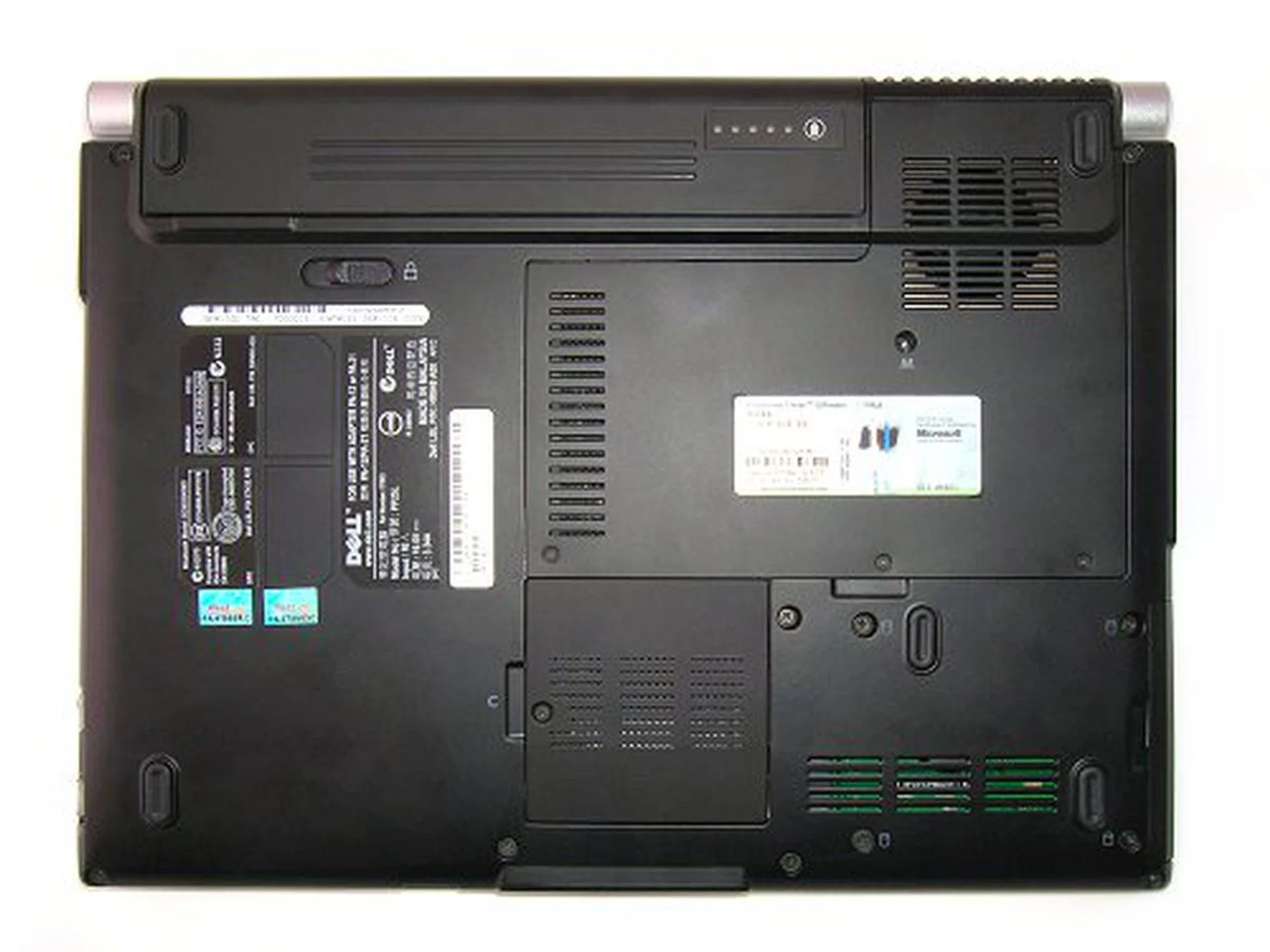
Under carriage is clean and surprisingly has very little compartments.
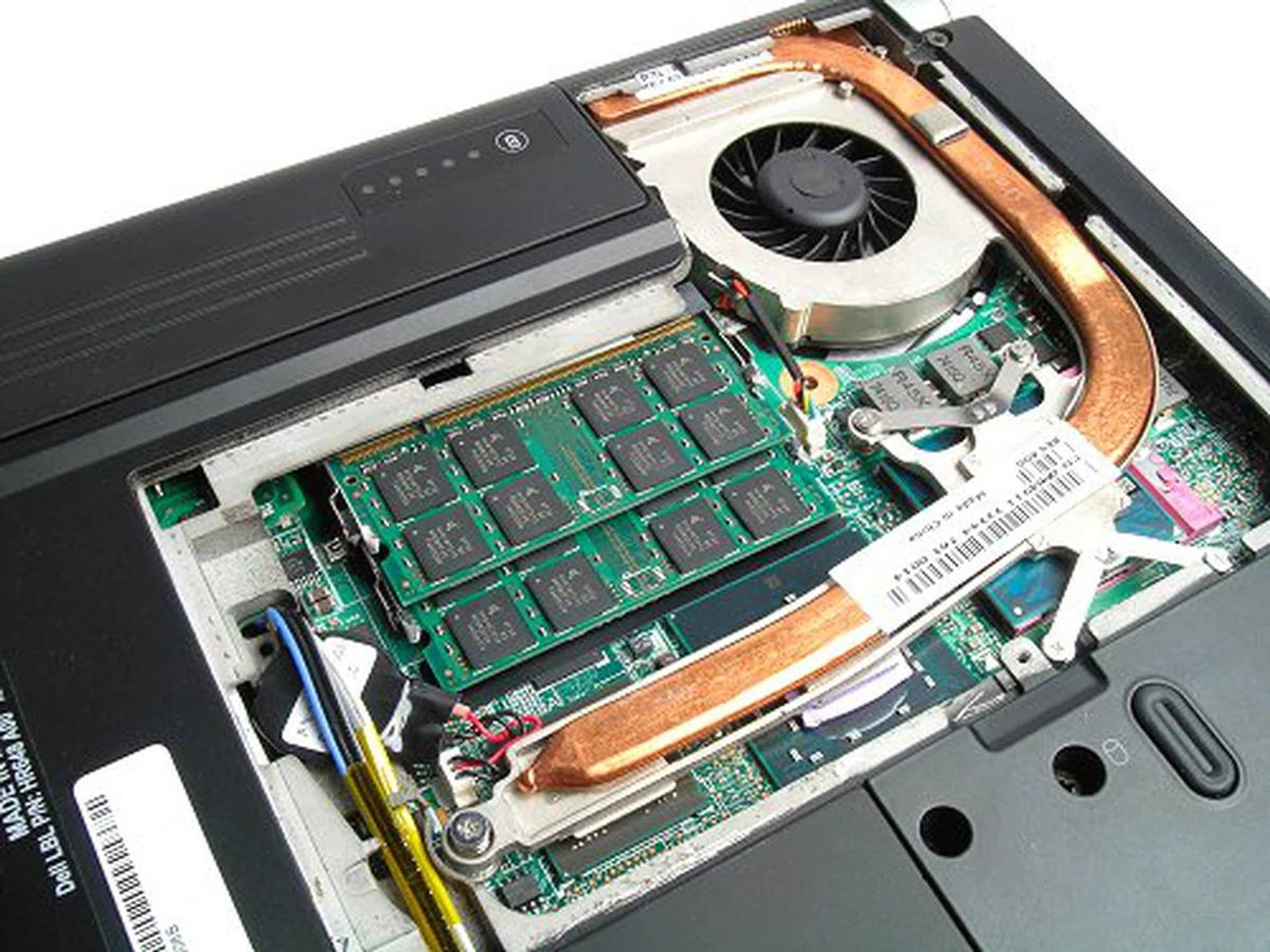
That's because most of the main components, including the RAM are located in one area. Notice the single heat-pipe to cool everything.
Another unexpected inclusion in our review unit is a desktop class 160GB 7200RPM SATA HDD instead of a usual 5400RPM one. Unlike the processor choice though, this is an actual option that can be selected from Dell's site right now. This is the reason the M1330 is such a powerhouse for something so small, Dell allows you put in some really high end hardware into the notebook. Besides the 7200RPM HDD, you can also opt to have a SSD (Solid State Drive). However, just like the Sony VAIO VGN-TZ18GN before, the only choice is a small 32GB drive. Not surprisingly, Intel's Turbo Memory (Robson) is not included as an optional component for the M1330. Ever since Santa Rosa's launch, this is one technology that most manufacturers have shied away from featuring because of the low performance gains, its proprietary nature and added cost.
The M1330 also comes with a NVIDIA GeForce 8400M GS graphics solution with 128MB dedicated memory onboard, a very powerful solution to have on an ultraportable at any rate. Because of the GeForce 8400M GS, the M1330 has a dedicated video processor and high definition decoding through PureVideo HD. This however isn't exactly a powerful GPU when it comes to notebook gaming, but it has adequate power for smooth performance even with modern games like Quake 4 or MMOs like World of Warcraft as we tried our hand in gaming.
With all this hardware in the small 32x24cm frame, you'd think that the M1330 will get pretty hot under full load, but surprisingly, the notebooks handles heat quite well. The palm rest gets warm under use, but not so much that it becomes uncomfortable. The same goes for the underside. We were able to leave the notebook on our lap for prolonged periods. Noise can become an issue only at full load, but do take note that we have a 7200RPM HDD and 2.4GHz processor in this petite notebook.
Battery Life and Power Consumption
Using a standard DVD run down test, the Dell XPS M1330 is able to last for about 130 minutes on a full charge with a 6-cell battery. This test is performed using the Dell Recommended power profile (equivalent to Vista's standard Balanced setting), with brightness and volume normalized to 50%, and WiFi/Bluetooth receivers turned off. However, in order to activate all the power saving features on a Santa Rosa notebook such as FSB throttling, we ran the same test using the Power Saver profile as well. FSB throttling is an additional feature introduced in Santa Rosa notebooks that halves the active FSB when the system detects it does not need it. This is true for DVD playback as well since the GPU handles most of the decoding, the CPU and memory is mostly dormant. Our DVD run down test using the Power Saver profile increased battery life by another 20 minutes to 150 minutes on a single charge. Battery life should be considerably longer with the 9-cell extended battery.
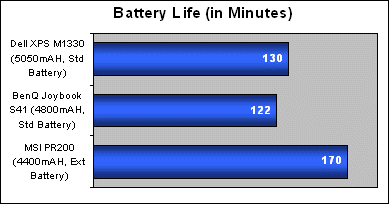
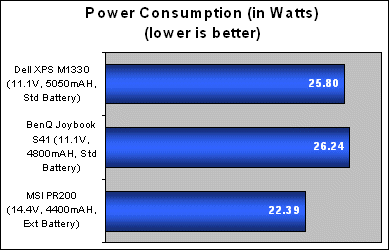
Compared with the BenQ Joybook S41, the XPS M1330 performed slightly better in terms of battery lifespan though there are various considerations to look at. The M1330 has a more powerful standard 6-cell battery for one and the Joybook S41 has the better GPU and a larger screen. Still, our M1330 review unit is considerably more powerful with a Core 2 Duo 2.4GHz T7700 and 7200RPM HDD, over the 1.8GHz Core 2 Duo T7100 and standard 5400RPM HDD on the Joybook. Taking in the specifications, the XPS M1330 did a pretty good job outlasting the Joybook S41. Average power consumption of the XPS M1330 is also slightly better than the Joybook S41 using the Dell Recommended power profile, consistent with its battery performance so far.
Portability Index
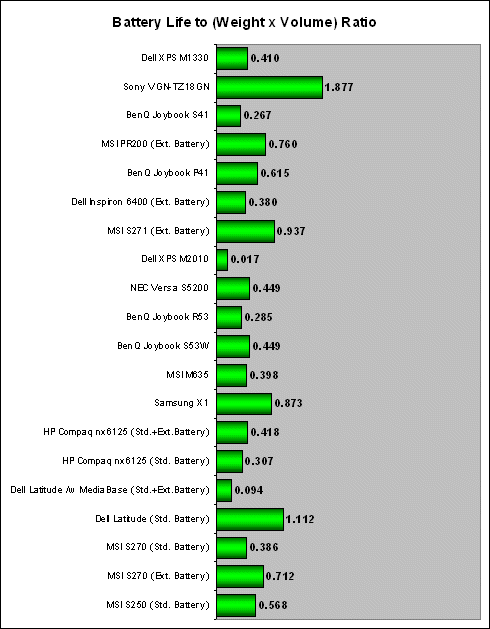
In this section, we try to determine just how portable a notebook is using our own formula considering the weight, size and its battery life performance. Classified as an ultraportable, the XPS M1330 does not score highly in our chart compared to true ultraportables like the Sony VGN-TZ18GN, which has an 11.1-inch screen and ultra low voltage 1.2GHz processor (Intel Core 2 Duo U7600). The M1330 is only an ultraportable by design and Dell managed to keep its weight under 2KG through the use of a 4-cell battery (applicable to certain models only) while the more common 6-cell variant tested here clocks in just about 2KG . In reality, the M1330 can be just as powerful as any performance notebook. Considering the specification and score of the BenQ Joybook S41, the M1330's portability index is quite impressive for a notebook sporting a 2.4GHz processor, 7200RPM HDD and discreet GeForce 8400M GS graphics. Again, this index is calculated using a 6-cell battery on the Dell Recommended power profile. If you're not doing anything intensive, you can extend battery life quite a bit more switching to the Power Saver profile in Vista.
Performance Benchmarking
Like most notebook reviews, getting matching configurations for benchmarking purposes is a rare thing to come by. We've reviewed a few Santa Rosa based notebooks in the past, but the Dell XPS M1330 is unique in its configuration and category that we do not have anything to compare it with 1:1. As such, we will benchmark the M1330 with different notebooks in relation to their specific subsystem and categories that are the closest match to the M1330 that we can find on hand.
Processor Name | Intel Core 2 Duo / Pentium Dual Core (Allendale) | Intel Core 2 Duo (Conroe) | AMD Atlhon 64 X2 / Athlon X2 (Brisbane) | AMD Athlon 64 X2 (Windsor) |
Processor Model |
| E6320, E6420, E6550, E6750, E6850 |
| 3600+ - 6000+ |
Processor Frequency |
| 1.86GHz - 3.0GHz |
| 2.0GHz - 3.0GHz |
No. of Cores | 2 | 2 | 2 | 2 |
Front Side Bus (MHz) | 800 | 1066 / 1333 | - | - |
HyperTransport Bus | - | - | 1GHz (2000MT/s) | 1GHz (2000MT/s) |
L1 Cache (data + instruction) | (32KB + 32KB) x 2 | (32KB + 32KB) x 2 | (64KB + 64KB) x 2 | (64KB + 64KB) x 2 |
L2 Cache | 1MB / 2MB (shared) | 4MB | 512KB x 2 | (256KB / 512KB / 1MB) x 2 |
Memory Controller | External Dual Channel (up to DDR2-800) | External Dual Channel (up to DDR2-800) | Integrated Dual Channel (up to DDR2-800) | Integrated Dual Channel (up to DDR2-800) |
VID (V) | 0.85 - 1.5 | 0.85 - 1.3625 | 1.15 - 1.25 | 1.35 - 1.40 |
TDP (W) | 65 | 65 | 45 / 65 | 35 / 65 / 89 / 125 |
Execute Disable Bit | Yes | Yes | Yes | Yes |
Intel EM64T / AMD64 | Yes | Yes | Yes | Yes |
Enhanced Intel SpeedStep Technology (EIST) / AMD Cool 'n' Quiet | Yes | Yes | Yes | Yes |
Virtualization Technology | No | Yes | Yes | Yes |
Packaging | LGA775 | LGA775 | AM2 | AM2 |
Process Technology | 65nm | 65nm | 65nm SOI | 90nm SOI |
Processor Codename | Allendale | Conroe | Brisbane | Windsor |
Die Size | 111mm² | 143mm² | 118 - 126mm² | 183 - 218mm² |
No. of Transistors | 167 million | 291 million | 154 - 221 million | 154 - 227.4 million |
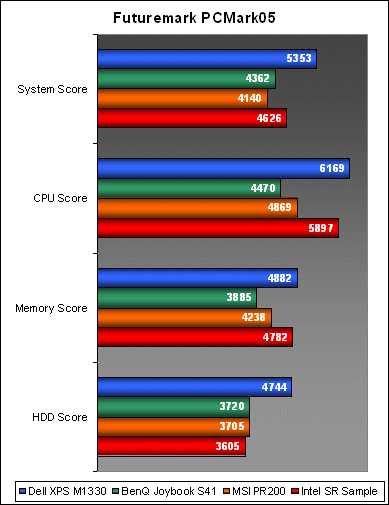
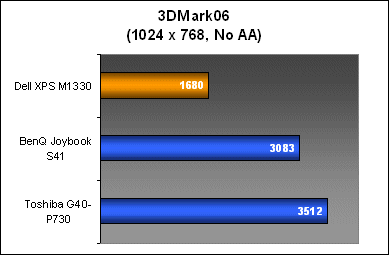
For overall platform performance, we will reuse the BenQ Joybook S41, MSI PR200 and the original Santa Rosa engineering sample we had the pleasure of playing around with a few months ago. These three notebooks carry the necessary processor stepping to show where the M1330 might stand. For graphics performance testing, the BenQ Joybook S41 and Toshiba G40-P730 will be used instead as they also carry the GeForce 8 family of mobile processors. Do note the hardware differences between the M1330 and the rest of the notebooks and take them into consideration when reviewing our benchmark results below.
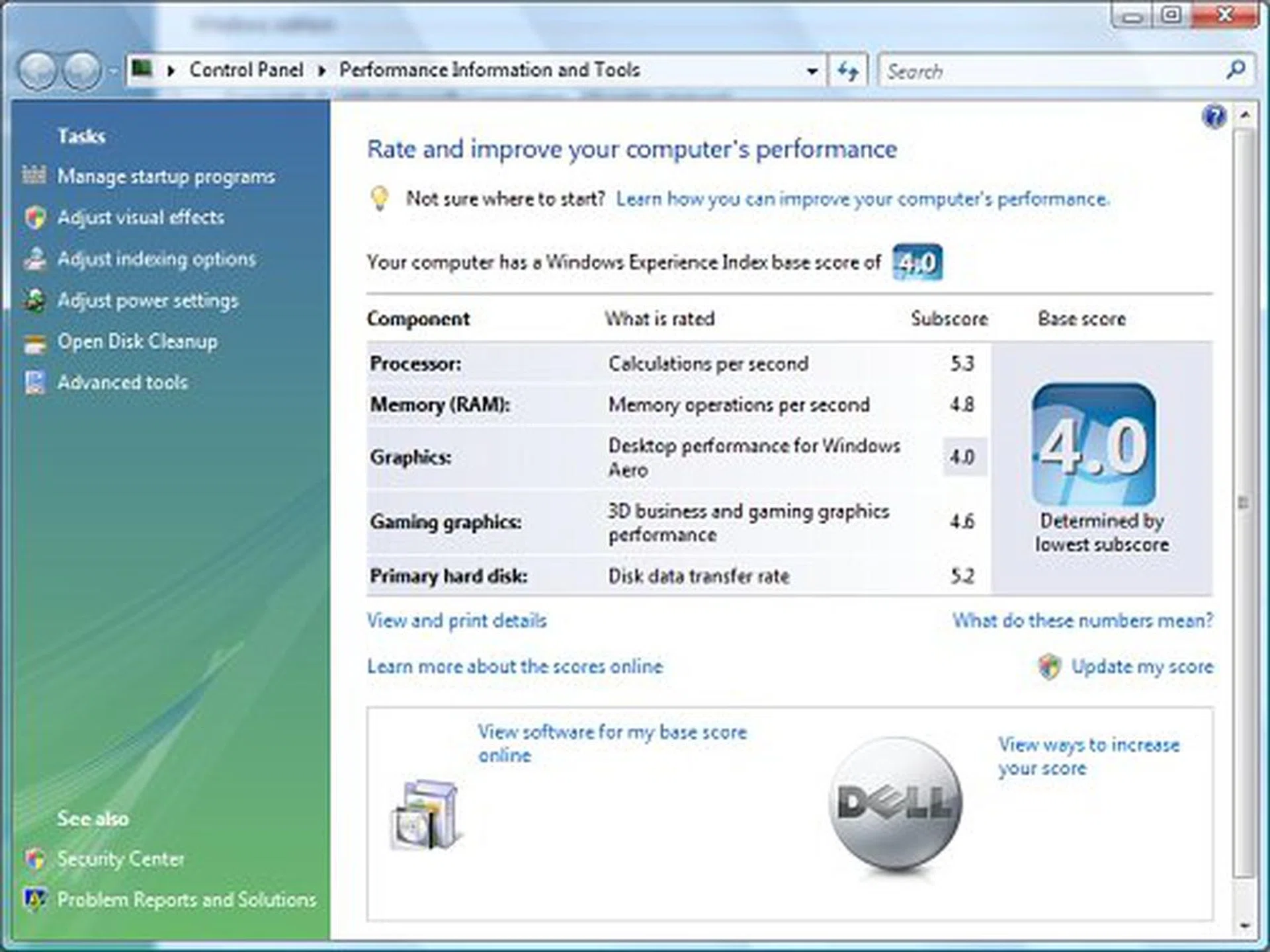
The M1330 scores very impressively in Vista's Windows Experience Index due to its high-performance CPU and HDD. Surprisingly, the GeForce 8400M GS scored lower for Desktop Graphics than Gaming Graphics, but we'll find out soon enough.
System Benchmarking
PCMark05 still remains one of the only major system benchmarking too that is compatible with Vista at the moment and one that we have been steadily building a database for. The Dell XPS M1330 comes off as the clear winner in every test scenario in PCMark05 with an impressive 15% lead over its nearest competitor in the System workloads and a huge 27% jump in HDD performance. If you look at individual comparisons, the XPS M1330 loses out in graphics performance to the BenQ Joybook S41. However, it more than makes up for it with raw processing power and a much faster HDD. The Intel Santa Rosa sample however, should have been able to compete as it also came with a Core 2 Duo T7700, but its performance was dragged down by its lower maximum memory and GMA X3100 graphics.
Graphics Benchmarking
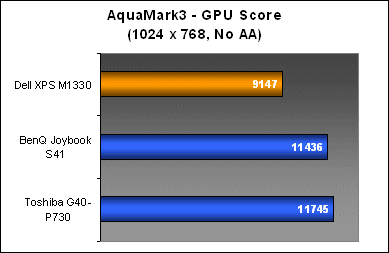
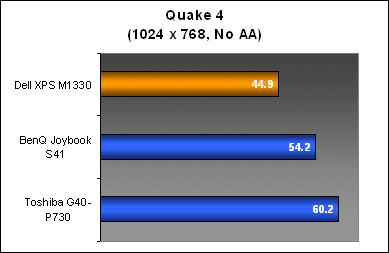
Unlike PCMark05, the CPU and platform prowess of the XPS M1330 did not help out too much in gaming performance. Here, the raw strength of the GPU really shines. The GeForce 8600M series in both the BenQ and Toshiba outclass the GeForce 8400M in the Dell, but don't take the weak 3DMark06 scores as an indication that to brush it aside. The GeForce 8400M GS is still a capable performer in real world games as you can see from our Quake 4 benchmarks. The M1330 is able to run Quake 4 at 1024x768 resolution with a decent 45fps average frame rate, sufficient for smooth game play.
Conclusion
Performance
At the beginning of this review, we mentioned that the M1330 possesses an uncharacteristically powerful configuration for an ultraportable and that is true, but only if you actually select these options when ordering your notebook. Our review unit came decked to the brim with the best available hardware for the M1330, but all these features are really optional items in Dell's big scheme of things. Instead of the GeForce 8400M GS, you can actually choose to have a vanilla Intel GMA X3100 instead. You can also opt for an older Intel PRO/Wireless 802.11abg network card instead of the 4965AGN Draft-N module common for Santa Rosa notebooks. You can choose from standard 5400RPM HDDs to the 7200RPM workstation models as seen on our review unit to Solid State Drives (SSD). On the processor front, the lowest configurable processor is a Core 2 Duo T5250 (1.5GHz core, 667MHz FSB) and the highest at the moment is a Core 2 Duo T7500 (2.2GHz core, 800MHz FSB) with the T7700 (2.4GHz core, 800MHz FSB) soon to follow.
The appeal of Dell's latest ultraportable lies not only with its new chassis, but also a combination of cutting edge hardware options that are rarely found to be available in this notebook category. This is the distinction that will differentiate the Dell XPS M1330 between being a exceptional ultraportable and just another ultraportable with a good design. Your only concern of course will be its price. The Dell XPS M1330 can start anywhere from US$1500 for a basic model to upward US$2600 if you want everything and the kitchen sink. Nevertheless, the choice is yours, and this is something that Dell has the firm advantage.
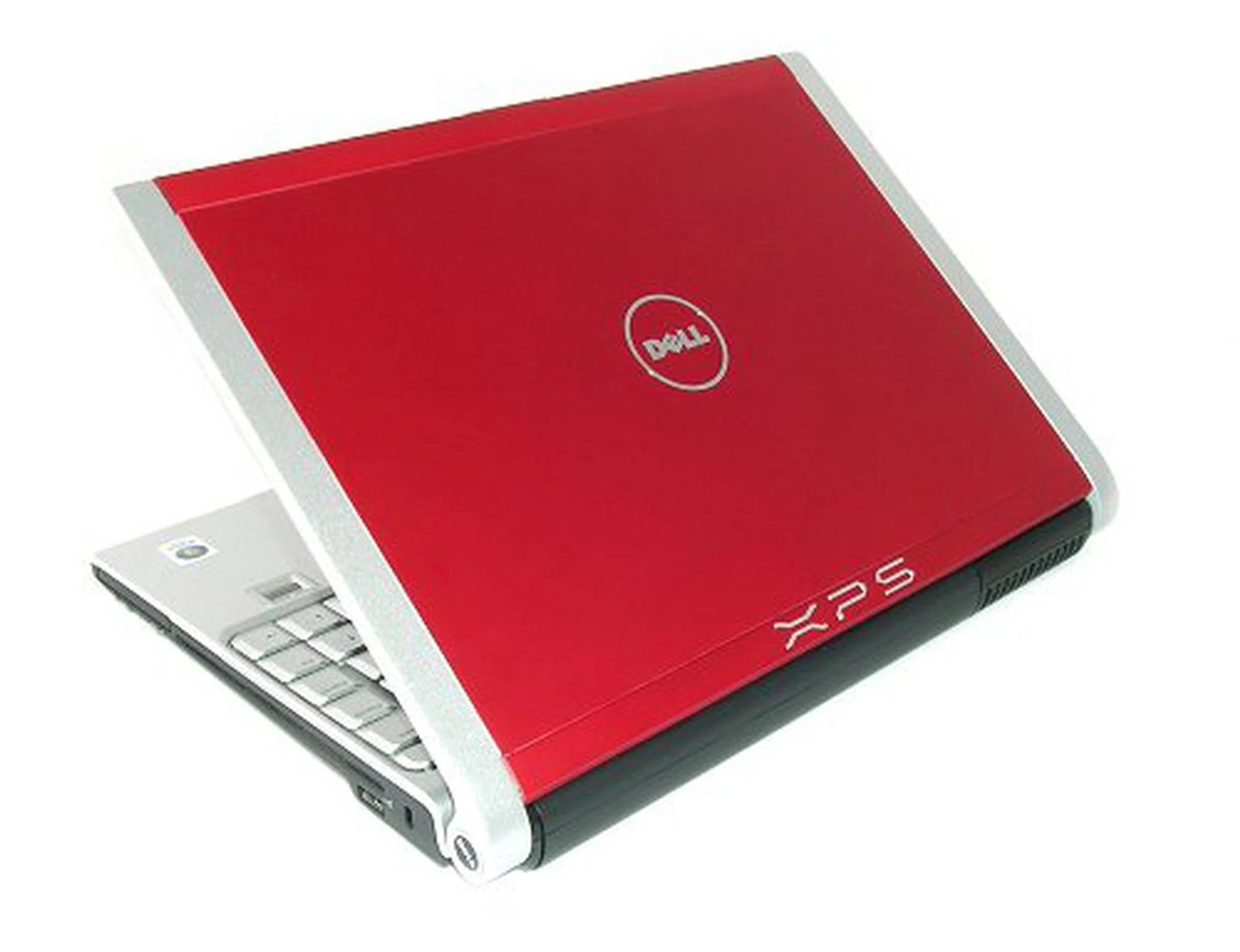
"The ultraportable re-envisioned – performance, style and form factor combined."
Usability
With its full sized keyboard and a clear and crisp LED backlit display, the M1330 is a very comfortable notebook to use and get used to. Its size and weight as an ultraportable notebook makes working on-the-go a breeze and the amount of features that Dell has put into the M1330 also ensures that everything you might need is already integrated. There is no need to lug around external peripherals like optical drives. The handy WiFi locator is also a real time saver when you need to find the strongest wireless point to connect to.
Battery performance is quite decent as well considering that we were running on a 2.4GHz processor, discreet graphics and 7200RPM HDD. With all these factors combined, the M1330 still managed to outlast the lower configured BenQ Joybook S41. We have no doubt that with a more conventional configuration, the M1330 should enjoy an even longer battery lifespan. If you're a power user, consider getting the extended 9-cell battery back instead. The notebook handled heat from the various high-end components very well without becoming too uncomfortable to use.
Minor Gripes
While Dell has certainly stepped up their game in a big way with this entry, the notebook is not perfect. We love the sleek new design elements of the M1330, but the painted plastic parts cheapen the experience somewhat, especially when you're scrutinizing the notebook up close like we do. It's not so much as the use of plastic that's the problem, but the gaudy silver metallic finish. Other things we'd like to see implemented or changed include a larger touchpad surface, better multimedia controls and half decent speakers shouldn't be to hard to ask for as well.
Overall
The Dell XPS M1330 is an excellent notebook that should be one of the top few choices on your list whether you're looking for a no frills ultraportable or one that packs enough punch for some well deserved entertainment away from work. And this time, you don't have to hide your Dell too. Without bringing a particular fruity company (and its horde of fans) into the picture, the M1330 sits neck to neck in terms of style with the best of class out there.
Our articles may contain affiliate links. If you buy through these links, we may earn a small commission.