
Dell Inspiron 6400 Multimedia Notebook (Centrino Duo)
The new Core 2 Duo based Dell Inspiron 6400 is a faithful workhorse that balances performance and battery life. Its other features though, are more down to earth and even a little uninspiring, including a chassis design that has been around for an eternity. What can the new Dell do for you? Read on.

Dell's Workhorse Goes Centrino Duo
Like clockwork, Dell inserts never fail to appear in your weekend papers placed amongst juicier sections. Boasting bargain basement prices with large cash rebates, it admittedly even impresses yours truly, albeit only price wise. Performance however, is different thing altogether that we have to investigate thoroughly. So without further delays, we take a look at Dell's workhorse notebook - the Inspiron 6400 series which has now been buffed up with Intel Core 2 Duo processor upgrades.
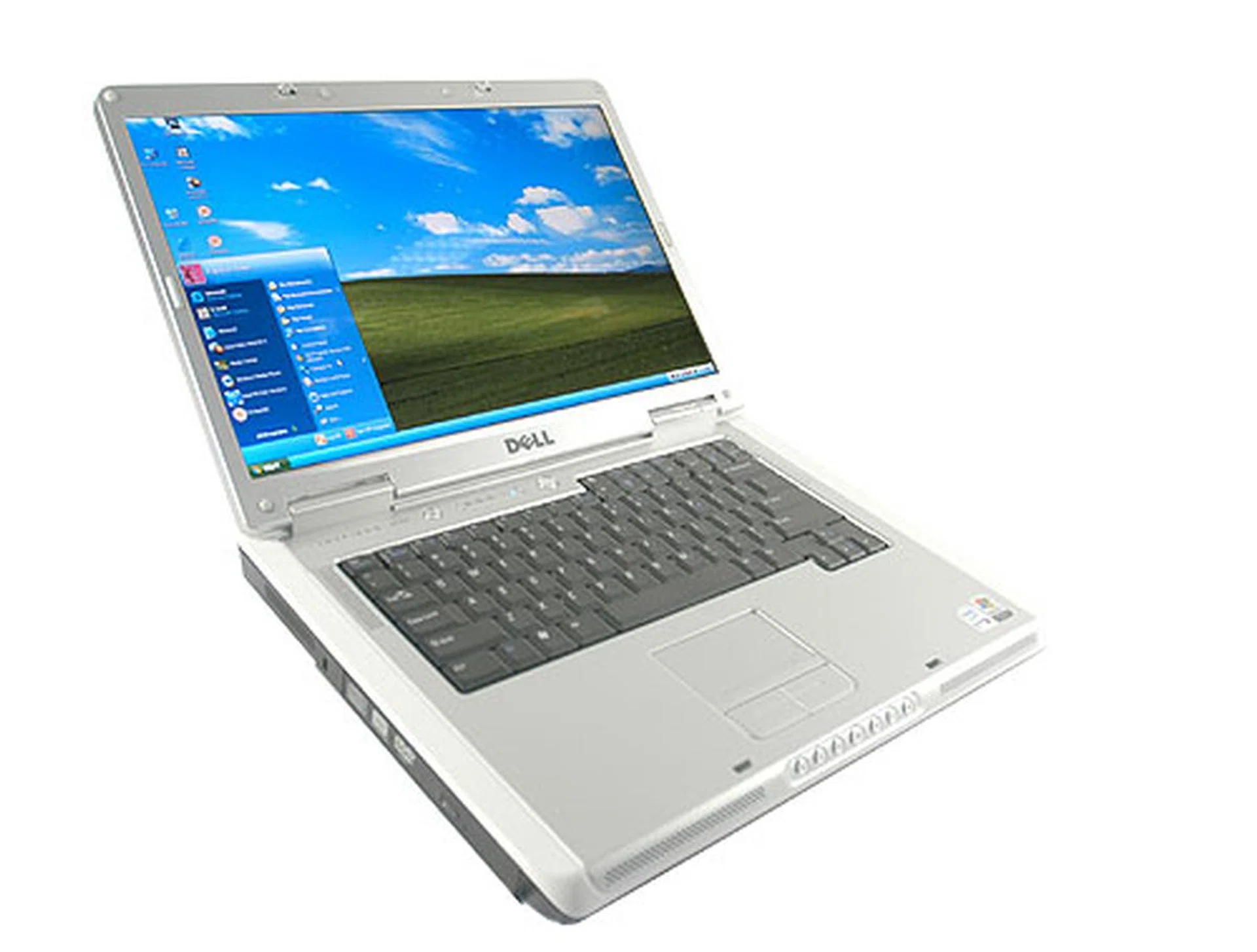
Dell's incumbent 15-inch workhorse: the Inspiron 6400. There has not been any aesthetic changes since the Inspiron 6000 series.
Checking out the notebook's aesthetics, there wasn't really much to yell about. It was pretty much the same notebook shell that we have been seeing from Dell for quite a while now: a chunky 40mm thick profile finished in silver and laced in white around the edges. Adorning the sides come the usual platter of connections that include four USB 2.0 ports (two on the right, two behind), one 4-pin FireWire port, a 15-pin D-SUB VGA, an S-Video out, 3.5mm audio in/out jacks, an RJ-45 Ethernet port, one RJ-11 modem jack and a 5-in-1 card reader. Once again, everything that's critical is here, but there are little if no creature comforts in sight.
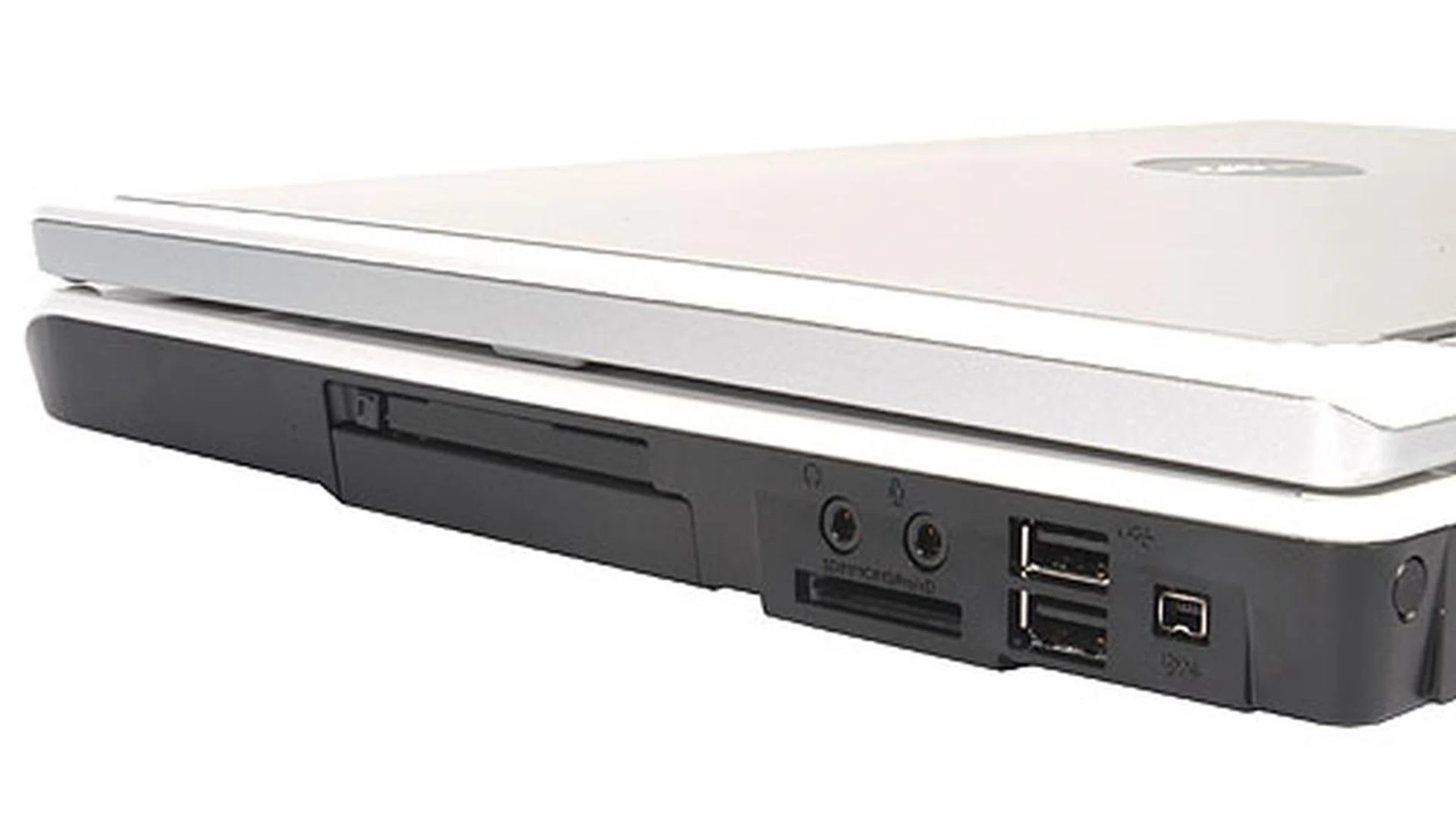
Two USB 2.0 ports, a 4-pin Firewire port, audio in/out and a 5-in-1 card reader can be found on the notebook's right profile.
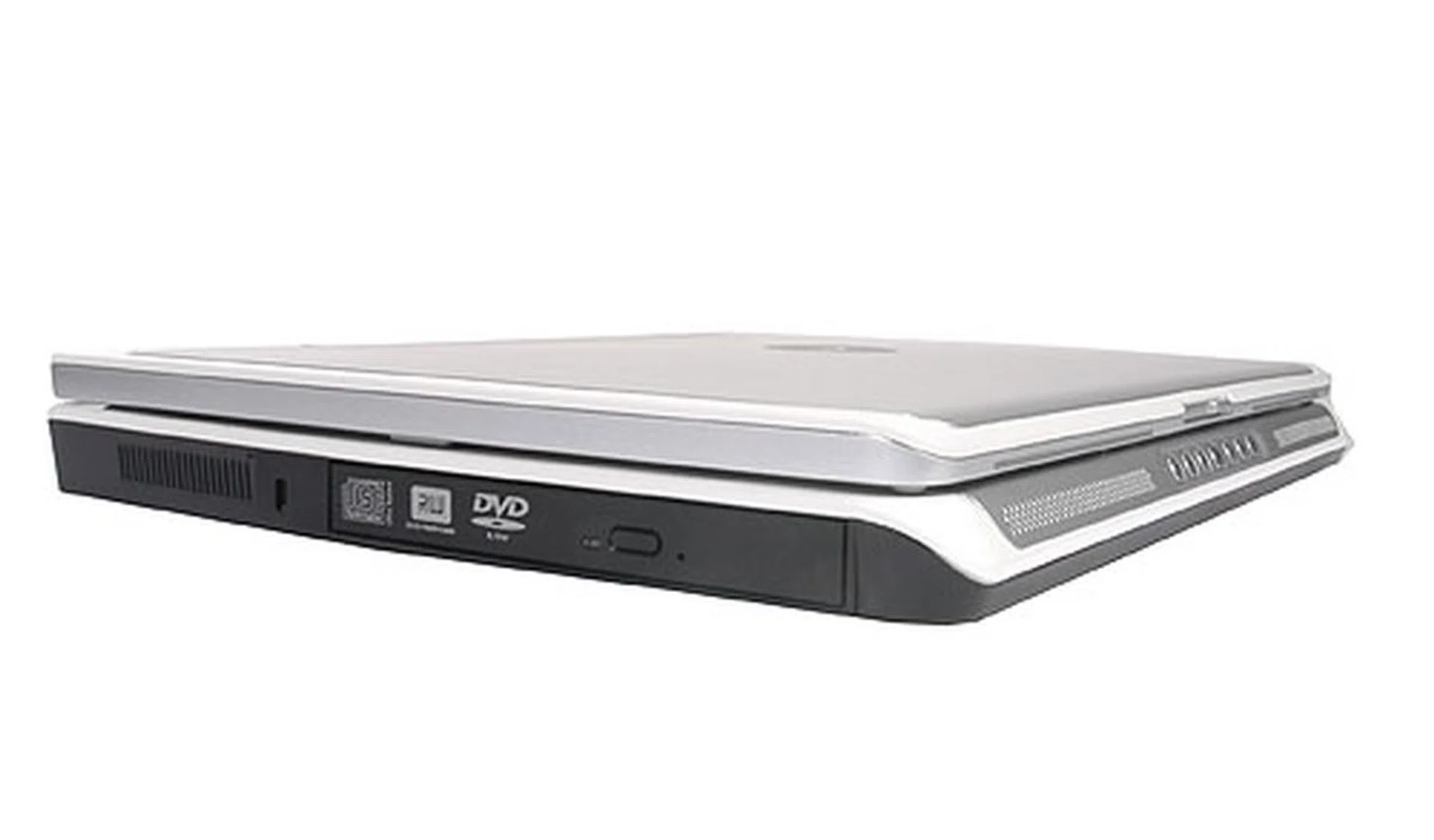
The left profile of the notebook is pretty bare save a DVD writer. Users looking for a portable notebook might want to keep in mind that the Dell Inspiron 6400 measures 40mm at its thickest.
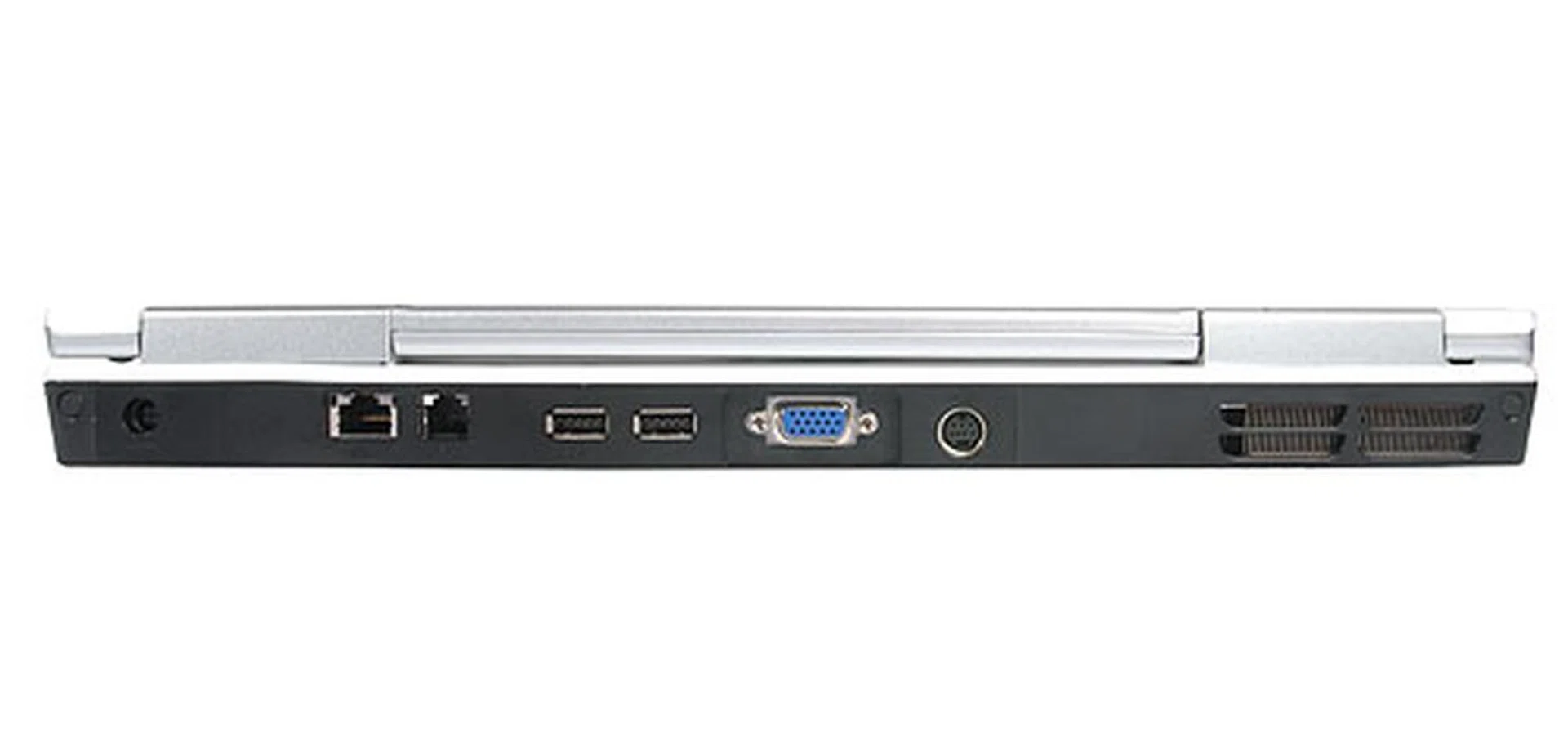
Along the back profile is a series of in/outputs which include the usual VGA output, S-Video connector, Ethernet LAN port and modem jack. Two USB 2.0 ports can also be found along the rear profile. Along the right edge is the power input.
Features
The multi-role Dell Inspiron 6400 is pretty spartan when it comes to tangible multimedia features - nary a webcam or inbuilt microphone can be found on the notebook. A small saving grace is perhaps a series of multimedia buttons enabling quick access to media playback such as Play, Rewind, Fast Forward, Mute and so on which can be found on the front bezel flanked by discreet stereo speakers.
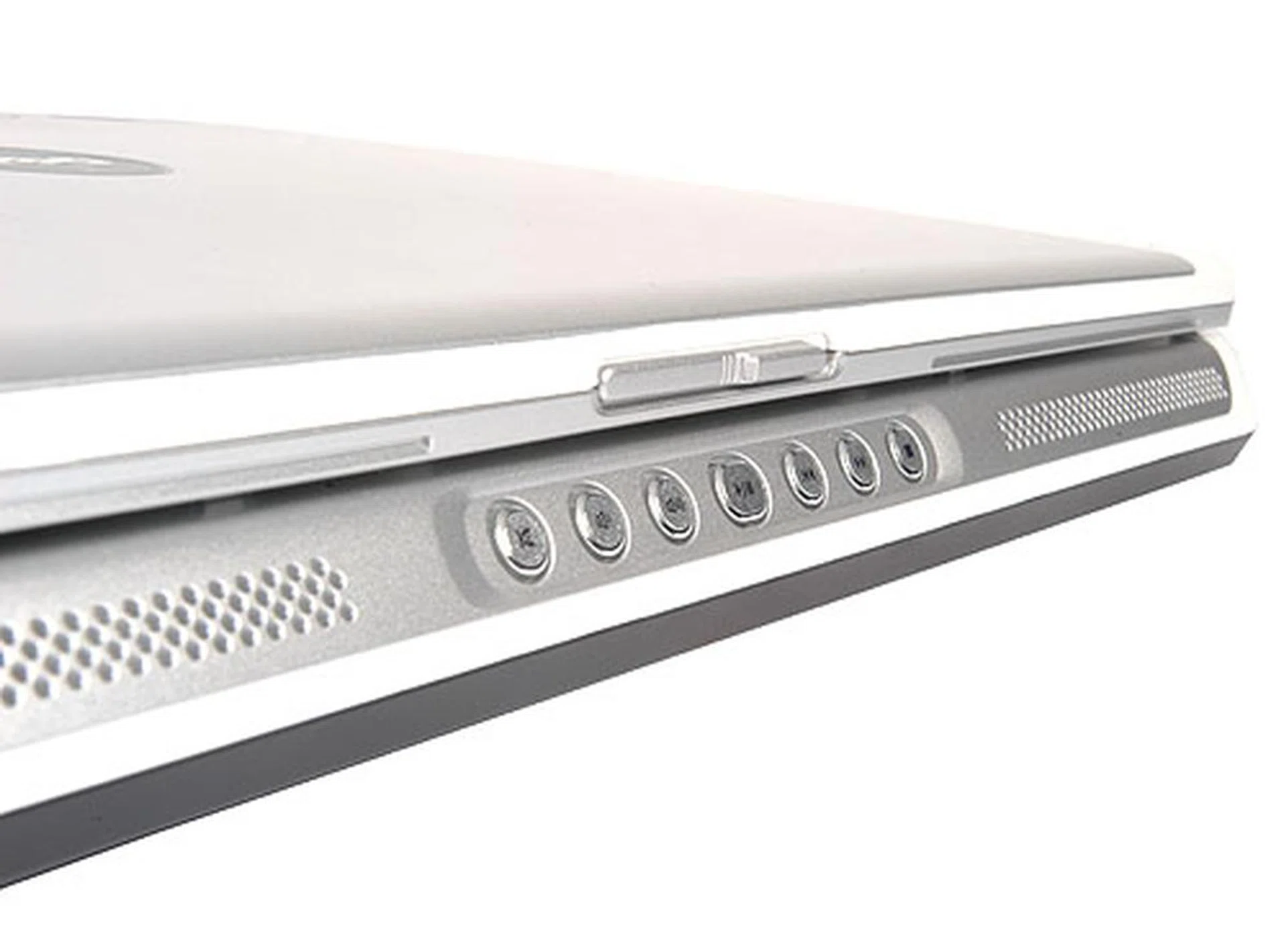
Similar to its predecessor, the Dell Inspiron 6000, a row of multimedia buttons can be found along the front bezel of the notebook.
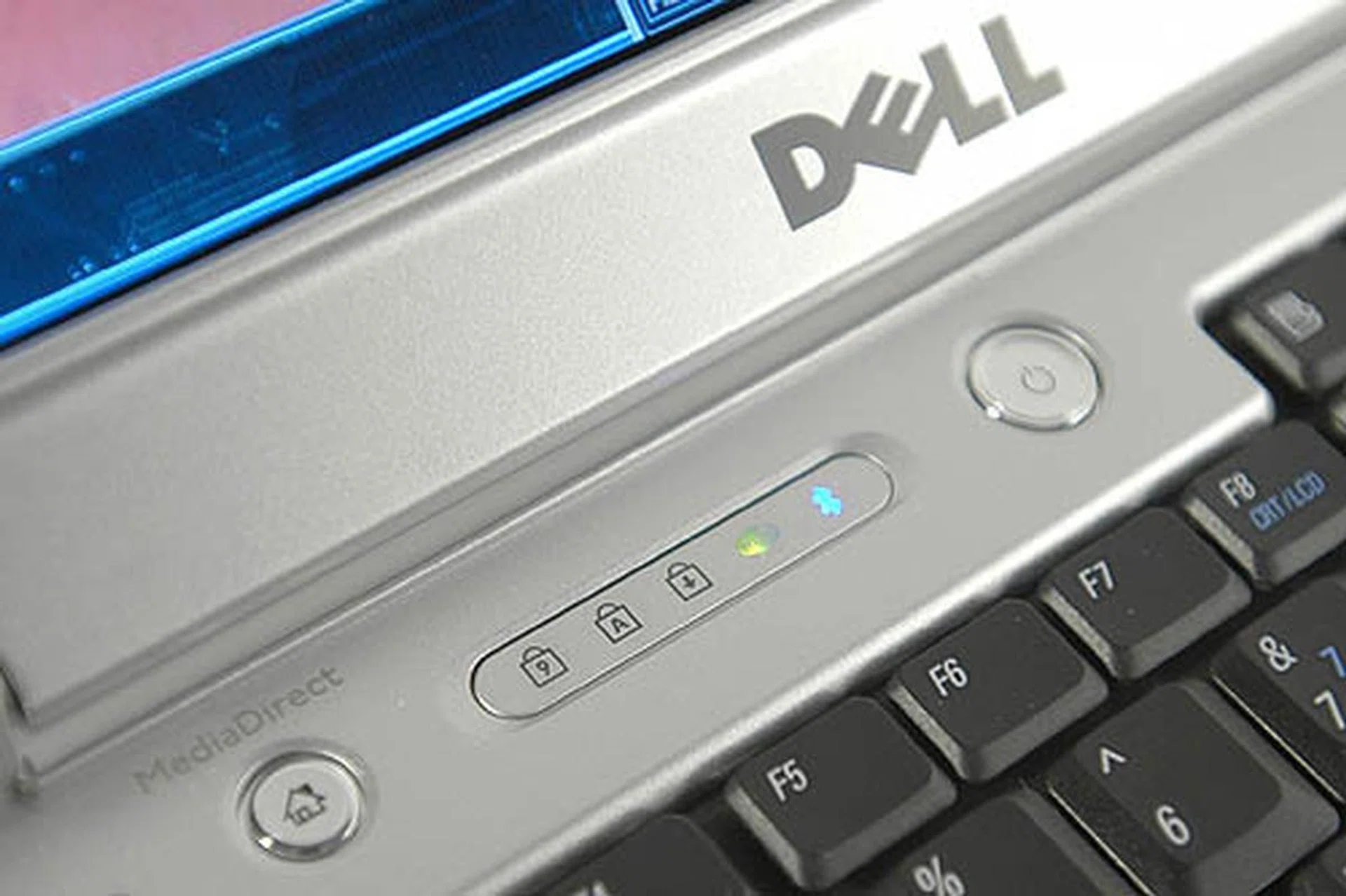
Another shortcut button on the far left end of the notebook leads you straight to Dell's propriety Media Connect software. A row of icons just above the keyboard tells you whether Wi-fi and Bluetooth is on.
The speakers in question do a passable job at projecting basic audio and music, but like almost all business minded notebooks, they are not audio powerhouses and are unsurprisingly limited as the system lacks a proper subwoofer to project bass. You'll get by when you're on the road, but don't expect to be blown away by the speakers when watching movies.
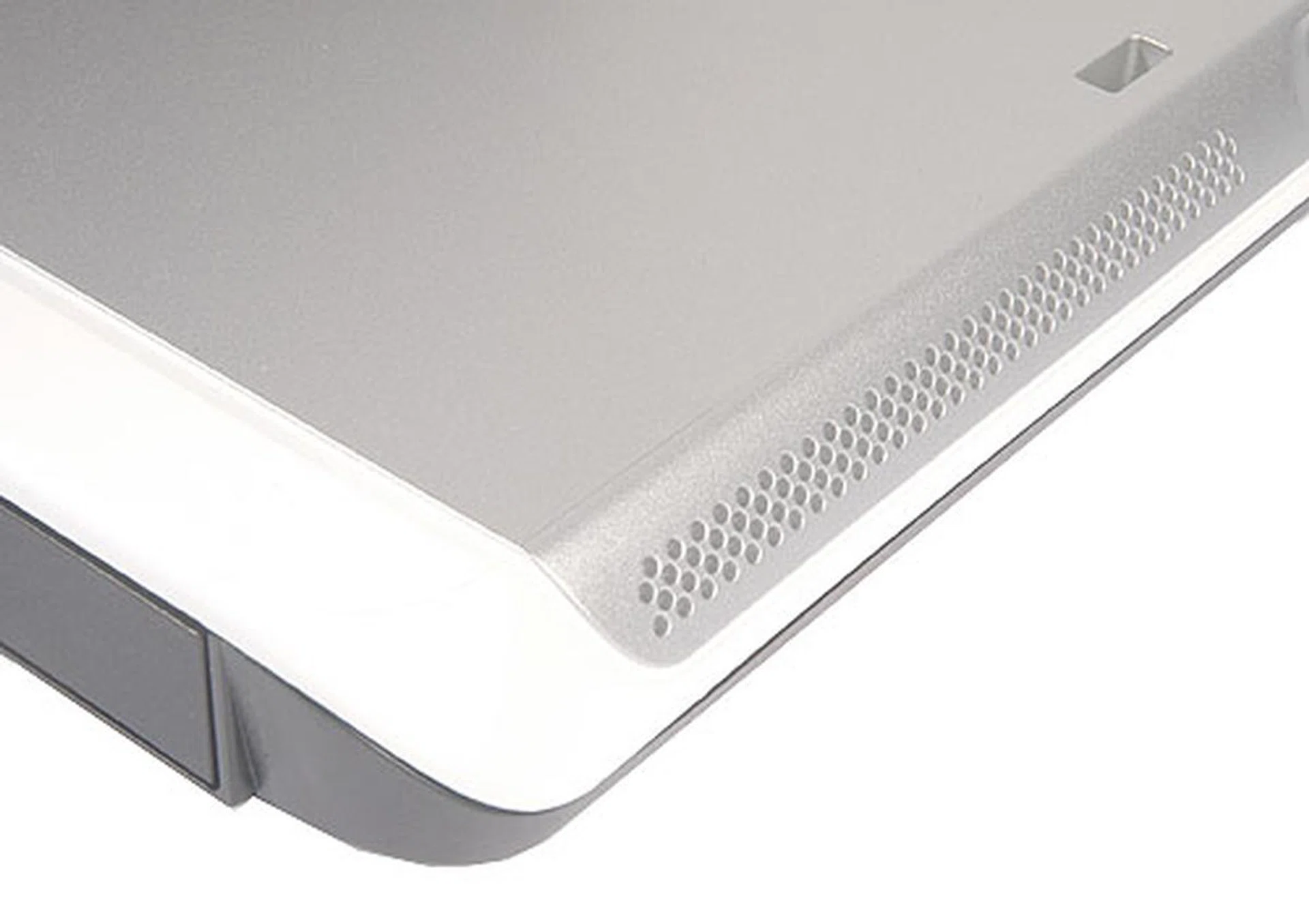
These stereo speakers are found flushed along the front bezel of the notebook. Though they look quite impressive judging by the large amount of perforation, performance is average. Don't expect to be wowed by them.
A feature worth noting is the Truelife technology that comes with its 15.4-inch wide screen LCD. The default Dell LCD panel (1280 x 800 pixels) contrasts sharply when put side by side with the Truelife LCD screen and it only costs US$69.17 (S$106.05) more for the upgrade. With Truelife technology, LCD backlighting was found to be more even across the display and can be configured to be extremely bright for viewing from distances. Apart from being brighter, colors are also more vivid and viewing angles vastly improved. We highly recommend any readers out there getting a Dell notebook to pick this upgrade (if available) as it truly improves the viewing experience for very little additional cost.
Although most manufacturers (and Windows itself) usually has an on-screen display for battery power meters, road warriors will appreciate the convenient battery meter on the physical battery itself. With a push of a button, LEDs will light up to indicate how much battery there is left within, a great plus factor for all Dell notebooks. This feature has actually cropped up in many different notebooks across various brands before, but for some reason it has never been a standardized mainstay function.
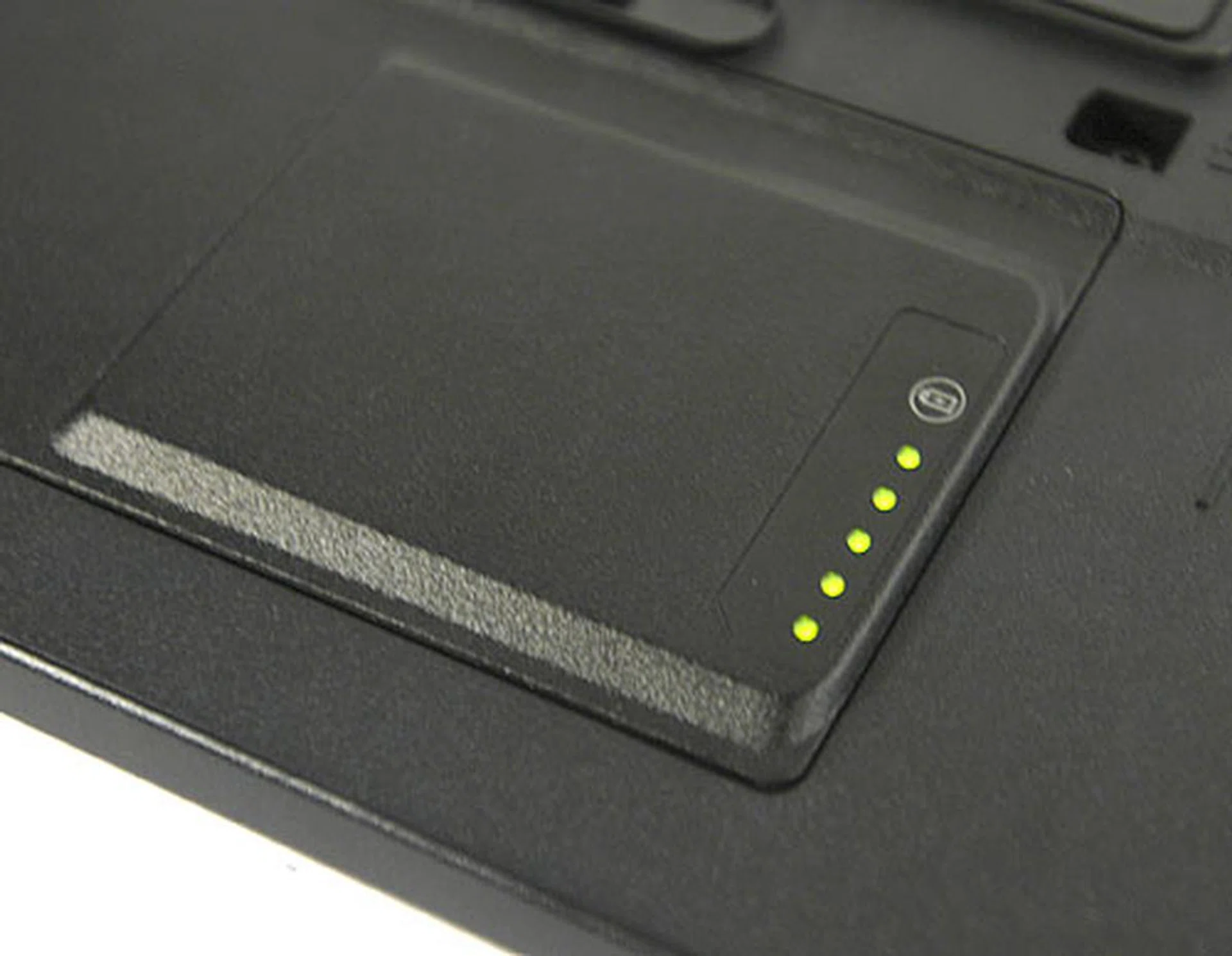
A row of handy LED lights light up at the push of a button to roughly display how much battery is left within.
Other basic features on the Dell Inspiron although not exhilarating, still deserves a passing mention. The keyboard, touchpad and buttons are tactile and responsive although they are not fitted with creature comforts such as ergonomic contours, thumb rests or fancy touchpad locks. If there is any one area you have to look out for, it is the wrist rest area of the notebook. Coated with silver paint, there is a high chance that regular use will wear out the paint layer, creating a ghastly faded footprint in the long run.
Users are also advised not to block the inlet vent found along the bottom (top right when flipped over) of the notebook, as this would prevent air from being sucked into the copper heatsink. During tests, the notebook pushed plenty of hot air out from its exhaust, indicating the need for proper airflow to function optimally.
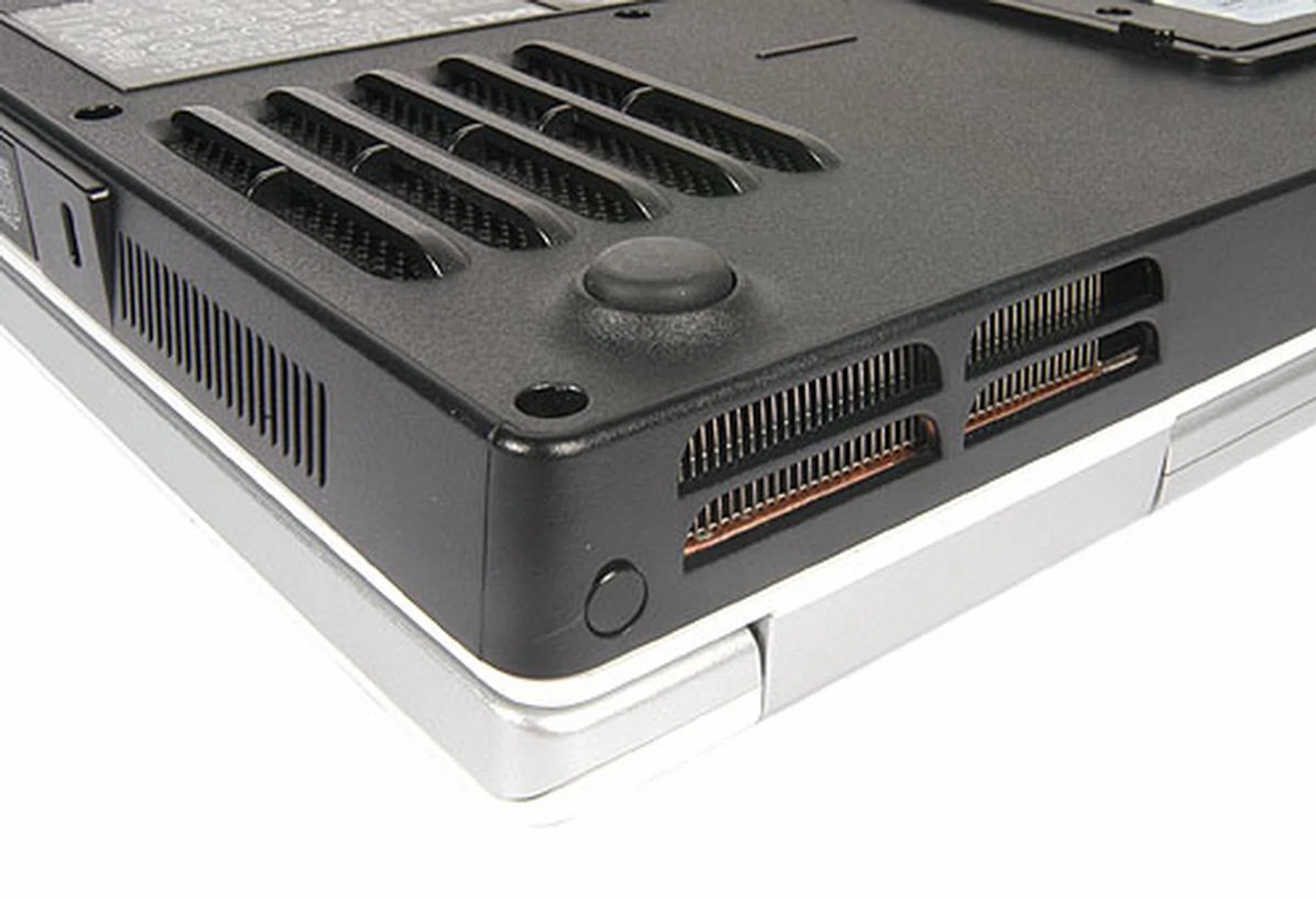
The exhaust found right behind the notebook can get pretty hot when running intensive programs. The inlet vent can be found below the notebook (above). Users should take note not to block this inlet or risk overheating the system.
System Benchmarks
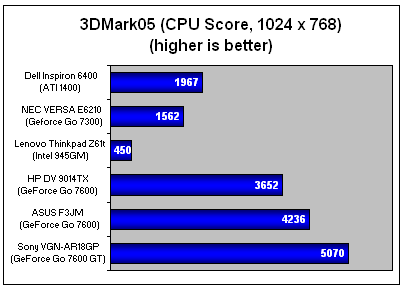
For the performance and benchmarking segment, the Dell Inspiron 6400 will be tested against the HP Pavilion dv9014tx, NEC Versa E6210, Lenovo Thinkpad Z61t and the updated ASUS F3JM. Before we dive in, we would like to remind readers that notebook specifications vary in various degrees and may affect benchmark results. For this review, the ASUS F3JM offers the closest comparison to the Inspiron 6400, both with a Core 2 Duo T7200 CPU and 2GB of DDR2 RAM. However, the ASUS has an edge in graphics performance as it is fitted with a superior NVIDIA GeForce Go 7600 512MB graphics solution. Still, the following notebooks have been chosen to offer a good performance gauge of how the Dell Inspiron 6400 workhorse stands in the market.
Comparison Table
Specifications/ Notebook | Dell Inspiron 6400 | ASUS F3JM | HP Pavilion dv9014tx | NEC Versa E6210 | Lenovo Thinkpad Z61t |
Processor | Intel Core 2 Duo Processor T7200 (2.0Ghz, 4M L2 Cache 667 MHz FSB) | Intel Core 2 Duo Processor T7200 (2.0Ghz, 4M L2 Cache 667 MHz FSB) | Intel Core 2 Duo Processor T7200 (2.0Ghz, 4M L2 Cache 667 MHz FSB) | Intel Core 2 Duo Processor T2300 (1.66Ghz, 4M L2 Cache 667 MHz FSB) | Intel Core 2 Duo Processor T2300 (1.66Ghz, 4M L2 Cache 667 MHz FSB) |
Chipset | North Bridge: Intel 945PM | North Bridge: Intel 945PM | North Bridge: Intel 945PM | North Bridge: Intel 945PM | North Bridge: Intel 945GM |
FSB | 667 | 667 | 667 | 667 | 667 |
Memory | 2 x 1GB DDR2 | 2 x 1GB DDR2 | 2 x 512GB DDR2 | 1 x 512GB DDR2 | 1 x 512GB DDR2 |
Video | ATI Mobility Radeon x1400 256MB | NVIDIA GeForce Go 7600 512MB | NVIDIA GeForce Go 7600 512MB | NVIDIA GeForce Go 7300 256MB | Integrated Intel 945GM |
MobileMark 2005
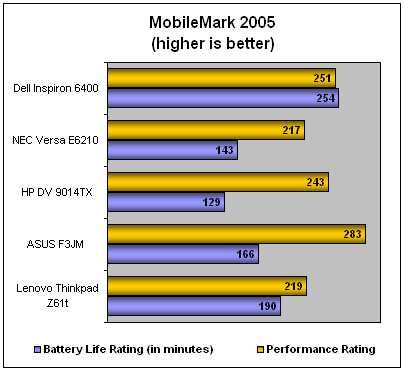
From the chart, we can see the Dell Inspiron 6400 closely matches the processing prowess of the HP DV 9014TX, but still falls short of the ASUS F3JM's lustrous performance that has yet been unbeaten in our benchmarks. All three notebooks have the same processing muscle and perhaps this goes to show how very similarly specced notebooks can still vary widely due to different system integration and optimizations by its manufacturers.
Battery life on the other hand sees the Dell Inspiron 6400 giving the other notebooks a trouncing. However, take note that the Inspiron 6400 that we received from Dell came with a 9-cell Lithium Ion battery and not the standard 6-cell battery that the notebook (and its competition) ships with. The 9-cell battery is actually an optional upgrade for the Inspiron 6400, so take these results as a rough gauge on how much extended life can be squeezed out with a battery upgrade. The results from MobileMark show generally good performance from the Inspiron 6400 so far.
3DMark 2005
Portability Index
In this section, the objective is to evaluate the mobility of the Dell Inspiron 6400 to determine how worthwhile it would be for frequent travelers relying on notebooks for productivity. Other than the subject of weight, battery life and volume, other variables are considered in this segment as well. By dividing the battery life of a notebook (uptime taken from MobileMark 2005) over the multiplication of mass (in kilograms) and volume (cubic meters), we derive a simple ratio of just how well balanced any given notebook is in terms of weight, volume and battery life.
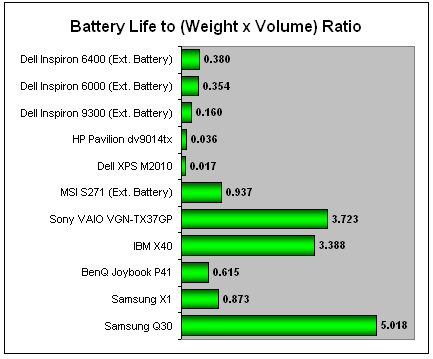
The Dell Inspiron 6400 weighs a hefty 3.22kg and according to the chart, performed almost similarly to its predecessor (Dell Inspiron 6000) using its extended 9-cell battery. This is an expected result as the chassis has hardly been changed despite its internal overhaul. The Dell Inspiron 6400 overall, still remains as one of the bulkier notebooks to carry about.
Power Consumption
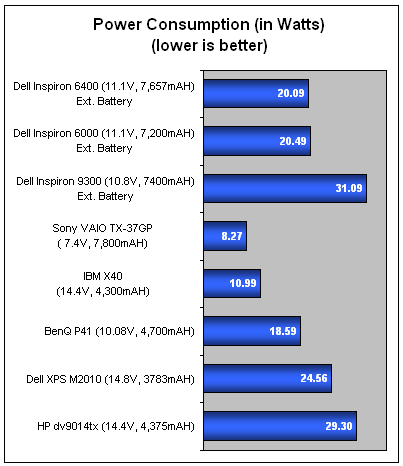
Consuming a total of 20.09W an hour, Dell maintained their standards with the Inspiron 6400 despite a 7200RPM hard disk drive and a much more powerful graphics solution within. Overall the Dell Inspiron 6400 performed averagely as far as power consumption is concerned.
*Do take note that this section does not factor in the performance figures for notebooks benchmarked with power saving features disabled and running off an AC power supply. Battery saving modes and associated technologies such as Intel SpeedStep would kick in when a notebook is in portable mode where battery stamina is of paramount importance than maximum performance.
Conclusion
The Dell Inspiron 6400 although clearly not too inspiring with its plain Jane looks, managed to deliver a generally good performance rating with its Intel Core 2 Duo processor and maintained a favorable power consumption level. Graphics wise, the Inspiron 6400 held it own with its ATI Mobility Radeon X1400 embedded solution, which brings about a great balance between performance and battery life for its class. Those that have the habit of playing the latest graphic intensive games would be a little disappointed though, as there are no upgrades to the Inspiron 6400 available that allows anything much more powerful to fit into its chassis. Nevertheless, the Mobility Radeon X1400 is a capable mainstream GPU.
While we requested our review unit to be loaded with Windows XP for benchmarking purposes, retail Inspiron 6400 units will come shipped with your flavor of Windows Vista. Looking at the notebook specifications alone is enough to see that the updated Inspirons should be able to handle the new operating system and the ATI Mobility Radeon X1400 is more than capable of showing off the bling available on Vista's Aero interface.
Priced at just over US$1,609 (S$2,457) for the reviewed configuration, this notebook is fairly affordable in Dell tradition and makes a great workhorse, albeit a little on the unwieldy side with its considerable weight and size. However those that are willing to put up with those inconveniences will find that the load on their wallet will be considerably lighter as similar offerings from other manufacturers which emphasize more on portability or aesthetics are priced at a premium when compared to the Dell Inspiron 6400. Ultimately, the Dell Inspiron 6400 brings about a great deal of value for money and those who aren't too critical about aesthetics or travel too much with their notebook should take a serious look at this workhorse.
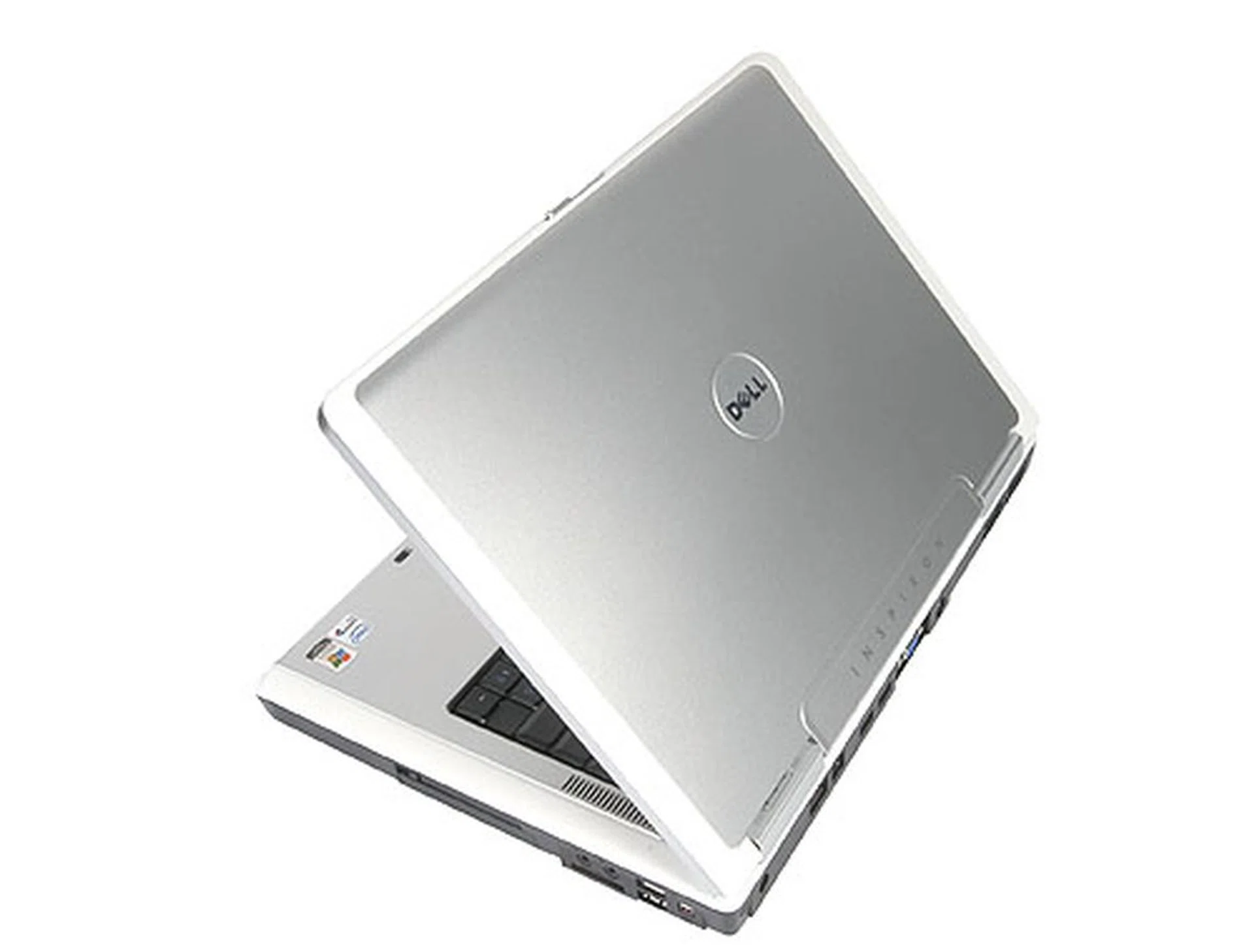
The Dell Inspiron 6400 notebook from another angle.
Our articles may contain affiliate links. If you buy through these links, we may earn a small commission.