
ASUS P5Q3 Deluxe (Intel P45) - Ready for Action
It's the beginning of the summer blockbuster season and Intel's P45 chipset is a month away from wide release. Like Intel's recent chipsets, will this new mainstream chipset take the gloss away from the higher-end variants? Find out how it performs with the ASUS P5Q3 Deluxe.

The Eagle has Landed
Intel's enthusiast oriented X48 chipset has been delayed for quite a while and though launched finally in March, the actual boards have been rather slow to reach retail markets, with availability limited mostly to the top tier manufacturers. Of course, with the incremental difference (FSB support to 1600MHz) between the X38 and the X48, there's no compelling reason to upgrade if you're already using a "3-series" motherboard. For those who can wait, the mainstream equivalent, the 'Eaglelake' P45 boards are slated to be released next month and with existing P35 boards providing good performance for its price, users are likely to view the upcoming boards with more enthusiasm.
So what does the new Intel P45 chipset bring to the table? There hasn't been much of a buzz at the moment, though one can expect this to crescendo once June and Computex comes round. From what we have gathered, some of the more significant updates on the P45 from the P35 include PCI Express 2.0 support while memory support is also bumped up to DDR3-1333 (along with an increase to 8GB maximum memory), though DDR2-800 variants are still supported. As you can see, this does seem very similar to the already released X48 chipset, with the exception of FSB support, which remains at 1333MHz for the P45 (likely as a way of distinguishing the high-end from the mainstream.) However, the P45 also uses the newer ICH10/10R Southbridge, which is not standard issue on the X48. More importantly for some users, CrossFireX (up to 8x lanes for each PCIe graphics slot) is found on this new mainstream chipset, which could give a boost to ATI.
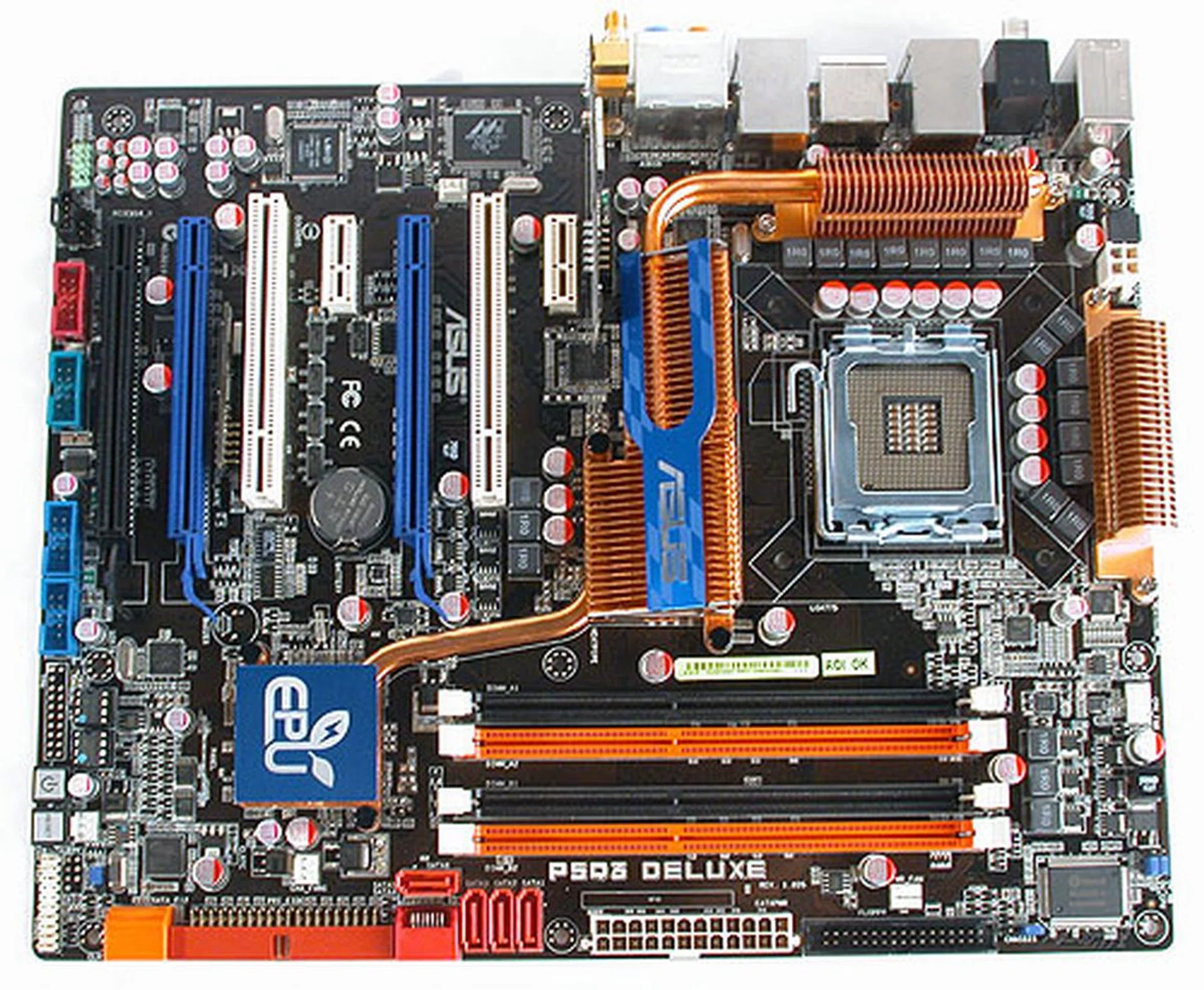
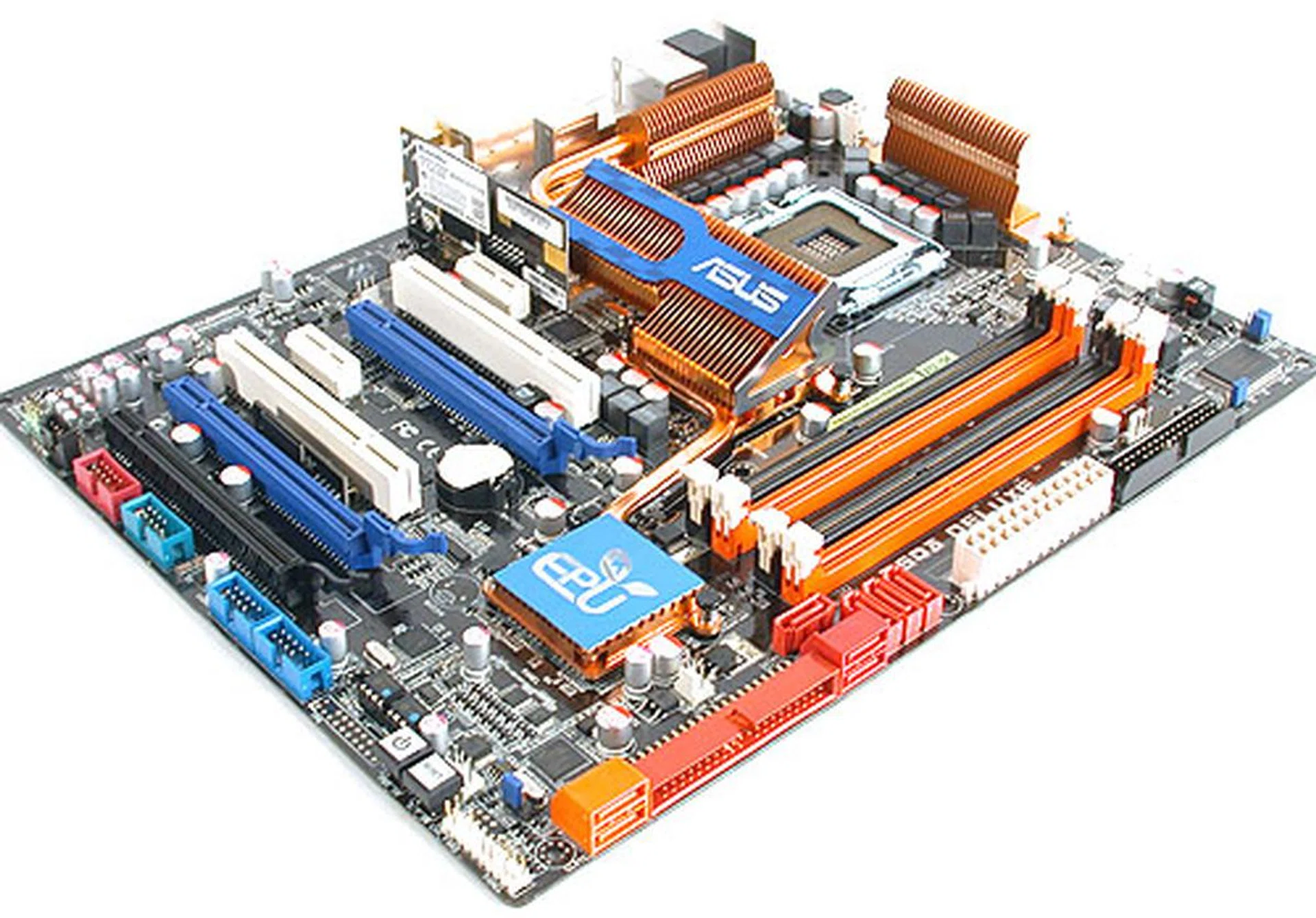
The ASUS P5Q3 Deluxe motherboard has a similar layout to some of the recent boards we have seen from the manufacturer.
Obviously, top tier manufacturers have already had their hands on these boards for a while now and we have already . Next up is ASUS' P5Q3 Deluxe, which has sent us an early sample for review. Note that we were only given a demo unit without the usual accessories that will be in the retail version. Also, while we used the latest BIOS (0129) from ASUS, the final version found in stores will likely be newer.
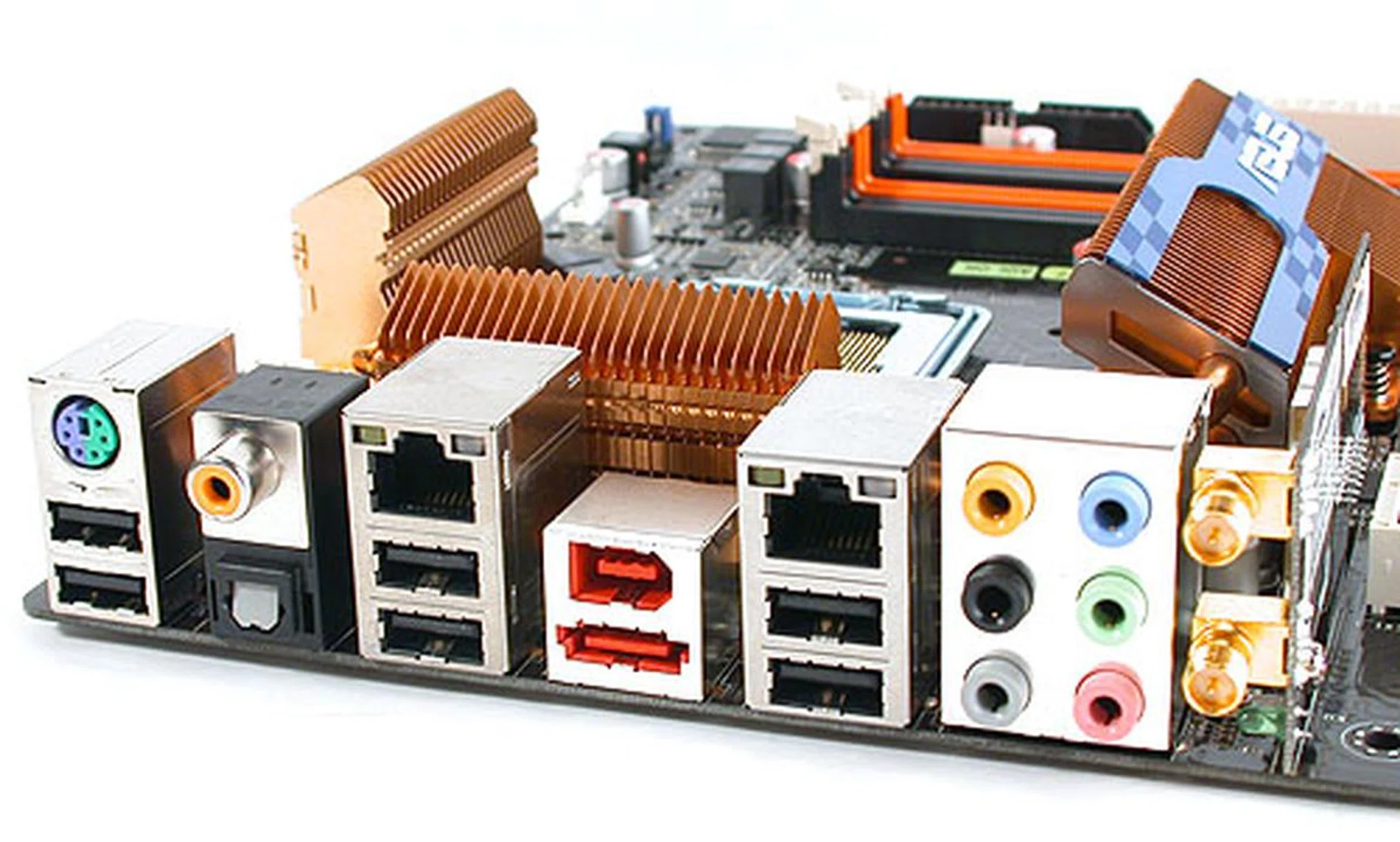
Like the ASUS P5E3 Deluxe, a Wi-Fi module with Draft-N support is included on the P5Q3 Deluxe. It also comes with dual Gigabit Ethernet ports and the PS/2 port has been reduced to one, and you can plug either the keyboard or mouse to it. As for the other input device, there are more than sufficient USB 2.0 ports.
Features
The last Intel board we reviewed from ASUS, the X38 based P5E3 Deluxe came with an innovative onboard Linux module, Express Gate and its Energy Processing Unit (EPU) chipset that reduced power consumption and lowered operating temperatures. These features remain on the new P5Q3 Deluxe, together which is likely to make this the flagship product from the company. Since we have already talked about these features before, you can refer to our ASUS P5E3 review for that information. What's new on the P5Q3, besides its exhaustive feature list is its new Memory OC Charger feature. According to the concise and not very useful description of this feature in the BIOS, it apparently enhances DRAM overclocking ability.
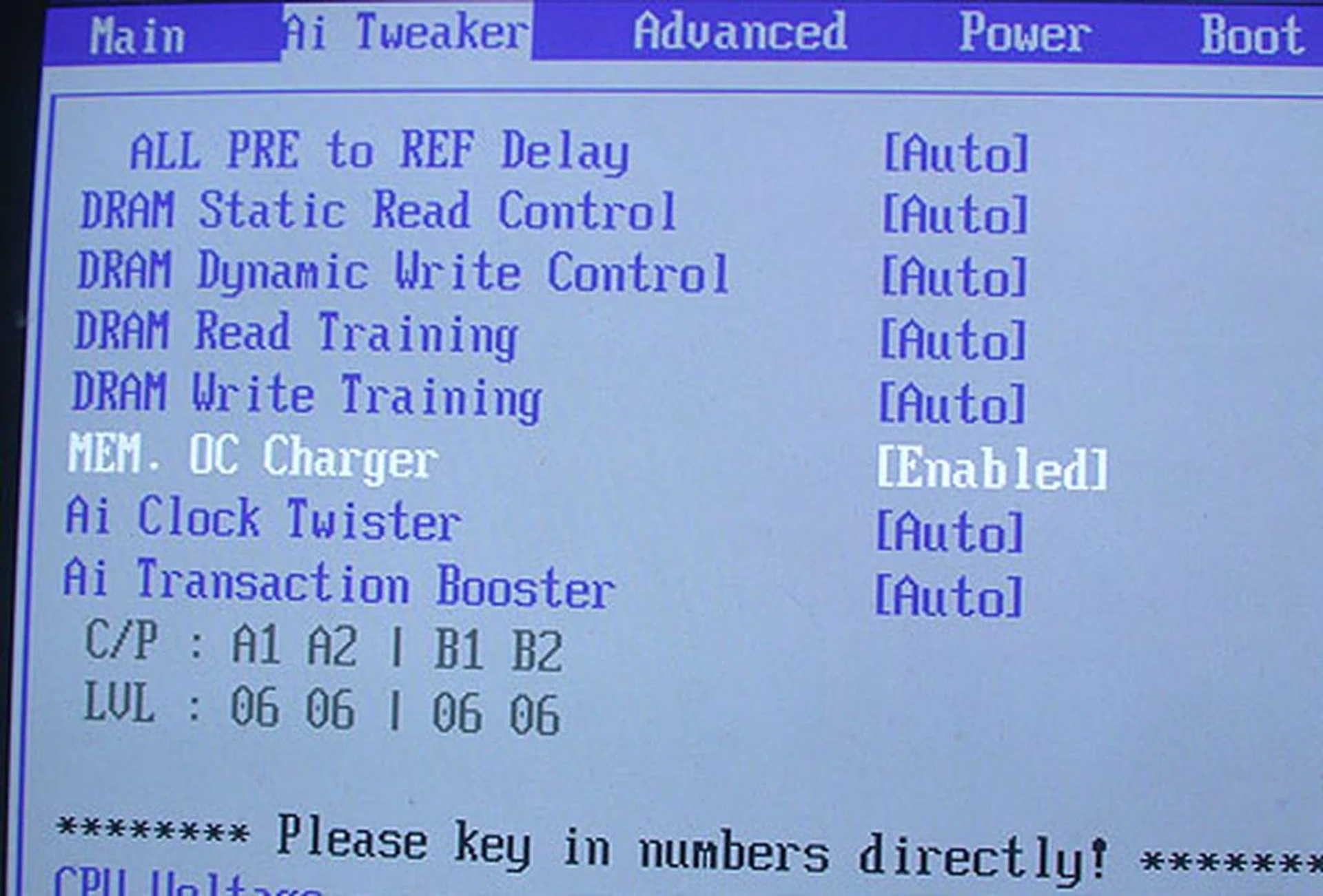
Even if the impact of this Memory OC Charger setting is hard to quantify given our limited time with it, we see no harm in enabling it if you're trying to overclock the memory.
While this is a simple Enable/Disable/Auto choice in the BIOS, according to ASUS, the Memory OC Charger represents many man hours tweaking the internal settings of the board in order to improve the overclocking of the memory modules. However, ASUS emphasized that it would not magically improve any memory modules, and presently, they have a short list of validated memory modules from OCZ, Corsair and Kingston (both DDR2 and DDR3) that works best with the Memory OC Charger. We'll have a short section on our overclocking experience with it enabled later.
As for the other features on this P45 board, you'll probably know that it supports all current LGA 775 processors from Intel, from the 90nm down to the recent 45nm versions. We should also mention that the P45 chipset itself is manufactured on 65nm, down from 90nm. Both dual and quad-core processors are supported, with the FSB support officially at 1333MHz. The ASUS P5Q3 is a DDR3 version (up to 1333MHz only), though ASUS will have DDR2 variants too. Finally, there is PCI Express 2.0 support for the main pair of PCIe 2.0 graphics card slots on the board, though there's only a single x16 slot. These can be automatically split into a pair of x8 lanes for CrossFireX purposes. The last PCIe graphics slot rides off the ICH10R Southbridge chip that's still running on the first generation of PCI Express (not that it matters a lot in real usage anyway), but remember that its use will disable the onboard PCIe x1 slots as there's limited PCIe lanes supplied by the Southbridge.
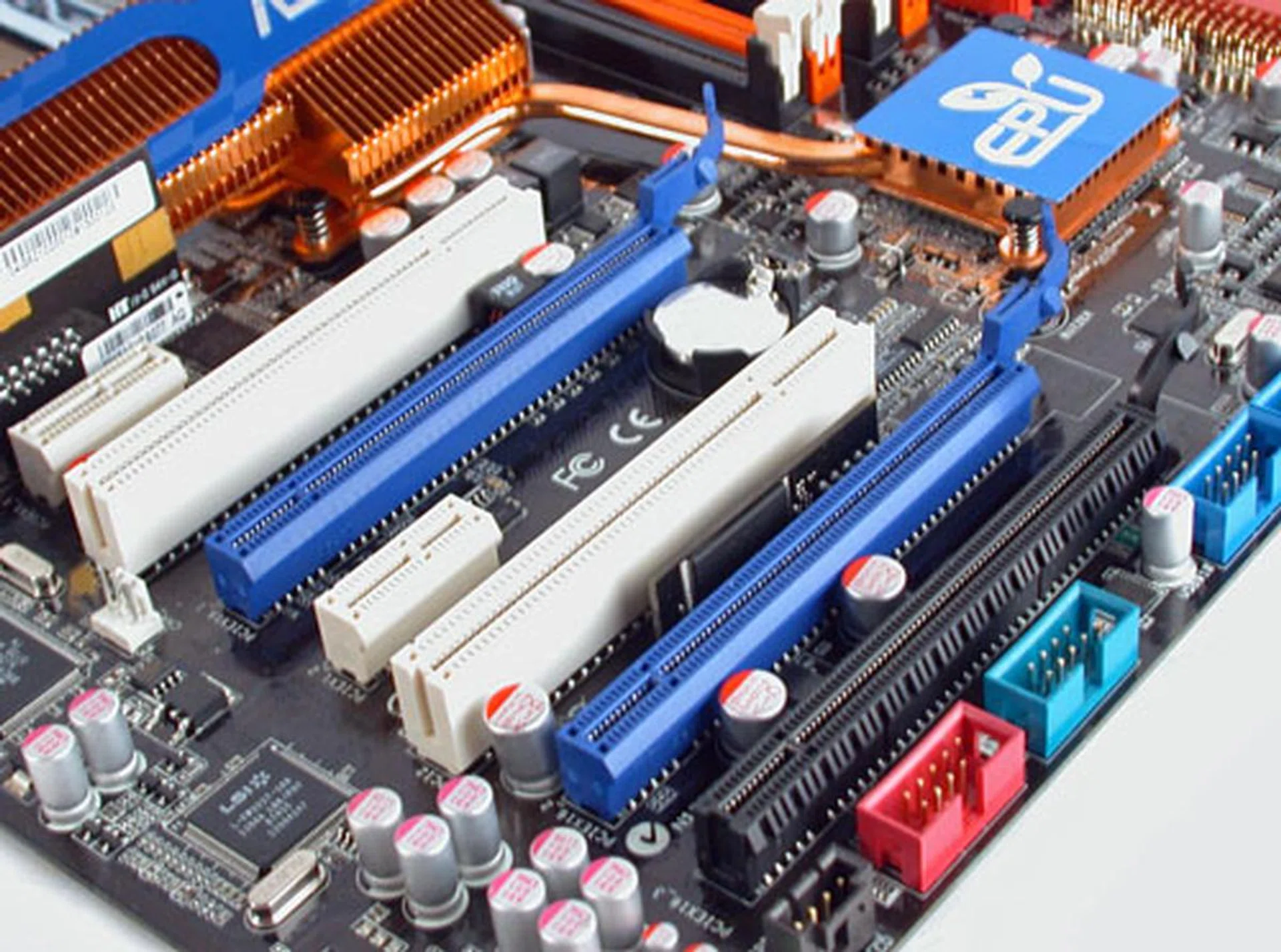
An important leap for the Intel P45 from the P35 is the support for PCI Express Gen 2. ASUS includes up two PCIe 2.0 x16 slots on the P5Q3 Deluxe. You can either configure the main PCIe slot to run at x16 or have two PCIe at 8x if you're running CrossFireX. ASUS also includes a third PCIe x16 slot, but this runs off the Southbridge (x4 electrical interface). On another note, if you're looking closely, you can spot the Express Gate module sandwiched in between the second PCIe x16 and PCI slots.
When it comes to storage and connectivity, the ASUS P5Q3 supports up to eight SATA 3.0Gbps ports, with an external SATA port behind and up to two FireWire ports courtesy of its agere chipset. There's the usual excessive number of USB 2.0 ports, with the board having up to ten such ports. Given that there's only one PS/2 port, these USB ports should come in handy. Just like the ASUS P5E3, there are dual Gigabit Ethernet ports, along with a Draft-N capable Wi-Fi module (the retail will have the included dual antennas). Surprisingly, there seems to be a new audio CODEC that ASUS is using from Analog Devices. This AD2000BX CODEC is not listed on the manufacturer's website yet, but you can probably expect 8-channel high definition audio using either the standard 6 port audio jacks, or optical/coaxial output.
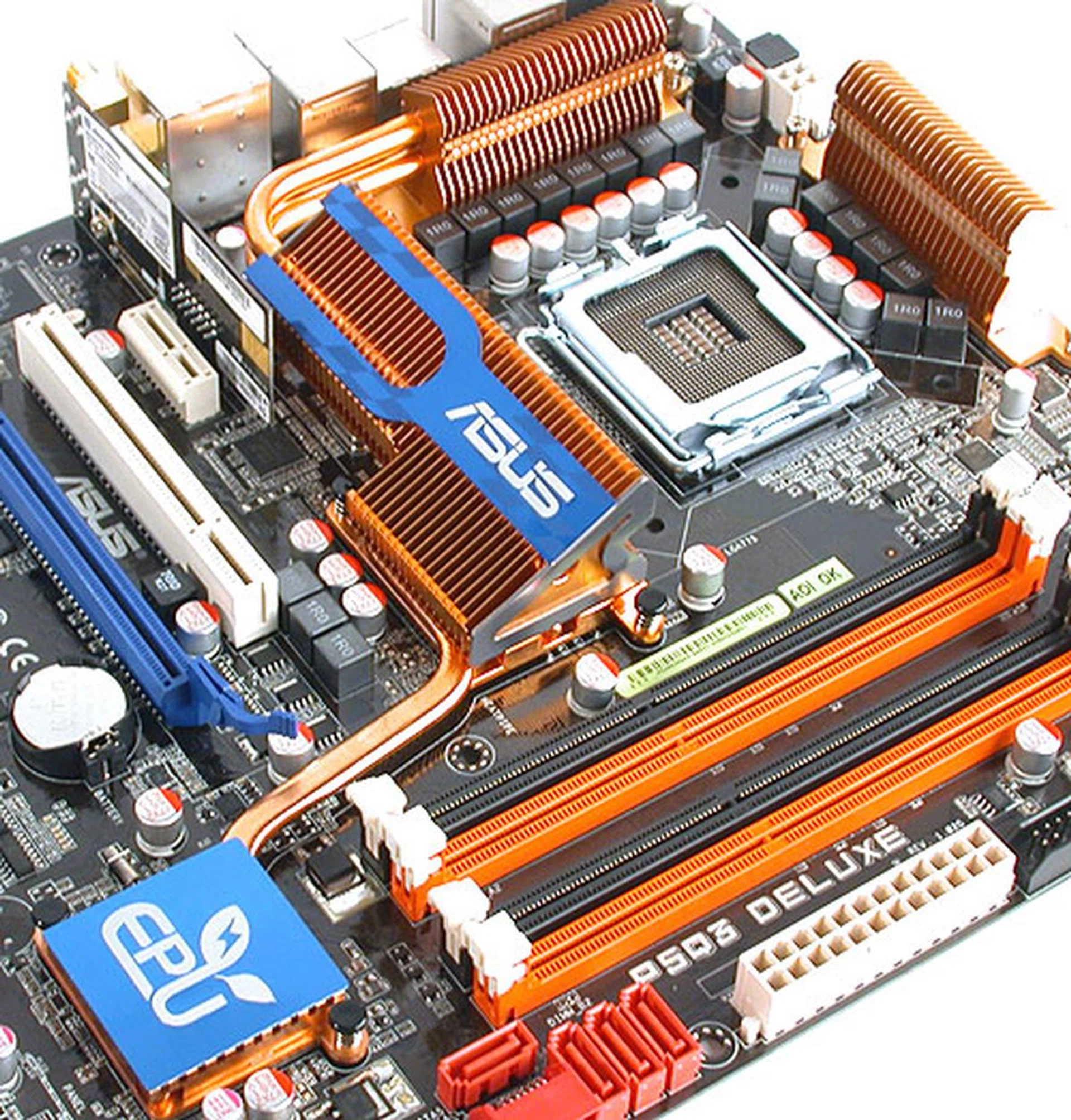
With the P45 chipset using the 65nm manufacturing process, the dual heat pipe passive copper cooler on this ASUS board is relatively cool to the touch during operation.
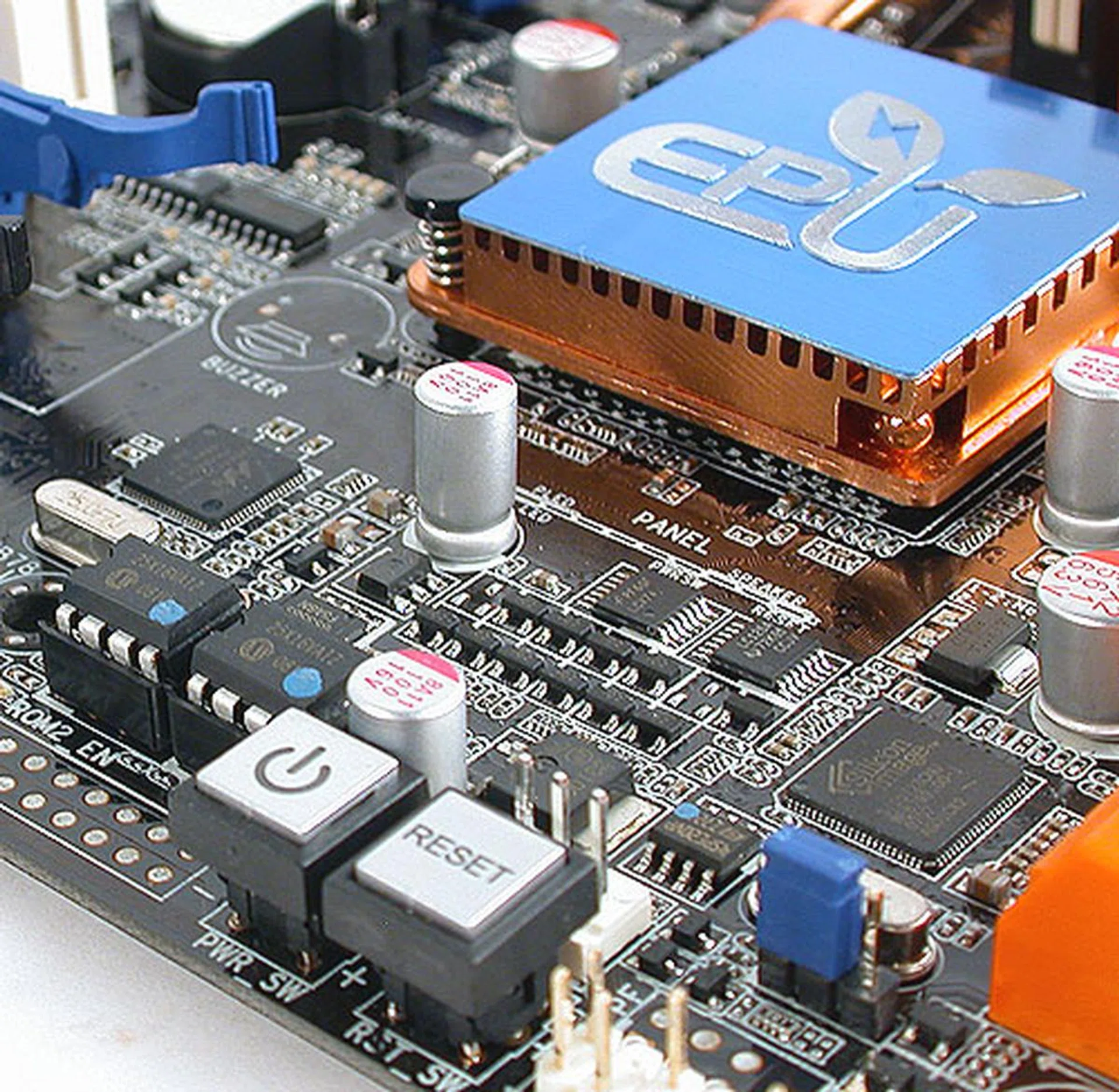
Like previous ASUS boards, you don't have to attach your power and reset headers from the chassis anymore with these buttons. Also, the EPU logo embossed prominently on the Southbridge heatsink indicates that ASUS' Energy Processing Unit (EPU) chipset is onboard, making for greater energy efficiency.
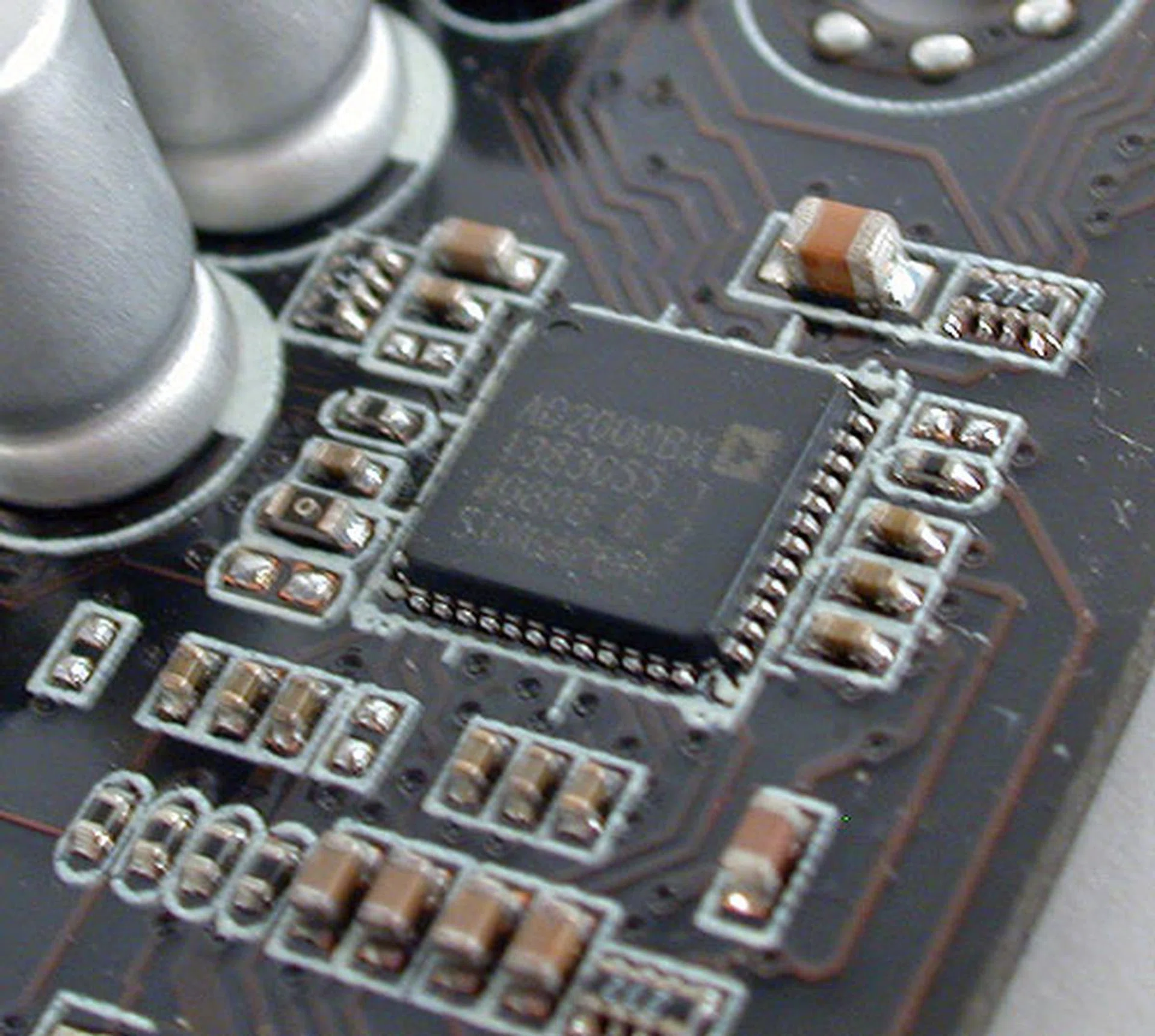
This appears to be a newer Analog Devices audio CODEC, which we didn't manage to find at the audio manufacturer's website.
Layout
The layout of the ASUS P5Q3 is effectively the same as the P5E3, which is to say, it's generally very good. There were no issues with removing memory modules with the graphics card installed. With the exception of a SATA port that could be blocked in the case of a long graphics card, the other SATA and IDE ports were all tucked neatly out of the way. There is also ample space for the CPU heatsink for installation.
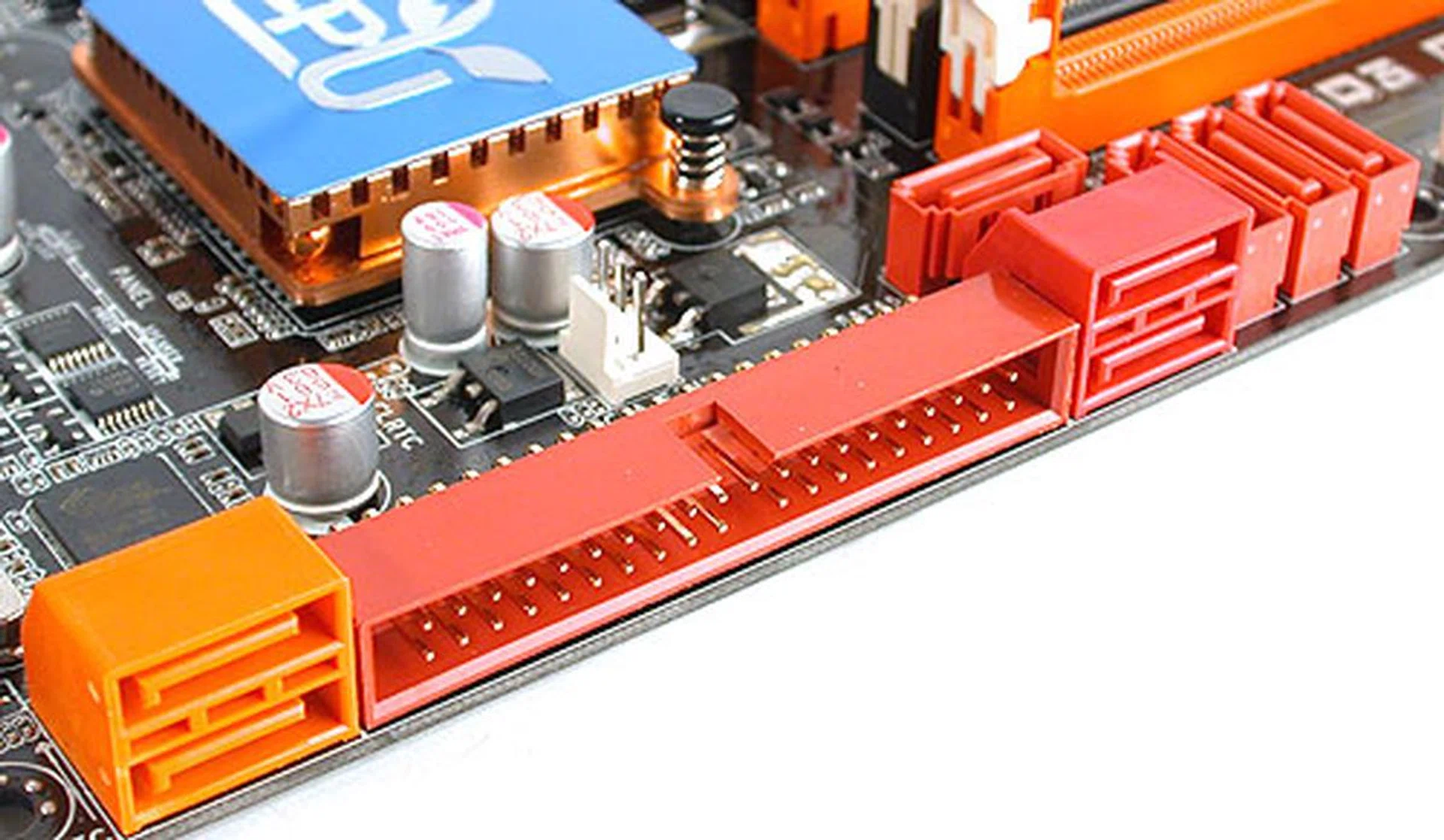
There are up to 8 SATA internal ports, with an external eSATA port at the rear of the board. For the most part, they are aligned such that even large graphics cards would not interfere. From our testing, only one SATA port will be affected by a graphics card like a GeForce 8800 GTX or 9800 GTX.
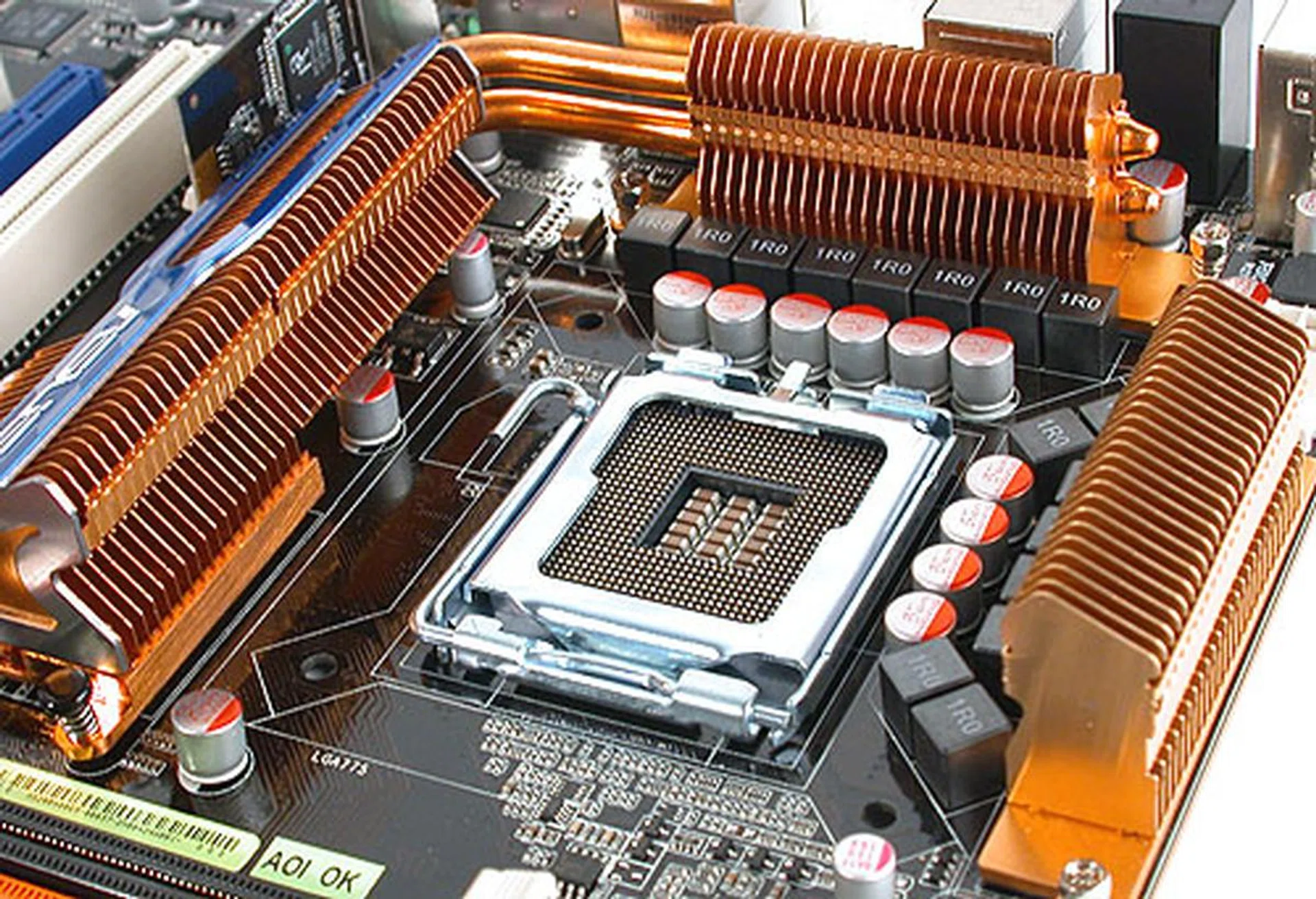
Compared to other ASUS boards, this P45 variant appears to have a 16-phase power supply for the processor. The X38-based ASUS P5E3 Deluxe for instance only has eight.
Overclocking
- FSB Settings: 200MHz to 800MHz
- DDR3 Settings: 667/800/835/887/1002/1066/1111/1333MHz
- FSB Strap: Auto, 200/266/333/400MHz
- PCIe Settings: 100MHz to 180MHz
- CPU Voltage Settings: 0.85000V to 2.1000V (in 0.00625V steps)
- Memory Voltage Settings: 1.50V to 2.78V (in 0.02V steps)
- FSB Termination Voltage Settings: 1.20V to 1.90V (in 0.02V steps) (from 1.10V for 45nm CPUs)
- CPU PLL Voltage Settings: 1.50V - 2.78V (in 0.02V steps)
- NB Voltage Settings: 1.10V to 2.061V (in 0.02V steps)
- SB Voltage Settings: 1.10V, 1.40V (in 0.10V steps)
- Loadline Calibration: Auto (default), Enabled, Disabled
- Ai Clock Twister: Lighter, Light, Moderate, Strong, Stronger
- Ai Transaction Booster: Auto, Manual
- Mem OC Charger: Auto, Disabled, Enabled
- Multiplier Selection: Yes (unlocked CPUs only)
From what we saw of the ASUS P5Q3 BIOS, the manufacturer is constantly improving on its already impressive list of options and tweaks for the enthusiast. This time, there's the addition of the Memory OC Charger feature, which we talked about earlier. Most of the options that were already on the P5E3 Deluxe is carried over to this P45 board, though they are either expanded (e.g. the Ai Clock Twister now has five settings instead of three) or adjusted to suit the chipset. There's also an XMP option for supported XMP memory.
As for our overclocking experience, where we tried to get the highest FSB possible on the board, we managed to get to 500MHz before hitting stability issues. The system could boot at 510MHz and even 520MHz, but it was not stable. This figure is comparable to the overclocking on the ASUS P5E3, which considering that this is an early sample of a mainstream chipset, makes it a very promising candidate for overclocking. This was done with the Memory OC Charger enabled, though it's quite possible that with validated memory modules, we may achieve better results.
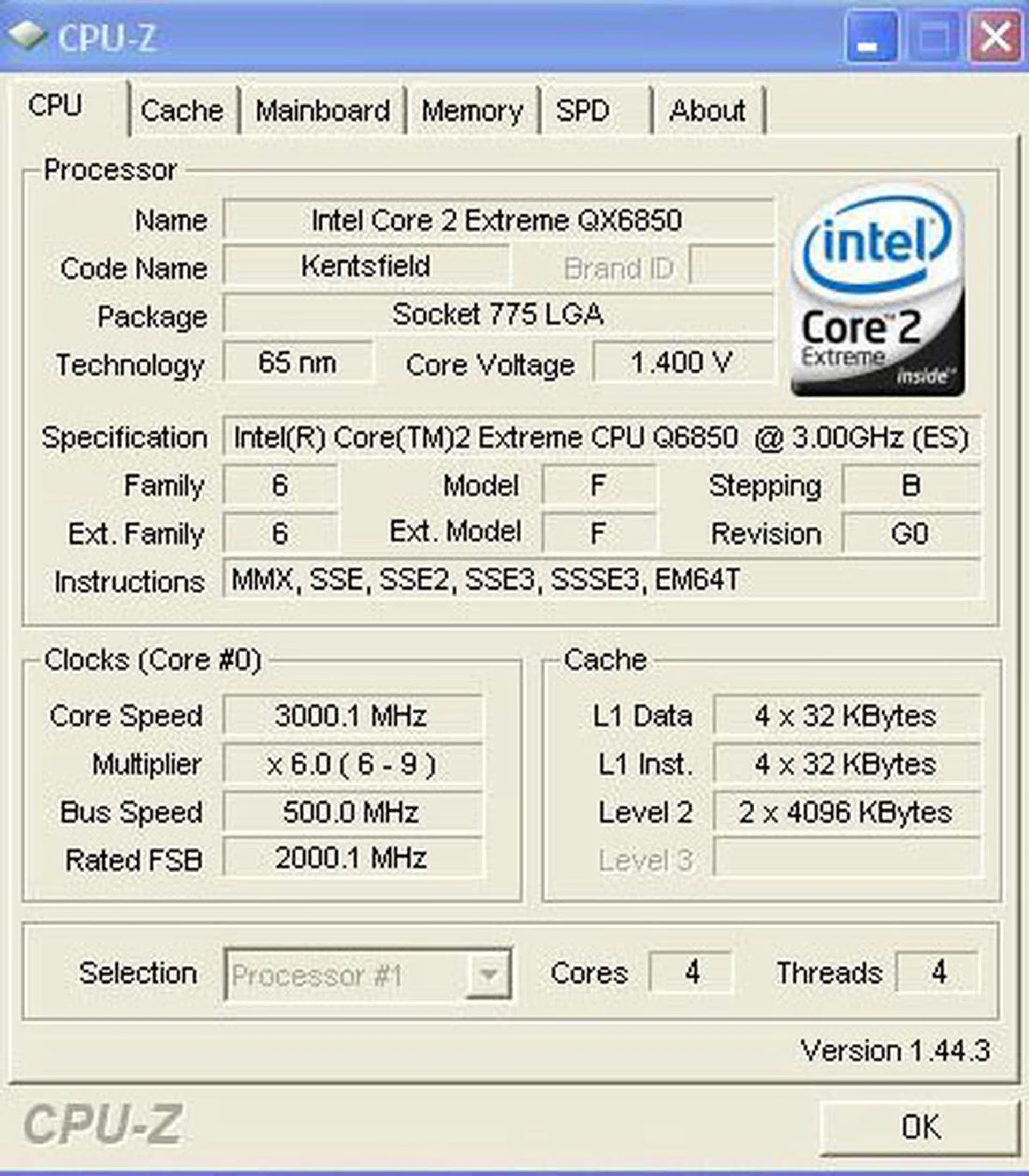
CPU-Z overclocking screenshot. We managed to reach 500MHz FSB quite easily without any special cooling and this was already higher than some of the enthusiast X38 boards that we had featured.
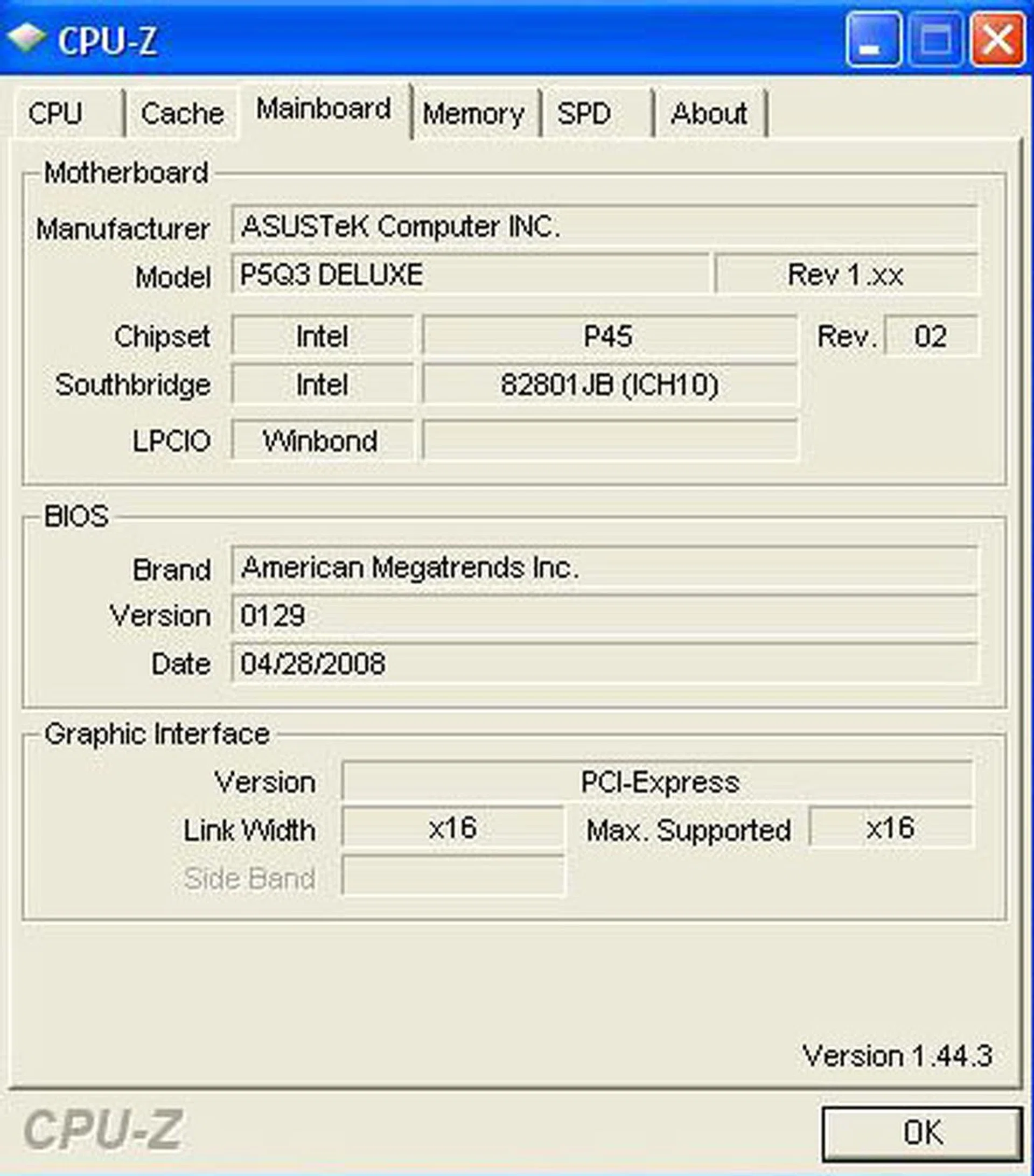
You'll need the new CPU-Z 1.44.3 to display the new Northbridge and Southbridge information correctly.
Test Setup
To find out how this new P45 board compares against the competition, we'll compare the ASUS P5Q3 Deluxe to a number of different chipsets, like the P35 based MSI Diamond, the X38 based ASUS P5E3 Deluxe, the new X48 based Gigabyte's GA-X48T-DQ6 and finally NVIDIA's nForce 780i board, the ASUS P5N-T Deluxe. To benchmark these boards, the following hardware configuration will be used, with varying memory configurations depending on whether they are DDR2 or DDR3 boards:-
- Intel Core 2 Extreme QX6850 processor (3.00GHz)
- 2 x 1GB Kingston HyperX DDR3-1333 @ 7-7-20 CAS 7.0 (ASUS P5Q3 Deluxe, ASUS P5E3 Deluxe and MSI P35 Diamond only)
- 2 x 1GB Kingston HyperX DDR2-1066 @ 5-5-16 CAS 5.0 (ASUS P5N-T Deluxe and Gigabyte GA-X48-DQ6 DDR2-1066 testing only)
- Seagate Barracuda 7200.10 200GB SATA hard disk drive (one single NTFS partition)
- MSI GeForce 8600 GTS 256MB - with ForceWare 162.18 drivers
- Intel INF 9.0.0.1007 and AHCI 8.0.0.1039 driver set (ASUS P5Q3 Deluxe only)
- Intel INF 8.3.1.1013 and AHCI 7.5.0.1017 driver set
- NVIDIA nForce 9.46 driver set (ASUS P5N-T Deluxe only)
- Microsoft Windows XP Professional with Service Pack 2 (and DirectX 9.0c)
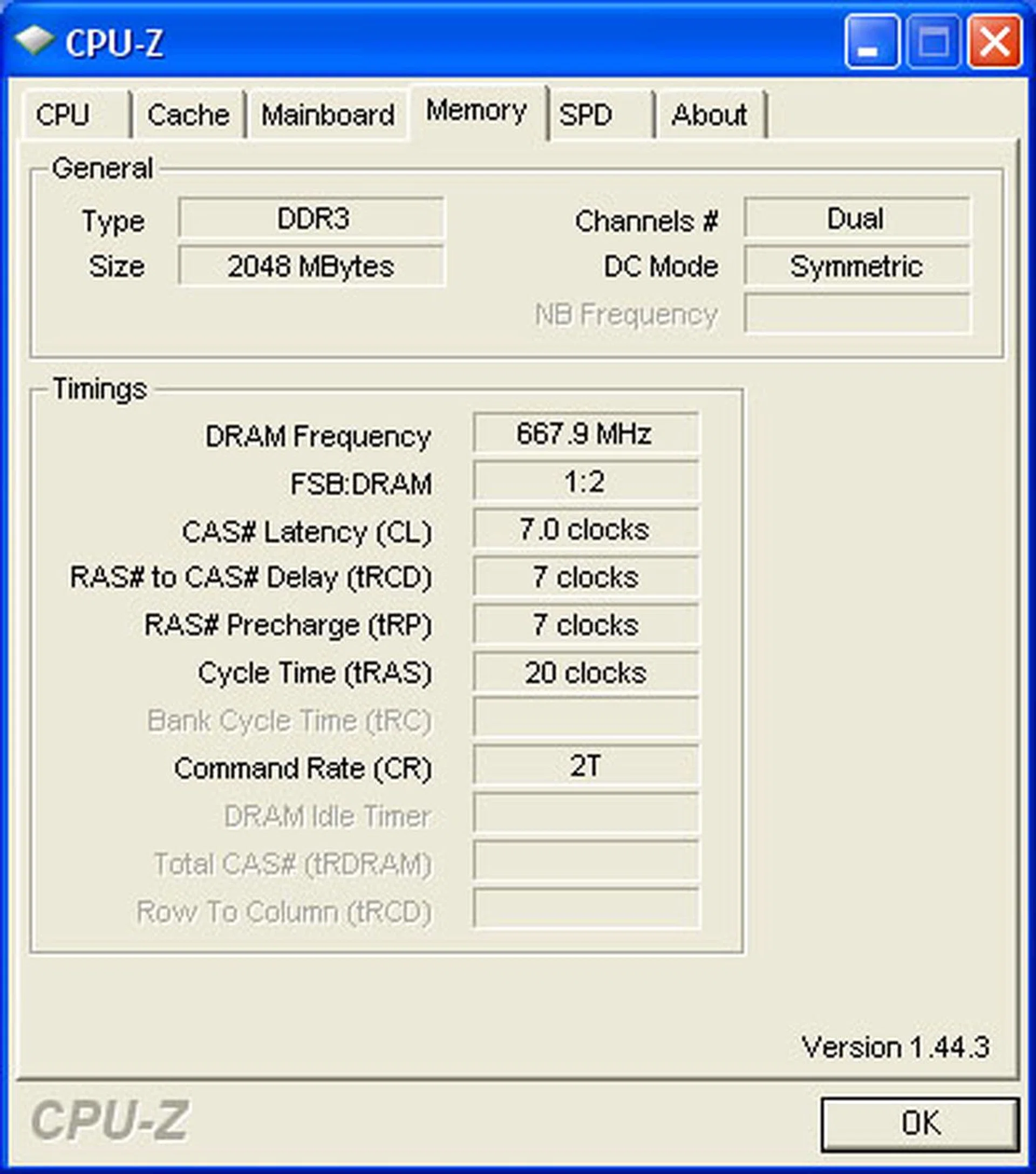
For our benchmarking purposes, we set the memory timings as above. We were however unable to find any setting in the BIOS to adjust the command rate.
Benchmarks
The following benchmarks will be used to determine the performance of the ASUS P5Q3 Deluxe:-
- BAPco SYSmark 2004 (with Patch 2)
- Futuremark PCMark05 (ver 120)
- SPECviewperf 9.0
- AquaMark3
Results - BAPco SYSmark 2004
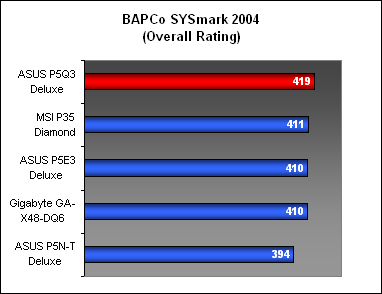
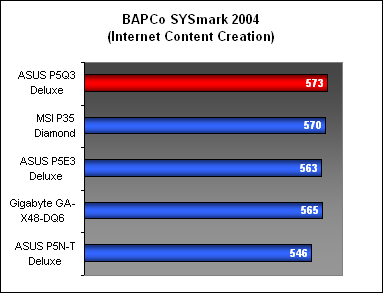
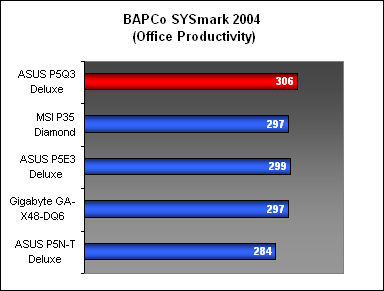
SYSmark 2004 was used as a general gauge of real world performance in numerous popular applications for both office productivity and content creation and the ASUS P5Q3 Deluxe certainly looked like the next big thing, as it topped the table for all three scores here. It has a slight lead over the older P35, X38 and even X48 boards, though of course the Gigabyte GA-X48-DQ6 was on DDR2. However, it showed that the P45 chipset and the ASUS P5Q3 Deluxe to be very competitive mainstream products, even while being relatively unpolished state.
Results - Futuremark PCMark05
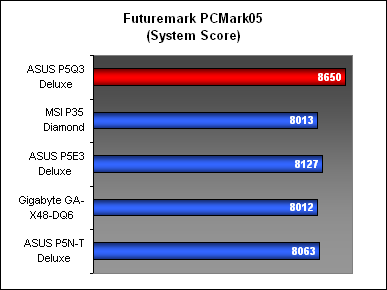
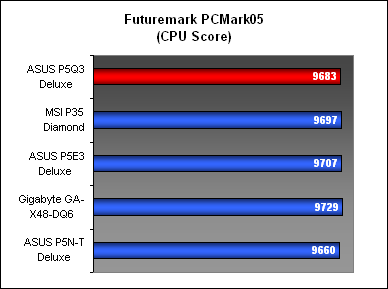
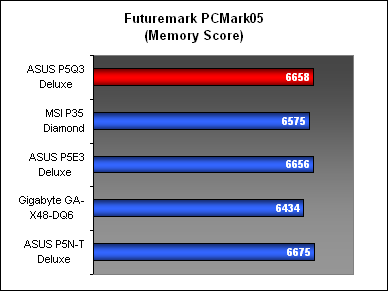
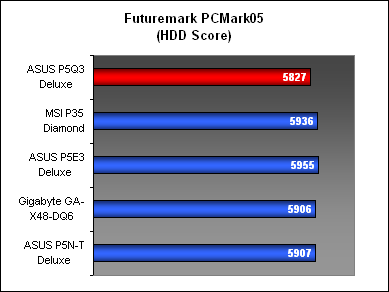
While the overall score for the ASUS P5Q3 Deluxe in PCMark05 again exceeded our expectations, it was a much closer affair if we examined the subsystem scores. For the CPU score, the P5Q3 was competitive but not to the extent of the X38 and X48 boards. It fared better in the memory segment and rivaled the ASUS P5E3 here. However, the storage subsystem looked off the pace compared to the other chipsets so we're looking forward to newer drivers that may close this gap.
Results - SPECviewperf 9.0
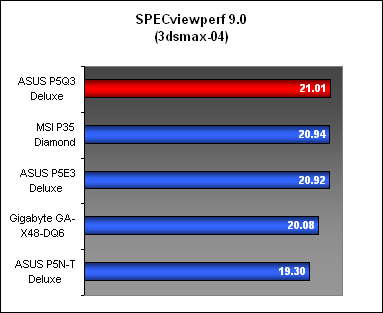
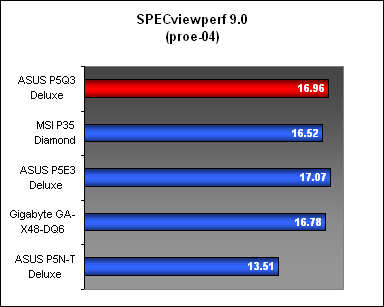
The ASUS P5Q3 Deluxe continued to shine in SPECviewperf 9.0, with the board emerging top or close to it in both workloads, thus signaling its competitive graphics and memory subsystems that these specific workloads highlight.
Results - AquaMark3
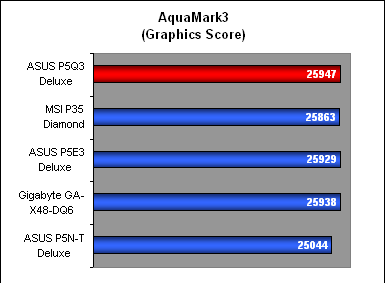
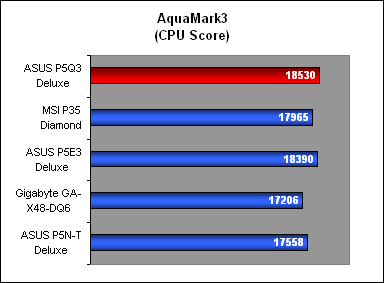
Again, the ASUS P5Q3 emerged as the fastest of all the boards compared, albeit with very slight and possibly negligible leads for both the CPU and graphics segment of AquaMark3. Nevertheless, it still points to this board full of potential, especially with future driver/BIOS updates.
Conclusion
When launched in June, the Intel P45 is likely to be the last mainstream chipset for Intel LGA775 processors, as one can expect the next generation 'Nehalem' processors to require new sockets. Not to mention that the new integrated memory controllers on these processors are supposed to support only DDR3. You can probably see where all this is heading. The LGA775 socket has had a decent run and its end seems imminent, at least according to the powers that be. Obviously, consumers, particularly those in the performance-mainstream segment that the P45 belongs to, are not as willing to upgrade as manufacturers would ideally like them to. Hence, the upcoming P45 boards are probably going to have to last the typical consumer two years at least.
ASUS has never been one to be rest on its laurels and the P5Q3 Deluxe looks to be the culmination of their recent innovations like Express Gate and EPU. For a supposedly mainstream chipset, it's looking rather impressive with its overclocking potential and its long feature list.
In which case, the ASUS P5Q3 Deluxe looks like just the candidate. With all the features of the P45 chipset and DDR3-1333 support, it is set to last for quite a while. Users can easily go from a 45nm dual-core to a quad-core if they have the need. Best of all, the performance that we have seen from this relatively raw review sample from ASUS is up there with the rest of its peers and it can easily stand on a level footing with the enthusiast X38 and X48 chipsets. Best of all, dual x8 lanes for CrossFireX is found on the P45, making it arguably more attractive than the higher-end chipsets.
Additionally, ASUS has continued to pile on the extras for its Deluxe motherboards, with the P5Q3 inheriting the Express Gate and EPU feature found on the best of the last generation ASUS boards. The ASUS Express Gate may not be necessary for most users, but for those who do, they are certainly getting something useful. The EPU chipset also has substantial energy savings, though we must say that the 65nm P5Q3 is already a rather cool board. Add to that the newest feature, Memory OC Charger, and one can see this P45 board overtaking its competitors with its ease of overclocking. Pair it with a suitably validated high-end memory module and you could easily go beyond 500MHz, while there are tons of options to satisfy any tweaker. The presence of relatively expensive, quality components (16-phase power circuitry for instance) should also contribute to better overclocking.
Together with the usual high standards for quality and build that you'll find on an ASUS motherboard, including a very nice and trouble-free board layout, the ASUS P5Q3 Deluxe already looks like a P45 board to get, even at this early stage. The only drawback is probably the price tag, though that's expected from an ASUS Deluxe board. The fact that the ASUS P5Q3 performs at the level of more expensive chipsets should tilt the odds in its favor.
Our articles may contain affiliate links. If you buy through these links, we may earn a small commission.