
ASUS EN9800GT Matrix - Is This 'The One'?
The guys at ASUS probably drew their inspiration for the card from watching The Matrix movie. Deck in black throughout, and sporting a fancy cooler and an even fancier Super Hybrid Engine chip, we see if the new ASUS EN9800GT Matrix has what it takes to be "The One".

Enter the Matrix
We are no strangers to the ASUS EN9800GT Matrix. In our recent GeForce 9800 GT roundup, we've received an engineering sample from the good folks at ASUS and decided to give it a go. Understandably, being an engineering sample, its performance wasn't quite up to mark, but this card has a couple of features that made it worth a second look. But more on that later.
The GeForce 9800 GT is, if you haven't already heard, based on NVIDIA's hot-selling 8800 GT. It is basically just a renaming exercise. Apart from support for HybridPower and plans to eventually manufacture the GeForce 9800 GT using a 55nm manufacturing process, the new GeForce 9800 GT and the older GeForce 8800 GT are one and the same.
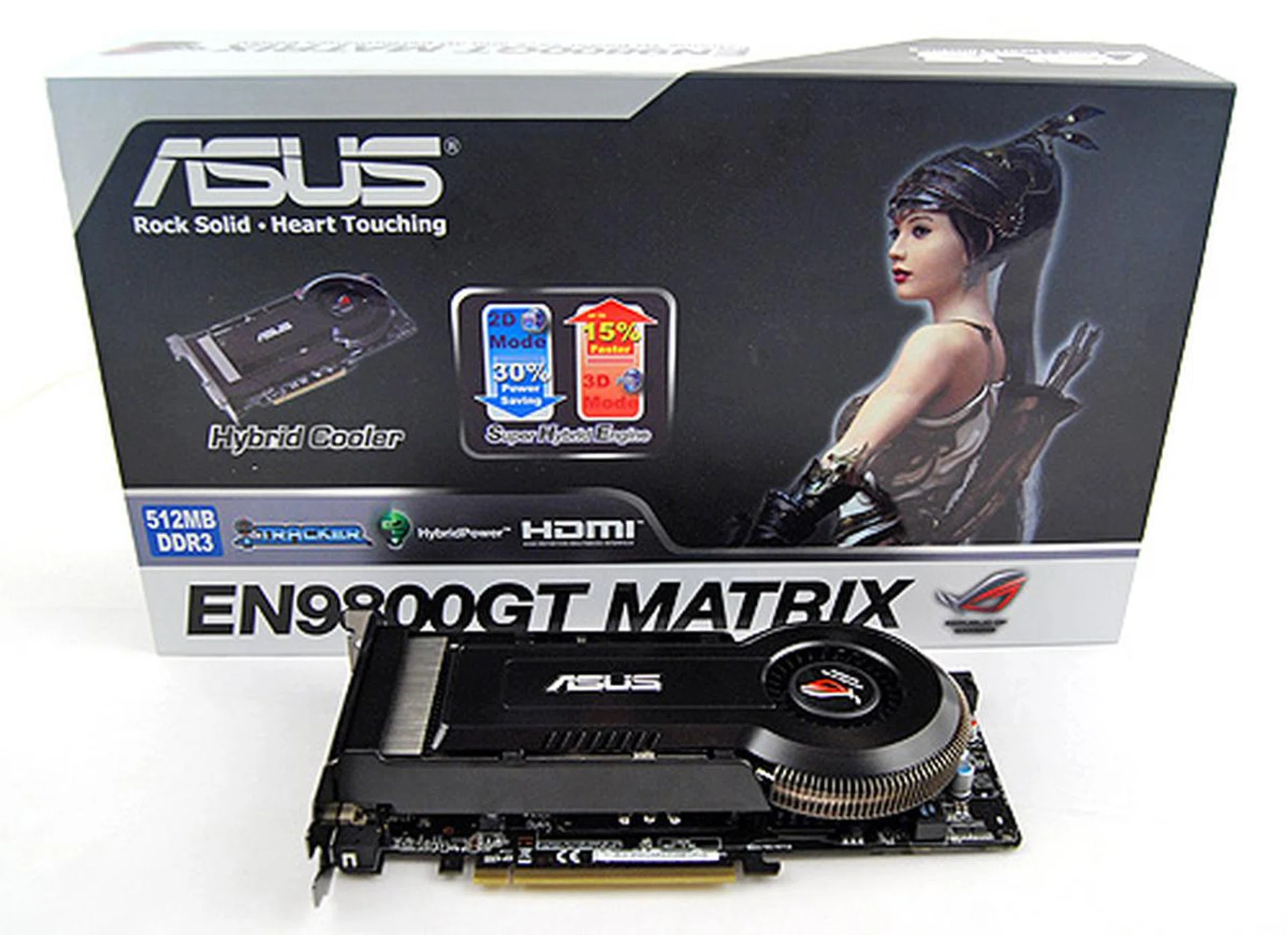
The ASUS EN9800GT Matrix came in a simple, fuss-free black and white box proudly proclaiming its Hybrid Cooler and Super Hybrid Engine.
Although ATI's Radeon HD 4850 is probably the current kingpin of the mid to high-end segment, the GeForce 9800 GT continues to be an interesting alternative, given its lower prices and rather competitive performance, especially from overclocked variants.
Having said that, let us now take a closer look at the ASUS EN9800GT Matrix.
The ASUS EN9800GT Matrix
The ASUS EN9800GT Matrix obviously takes its styling cues from The Matrix movie. Deck in black all over; black cooler, matte black PCB, it is the graphics card equivalent of Neo aka Mr. Anderson aka "The One".
The EN9800GT Matrix joins ASUS' Matrix line of cards (obviously), which in turn is part of their gamer-oriented Republic of Gamers line of products. Out of the box, the EN9800GT Matrix is clocked at 612MHz at the core, 1800MHz DDR at the memory and 1500MHz at the shaders. That's just a slight overclock to the GPU core, but the rest of the clocks are similar to a stock card. To further ensure that the EN9800GT Matrix is competitive in this cutthroat segment, ASUS have introduced on the card something called the Super Hybrid Engine.
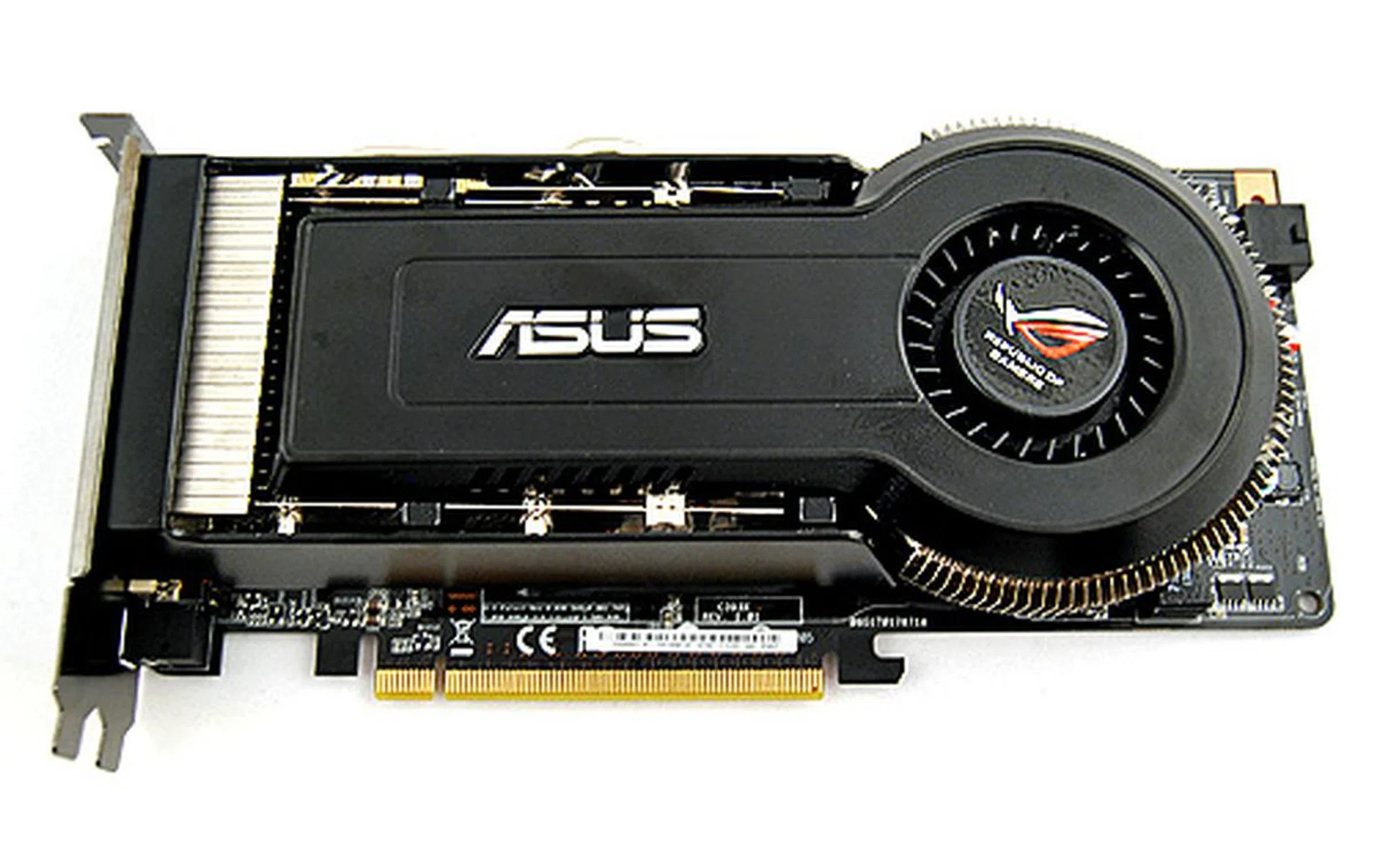
The ASUS EN9800GT Matrix is as black as night, instantly conjuring in our minds images of Neo of The Matrix movies.
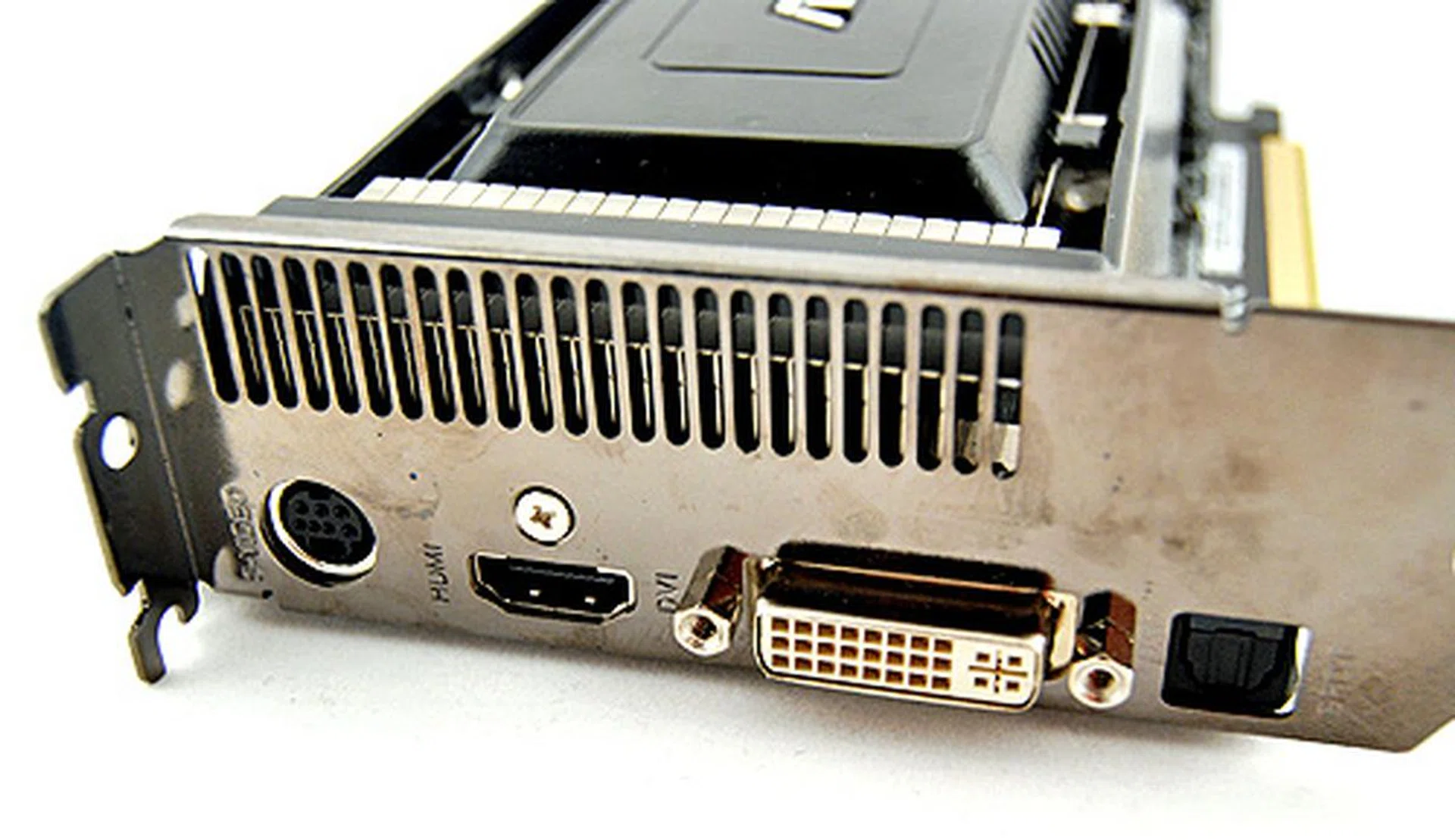
Unlike most other cards in this segment, ASUS has opted to have one DVI output instead. This will undoubtedly inconvenient dual monitor users with monitors that don't support HDMI.
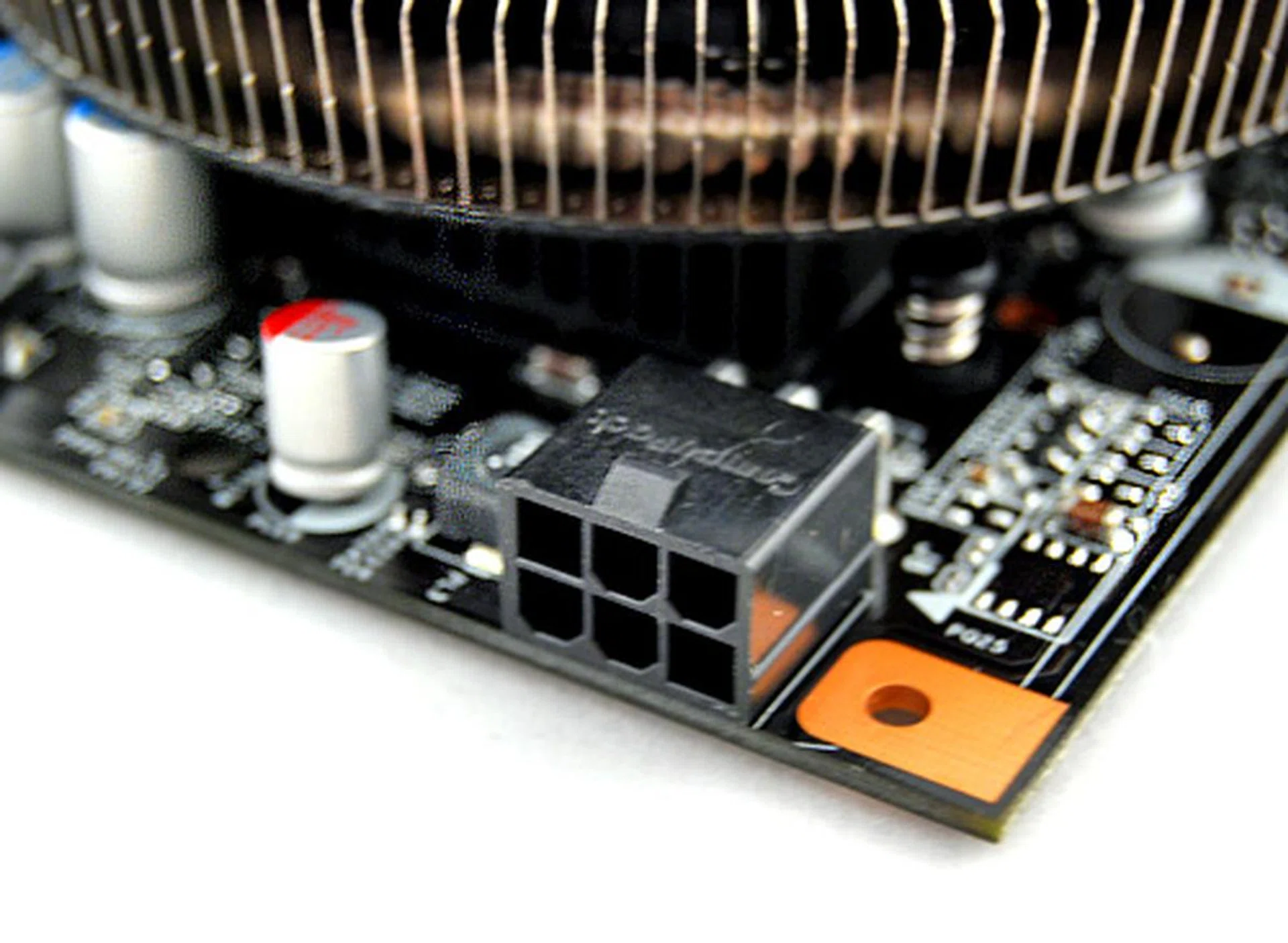
The ASUS EN9800GT Matrix requires a 6-pin Molex connector to operate, and a PSU with a minimum rating of at least 400W.
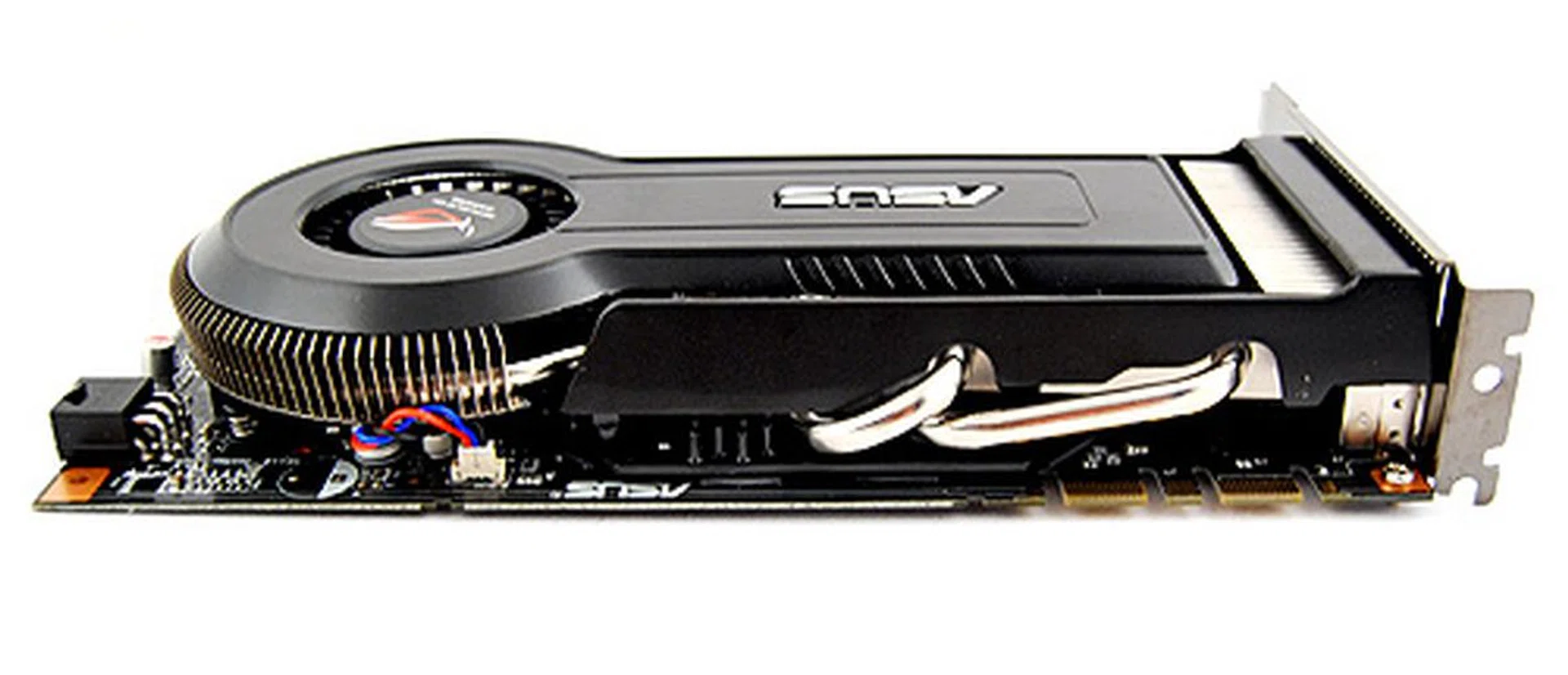
As you can see, the Hybrid Cooler of ASUS shares many similarities with HIS' IceQ 4 cooler. The only thing that sets it apart from the IceQ 4 is its lack of massive heatsinks.
The Super Hybrid Engine is responsible for a number of rather unique functions on the EN9800GT Matrix, one of which is down powering card by reducing voltage and clockspeeds when 3D applications are not being run, thus reducing heat ouput in the system and power consumption. But when 3D applications are activated, the Super Hybrid Engine goes into turbo mode and increases voltage to the GPU and memory and overclocks them, giving a performance boost. How much? Well, ASUS claims on the box that Super Hybrid Engine can give the card up to 15% boost in speeds. We'll definitely be putting that to the test.
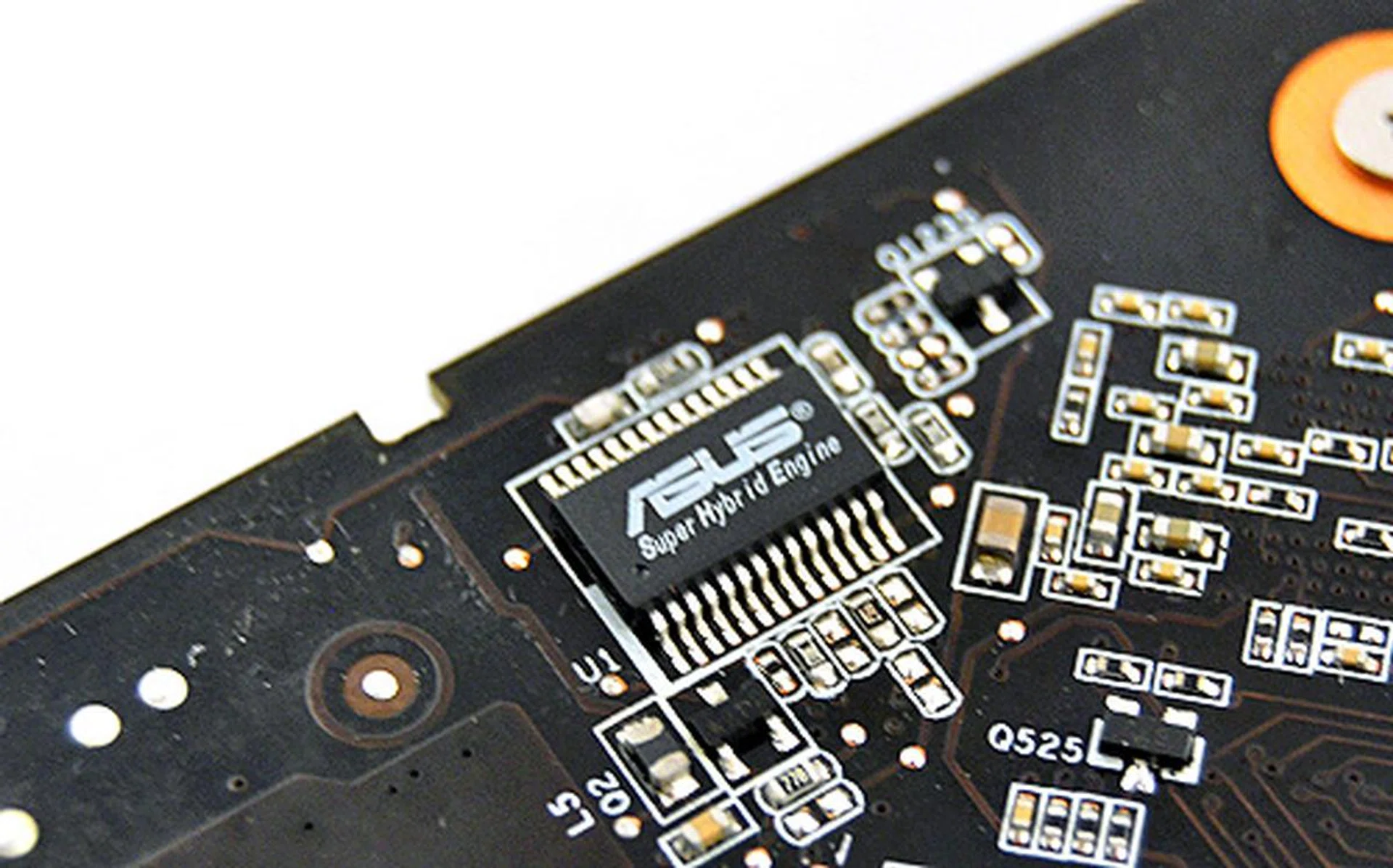
As they say in MTV Cribs, "This is where the magic happens". It is thanks to this chip that the EN9800GT is able to adjust voltage to the GPU and memory, allowing for a greater overclocking overhead.
Aside from the Super Hybrid Engine, the ASUS EN9800GT Matrix also features something that most, if not all, other GeForce 9800 GT card doesn't have - dual-SLI connectors - which means 3-way SLI. Officially, the GeForce 9800 GT supports only 2-way SLI, so the two connectors we see here are a bit of a surprise.
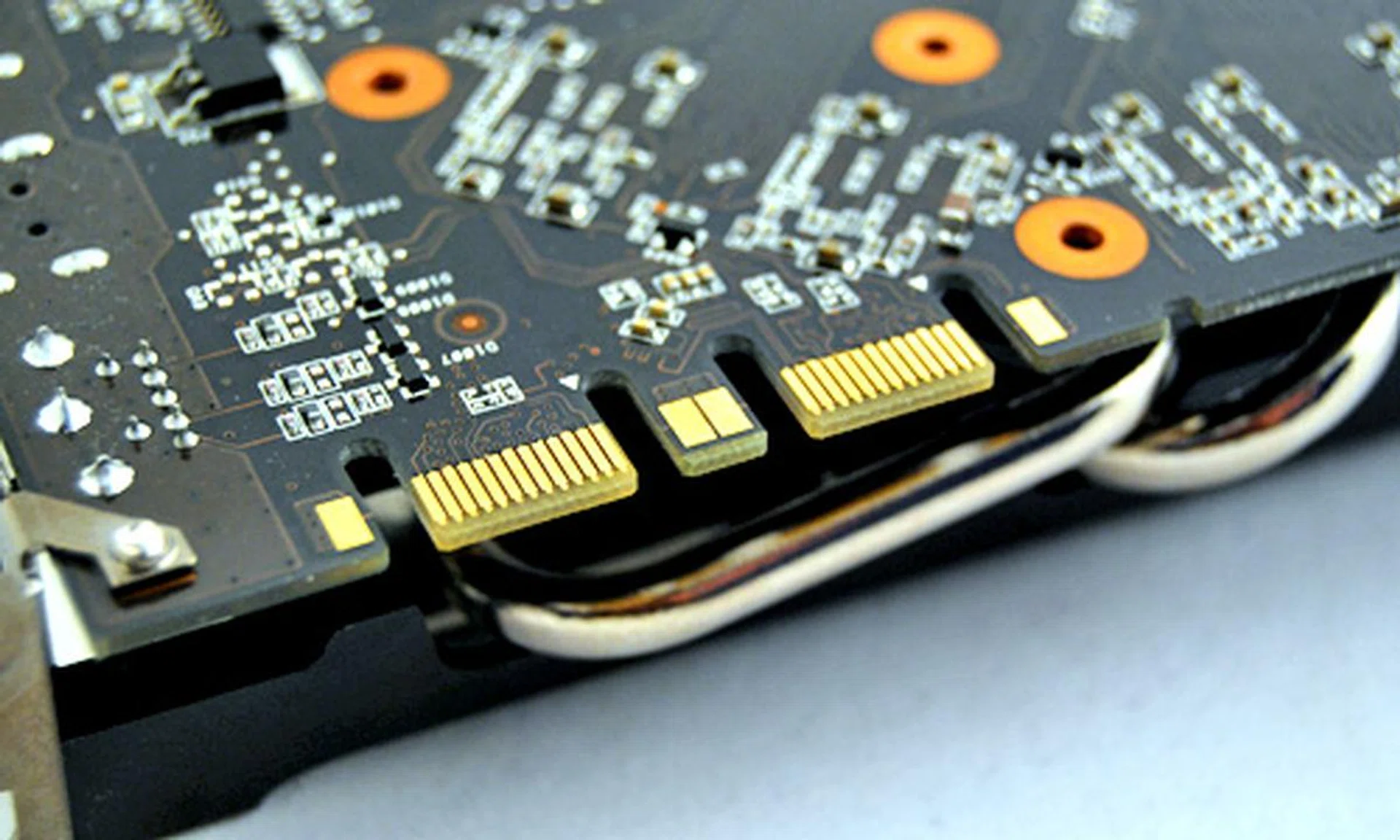
Unlike other cards based on the GeForce 9800 GT GPU, the EN9800GT Matrix has two SLI connectors, meaning that 3-way SLI is possible.
The ASUS EN9800GT Matrix also sports a unique cooler of ASUS' own design, known simply as Hybrid Cooler. It closely resembles the cooler from the recently reviewed HIS IceQ 4 Radeon HD 4850, only that it is not copper and has a much more restrained heatsink design. Judging from its design, it looks promising and should give the ASUS EN9800GT Matrix a good temperature reading in our test later.
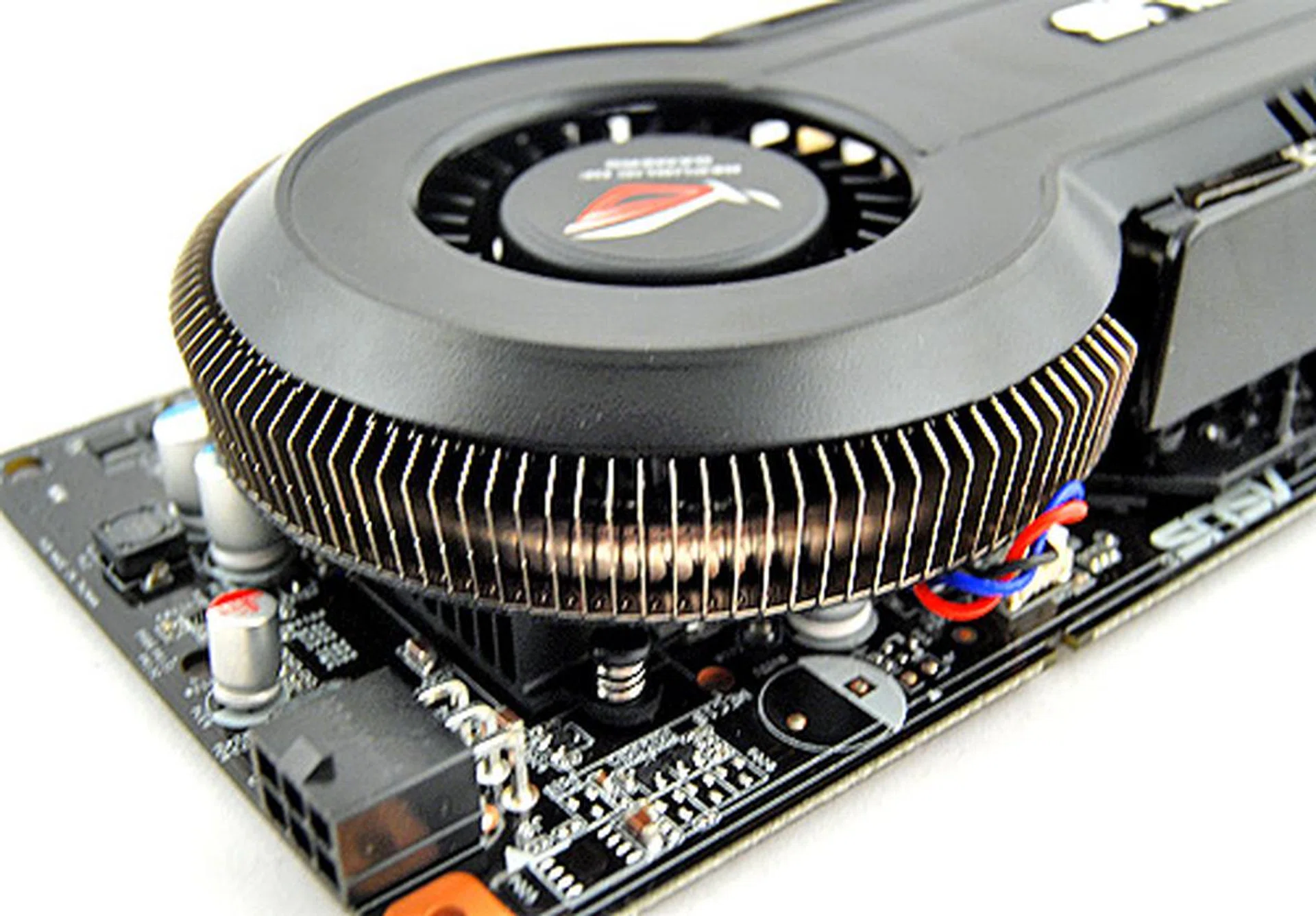
The design around the fan is rather interesting. Circling the fan is actually a heat pipe laced with fins that acts as radiators. This should help in keeping the card cool. Pity it isn't copper though.
Also, this is what the ASUS EN9800GT Matrix comes with:
- Installation guide
- 2 x CDs containing drivers and utilities
- 1 x DVI to VGA adapter
- 1 x SPDIF cable
- 1 x Molex to PCIe connector
- 1 x S/Video out
Test Setup
As usual, we'll be putting the ASUS EN9800GT Matrix through its paces on our XP and Vista system. Readers of our 9800 GT roundup will know we encountered problems with the EN9800GT with our trusty Vista and again, the same problem arose.
We contacted ASUS about this and the guys at their R&D department reckoned that it could be due to our PSU. This was quite an oddity as we've ran extremely power hungry cards on the same PSU, which mind you, is a monster 1.2KW unit from Thermaltake. After replacing the PSU with an Antec Quattro 1KW PSU, the card finally worked. When we enquired further, we couldn't get a lot more details other than the sequence of starting the 12V & 3V3 lines affect power IC functionality.
We pressed on with testing the card now that it was working. Here the specifications of our test systems as listed below:
Windows XP SP2 Test System
- Intel Core 2 Duo E6700 (2.66GHz)
- Intel D975XBX 'Bad Axe' motherboard
- 2 x 1GB DDR2-800 Kingston HyperX memory in dual channel mode
- Seagate 7200.7 80GB SATA hard drive
- Windows XP Professional with Service Pack 2 and DirectX 9.0c
Windows Vista SP1 Test System
- Intel Core 2 Extreme QX6850 (3.00GHz)
- Gigabyte X38T-DQ6 motherboard
- 2 x 1GB DDR3-1333 Aeneon memory in dual channel mode
- Seagate 7200.10 200GB SATA hard drive
- Windows Vista Ultimate with SP1
The last time we tested the ASUS EN9800GT Matrix, it was an engineering sample and so understandably, it did not perform quite as well as we would have hoped. This time however, with a retail version in hand, there can be no excuses, and it'll be interesting to see how it matches up with the other 9800 GTs.
Other key tests that we'll be paying close attention to include the temperature and overclocking tests. ASUS reckons that the EN9800GT Matrix can be easily overclocked to 750MHz at the core, 2000MHz at the memory and 1753MHz at the shaders, thanks to its Super Hybrid Engine, which is quite impressive.
Here's the list of cards and the tested driver versions:
- Gigabyte 9800 GT 512MB (Forceware 177.79)
- MSI NX9800GT-T2D512-OC (Forceware 177.79)
- Palit GeForce 9800 GT Sonic (Forceware 177.79)
- Zotac GeForce 9800 GT AMP! Edition (Forceware 177.79)
- NVIDIA GeForce 8800 GT 512 MB (Forceware 177.79)
And the following benchmarks were tested using their built-in time demo or benchmarking tools:
For Windows XP:
- Futuremark 3DMark06 (ver 110)
- Company of Heroes (ver 1.3)
- F.E.A.R (ver 1.0)
- Crysis (ver 1.1)
- Unreal Tournament 3 (ver 1.1)
For Windows Vista:
- Futuremark 3DMark Vantage (ver 101)
- Crysis (ver 1.21)
Windows XP Results - 3DMark 06 (ver 110)
In true HardwareZone tradition, we begin our benchmark report with the ever popular 3DMark 06. The ASUS EN9800GT Matrix got off on a bad start, posting results that were nearly identical to the engineering sample we tested earlier. Even worse was that these numbers were lower than that posted by the Gigabyte 9800 GT, which ran on reference clockspeeds.
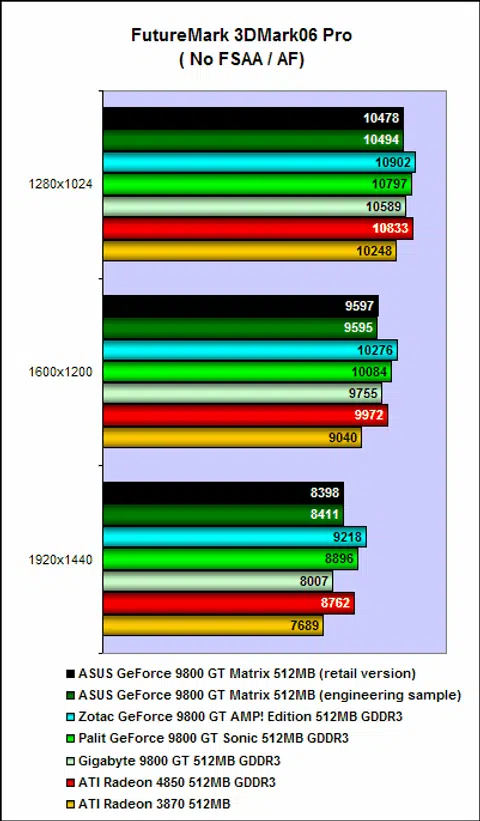
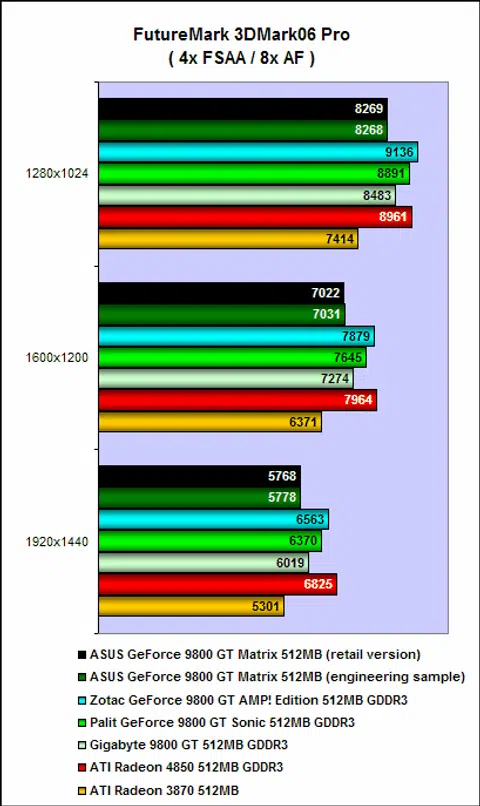
Windows XP Results - Company of Heroes & F.E.A.R.
The ASUS EN9800GT Matrix continued its disappointing start in Company of Heroes, where it continued to post scores similar to the engineering sample. These scores were also slightly slower when compared to the reference-clocked Gigabye 9800 GT.
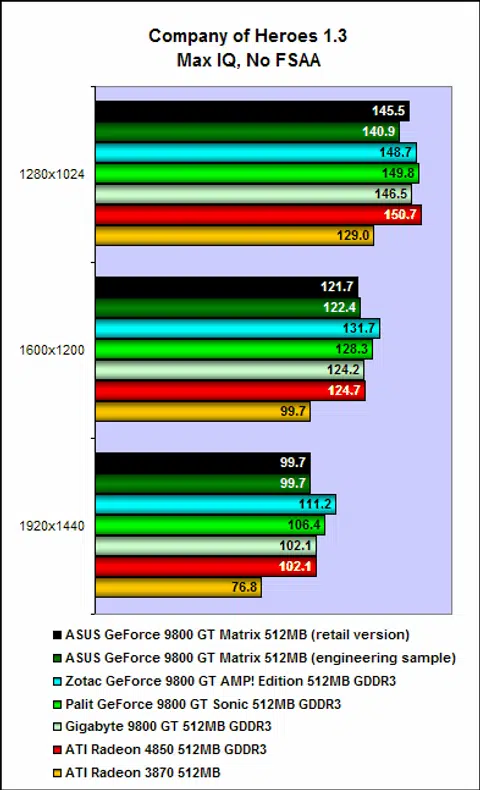
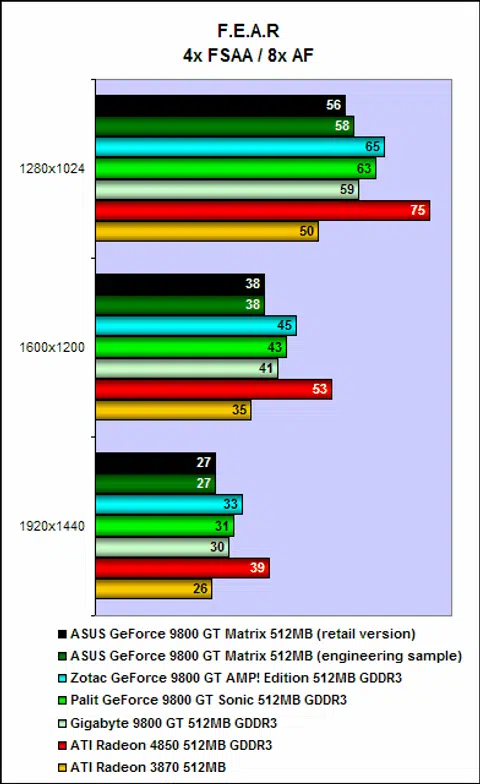
The ASUS EN9800GT Matrix's poor showing was replicated in F.E.A.R. as well. Despite being slightly overclocked at 612MHz, we were surprised at how the ASUS EN9800GT Matrix was consistently slower than the Gigabyte 9800 GT. And again, there was no noticeable difference between the retail version and the engineering sample. We suspect this could be a case of the Super Hybrid Engine not working as intended.
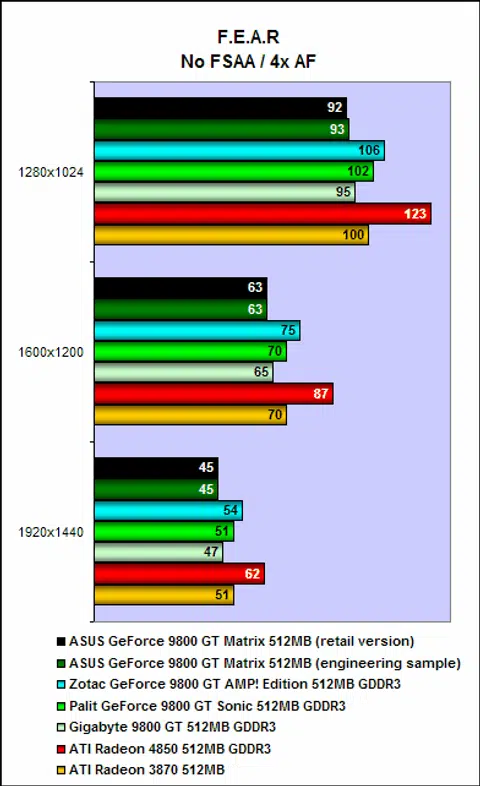
Windows XP Results - Unreal Tournament 3 and Crysis
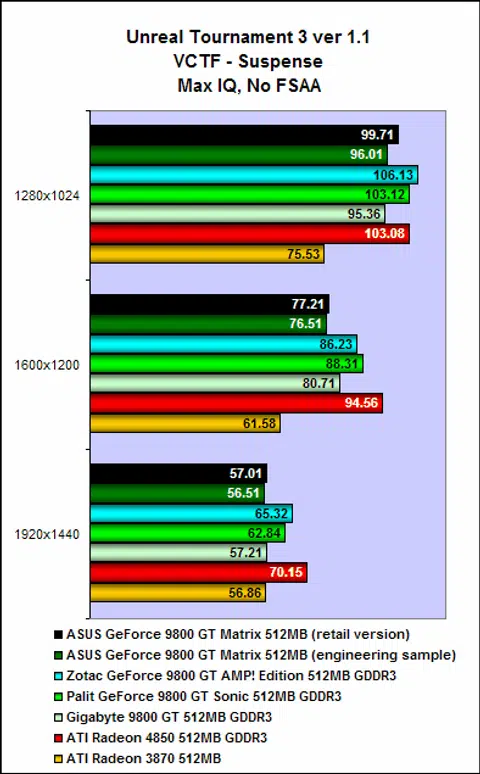
The ASUS EN9800GT Matrix performed a little better in Unreal Tournament, but that could be due to the random nature of the botmatch benchmark. Here, it posted scores that were much closer to the Gigabyte 9800 GT, but were still not what we were expecting.
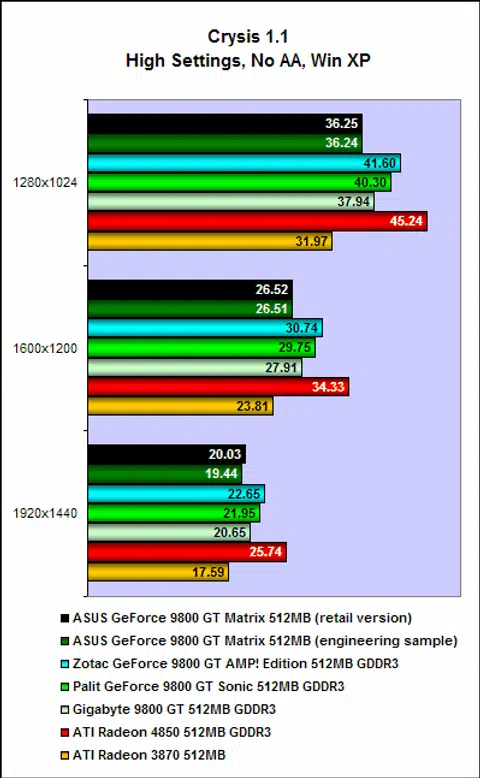
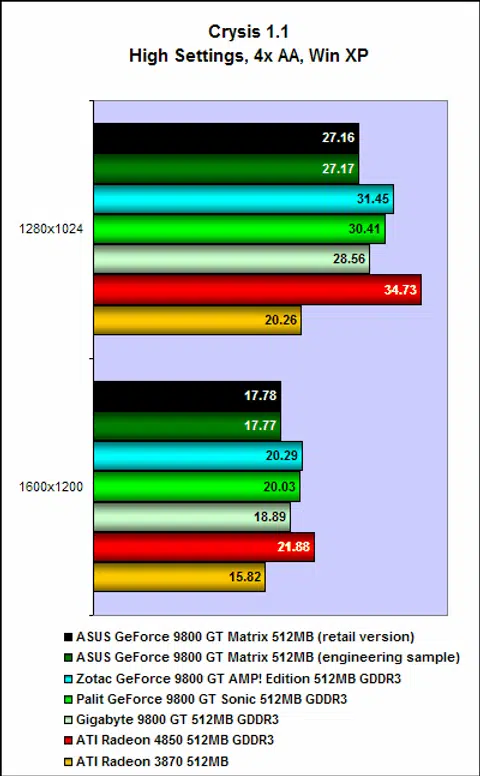
Moving over to Crysis, the ASUS EN9800GT Matrix continued its poor performance. Again, it posted scores similar to the engineering sample and once again, it failed to match even the reference-clocked Gigabyte 9800 GT. We are certainly puzzled by the EN9800GT Matrix's lackluster performance and if Super Hybrid Engine is working at all.
Windows Vista Results - 3DMark Vantage
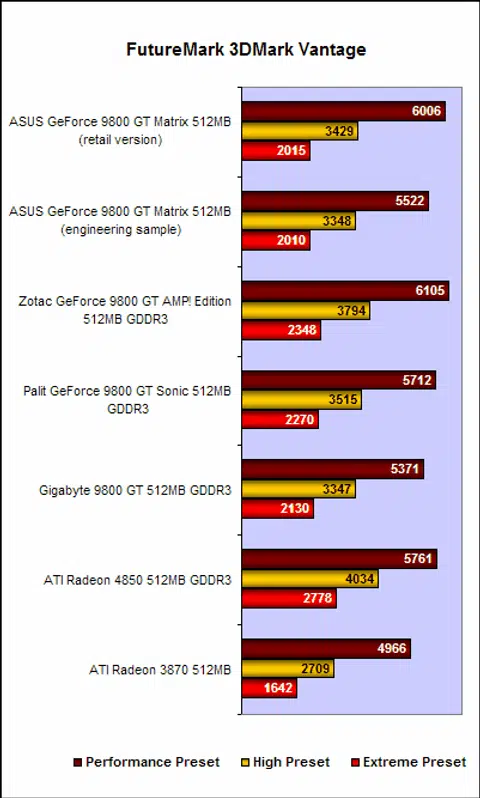
On to Windows Vista, we saw the ASUS EN9800GT Matrix getting off to a good start, posting scores at the 'performance' preset that was significantly better than the engineering sample as well as the reference-clocked Gigabyte 9800 GT. But sadly, it lost steam once we increased the settings. At the 'extreme' preset, it was once again, the worst performing amongst the GeForce 9800 GT cards.
Windows Vista Results - Crysis (ver 1.21
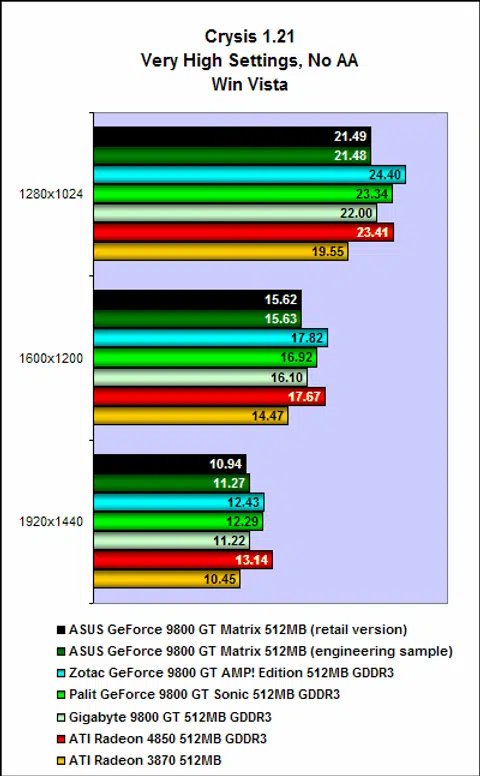
Lastly, running Crysis on Vista, we saw once again that the ASUS EN9800GT Matrix was churning out frame rates identical to the engineering sample. The performance of the ASUS NE9800GT has really been disappointing and puzzling.
Temperature, Power Consumption & Overclocking
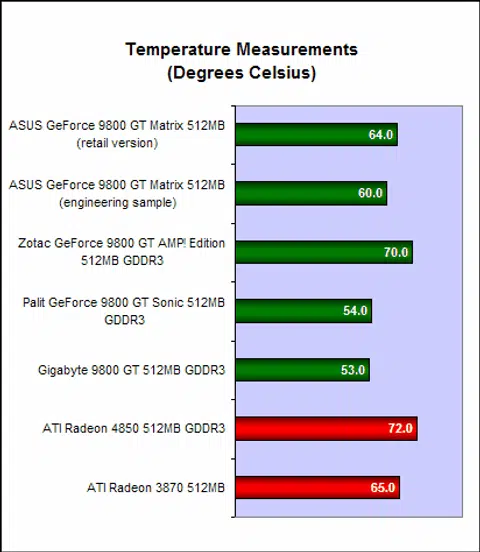
As for temperature testing, the ASUS EN9800GT Matrix recorded an operating temperature of 64 degrees Celsius, which makes it a little better than the Zotac GeForce 9800 GT AMP! Edition, which, remember, sports a single slot reference cooler. Additionally the Zotac card is also the most aggressively overclocked of the bunch here, coming in at 700MHz at the core, 2000MHz DDR at the memory and 1700MHz at the shaders. This clockspeeds are significantly higher than the ASUS EN9800GT Matrix's. Having said that, we were disappointed with ASUS' Hybrid Cooler.
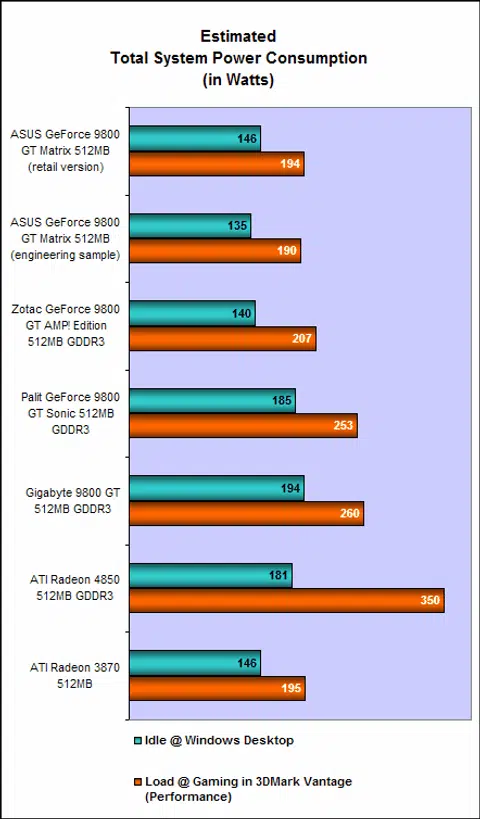
Power consumption is where the ASUS EN9800GT Matrix performed the best, where its power ratings were only slightly higher than those of the engineering sample and is quite clearly the lowest amongst our bunch of GeForce 9800 GT cards, although the Zotac GeForce 9800 GT AMP! Edition was not too far off. This certainly looks like the Super Hybrid Engine is working its charms in both 2D and 3D but is at the expense of performance? The more we analyze the results, the more it seems to be the case.
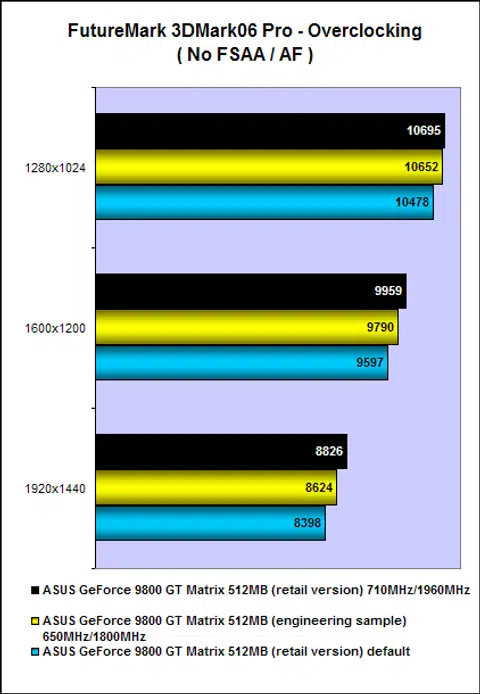
Remember what ASUS said about its Super Hybrid Engine? ASUS believes that with it, the EN9800GT Matrix can be easily overclocked to 750MHz at the core, 2000MHz DDR at the memory and 1753MHz at the shaders. But unfortunately, we didn't manage to push it that far and managed to get it up only to 710MHz at the core and 1960MHz DDR at the memory, giving us only little boost in performance. Note that these overclocks are lower than what other competing GeForce 9800 GT cards had managed, which brings us back to the point of the Super Hybrid Engine which looks like it is actually hindering the card's capabilities instead of helping it.
iTracker & GamerOSD
Included with the EN9800GT Matrix are two utilities that allow users to tweak their cards so that it performs optimally. One of which is iTracker, which works by providing users real-time information about the cards operating status such as clockspeeds and operating temperatures. Working in tandem with the Super Hybrid Engine, it automatically adjusts clockspeeds and fanspeeds according to the load, thereby ensuring maximum performance and cooling.
iTracker comes preset with four settings: optimized mode, gaming mode, power saving mode and default mode. And each setting has two further subsets, 2D and 3D mode. The idea behind iTracker is that when the system is idle or running 2D applications, it automatically downclocks the card, thereby saving power and reducing operating temperatures. When it detects a 3D application running however, it'll up the clockspeeds so as to handle the extra load.
To test the feature, we ran iTracker and ran Crysis in windowed mode. Before Crysis was running, we noted that iTracker was in 2D mode, which was all well and good. However, turning Crysis on and running the benchmark did not cause iTracker to increase the clockspeeds. We found that we had to manually switch iTracker's settings from 2D to 3D mode. This really defeats the purpose of iTracker, we think.
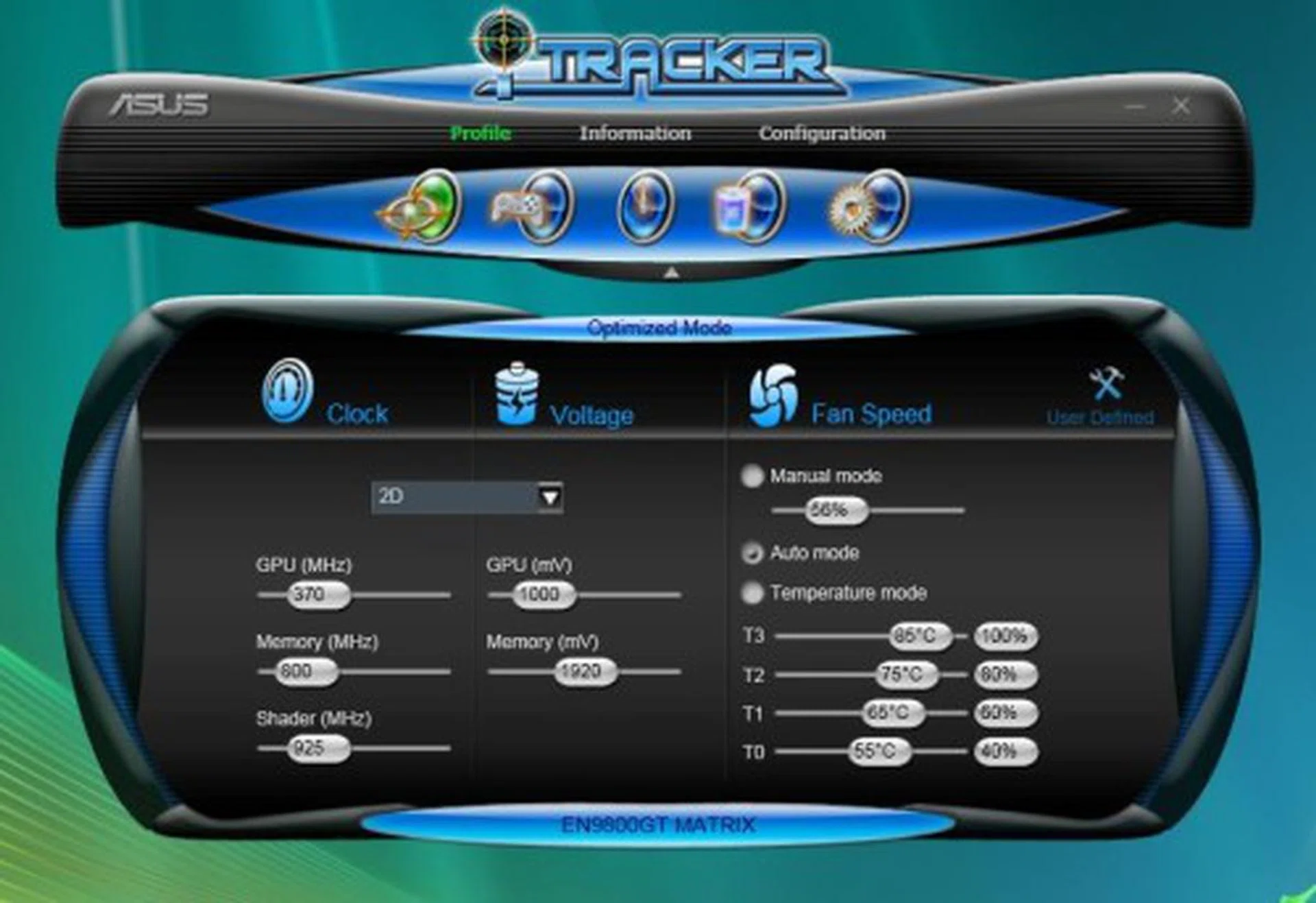
iTracker is a brilliant idea on paper - automatic adjustments of clockspeeds, real-time information, comprehensive tweaking options. But in practice, it didn't work the way it was supposed to.
GamerOSD is the other utility that was bundled with the card. Basically, GamerOSD is a utility that shows real-time FPS and allows for on-the-fly tweaking of the GPU core clockspeeds, gamma, brightness and contrast levels. In addition, it also allows for video capturing and the taking of screenshots. This is one quick way to lower or increase your GPU core clockspeeds and is a pretty nifty utility.
Not 'The One'
While ATI has been releasing a constant stream of new GPUs based on their new RV770 foundation chip, NVIDIA has instead chosen the path of the dark side, taking the easy way out and renaming and rehashing old products. At the time of writing, we've just received a working sample of ATI's soon-to-be-released Radeon HD 4830 that we suspect will go head-to-head with the GeForce 9800 GT. As of now, the gap between the HD 4850 and HD 4670 is simply too wide, leaving NVIDIA free rein that area with their 9800 GT and 9600 GSO models.
In view of that, in order to stand up to the oncoming onslaught that is the Radeon HD 4830, ASUS needs their EN9800GT Matrix to be something special, but sadly, it isn't. It showed a lot of promise, with some very nifty features such as the automatic throttling of GPU clockspeeds and memory voltages, but we discovered, much to our dismay, that it didn't work as well as it should.
More puzzling however is the disappointing performance put in by the card. Admittedly a 12MHz overclock might not be much, but we were taken aback by how it time and time again was bettered by the reference clocked Gigabyte 9800 GT. We expected it to be at least on par.
As tested in our power consumption phase, the Super Hybrid Engine does a dandy job in both idle and load states. However, the card fails to perform as expected of its specifications, nor throttle up the clocks as marketed, doesn't overclock to the expected level of this SKU when compared to other cards and it even has PSU compatibilities. Also inferring from its engineering sample that we tested earlier, we can easily tell that the Super Hybrid Engine is perhaps the culprit holding back the card's capabilities. Let alone these, the seemingly special Hybrid Cooler's performance was lackluster and the iTracker software was not working to expectations.
Even worse is its suggested retail price of S$299, which easily makes it the one of the most expensive GeForce 9800 GT card currently available. At that price, it is also more costly than most Radeon HD 4850 cards. Judging from its performance in our tests, its exorbitant price-tag is clearly not justified.
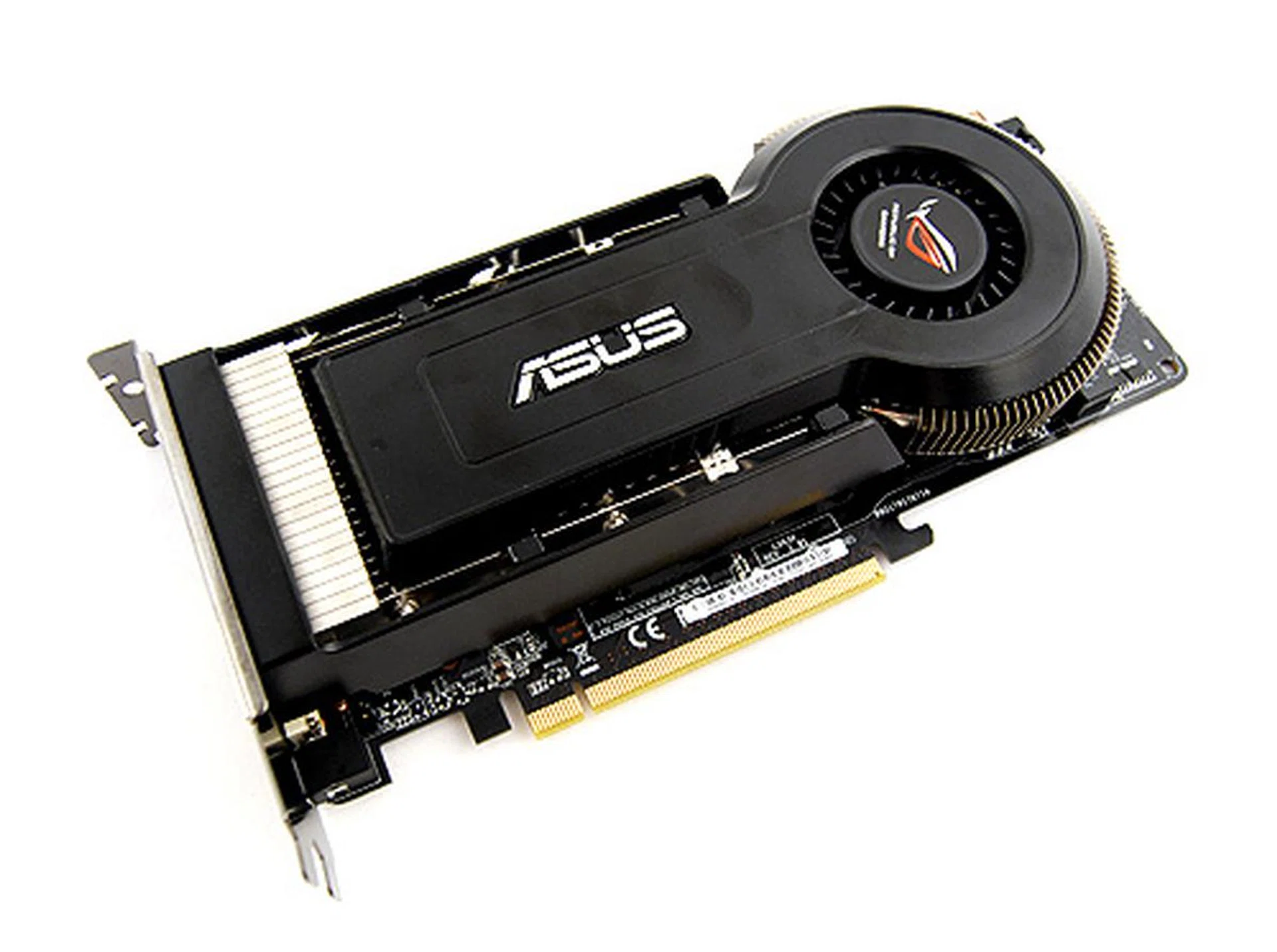
Like Neo in the movie who had to die in order to be resurrected as "The One", so too must ASUS take a second look at the EN9800GT Matrix.
All in all, the ASUS EN9800GT Matrix had a lot of going for it, but was ultimately undone by its bafflingly poor performance, unpolished utilities and, frankly, quite unreasonable price-tag. To answer the question, the ASUS EN9800GT Matrix is not 'The One'. There are better GeForce 9800 GT cards out there.
Our articles may contain affiliate links. If you buy through these links, we may earn a small commission.