
ASUS EN8600GT OC Gear 256MB DDR3
Tweaking your graphics cards is now as simple as turning a knob with ASUS' OC Gear edition of the GeForce 8600 GT. We tried our hand at fiddling with this new product and here's what we found.

Dashboard Confessions
There's something about flashing lights and LED displays that seems to appeal to the male psyche. Witness all the 'toys' that males generally make a beeline for - fast cars, electronic devices and expensive home theater systems. Common to all these gadgets is that they all have something shiny to boast about, be it the testosterone-fuelled dashboard of a super car or the classy VFD of a hi-fi system. For those who have similar urges but as yet unable to afford these finer things in life, DIY PC systems make for a reasonable alternative due to its lower entry price. Hence, case modding and decking out the PC in LEDs like a Christmas tree is usually the domain of male teenagers and adults. Undoubtedly, some of them will graduate to more expensive hobbies in the future but there is always a ready market for males looking to customize their 'rigs'.
It is this group of enthusiasts that ASUS hopes to capture with its latest product. Since most enthusiasts who overclock or heavily tweak their systems desire instant access to information like temperature and fan speed, ASUS has followed the trend of some manufacturers by including these in a separate display module that can be mounted in the 5.25-inch drive bay of the chassis. Such an approach has been done previously with both liquid and air cooled setups and we have even seen a PSU with such a monitoring module previously from AcBel. Now it seems that it's the turn of the graphics card to get such a real time monitoring tool and in fact according to ASUS, it's the first of its kind.
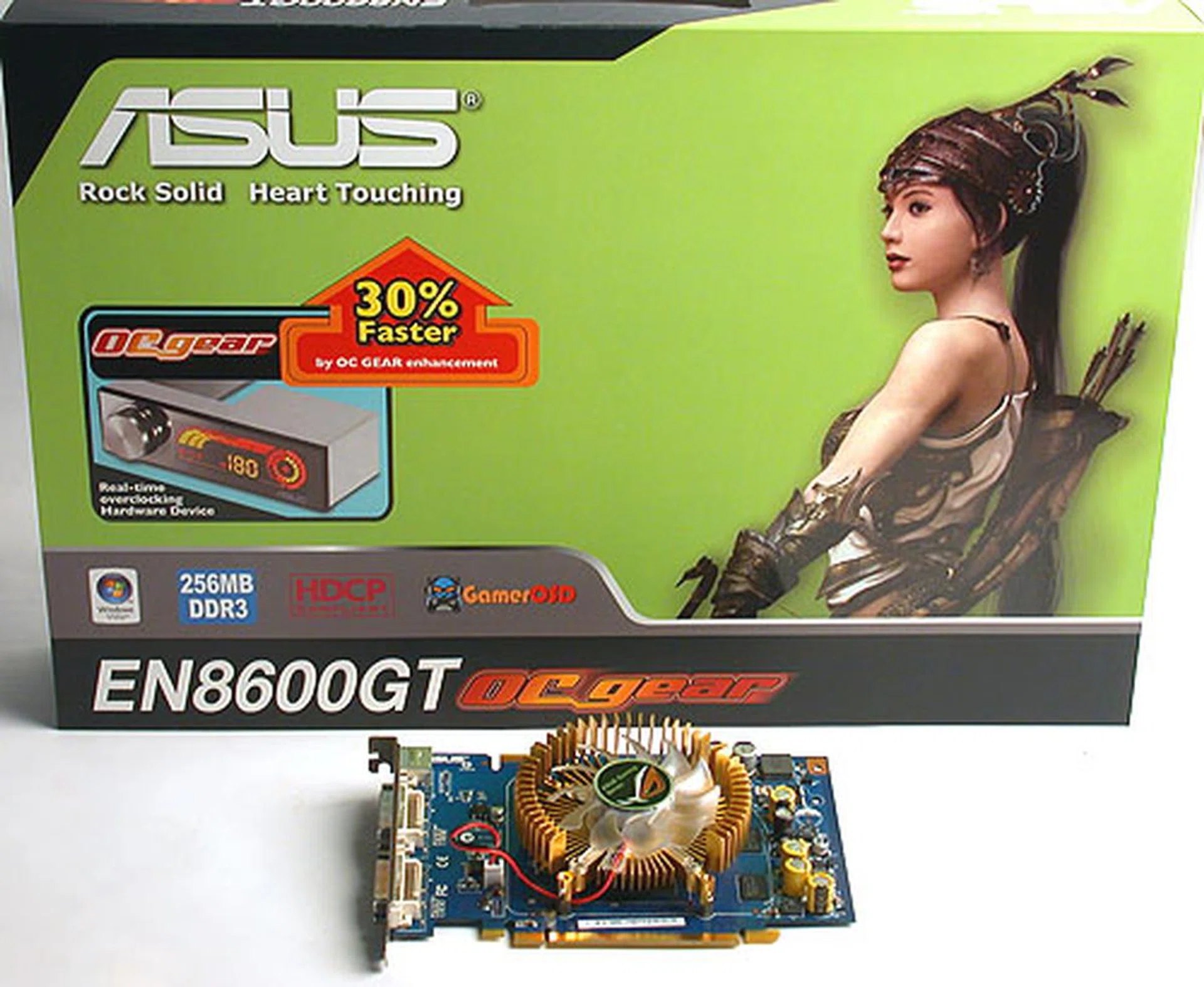
Control freaks will rejoice at the easy access to the fan and clock speed with a twist of the knob. ASUS' OC Gear module is targeted at these users.
Dubbed the OC Gear, this add-on has been surprisingly paired with a mid-range NVIDIA GeForce 8600 GT graphics card. Perhaps ASUS feels that this module will give its product an advantage in this highly competitive segment. The card itself will function normally without installing the module; doing so just gives users the ability to modify the core clock, system volume and fan speeds simply by turning a knob. This can be done without exiting any application and going to the NVIDIA Control Panel as would be the usual case. Before we explore further how this monitoring tool works, let's take a look at the technical specifications:
The ASUS EN8600GT OC Gear 256MB DDR3
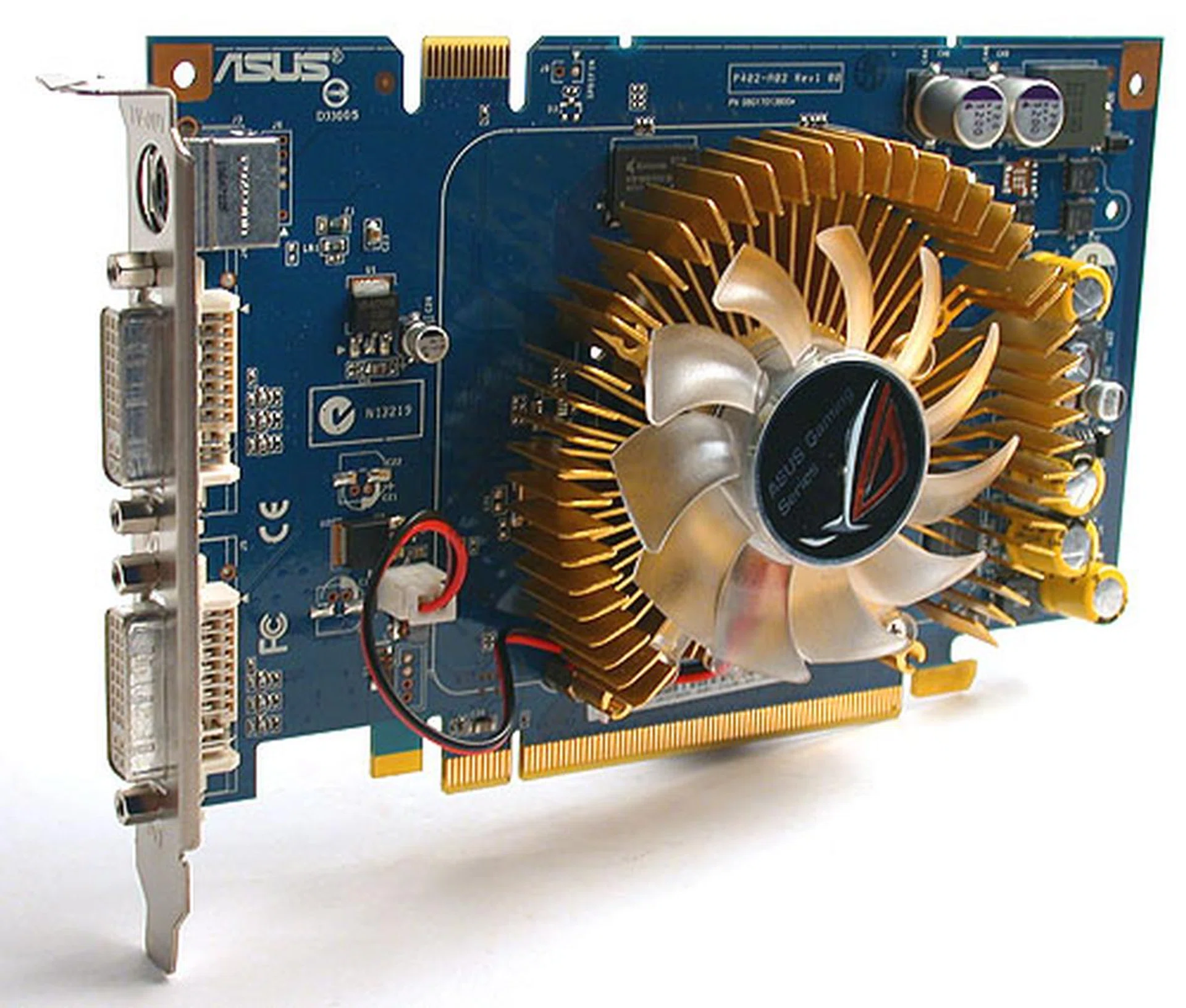
Based on the mid-range NVIDIA GeForce 8600 GT, this ASUS card is modest in length and height. The fan however is a two-slot version that will take up an extra expansion slot. It is rather quiet with a low, faint hum when running and that too at its maximum speed. Like other GeForce 8600 GT cards, no power connector is needed as the card takes all it requires through the PCIe bus. The clock and memory speeds are at the standard frequencies of 540MHz and 1400MHz respectively. However, we got slightly higher numbers than expected in our benchmarks and a check of its BIOS revealed that the 32 stream processors are running at 1296MHz, roughly 100MHz higher than usual. This probably accounted for the performance that we noticed.
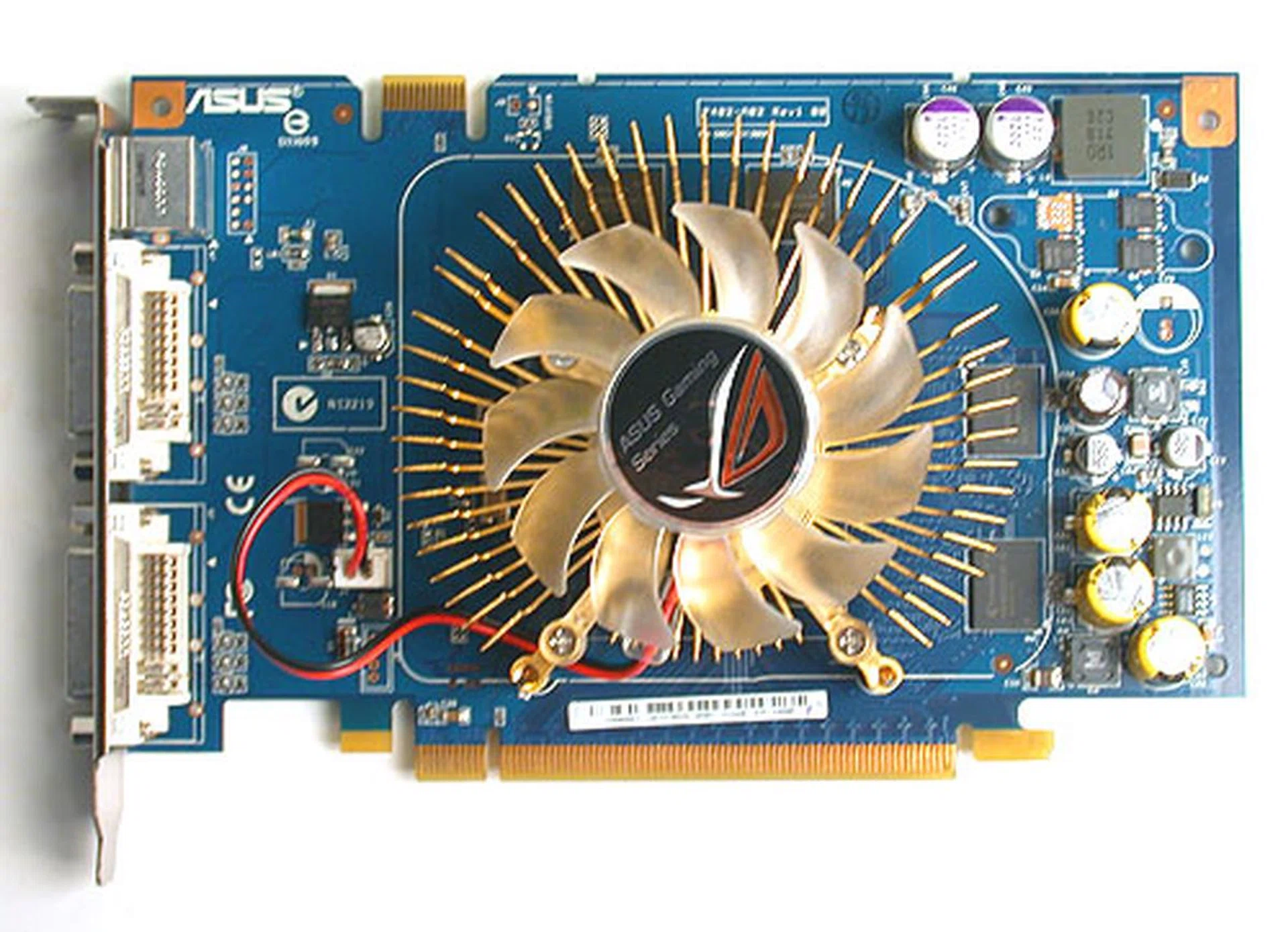
The NVIDIA GeForce 8600 GT is a mid-range card, hence the modest size of the PCB. ASUS has included a variable speed fan that can be controlled via the OC Gear module.
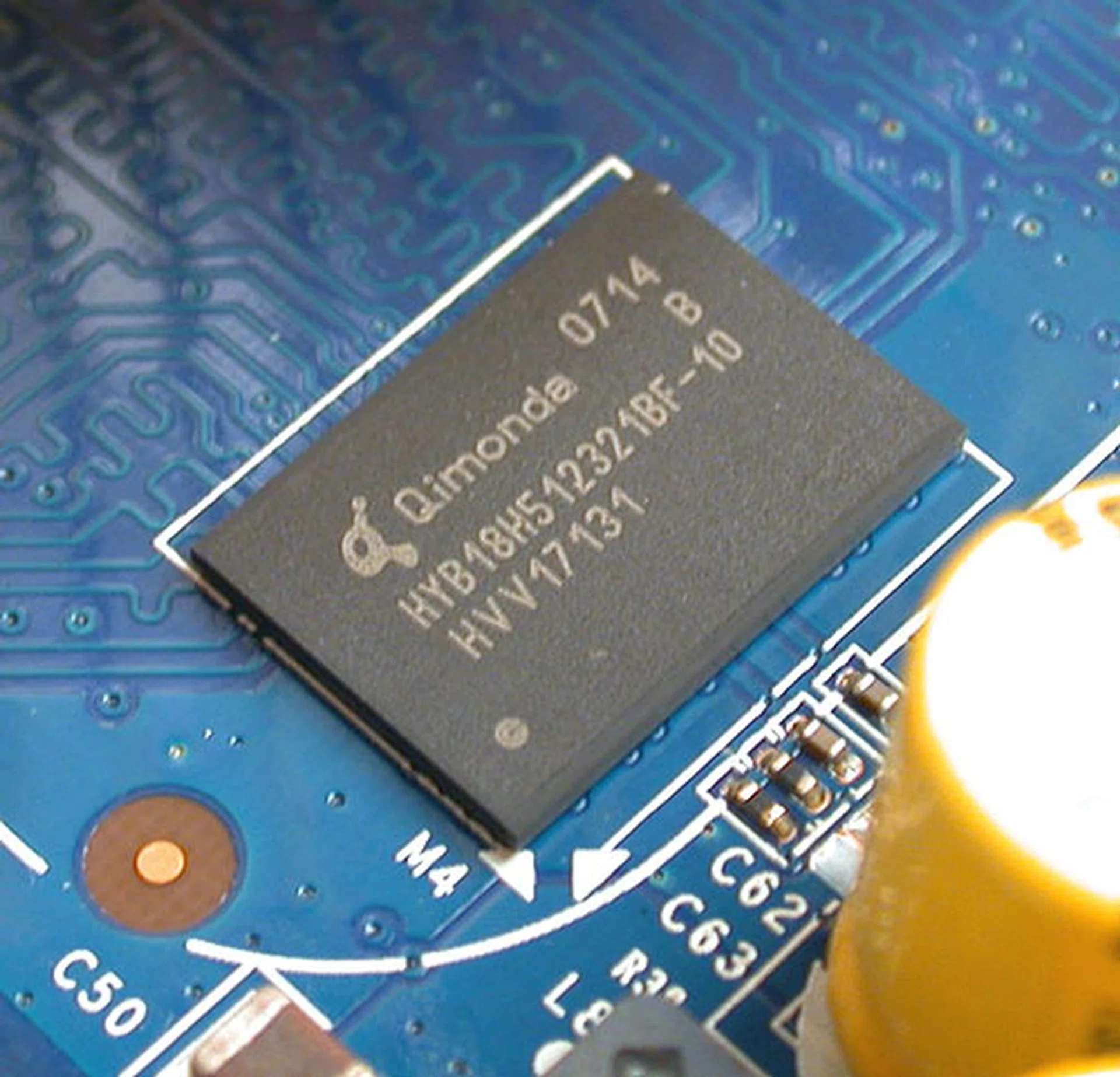
1.0ns rated DDR3 memory chips from Qimonda.
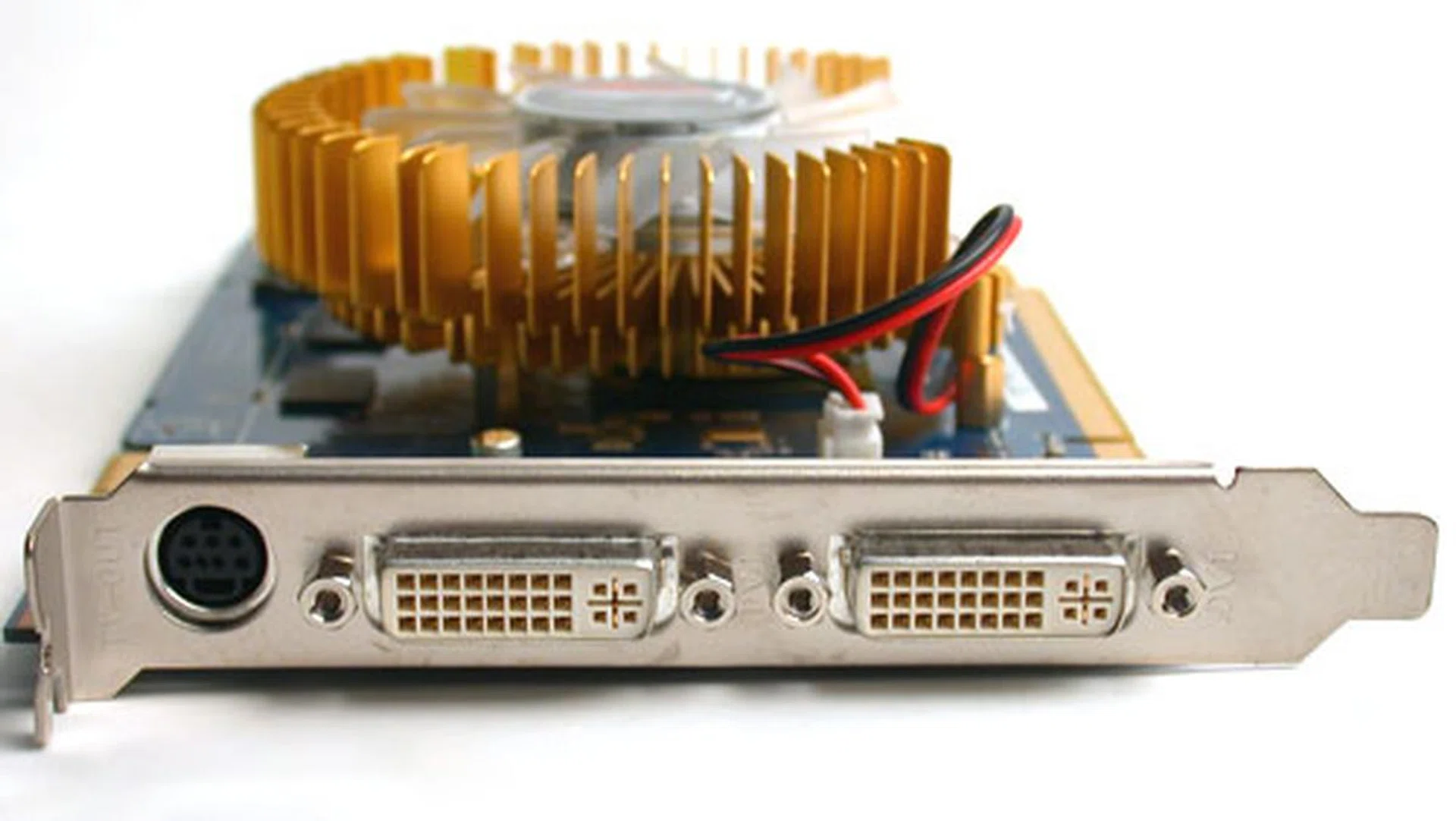
Unlike most generic GeForce 8600 GT cards, the ASUS comes with HDCP support for both its dual-link DVI outputs.
The OC Gear Module
As for the OC Gear module, it fits snugly into any 5.25-inch drive bay on the chassis and screws are required to mount it securely. A spare 4-pin USB header on the motherboard is required for it to work as a connecting cable is provided to connect the module to the motherboard. It is through this avenue that the OC Gear gets its power and real time system information. Users can even adjust how often they want the module to poll the system for information like temperature and frame rate through the included SmartDoc utility. Extra drivers are needed for this module and supporting tools like SmartDoc and GamerOSD must be installed to get full functionality.
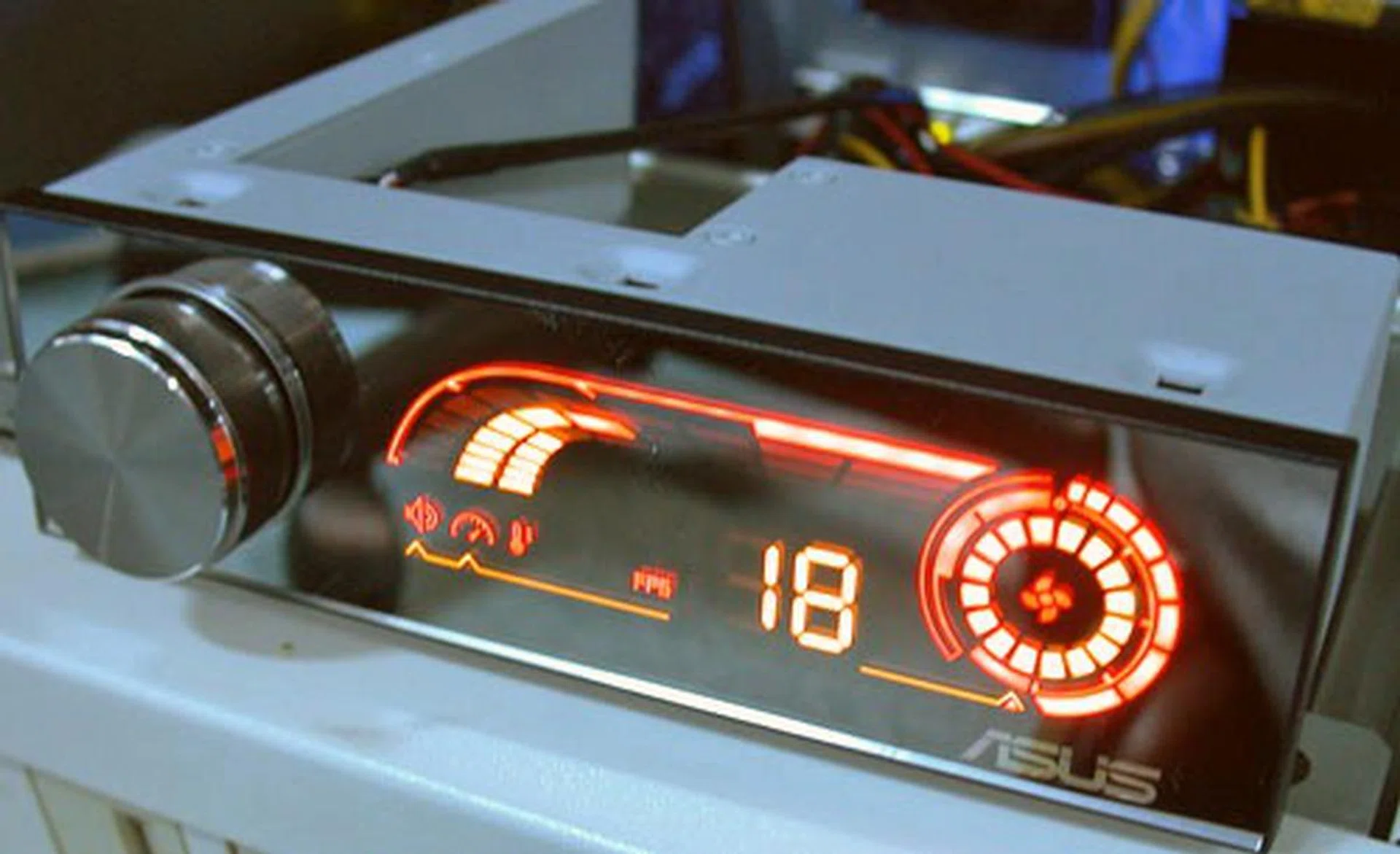
The OC Gear module displays the frame rate of the application or game at any point in time. In this case, it's 18. Other indicators show the fan, GPU temperature and core clock speed, though these are represented graphically rather than with exact numbers. Users can choose to adjust the volume, fan and core clock speed using the knob. Pressing the knob inwards will switch the focus to the various settings. A small red indicator in the form of a pointy arrow shows which function the knob is focused on.
The module will only start up after Windows is loaded (the LED display won't work before that) and we doubt that it will work in other operating systems at the moment (Vista beta drivers are available though). It will however work with other ASUS graphics cards, though some functions like fan speed control may not be present, depending on whether the graphics cards has such a feature in the first place. With the OC Gear, users can monitor and adjust these settings without exiting their applications. The only downside we found is that the memory speeds cannot be tweaked in this fashion as the knob only controls the core clock. For the memory clock, you'll have to rely on the SmartDoc utility or NVIDIA Control Panel. Also, while we appreciate that too many numbers will clutter the display, the lack of any solid numbers may not fully convey the information, especially crucial ones like temperature and clock speeds. One thing to note that any changes done via the OC Gear module are affective in real time and you can check that against the SmartDoc utility or NVIDIA's Control Panel.
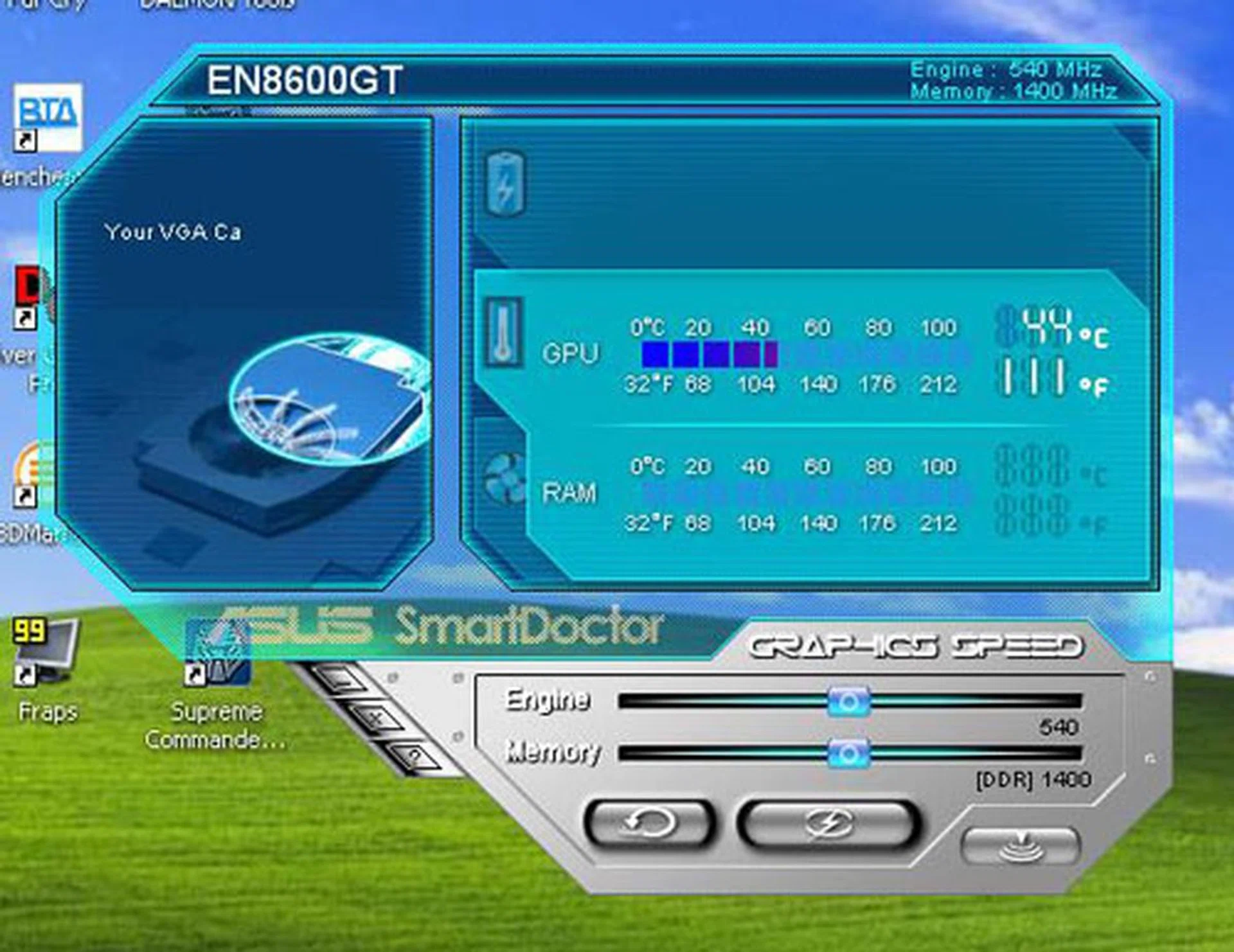
ASUS' SmartDoc application gives a more comprehensive overview of the tweaks available on this graphics card. You can change the settings here through this interface and there are more options compared to the hardware module.
Here is the full list of the items found in our package:
- 1 x DVI-to-VGA adaptor
- 1 x 9-pin mini-DIN to Component dongle
- User Manual (CD format)
- Utilities and Driver CD
- OC Gear module
- Leather CD wallet
Test Setup
Starting with an Intel D975XBX 'Bad Axe' motherboard, our test system was also installed with an Intel Core 2 Duo E6700 processor (2.66GHz). There was 2GB of low latency DDR2-800 HyperX memory modules from Kingston and an 80GB SATA hard drive from Seagate (7200.7). The operating system was as usual Windows XP Professional and the installation was patched with Service Pack 2 and DirectX 9.0c.
We have covered quite a few GeForce 8600 GT retail cards in the past, including overclocked ones like the XFX GeForce 8600 GT Fatal1ty and Foxconn GeForce 8600 GT. These cards will be compared against the ASUS EN8600GT OC Gear, together with a silent version from ASUS. These four cards will be running ForceWare 158.22 drivers. We also included a standard NVIDIA GeForce 8600 GT and 8600 GTS for reference and these are on ForceWare 158.16 drivers. The following benchmarks were tested:
- Futuremark 3DMark05 (ver. 120)
- Futuremark 3DMark06 (ver. 102)
- Tom Clancy's Splinter Cell: Chaos Theory (ver 1.3)
- F.E.A.R
- Company of Heroes (ver 1.3)
- Quake 4 (ver 1.2)
Results - 3DMark05 Pro & 3DMark06
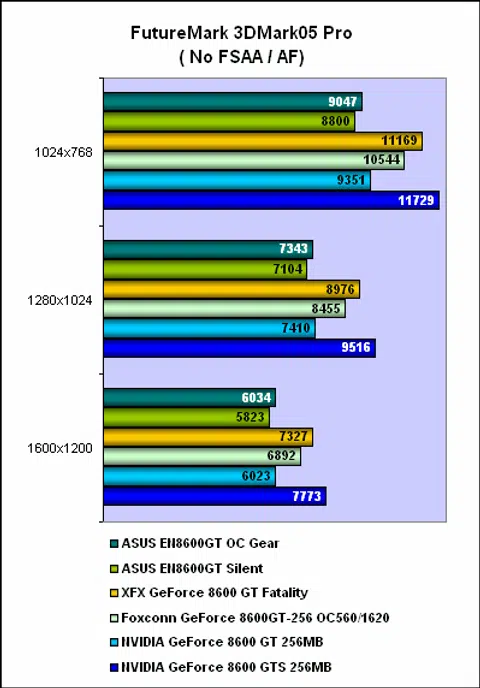
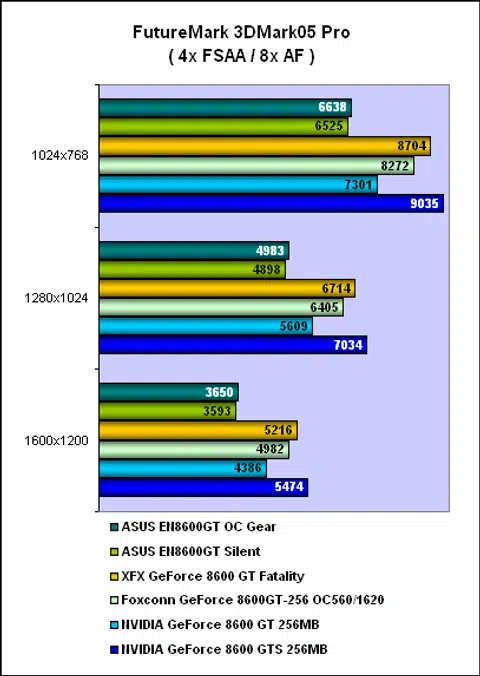
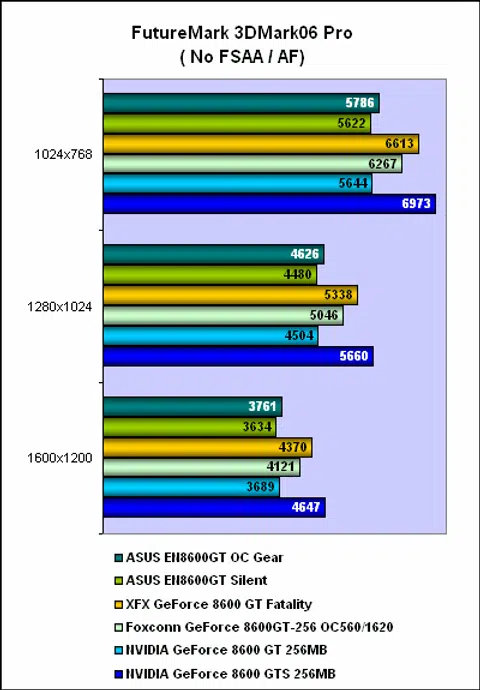
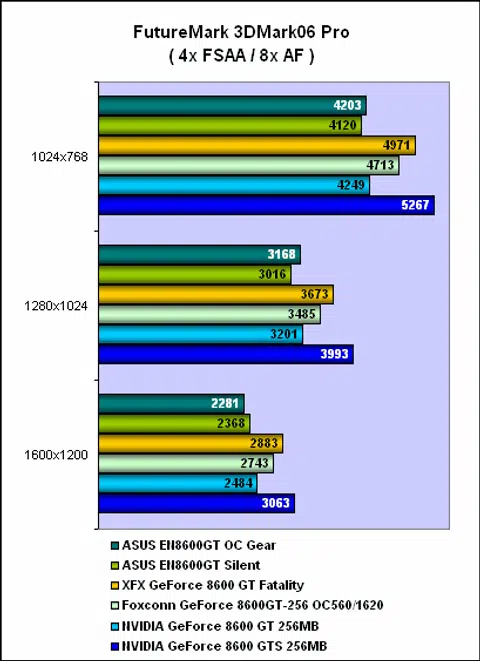
Despite the higher stream processor clock, the ASUS EN8600GT OC Gear ended up slower than the reference GeForce 8600 GT, though it was marginally faster than the ASUS EN8600GT Silent. This difference was quite significant especially with anti-aliasing enabled in 3DMark05. However, the fact that both were using slightly different driver sets could be a reason for such results. This is borne out with the scores in 3DMark06, where the ASUS OC Gear was slightly ahead of the reference card. Naturally, the overclocked cards were ahead of both the silent and OC Gear ASUS cards.
Results - Splinter Cell: Chaos Theory (DirectX 9 Benchmark)
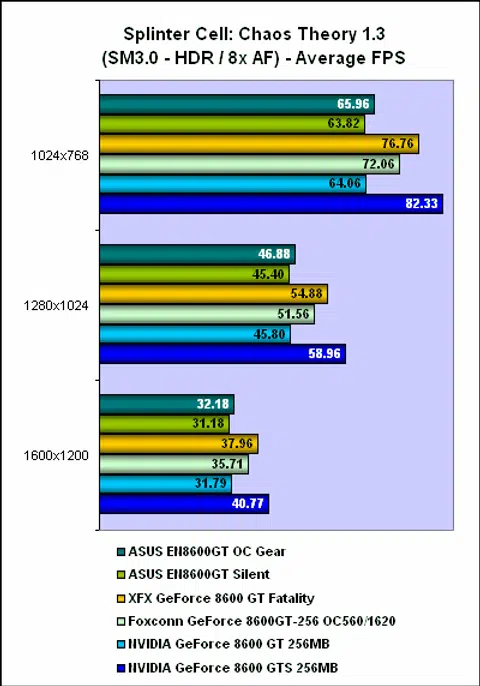
Here, we found the ASUS OC Gear card scoring slightly better (up to 2%) than the silent ASUS GeForce 8600 GT and the reference card on most occasions, which meant it performed to our expectations. The actual in-game difference was rather indistinguishable and users would be hard pressed to identify the cards.

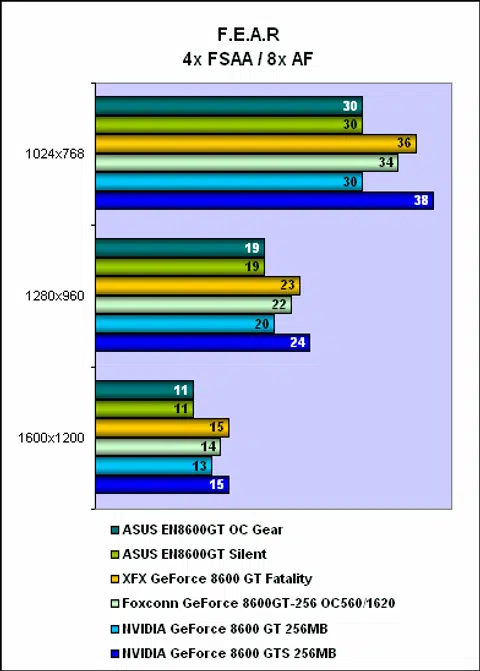
Results - F.E.A.R (DirectX 9 Benchmark)
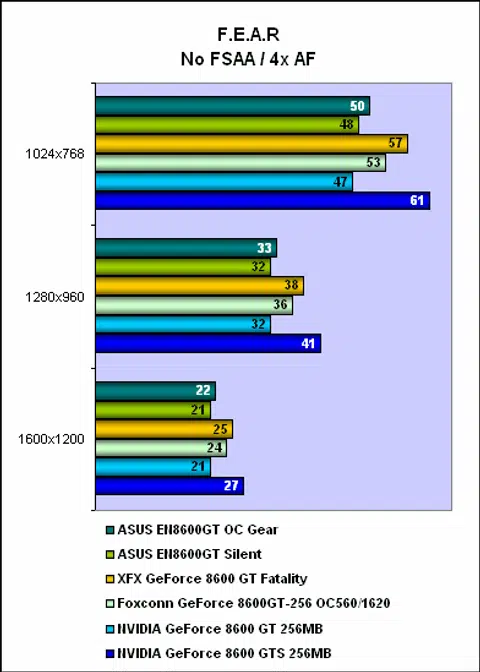
The ASUS EN8600GT OC Gear held a lead of just 1fps over the silent version and the reference card in F.E.A.R. With anti-aliasing however, this was no longer so and the reference card was the slightly stronger performer. Again, the different driver versions used may account for the minor discrepancy in scores, but in the overall scale of things, they're all performing similarly.
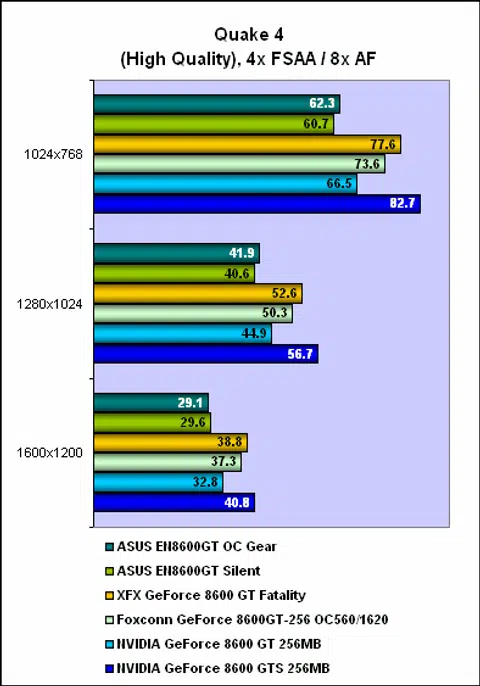
Results - Quake 4 & Company of Heroes (SM2.0+ Benchmarks)
Quake 4 was another case where the two ASUS cards trailed the reference card. At least the ASUS EN8600GT OC Gear managed a slight lead over the silent version. We also encountered a strange problem in the game during our timed demos. The OC Gear kept freezing during the demo at the exact same point and despite our attempts to reinstall both the OC Gear drivers and its related utilities (SmartDoc and GamerOSD), it refused to complete the benchmark. Only after we had completely uninstalled all drivers and applications required by OC Gear - essentially testing the card based solely on its hardware - did the problem vanish and we could finish our benchmarking. We speculate that the OC Gear module and applications could in some way be interfering with the game but based on only one example, it's not conclusive. Meanwhile, ASUS' engineers are trying to replicate this 'bug' in its labs and we'll update this section if there is outcome to this issue. So far from their current findings, it seems more like an isolated issue.
As for Company of Heroes, the results were reversed in where the two ASUS cards managed to overturn the scores of the reference GeForce 8600 GT, with the OC Gear version rightly outdoing the silent edition. There were even moments when it seemed that the OC Gear could catch up with the overclocked Foxconn card.

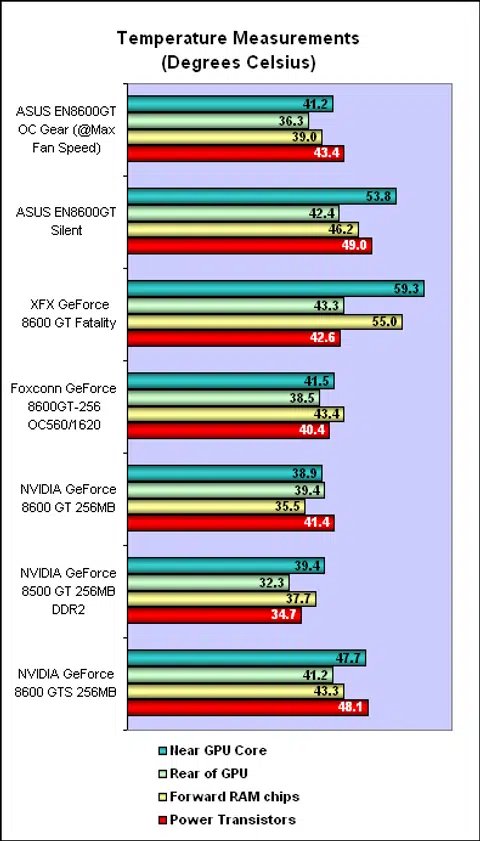
Temperature Testing
With the fan on the OC Gear adjusted for maximum, the temperatures we recorded on the card were comfortably cool and competitive with the other GeForce 8600 GT cards. Even at its maximum speed, the noise level did not alter much and we couldn't really tell with our ears that the fan was at its fastest. ASUS seems to have attached a rather efficient cooler to this card and the fact that the fan speed is adjustable is another bonus; though we doubt you would need to adjust it anyway since it's relatively quiet regardless of the fan speed.
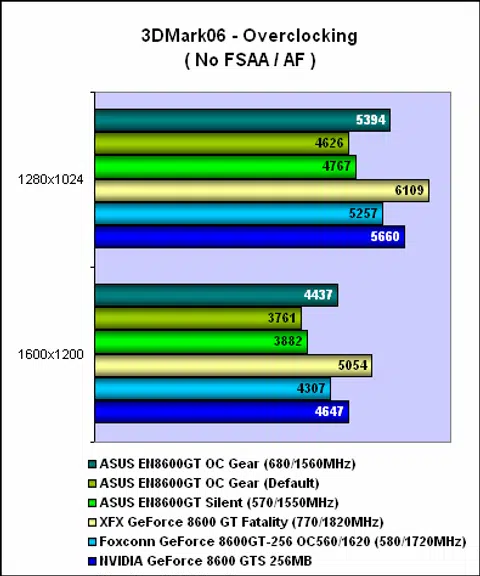
Overclocking
The point of the OC Gear module is to make overclocking as simple as twisting a knob - but that's limited only to the GPU core unfortunately. But that aside, how far can this ASUS card really go? Despite the 700MHz upper limit that we found on the ASUS SmartDoc application, we couldn't get the card to complete 3DMark06 at any core clock above 680MHz. The memory chips were also limited to 1560MHz DDR, falling short of what the Foxconn and XFX achieved. Overall, the ASUS OC Gear was quite decent for overclocking, finishing behind the outstanding XFX Fatal1ty and ahead of the Foxconn in the benchmark. It was also an improvement of up to 17% compared to the original clocks of the ASUS EN8600 GT OC Gear.
Conclusion
With its OC Gear module, ASUS has probably taken the next step towards making overclocking graphics cards even more accessible to users. To be fair, it has been anything but challenging for a while now, as manufacturers have been very accommodating when it comes to this, from offering products that are overclocked out of the box to custom cooling solutions to enhance overclocking and numerous novice friendly software tools that ramp up the clock speeds with the click of a button. There have even been instances where vendors have experimented with voltage overclocking and while we doubt that they have been successful in retail, one could almost say that overclocking has been distilled into another marketing tool to attract consumers and not some arcane secrets shared and understood only by the hardcore enthusiasts.
ASUS' OC Gear module now brings the overclocking from the usual software based tweaking to simply turning a knob. It's as easy as adjusting the brightness or volume control, the main advantage is that users no longer need to exit or switch to their software overclocking tool to do this. They can decide to increase the core clock or fan speed and have that applied immediately. As with any new product, there are limitations of course, like the inability to use this module to adjust the memory clock. The graphical representations for the temperature and clock speeds also tell us nothing about the actual values for these settings (although learning the upper limits of this tool first via the SmartDoc interface should quickly give users a feel of how high it can go).
If you have the money and the extra 5.25-inch slot free on your casing, the ASUS EN8600GT OC Gear adds some eye candy to your system. There are some limitations at the moment but that's not surprising considering it's the first version.
As for the GeForce 8600 GT at the heart of this product, ASUS has gone for the safe route of having the standard clocks except for the stream processors, which we found to be slightly higher clocked than usual. Hence, performance should be relatively on par with equivalent cards in the market, but given its default clocks, it may not be as fast as some of its overclocked competitors. The cooler is certainly above average in terms of noise and heat output, though it does have a minor drawback with its size. Overclocking too was very decent and this ASUS card emerged second, behind only the XFX Fatal1ty in the overclocking department.
Finally, like any new 'innovative' feature offered by vendors, expect to pay a premium for this product. At the time of publishing, the card's price is still not known but coming from ASUS, which is known more for its quality than bargains, the final retail price for this OC Gear edition will definitely be more than the usual GeForce 8600 GT. While the actual value the OC Gear module offers to consumers when it comes to tweaks and overclocking may not be significant, especially to experienced users, it does add to the whole modding experience and of course the 'bling' effect. We have no doubt that some enthusiasts will be attracted to this card, just for the fancy flashy lights that scream 'leet' to their peers.
Our articles may contain affiliate links. If you buy through these links, we may earn a small commission.