
ASUS A8N32-SLI Deluxe (NVIDIA nForce4 SLI X16)
ASUS takes a go at the nForce4 SLI X16 chipset and comes out looking like a champ not because it carries the most features, but because of its impeccable design. In the midst of the rat race comes a gaming motherboard designed to deliver stability first.

Introduction
When you look at ASUS motherboards, there are usually two modes of presentation: entry to mid-level boards are rather bland while high end boards try to blow you away. However, if there's one thing ASUS has brought forward throughout the years is a tradition for quality. When manufacturers like Abit and EpoX began catering to enthusiasts with overclocking flexibility the promise of pushing performance limits, ASUS seemed content with delivering solid and stable motherboards, though it meant that they were left out of the gaming picture. However, this is ancient history. As other top-tier manufacturers up the level of quality on their boards as well as encroaching competition from value and volume driven manufacturers, ASUS has been beefing up their high-end boards; introducing the premium AI Proactive and AiLife branding, packing in features and aggressive performance programming, all to make a bigger impact.
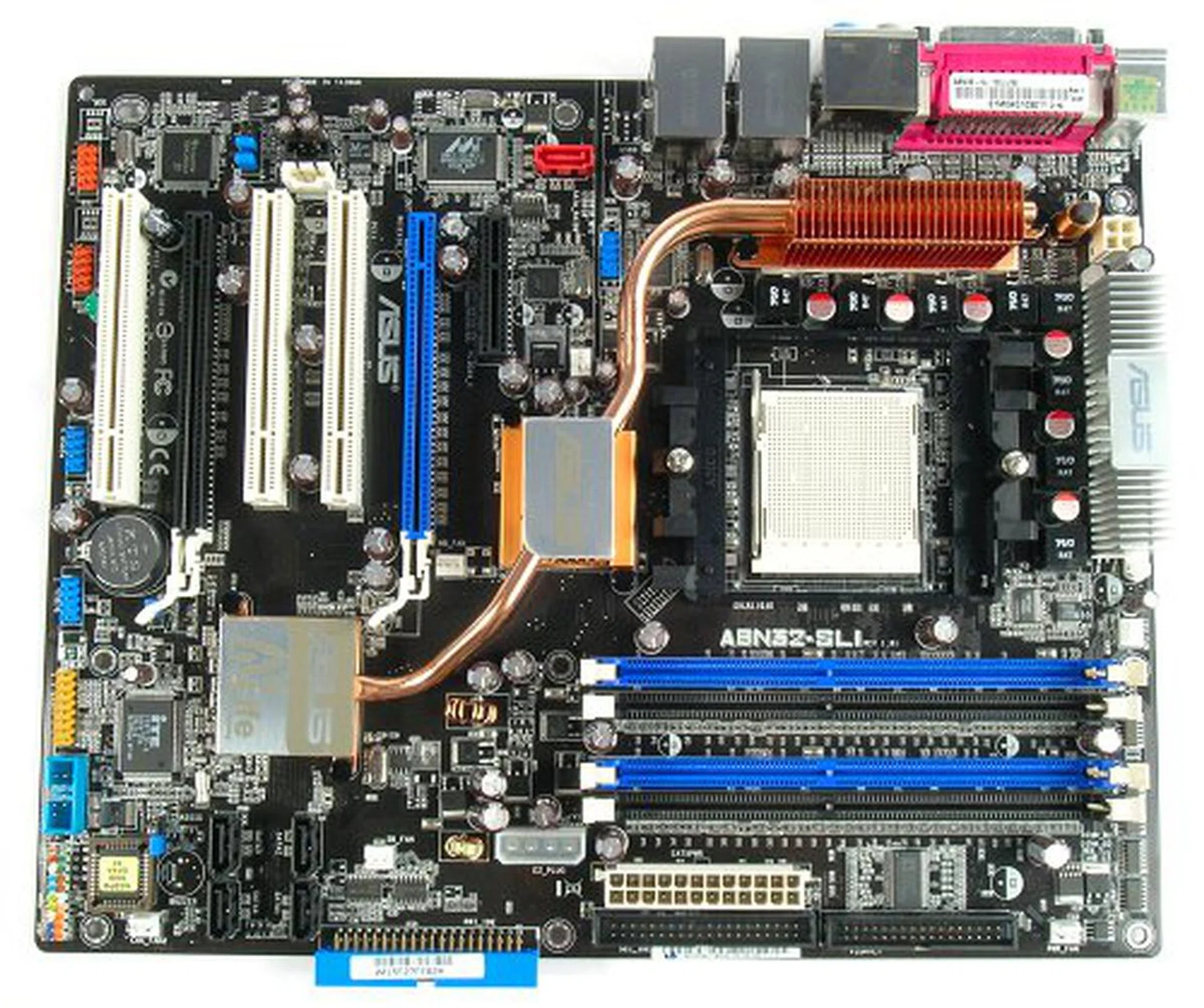
The ASUS A8N32-SLI Deluxe motherboad.
While the last few Intel based boards have gained accolades from us, the last AMD motherboard from ASUS we tested (A8N-SLI Deluxe) fell slightly short of our expectations with compatibility issues in some benchmarks. Since NVIDIA has launched their nForce4 SLI X16 chipset refresh, we decided to look at the updated SLI board from ASUS, the A8N32-SLI Deluxe. ASUS calls it the AiLife Gaming Edition motherboard and in the following pages, we'll tell you why you should be excited about it.
The ASUS A8N32-SLI Deluxe comes with the following bundle:
- 5 x SATA data cables
- 3 x SATA power converter cables (dual plugs)
- 1 x 80-conductor Ultra ATA data cable
- 1 x 40-conductor ATA data cable
- 1 x floppy drive data cable
- SLI high-speed digital link interface bridge
- MOSFET cooler fan
- IEEE 1394a port bracket (2 ports)
- USB 2.0 (2 ports) and Game port bracket
- COM port bracket
- I/O shield
- Driver CD
- InterVideo WinDVD Suite
- User's Manual
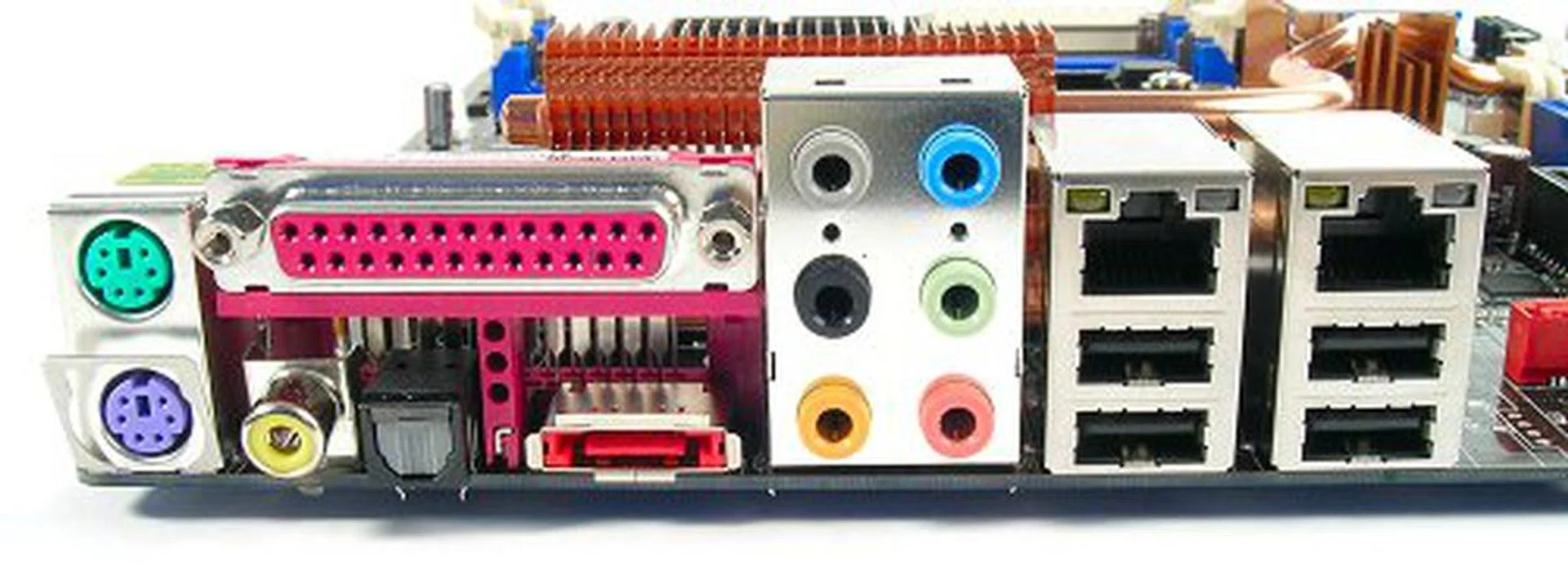
PS/2 and Parallel legacy connetors are available along with full set of analog and digital audio jacks, LAN, USB and even one eSATA connector.
ASUS Gets Tough
The A8N32-SLI Deluxe is not the first motherboard we've tested with the nForce4 SLI X16, nor is it the first to use heat pipe cooling for its chipset. However, one cannot deny that the board looks like it means business. Behind serious facade of its black PCB design, the A8N32-SLI Deluxe is a statement of ASUS engineering to provide the next generation in heat and noise management, two of the biggest 'side-effects' of current high-speed performance systems. While many a manufacturer have effective solutions for component cooling (think ABIT OTES or Gigabyte Turbojet), ASUS is the only one that is committed to a totally fanless operation. Ironically though, since the rear radiator block cools both heat pipes, it must rely on the CPU cooler to provide airflow for optimum cooling. ASUS knows this as well, which is why the board is actually bundled with a secondary fan to be used if users opt for other CPU cooling methods like waterblocks, where there is no fan to circulate air through the heat pipe radiator.
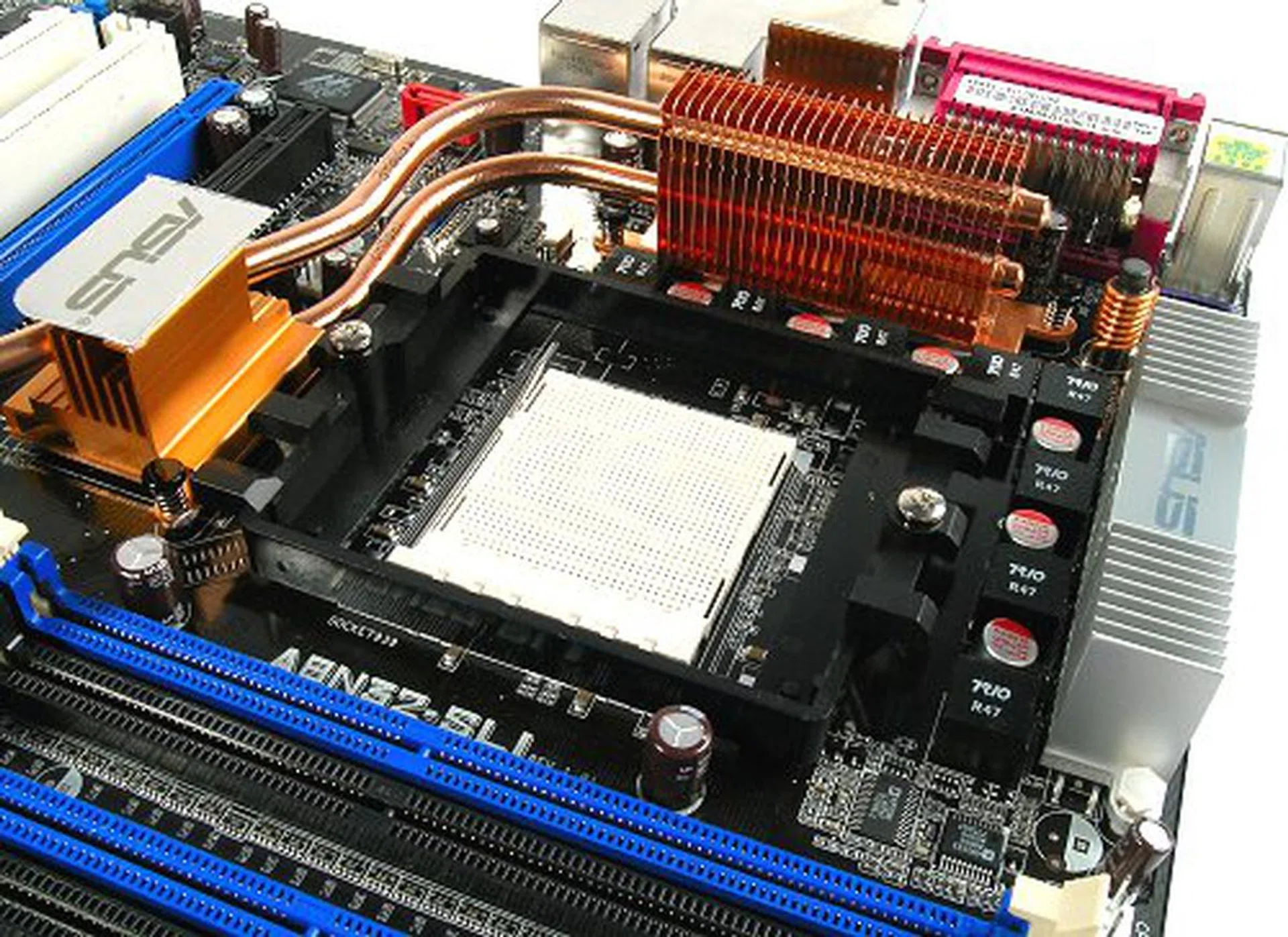
Socket area is surrounded by heatsinks courtesy of ASUS' fanless design.
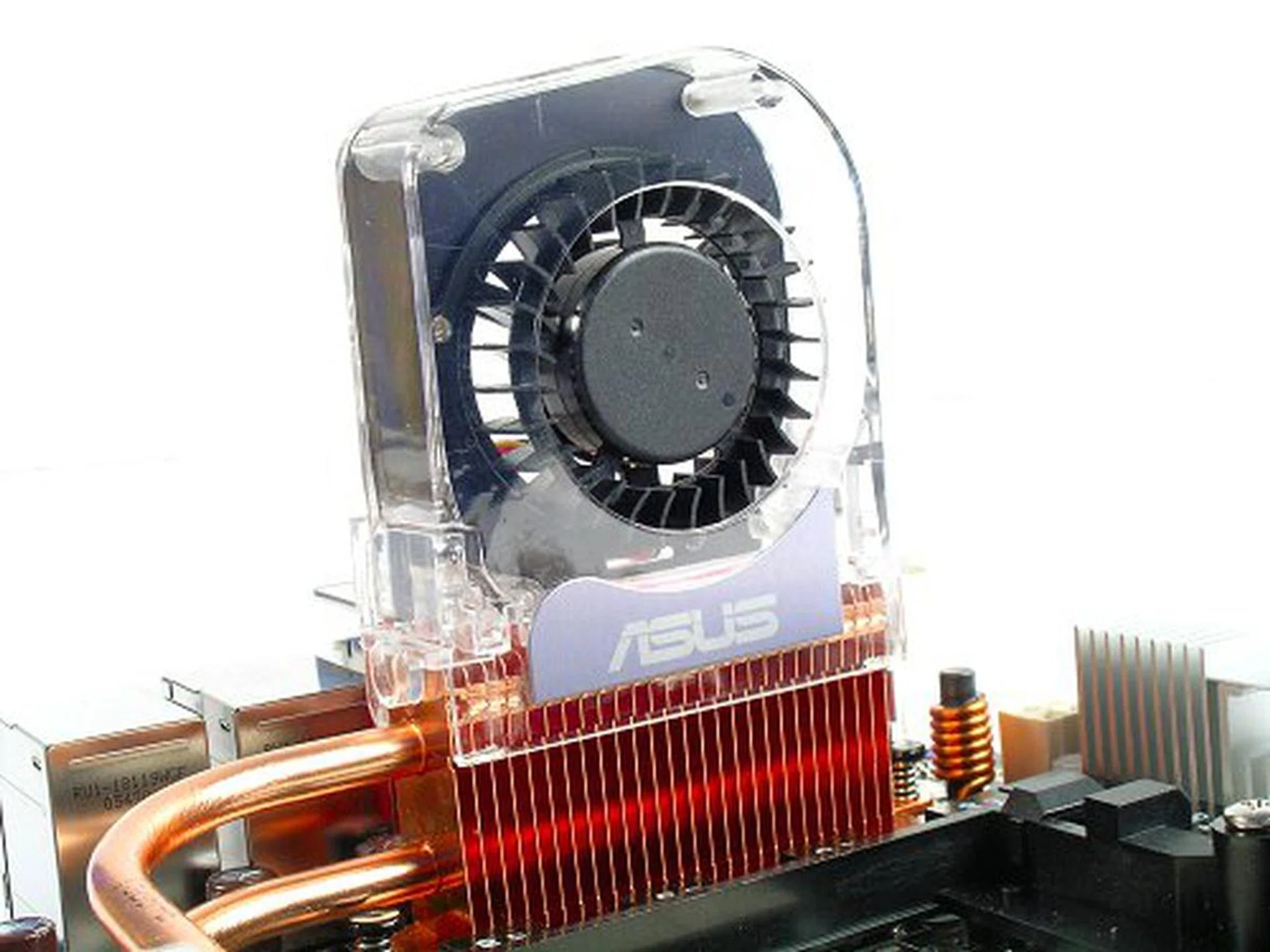
If you're going to be using water cooling for your CPU, a supplimentary radiator fan is provided to ensure proper cooling for the chipset and MOSFETs.
On the board itself, we have a total of four low profile and slim heatsink blocks, three of them bear a heat pipe design. Instead of sharing a single snaking heat pipe, both the nForce4 SLI X16 MCP and SPP chips have their own dedicated heat pipe cooled through the rear radiator block. Since NVIDIA's nForce4 family is known to run seriously hot, this design really helps in cooling efficiency. The A8N32-SLI Deluxe also features ASUS' Stack Cool 2 technology at the underside to further increase heat dissipation. Now we can't really measure the true effectiveness to the decimal in degrees, but when you have a fully loaded nForce4-based motherboard that is just slightly warm to the touch, that's impressive by any standards.
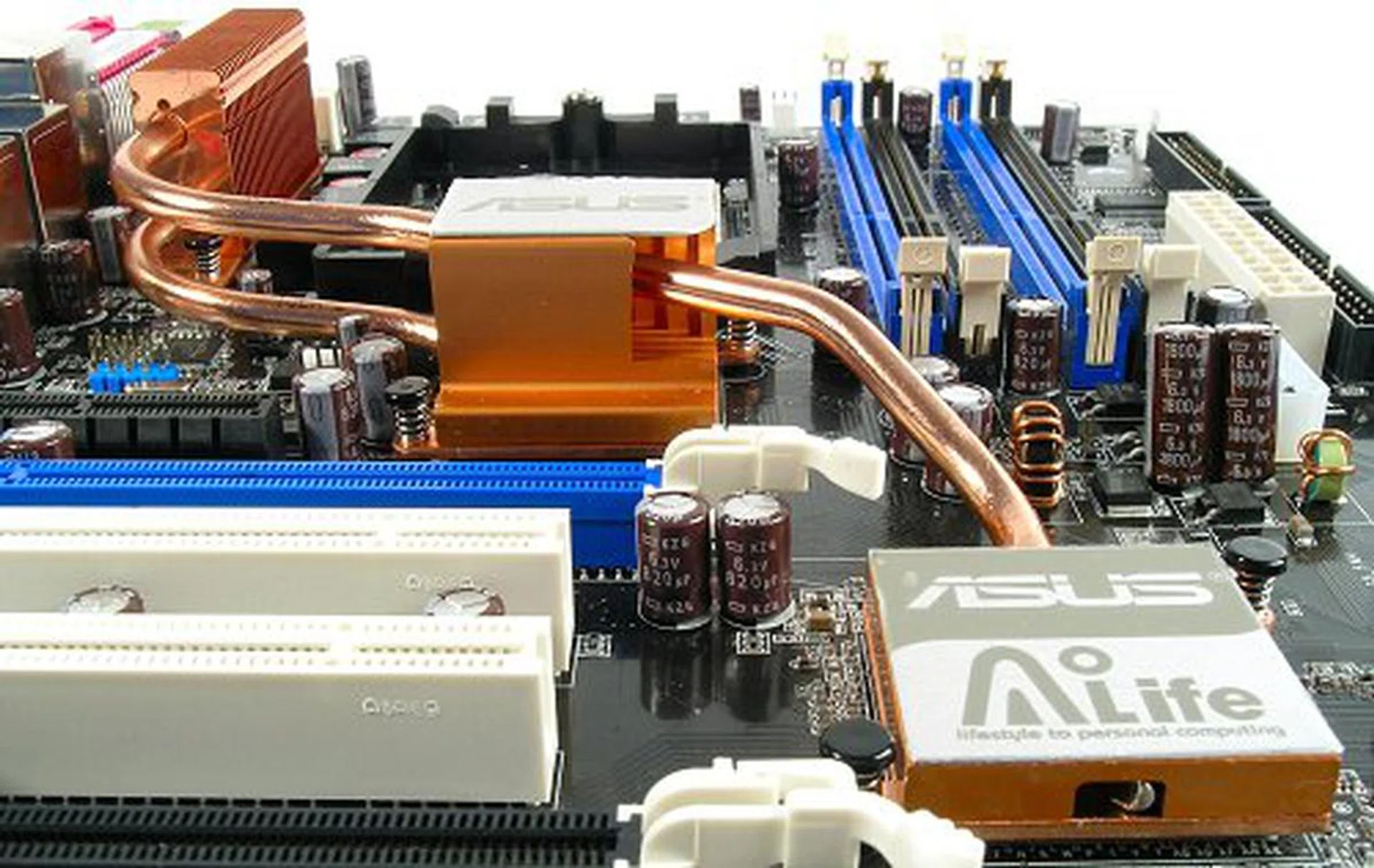
Dedicated heat pipes for each heatsink ensures cooling efficiency.
Another standout feature of the A8N32-SLI Deluxe is its incredible 8-phase power circuitry built on the board itself. Sure, Gigabyte has done this before with their U-Plus D.P.S. However, Gigabyte employs a separate VRM module plugged onto the board, which we've sometimes found impossible due to space restrictions. The definite benefit to such an elaborate design is cleaner power to the CPU and better load balance, which in turn equates to a more stable platform.
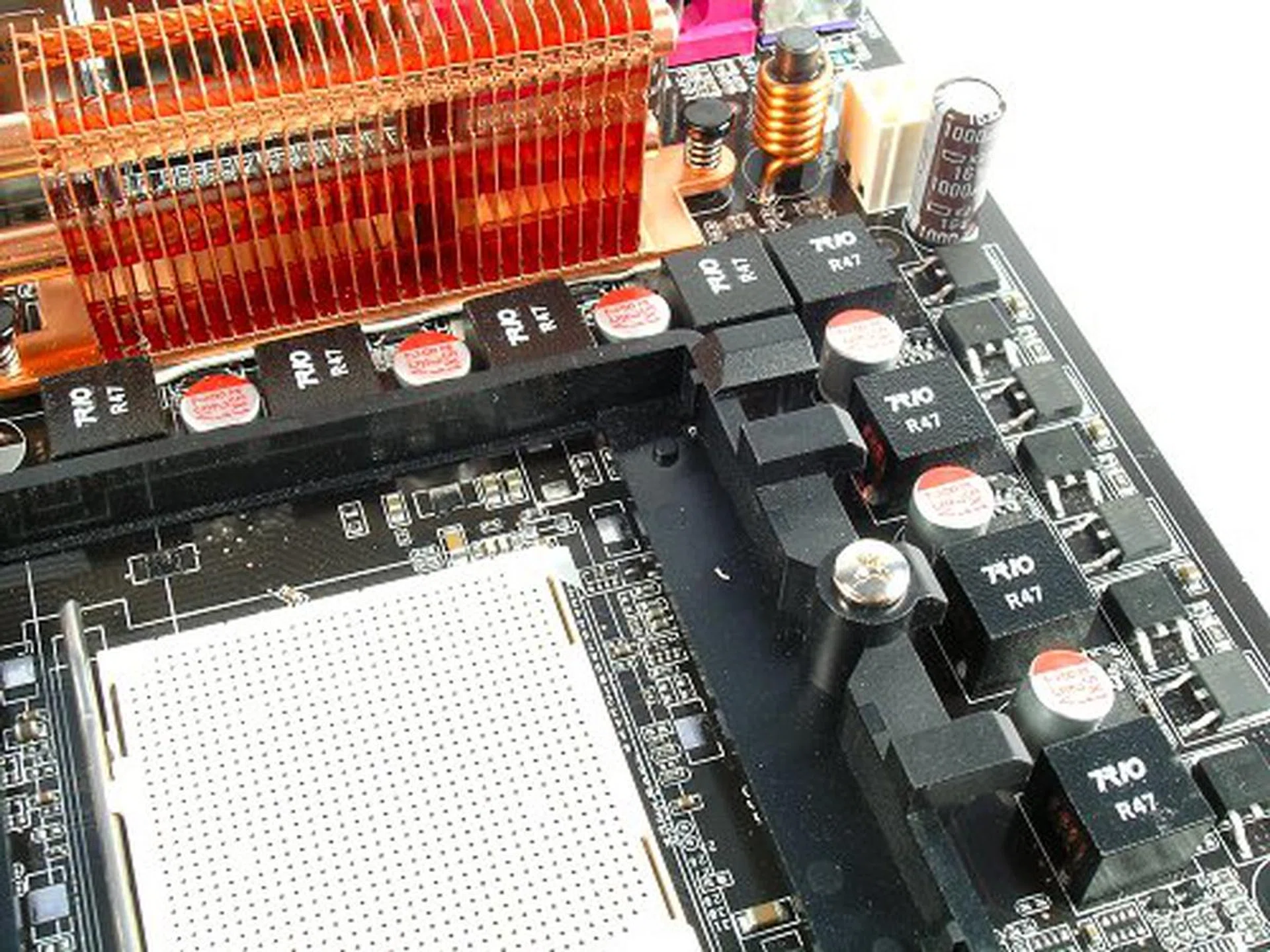
8-phase PWM design lowers ripple current and yields lower power consumption over regular 4-phase designs.
At a glance, the board comes with similar features to its predecessor, the A8N-SLI Deluxe, but it actually sports some nifty updates. You've got two additional SATA II connectors in the form of Silicon Image's SiI3132 controller with a dedicated eSATA port, dual high-bandwidth Gigabit LAN ports (Marvell PCIe 88E8053 + 88E1115 PHY) and to top of the feature list, a Texas Instruments (TSB43AB22A) 2-port IEEE 1394a controller. The only letdown though was the audio support, which still relied on an AC'97 CODEC (Realtek ALC850). With competitors Gigabyte and MSI both embracing Sound Blaster Live! and Audigy series of audio solutions, it is a shame to see this board has not been refreshed in this department.
Design-wise, the board is just shy of being flawless, but then we don't think there is such a thing. What ASUS has done right was its component placements. All major components are properly spaced out, CPU socket and DIMM slots are far enough away from the expansion slots and ASUS moved down both PCIe x16 graphics slots so as to have space on both sides of installed cards. There is however, a drawback to this since it means there is very little space for other expansion cards with a full SLI rig. At best, you'd have access to one PCI and one PCIe x1/x4 slot, an important concern for gamers since you'd want to leave a space for a dedicated sound card.
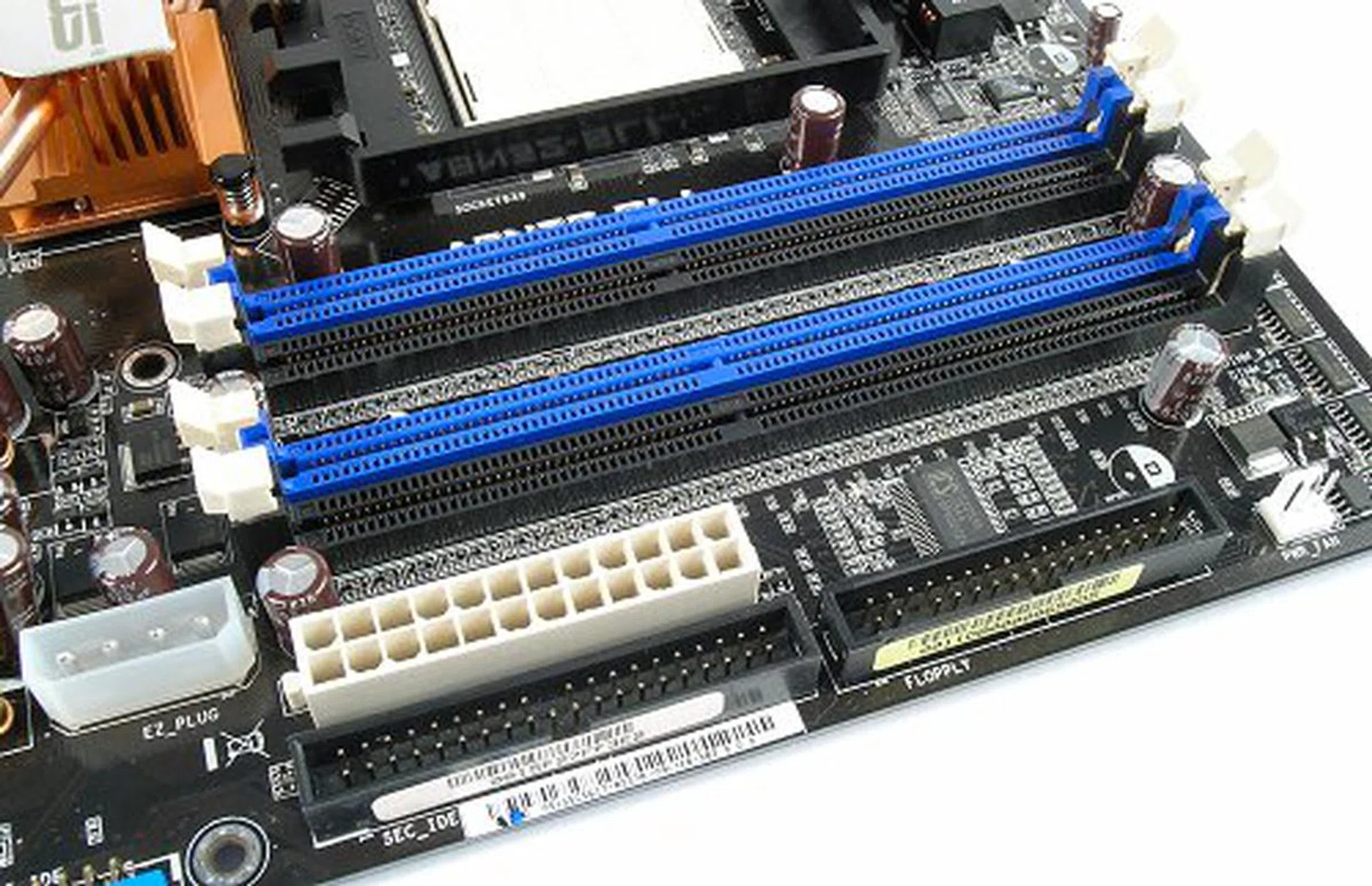
Board design covers good component spacing.
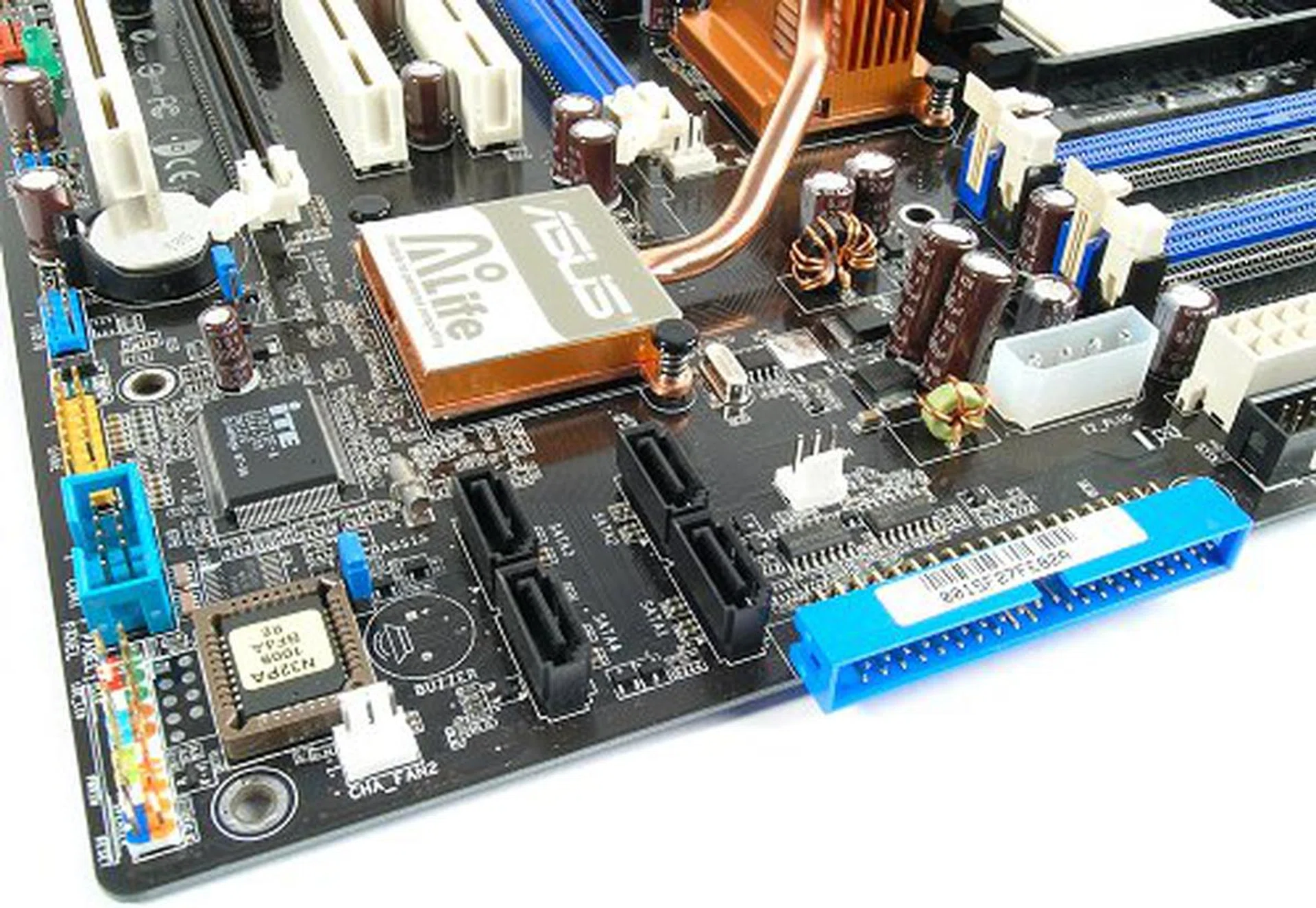
Bottom area cannot be too cluttered with headers and connectors because the board has to cater for two graphics cards. The A8N32-SLI Deluxe manages this with aplomb.
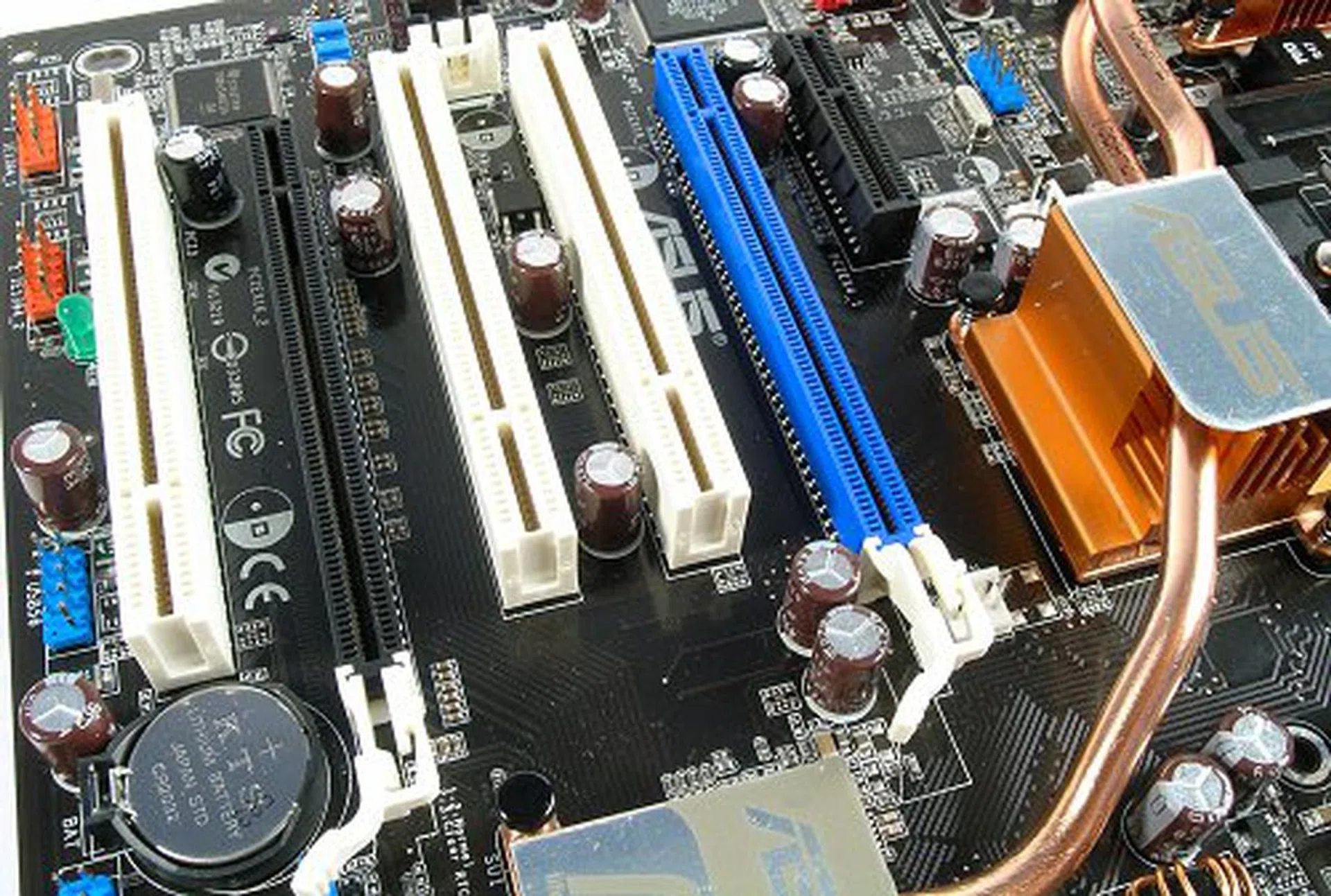
With priority given to power and cooling, expansion slots are kept to the basics, though the board future-proofs itself with a PCIe x4 slot.
Overclocking
- FSB Settings: 200MHz to 500MHz
- SB-NB Frequency: 200-300MHz
- PCIe Frequency: 100MHz to 200MHz
- RAM Frequency: DDR200, DDR266, DDR333, DDR360, DDR400
- CPU Voltage Settings: 1.000V to 1.625V (in 0.0125V steps), +200mV
- Memory Voltage Settings: 2.60V to 3.20V (in 0.05V steps)
- NB Voltage: +0.1V
- SB Voltage: +0.1V
- HyperTransport Voltage: +0.1V
- PEG Link Mode Settings: Normal, Fast, Faster
- Multiplier Selection: Yes (unlocked CPUs only)
For some reason ASUS has limited the A8N32-SLI Deluxe in the overclocking department. They've so far done everything to make sure the board stayed cool and have a stable power supply, but we were slightly disappointed with the voltage selection in the BIOS, especially after seeing the deluge of options on the MSI K8N Diamond Plus. Overvolting the chipset is basically a simple 0.1V toggle and that's about it. It did however allow users to play around with the SB to NB HTT link frequency, so you can try boosting it up for more bandwidth especially in SLI modes.
The A8N32-SLI Deluxe displayed a similar level of overclocking prowess during our tests. Like our MSI K8N Diamond Plus review, we managed to hit 295MHz FSB by default with a HTT multiplier at 4x. Of course, like all our overclocking tests, we first lower CPU and memory speeds to ensure they are not the limiting factor. However, without more comprehensive options, we were unable to push it any further.
It's All Good, but..
Although we've been raving on about the fan-less cooling on the board, it might also potentially become a hindrance to CPU cooler installation. We didn't run into any issues ourselves, but the SPP cooler and protruding heat pipes look to be really close to the left side of the CPU retention unit.
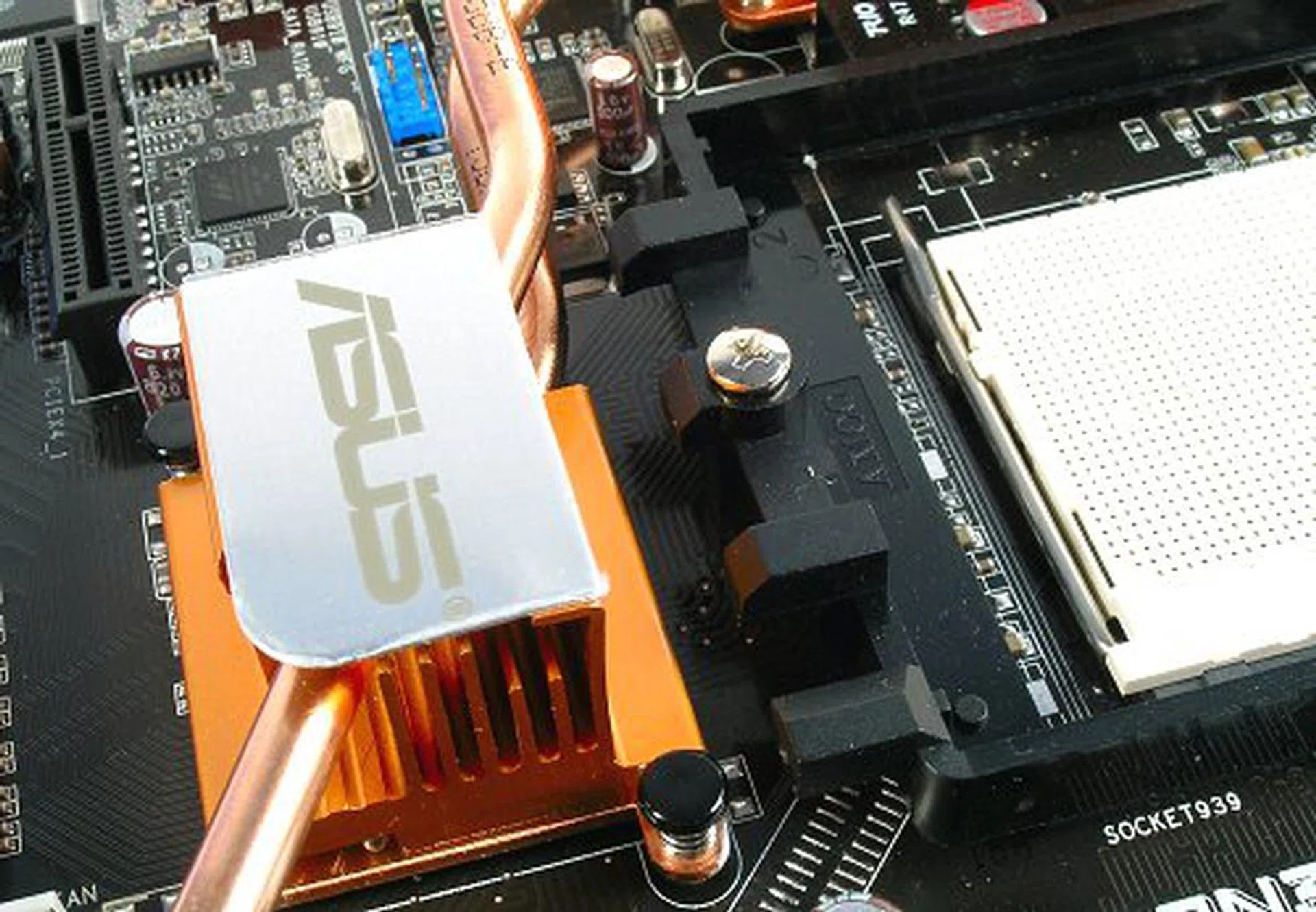
Heat pipe a little too close to the corner retention clips.
Test Setup
With our review of the MSI K8N Diamond Plus just behind us, we've some numbers to pit the ASUS A8N32-SLI Deluxe against. We'll be using the same setup components as we did for the K8N Diamond Plus and grabbing those results for comparison. In recent times, ASUS has always sneaked in potentially more aggressive timings than its competitors, giving them the edge is some benchmarks, so it'll be interesting to see if the A8N32-SLI Deluxe carry any such optimizations.
- AMD Athlon 64 3500+ (2.2GHz)
- 2 x 512MB Corsair DDR400 @ 6-3-3 CAS 2.5
- Seagate Barracuda 7200.7 80GB SATA hard disk drive (one single NTFS partition)
- Gigabyte GV-NX66T128D-3 GeForce 6600GT 128MB - with NVIDIA ForceWare 81.94 driver
- NVIDIA nForce4 X16 package 6.82 (ASUS A8N32-SLI Deluxe and MSI K8N Diamond Plus)
- NVIDIA nForce4 X16 package 6.82 (NVIDIA nForce4 SLI)
- Microsoft Windows XP Professional with Service Pack 1 - with DirectX 9.0c
Benchmarks
The A8N32-SLI Deluxe will be benchmarked with the following applications:-
- BAPco SYSmark 2004
- Futuremark PCMark04
- SPECviewperf 8.01
- Futuremark 3DMark03
- AquaMark3
Results - BAPco SYSmark 2004
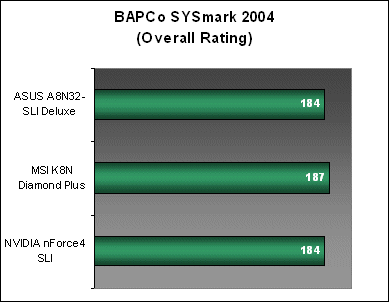
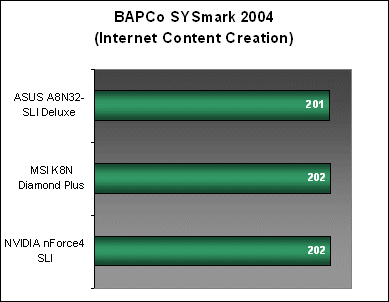
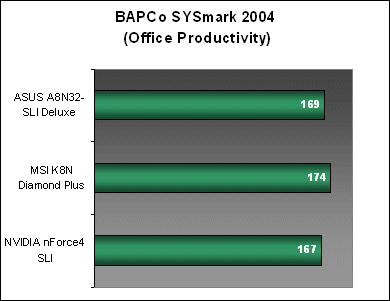
The A8N32-SLI Deluxe loses out slightly to the K8N Diamond Plus in SYSmark 2004 with an overall score than is a few points off the mark, though they are within the average performance of an nForce4 SLI board.
Results - Futuremark PCMark04
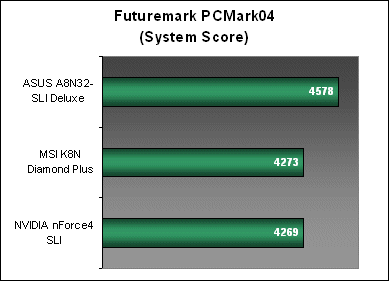
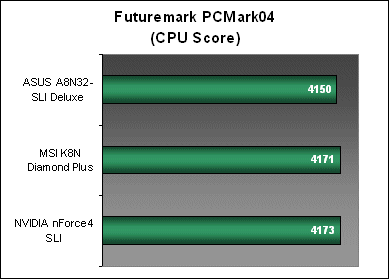
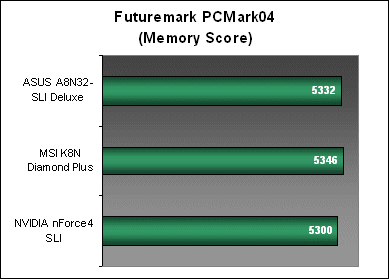
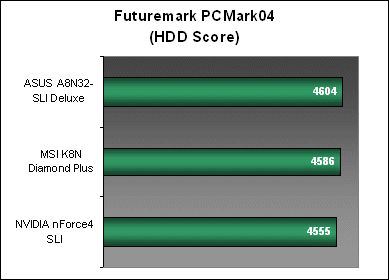
For the A8N32-SLI Deluxe, PCMark04 manages to give a better impression of the board's productivity performance on a whole than SYSmark did and confirms a slight dip in CPU workload performance, which is probably why it scored lower in the SYSmark tests. Memory scores are up from our regular nForce4 SLI board and it's HDD performance edges out the rest.
The surprising result comes from PCMark's overall System workload, giving the A8N32-SLI Deluxe an almost 7% lead. However, readers should remember that the System workload comprises of a series of tests including video and graphics, which may indicate some form of tweaking on ASUS' behalf. We've run this test a few times to ensure consistent average and the A8N32-SLI Deluxe always posts similar scores.
Results - SPECviewperf 8.01
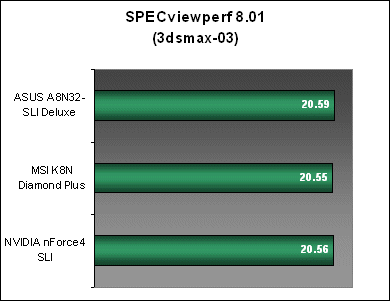
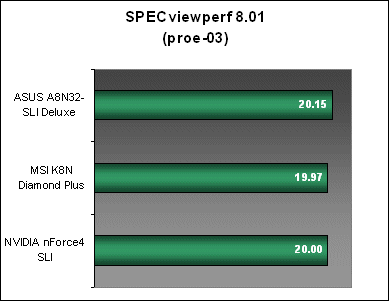
SPECviewperf's OpenGL tests show some gains in graphics performance for the A8N32-SLI Deluxe over the competition, giving it the lead in every workload run. However, like the last few benchmarks, these scores are within negligible limits in terms of real life performance.
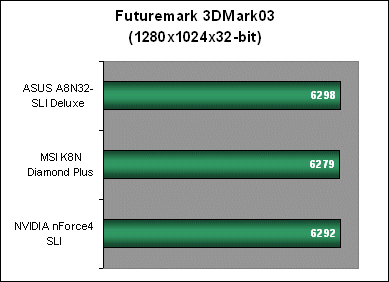
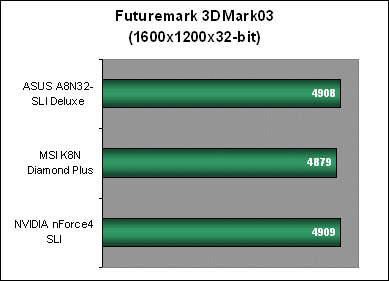
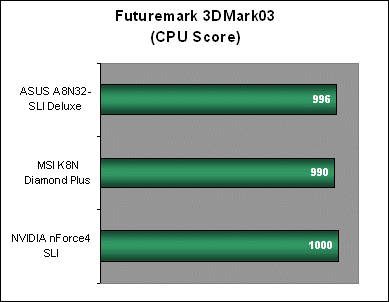
Results - Futuremark 3DMark03
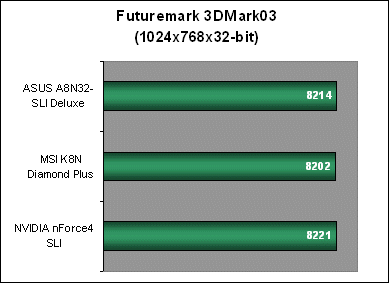
All three boards perform on par with each other in 3DMark03 and these scores remain identical throughout all resolutions.
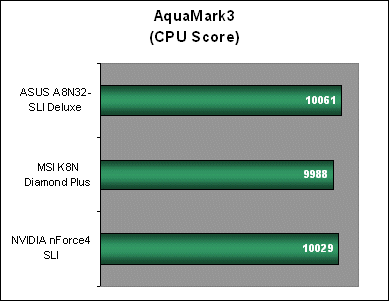
Results - AquaMark3
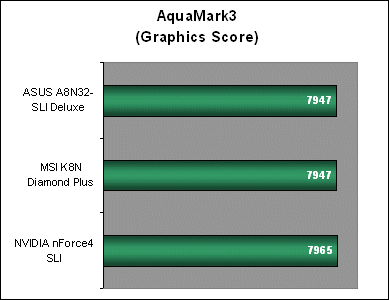
Again, both the ASUS A8N32-SLI Deluxe and the MSI K8N Diamond Plus prove that the nForce4 SLI X16 chipset is on par in performance to the older nForce4 SLI with regular gaming. You'd need to crank up the resolutions and AA/AF to their max before you'd see the performance scaling benefits in SLI mode from the older dual x8.
Conclusion
Motherboard's are the backbone of any PC system and they're required to be rock solid and able to handle just about any hardware installed without kicking up too much of a fuss. The ASUS A8N32-SLI Deluxe is a prime example of a motherboard built with this in mind. Many manufacturers try to woo consumers with the focus on peripheral features and extravagant (and sometimes unnecessary) designs, but this isn't the case with the A8N32-SLI Deluxe. While ASUS is just as guilty for pimping their AiLife range of technologies, they created a motherboard that really focuses on addressing the three main concerns of all high-end computing users: power consumption, heat and noise.
The built-in 8-phase power circuitry ensures stable CPU operation and help prolong component lifespan. With its unique fan-less heat pipe cooling and Stack Cool 2 implementation, ASUS has also managed to design one of the coolest running nForce4-based motherboards we've tested to date. The bundled optional exhaust fan is a thoughtful inclusion as well and will come in useful if you're running on water cooling or other types of passive CPU cooling. The fan itself is a low RPM model, and thus noise levels are low enough to be disregarded.
Performance-wise, you'll be looking at the levels of an average nForce4 SLI or SLI X16 motherboard. Basically running on the same chipset, nForce4 SLI and nForce4 SLI X16 boards will not differ much until one starts to fill the graphics bandwidth, and the only way to do that is to run ultra high resolutions with NVIDIA's SLI AA modes enabled (We'll cover this topic in more detail in a separate article). In comparison, the default overclocking capabilities of the board matches the K8N Diamond Plus, but the later delivers a much better range of voltage, which will make the MSI more desirable to hardcore enthusiasts.
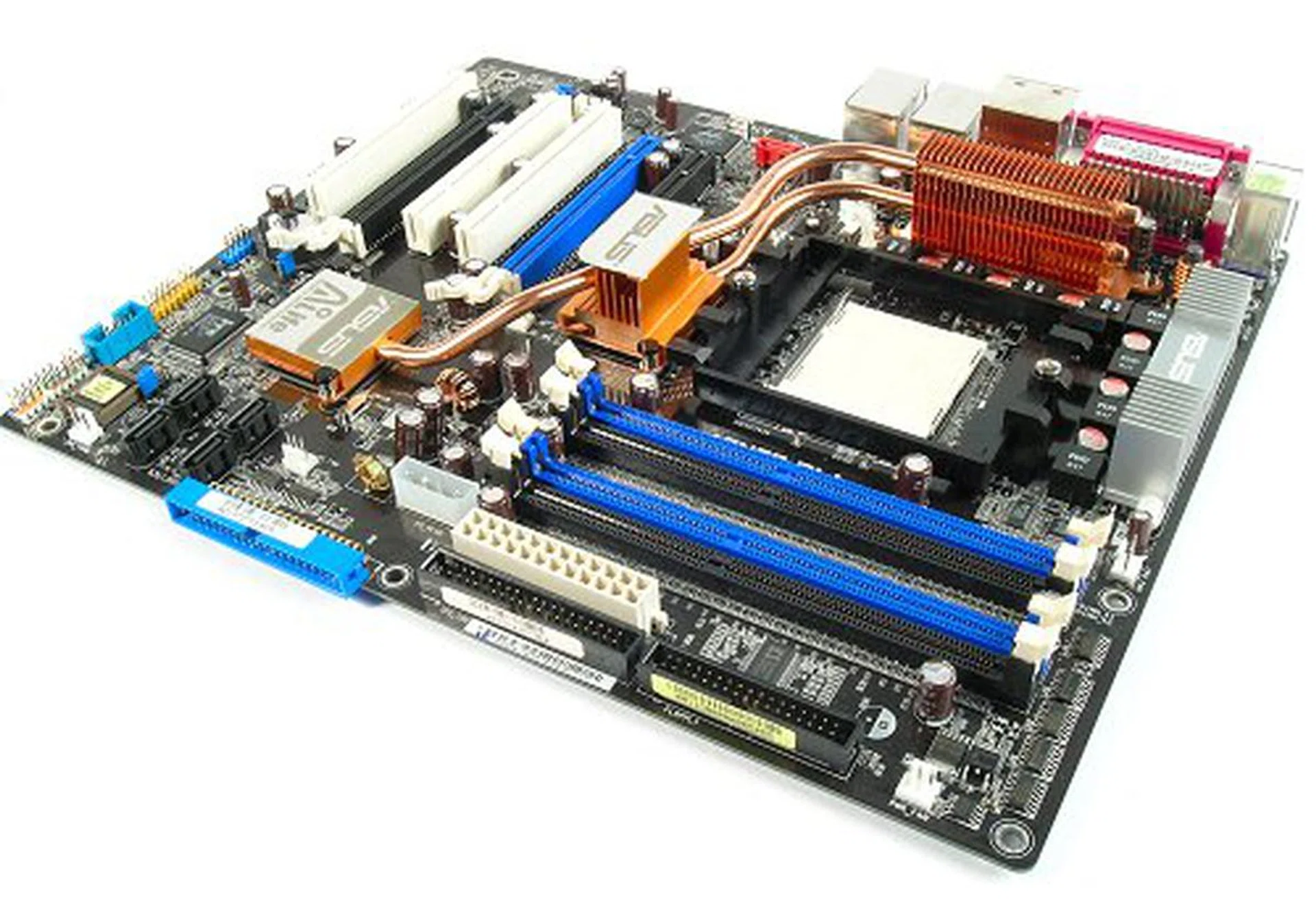
The ASUS A8N32-SLI Deluxe may well be the ultimate SLI gamer's motherboard (for now).
The A8N32-SLI Deluxe can be found for around US$215 in major online retailers, a price point that is similar to other brands in the market today. Since ASUS boards are usually sold at a premium, this comes as a pleasant surprise. Overall, we think the ASUS A8N32-SLI Deluxe is an excellent board. If you're into serious gaming and know your hardware, you'd want a streamlined motherboard that is both high on reliability and performance such as the A8N32-SLI Deluxe. Performance today comes from the latest processors and graphics cards, but what you need is a board that won't let you down. In the end, getting an ASUS A8N32-SLI Deluxe is a calculated investment for your ultimate SLI gaming rig and not an impulsive decision brought on by flashy designs and a salesman's smile.
Our articles may contain affiliate links. If you buy through these links, we may earn a small commission.