

An Apple a Day
Every year, almost like clockwork, some things for Apple happen. A new iPhone is announced (or leaked really early by accident), a new iPod is released, and usually, some changes to its iMac and MacBook Pro line-up occur. In 2008, we saw the introduction of the aluminum unibody MacBook Pros while in 2009, we saw the MacBook Pros switch over to a non-removable battery format. Now in 2010, Apple has finally upgraded their offerings to embrace the newer Intel Core i5 and i7 processors for the 15-inch and 17-inch form factors.
The 13-inch gets a slight hardware bump but will still use the older Intel Core 2 Duo instead of the Intel Core i3 processors. It's probably due to the fact that NVIDIA doesn't have a license to interface with the newer Intel processors and Apple does want to offer a better graphics experience via NVIDIA's integrated chipsets as opposed to relying on Intel's own integrated HD graphics on the new processors. By doing so, Apple doesn't have to use discrete graphics for the 13-inch models and keep the cost and thermal design power of the entire platform low. Else both costs and cooling requirements will go up and would be tough to juggle in that form factor. Stepping up from the GeForce 9400M chipset previously, NVIDIA updated the GPU portion to incorporate the GeForce 320M (based on the same GT216 core as the desktop ) so it should be a lot faster than the older 13-inch MacBook Pro notebooks.
We've previously reviewed a 13-inch and 17-inch MacBook Pro, so our review of a 15-inch MacBook Pro seems quite apt. Instead of going for an entry-level SKU, we've requested for the top of the line model, and our review unit is as decked out as it can be - Intel Core i7 (2.66GHz), 4GB DDR3 memory and NVIDIA graphics in the form of a NVIDIA GeForce GT 330M GPU and augmented by the processor's own Intel HD Graphics engine. We'll be running the notebook in our benchmarking session to see how it holds up, but let's first focus on aesthetics of the 15-inch MacBook Pro, which looks pretty similar to its predecessor without notable changes.
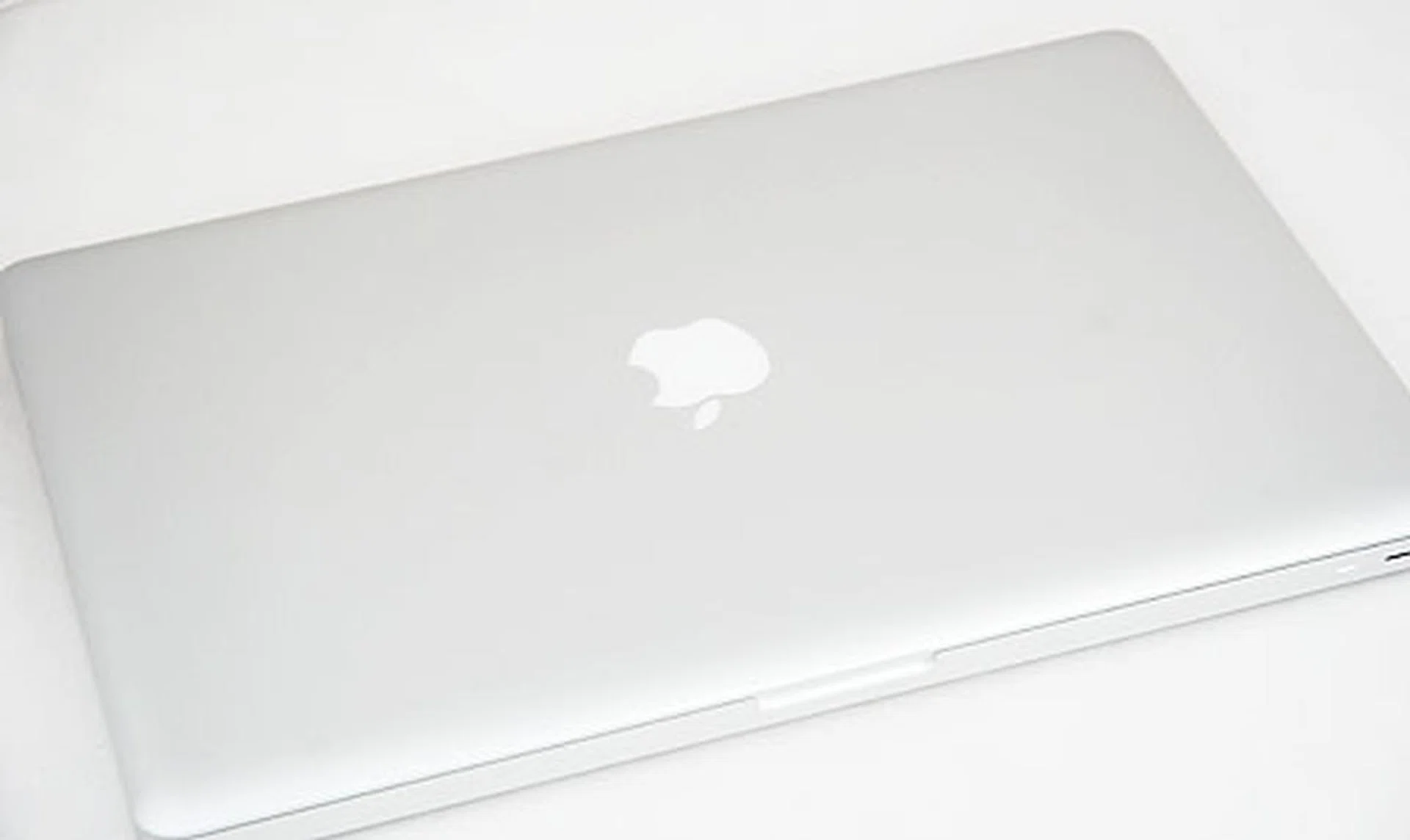
Looking all familiar - the new 15-inch Apple MacBook Pro.
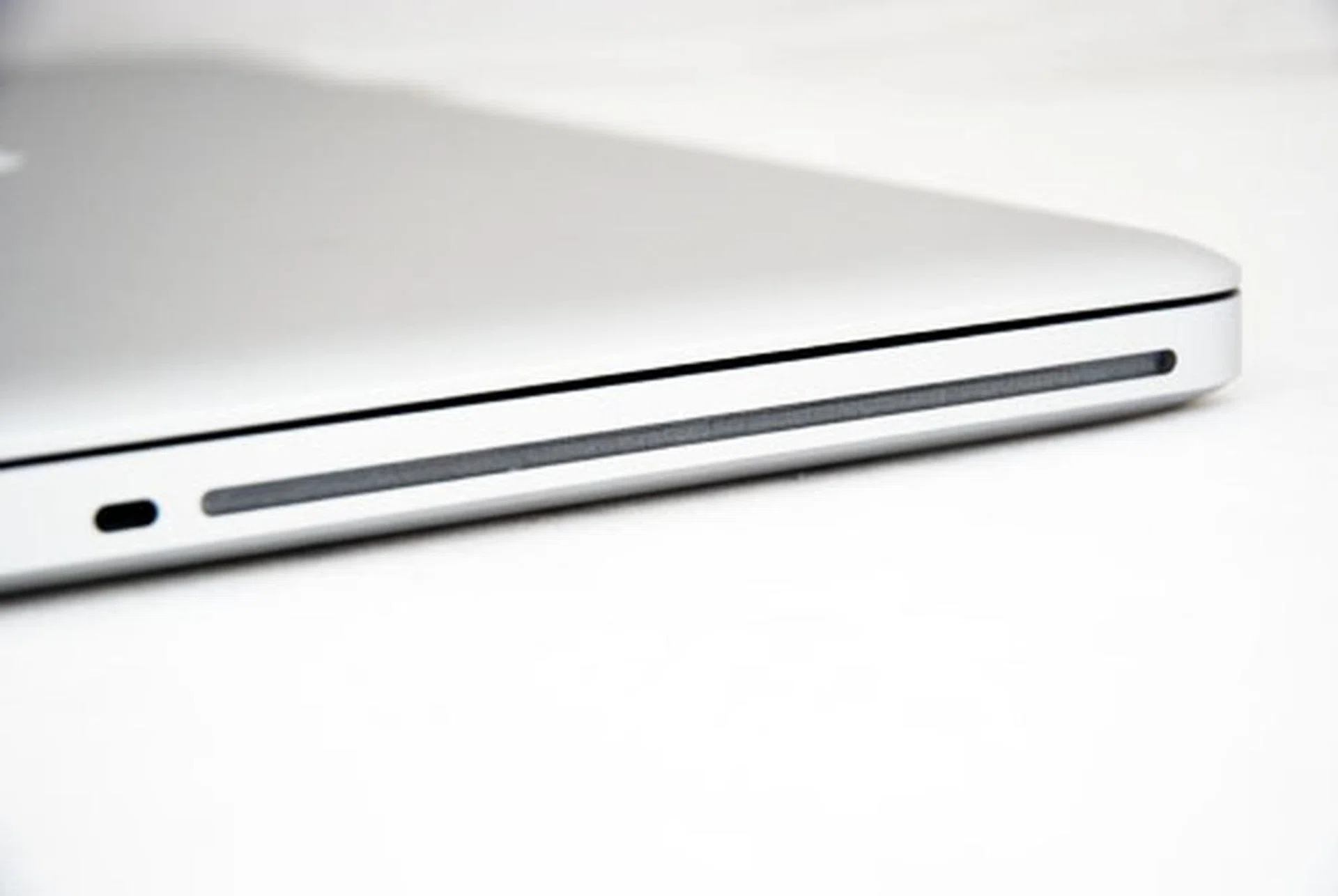
Over on the right side, the slot-loaded optical drive.
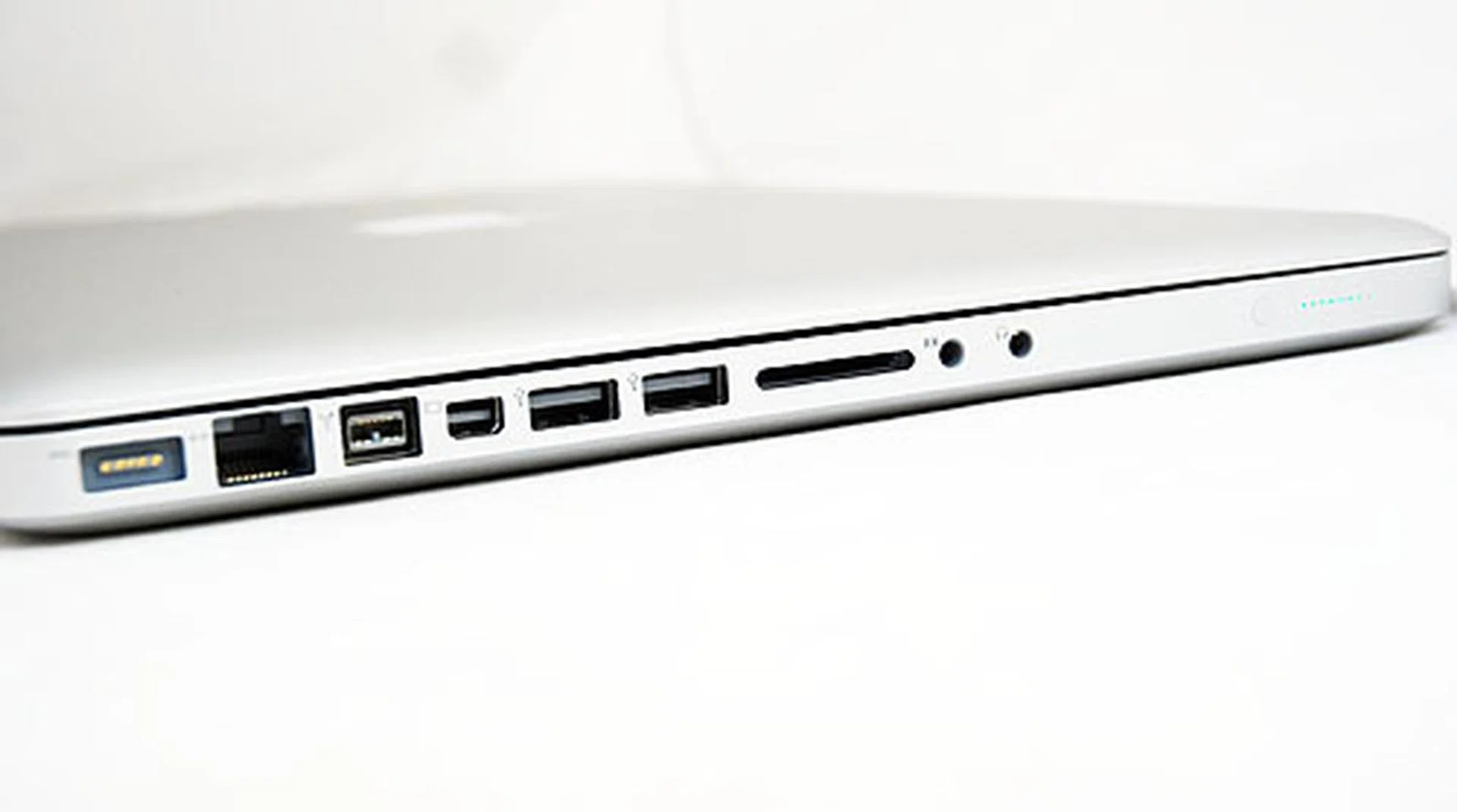
The left side features the MagSafe power port, Gigabit LAN port, FireWire port, two USB 2.0 ports, a Mini DisplayPort, SD card reader, audio input and headphone jacks.
The Apple Inside
If you found the exterior to be similar, the interior too keeps everything the same. Since you'll not find much difference here, let's talk about the minor tweaks in the refreshed version. After all, Apple can't just sell you a new MacBook Pro with just a hardware refresh, right? So let's see what's new underneath.
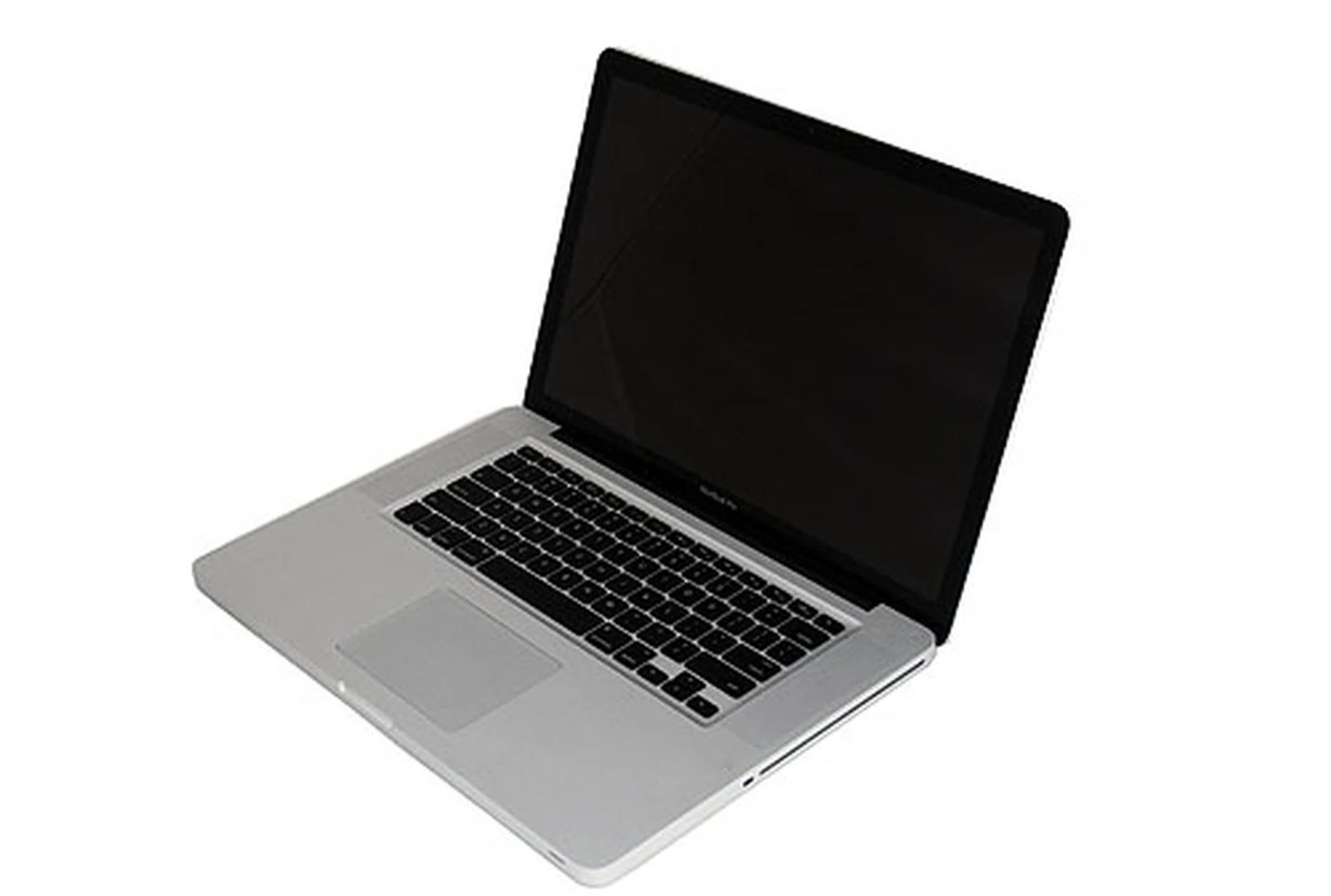
The design looks awfully familiar, no?
First off, you have the most talked about function - the automated switchable graphics. Instead of the older system where you had to log in and out to either set it to the integrated or discrete graphics, the newer 15-inch and 17-inch MacBook Pro notebooks will automatically switch depending on the application being used.
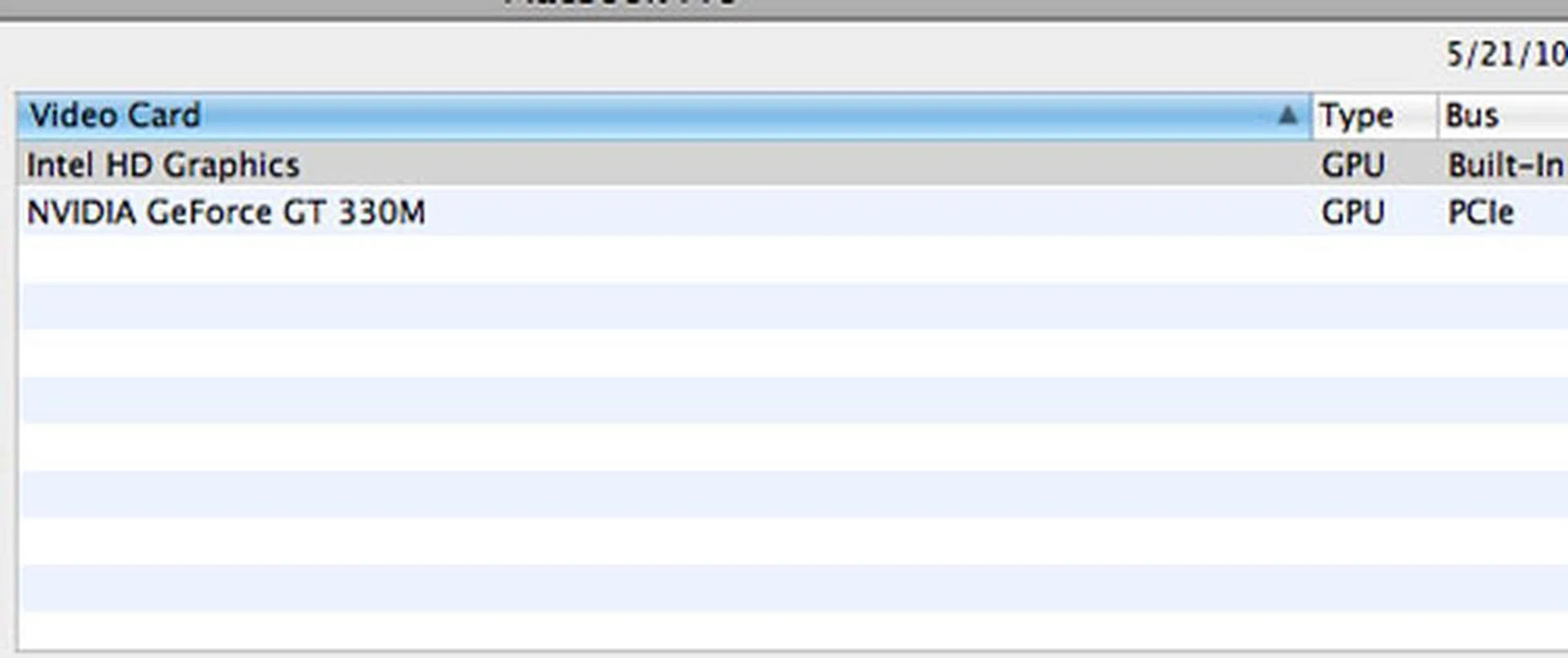
We've heard reports of the automatic switchable graphics turning on the discrete even for simple applications like a Twitter client, and our tests with browsers and Flash does show that the system isn't perfect just yet. Hopefully Apple will be able to fix some of the issues already reported by users but we must admit, automated switching technology for graphics will go a long way in helping the newer MacBook Pros live up to the next feature - built-in 10-hour battery life.
We'll find out more if the battery of the newer MacBook Pro notebooks will hold up to the claimed battery life soon enough, but let's take a look at the last feature we would like to highlight - the inertial scrolling. This feature of the trackpad allows for continued scrolling even after you lift your fingers, which well, does help make life easier if you're reading a long document or webpage. Given that there's no hardware change on the trackpad, it's very likely that the inertial scroll feature is software based. As such, we may see this upgrade being made available to older models after a certain 'exclusivity' period, perhaps maybe in Mac OS X 10.6.4.
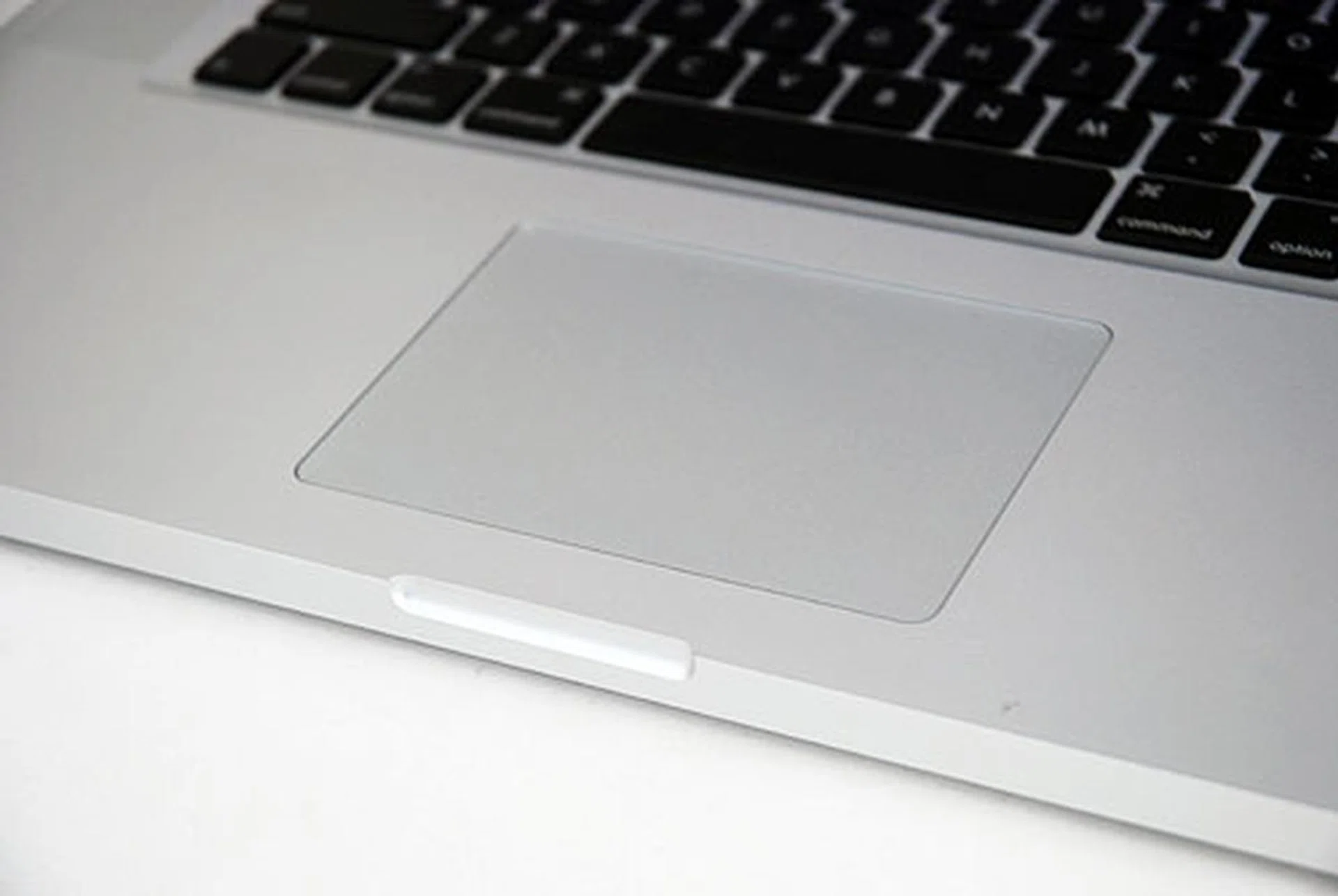
The trackpad of the newer MacBook Pro notebooks features inertial scrolling, which we guess is a software feature that may be implemented in the older MacBook Pros in due time.
The Performance Aspect
Considering the 'vast' variety of benchmarking programs available for Macs, we've had to resort to performing a Boot Camp of the 15-inch MacBook Pro just to get the numbers we need for comparison. Bear in mind, Boot Camp numbers may not accurately reflect the state of things, possibly due to driver support (since Apple has no obligation to do so but it's nice that they do allow this feature), so if the numbers are a little off, we'll be sure to point it out.
Specifications / Notebook | Apple MacBook Pro (15-inch, new) | Apple MacBook Pro (15-inch, old) | Apple MacBook Pro (17-inch) |
Processor | Intel Core i7-620M 2.66GHz, 4MBL2 cache | Intel Core 2 Duo P8700 2.53GHz, 3MBL2 cache | Intel Core 2 Duo 2.66GHz, 6MB L2 cache |
Chipset | Intel HM55 | NVIDIAGeForce 9400M | NVIDIA GeForce 9400M |
FSB | NA | 1066MHz | 1066MHz |
Memory | 4GBDDR3-1066 | 4GB DDR3-1006 | 4GB DDR3-1066 |
HDD | 500GBSATA (5400RPM) | 250GBSATA (5400RPM) | 320GB SATA (5400RPM) |
Video | NVIDIAGeForce GT 330M + Intel HD Graphics | NVIDIAGeForce 9400M | NVIDIA GeForce 9400M + NVIDIA GeForce 9600M GT |
Operating System | OSX ver. 10.6
(Snow Leopard) | OS X ver. 10.6
(Snow Leopard) | OS X ver. 10.5
(Leopard) |
Futuremark PCMark05 + PCMark Vantage
Pitting the newer Intel Core i7 MacBook Pro against it's older Intel Core 2 Duo MacBook Pro shows a pretty big difference in performance scores. For PCMark05, the much higher scores overall indicate the top end MacBook Pro has much to offer. The numbers here don't lie, the newer MacBook Pro will outperform the older machine in almost every way. On PCMark Vantage, the newer MacBook Pro shows an even bigger performance lead, proving just how far ahead a MacBook Pro equipped with an Intel Core i7 processor can do.
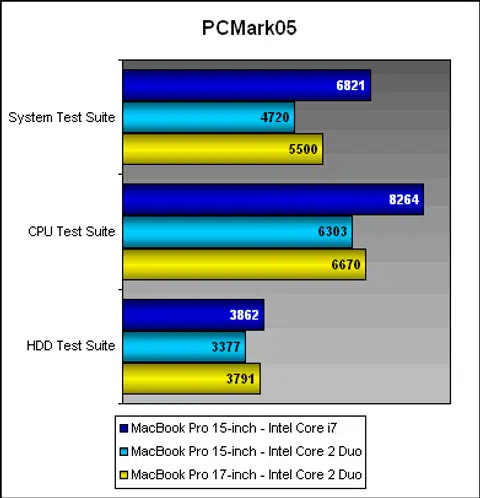
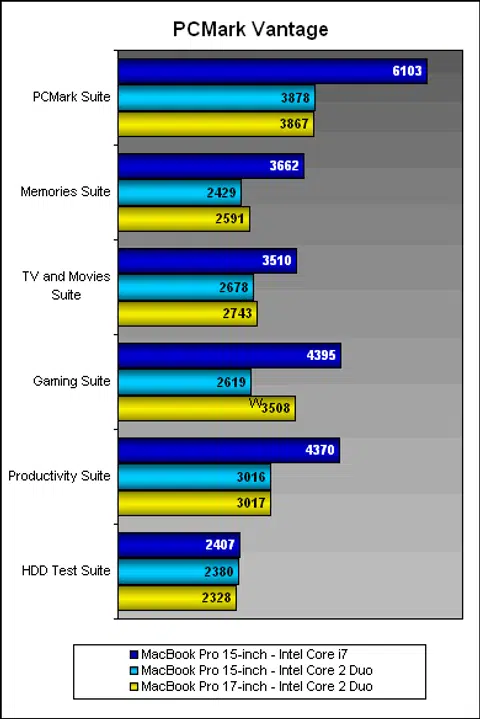
When pitted against a stronger contender, the 17-inch MacBook Pro which was the top of the line in the previous refresh, we see scores that all but indicate that the newer Intel Core i5 and i7 processors are the way to go if you're looking for a MacBook Pro, even if the older units may be slightly cheaper as they try to clear older stock.
Futuremark 3DMark06
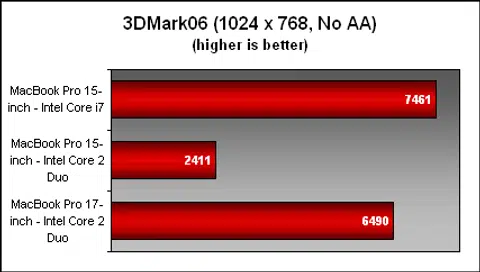
The newer NVIDIA GeForce GT 330M GPU scores well here, with a very strong result compared to the integrated NVIDIA GeForce 9400M G of the older MacBook Pro. Against the NVIDIA GeForce 9600M GT of the older 17-inch model, the new top of the line 15-inch MacBook Pro is still the more capable gaming notebook, especially if you are going to use Boot Camp to indulge in Windows-based games.
Benchmarking in Mac OS X
While there aren't that many benchmarking programs available in Mac OS X, there is one stressful benchmark available for multiple platforms and should give a good idea of the MacBook Pro's performance in graphics rendering or other equally stressful situations. We're talking about the cross-platform CineBench 11.5, and we've run our test machine through the grinder. To get a comparison with the older 17-inch MacBook Pro which we've last tested sometime back, we've first included the older CineBench 10 test. Let's take a look at the scores.
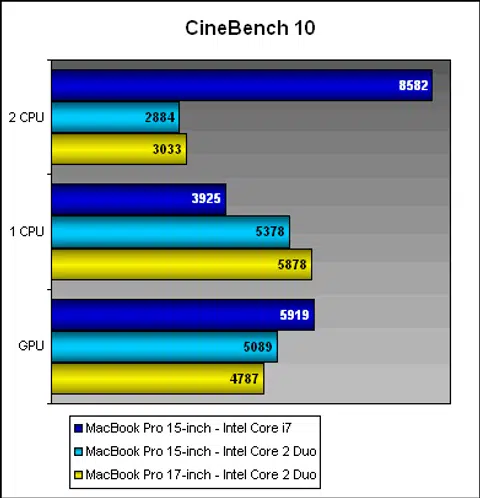
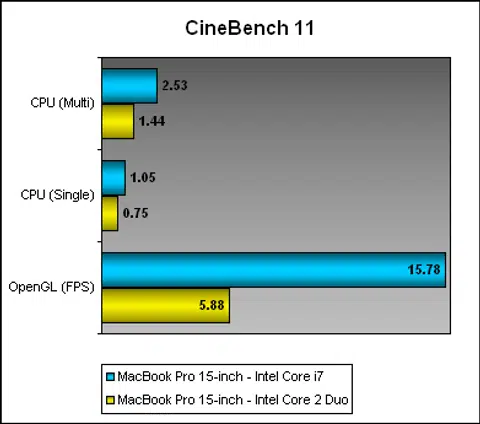
Interestingly there isn't much of a difference when we ran CineBench on Windows, so the scores you see for Mac OS X are the same as what you'll get when you run this in Windows. There's certainly a big gap between the notebooks in terms of processor performance as you'll note from the scores, and this means the newer Intel Core i7 MacBook Pro is pretty much the notebook you want in a high performance portable machine. The HyperThreading feature of the new CPUs give it more leverage to utilize more unused resources to provide more crunching power and the performance in this benchmark clearly proves it in multi-core loads.
On the GPU side, CineBench 10 shows that improvements made to Snow Leopard OS have significantly improved the scores for the GPU test, so the scores between the older 15-inch MacBook Pro is much better than the 17-inch unit with its supposedly better discrete graphics. There's not that much of a gap between the new and old 15-inch MacBook Pro notebooks in this test. CineBench 11 however, does ramp things up a tad, and you'll find that the newer 15-inch all but blows its older cousin away with far better results, thanks to better hardware and newer drivers.
iTunes Encoding
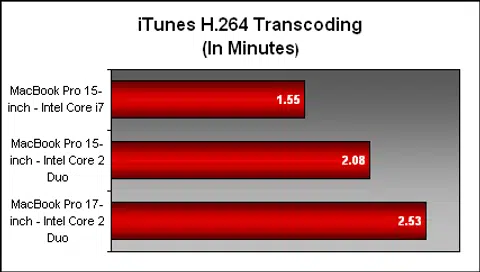
Moving on, we've also used a reliable trusty benchmark from our preview reviews - timing how fast iTunes converts a 1080p movie trailer to one that's viewable on the iPhone/iPod Touch. Since we already have a good idea on how fast the newer MacBook Pro is, the iTunes encoding test will basically confirm our findings. As you can see, the newer MacBook Pro leaps ahead by more than 30%, and the older MacBook Pro even beats the previous top end 17-inch unit.
This is puzzling to be sure - but we're putting the difference down to various changes brought about by Snow Leopard such as improved the software efficiency in the transcoding processes. We've also checked the iTunes changelog on performance boosts that could have helped in the outcome, but it seems unlikely. Since both 15-inch notebooks (old and new) are on the same OS version and running the same version of iTunes, we were still able to get pretty indicative results as mentioned in the previous paragraph.
Battery Life and Portability Index
Apple claims the newer refresh comes with a better battery life, and the 13-inch models (which aren't using the Intel Arrandale cores) are pegged at 10 hours, but the 15-inch and 17-inch versions will last you 8 to 9 hours, depending on whether the discrete graphics kicks in and what applications you are using. Based on iFixit's teardown of the newer MacBook Pro, we know that the battery capacity has been increased from 73Wh to 77.5Wh. That doesn't seem like a lot, but add in lower power consumption and we'll probably see a dramatic increase in battery life. Let's see if our guess is true.
Battery Life
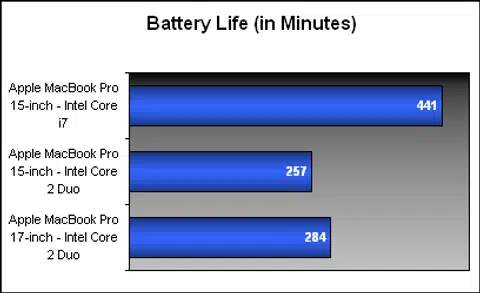
We're not expecting to see up to 9 hours uptime on our DVD move playback test, but anything that beats the older MacBook Pro should be vindictive of the battery performance of the newer MacBook Pro. We've used our usual 50% brightness and volume settings and let the notebook do its thing. The results? A surprisingly long uptime, almost nearing Apple's rating own rating of 8 to 9 hours. The newer MacBook Pro lasted 7 hours and 21 mins! Now that's just jaw-dropping impressive. The older MacBook Pro fared pretty well too, with an uptime of 4 hours and 28 minutes, which is close to the 4 hours and 44 minutes of the 17-inch MacBook Pro which had a bigger capacity battery.
Power Consumption
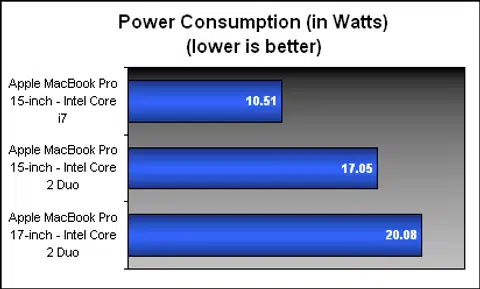
As for power consumption, we're looking at our calculations with a raised eyebrow of surprise. The power consumption of the newer MacBook Pro tops out at just 10.51 watts, a surprisingly low figure that's on par with netbooks and CULV processor bases notebooks. This also could be that the Mac OS X has better power management settings that's tied with the hardware, or that the battery is simply very efficient. Most likely, it's a combination of all these factors, especially given how good Intel's new processors fare in the power efficiency department. Still, it's an impressive figure and it looks to be a great feature for any notebook to aspire to match.
Portability Index
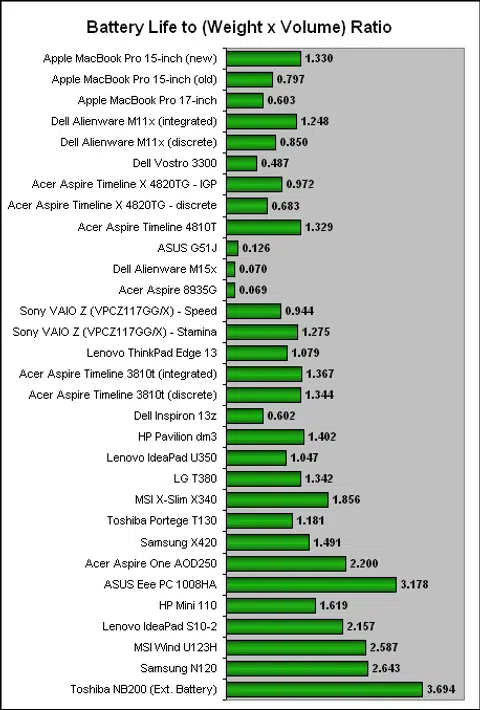
In our Portability Index test, we take the battery uptime and divide it by the product of the unit's weight and volume and the higher the ratio, the more portable the unit is. Given the battery life of the newer MacBook Pro so far, we're expecting a really high ratio. And the MacBook Pro doesn't disappoint here, with a stellar ratio of 1.330 that is quite mind blowing despite its heavier self. Its ratio is unheard of for its class of performance and capability. If you're looking for a notebook that will last you the distance, the newer MacBook Pro is probably the one you should lug around if you're cool with the 2.54kg weight of the notebook.
The Apple of Lust
Say what you like about Apple products, but there's just no denying that the design and looks of their products are simply gorgeous. We've seen some of their designs flow into other notebooks - most noticeably the HP Envy series, and some of their ideas like making the lesser used Function keys as control buttons for the notebook yet again migrating into other notebooks. In terms of design, Apple does have a strong lead, though we're of the opinion that Sony and some other brands can hold their own with ease.
Performance wise though, there has to be some compromise for the hardware. You won't find top of the line graphics or quad-core processors for your MacBook Pro, but it's safe to say that Intel's current generation of processors are more than capable of doing the job. The same can be said for NVIDIA's mid-range discrete graphics solution used in our top config MacBook Pro, it's a step up from the previous version, and handles well enough to keep up with the demands of today. While you can game somewhat with Steam on the Mac platform these days, having a Boot Camp option will still be useful, and the results do indicate gaming is posible with modest quality settings.
Battery life seems to be the clear winning feature here; we've not seen any other notebook that's as well specced come close to the battery life of the MacBook Pro that's not attached to an external battery dock. So hands down, this is why you should get the MacBook Pro - it's a great workhorse and a capable simple gaming machine. That said, price wise, it's not going to be cheap, as can be expect of an Apple product. You'll certainly be paying a premium for the design and features. The Intel Core i7 version of the 15-inch MacBook Pro will cost you a staggering S$3188, which can be quite a wallet breaker. But if you've always been using Apple products, and willing to fork out the premium, then you'll definitely be more than willing to pay for the notebook, and we daresay you'd be getting your money's worth - in various tangible and intangible ways.
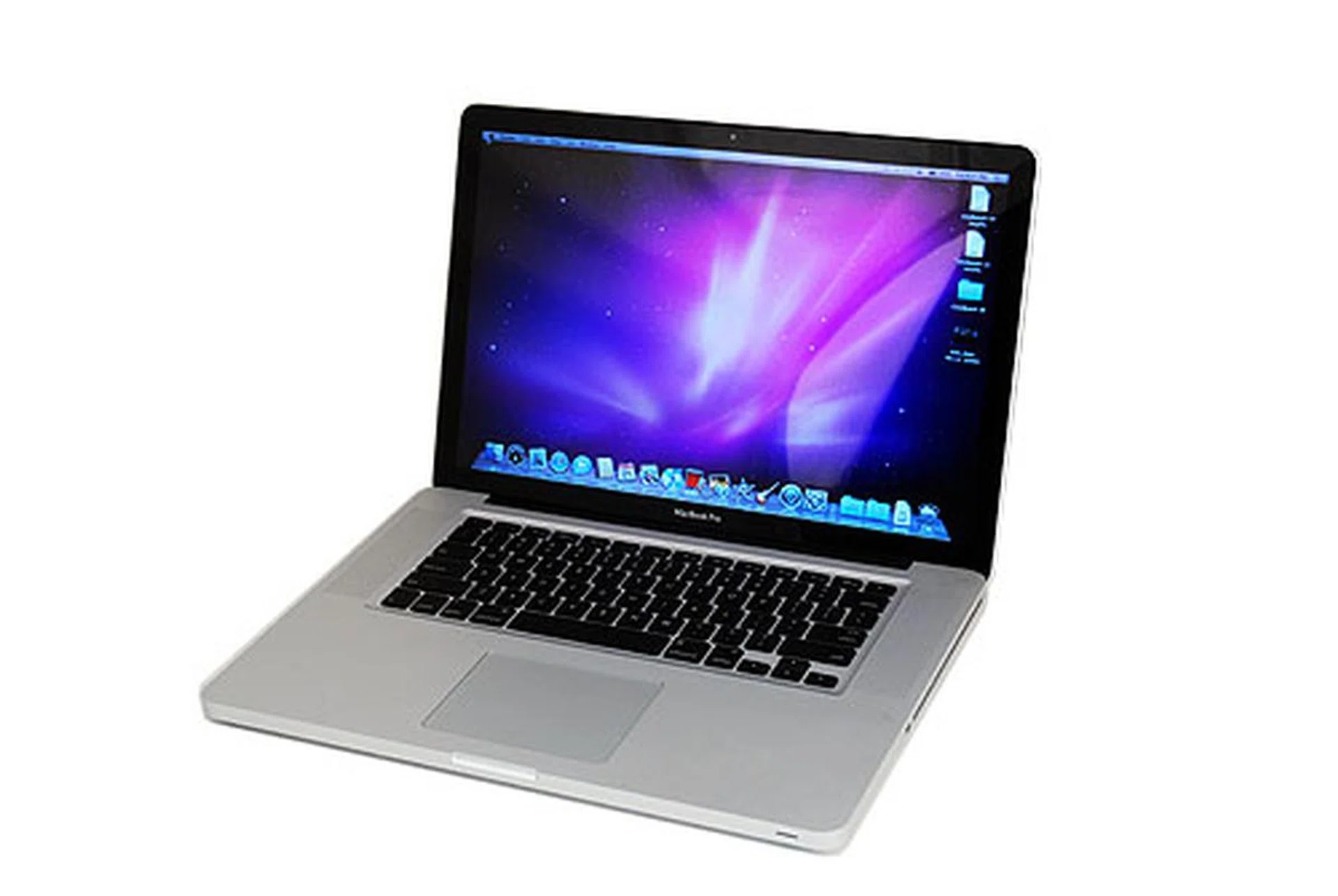
The new Apple MacBook Pro is certainly worth the its weight in cash. Just be prepared to spend a lot of cash though.
Our articles may contain affiliate links. If you buy through these links, we may earn a small commission.