
Doubling the Value - GeForce 8800 GT SLI Performance
Having seen how much performance that NVIDIA managed to pack into the new GeForce 8800 GT while offering it at an extremely attractive price, today we look at whether the GeForce 8800 GT SLI combo is worth the admission fee.
GeForce 8800 GT SLI Performance
Everyone's talking about it. No, it's not the iPhone but NVIDIA's latest salvo, the GeForce 8800 GT. With 3D performance almost on par with the company's own high-end GeForce 8800 GTX but with a price tag that's only slightly more than its mid-range GeForce 8600 GTS, this is probably the most exciting development in graphics cards for the DirectX 10 era, at least for the majority of consumers who could only drool at the Ultras and GTXs from afar.
Given the anemic state of decent mid-range options for DirectX 10 graphics cards before its stunning arrival, this outburst of enthusiasm is perhaps not surprising but when a GeForce 8800 GTX is almost twice the price of a single GeForce 8800 GT for a couple more frames at normal resolutions of 1600 x 1200 and below, it naturally begs the question of SLI performance for a pair of GeForce 8800 GT 512MB cards.
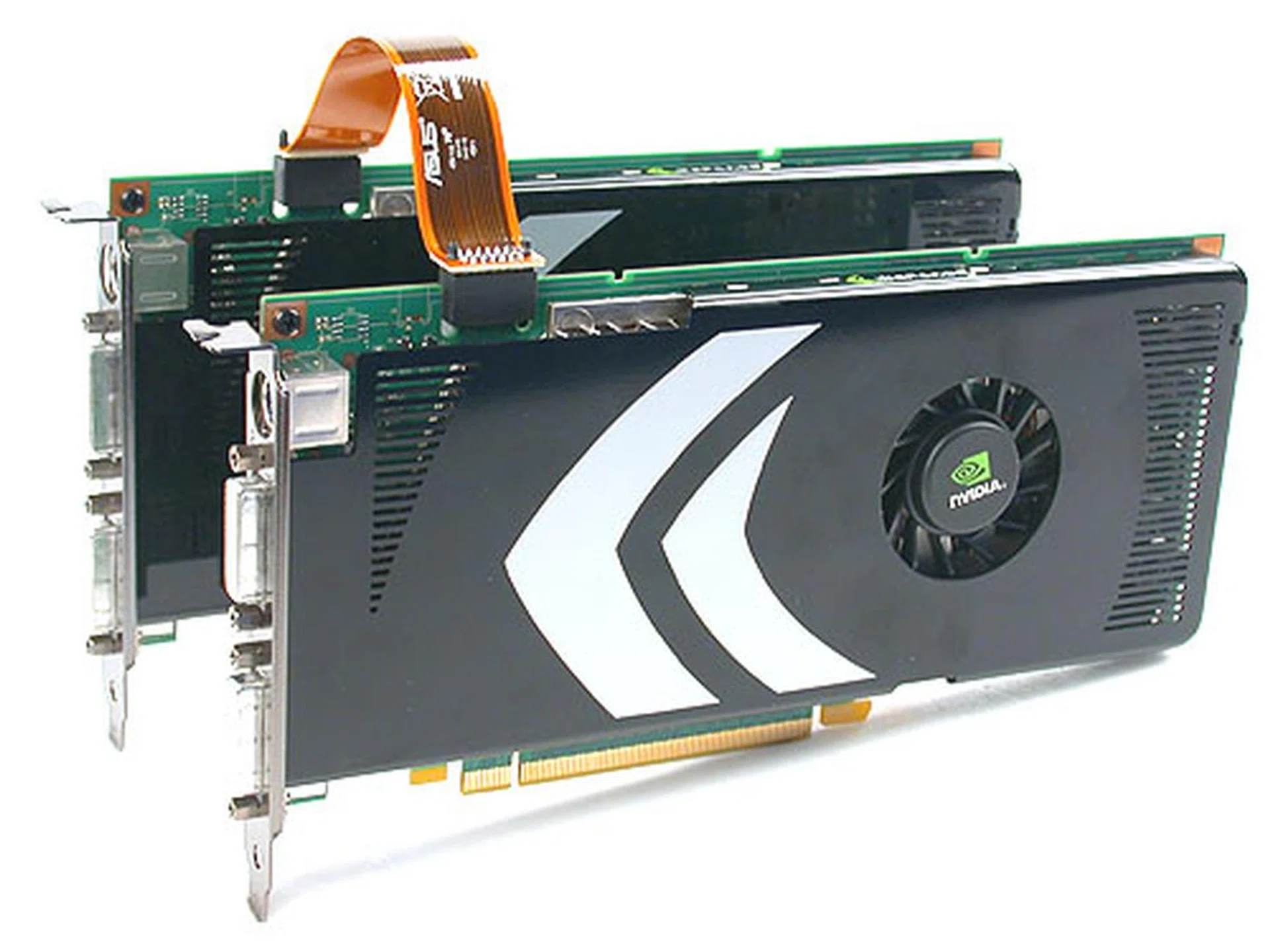
Have we found the best graphics deal of the year?
Admittedly, we should have included a SLI segment in our initial review of the GeForce 8800 GT but due to time constraints, we had to skip that. The arrival of newer drivers from NVIDIA meant that we could now test the SLI performance of the GeForce 8800 GT, along with updating our original test system with the new drivers. So is getting 2 x GeForce 8800 GT the answer to the bunch of hot PC game titles coming your way for the Christmas season?
Test Setup
Our usual test system was not exactly built for SLI so instead of our Intel D975XBX 'Bad Axe' motherboard, we used an ASUS P5N32-E SLI Plus board (nForce 680i) for the SLI testing. The rest of the components were similar to our typical configuration, with an Intel Core 2 Duo E6700 (2.66GHz) processor, 2GB of DDR2-800 Kingston HyperX memory modules, Seagate 7200.7 SATA hard drive and especially for this benchmarking, we had a Cooler Master Real Power Pro (850W) to ensure that power wasn't an issue with two GeForce 8800 GT cards. Windows XP Professional with Service Pack 2 and DirectX 9.0c completed the rig. For the testing of single cards, we used the Intel D975XBX board instead.
The following cards were tested, along with their respective drivers:
- NVIDIA GeForce 8800 GT SLI (ForceWare 169.02)
- NVIDIA GeForce 8800 GT (ForceWare 169.02)
- NVIDIA GeForce 8800 GTX (ForceWare 158.19)
And the benchmarks tested are as follows:
- Futuremark 3DMark06 (version 102)
- F.E.A.R
- Supreme Commander (version 3255)
- Company of Heroes (ver 1.3)
- Unreal Tournament 3 Beta Demo
- Crysis Pre-release Demo
SLI Performance Benchmarks - Part 1
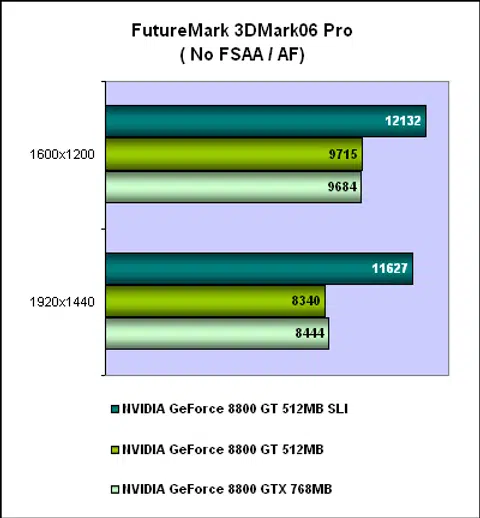
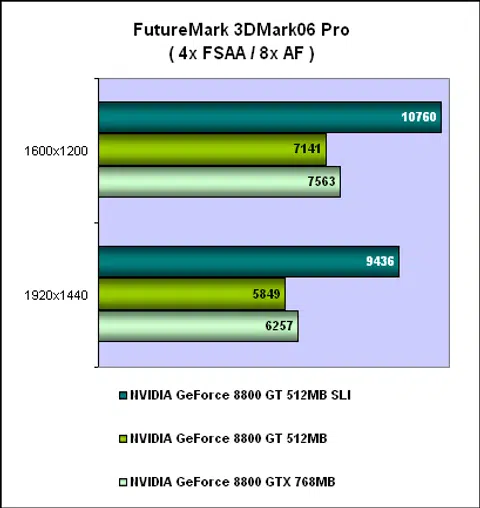
Not everyone agrees on the utility of synthetic benchmarks like 3DMark06 but there is no escaping the fact that they are extremely popular and easy to use. The SLI GeForce 8800 GT easily proved its worth, especially at 1920 x 1440 with anti-aliasing, where it showed up to 61% increase in base scores.
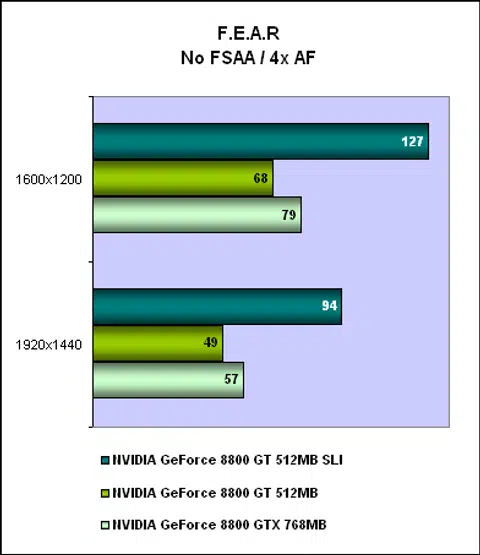
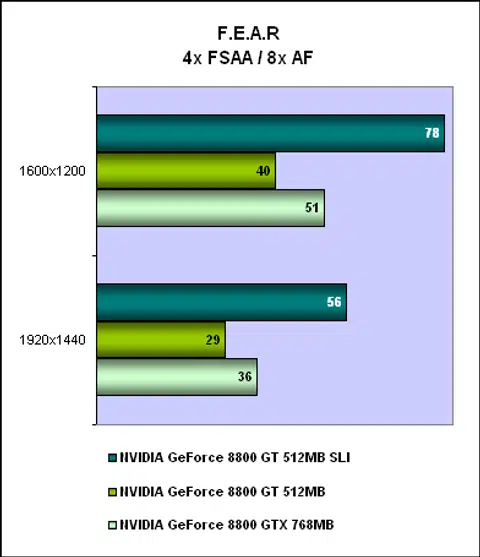
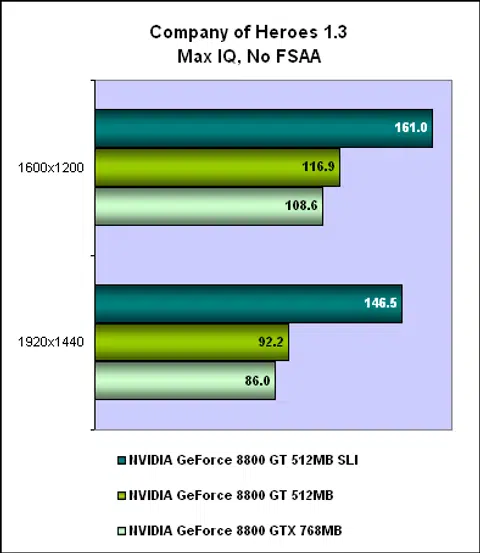
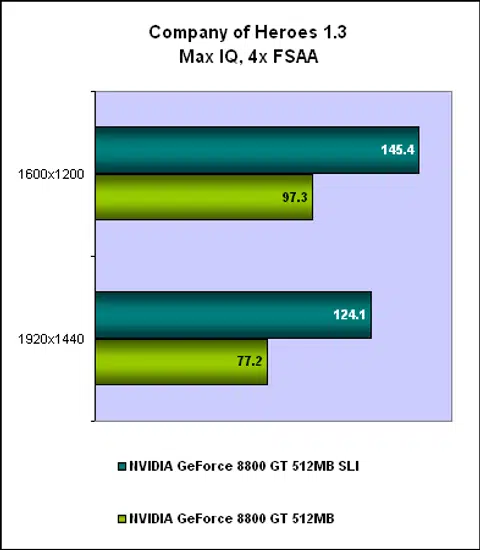
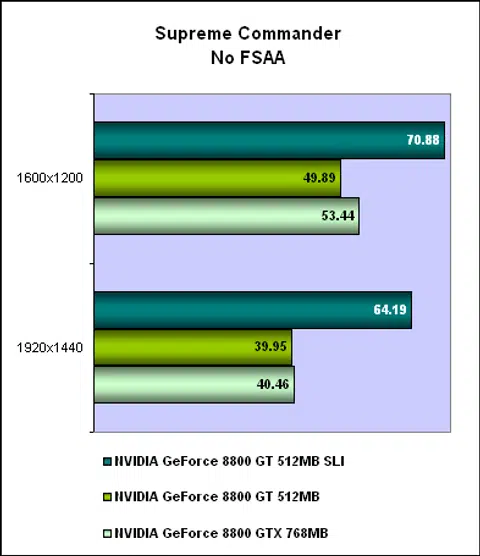
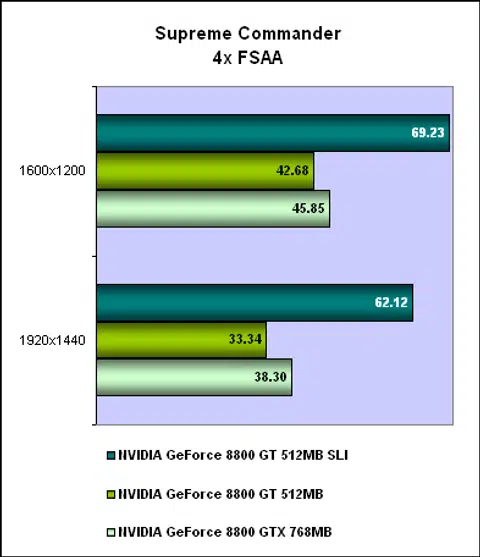
All these games showed that having two is definitely better than one, and more importantly for the budget maximizing gamer, such a configuration will also outpace a GeForce 8800 GTX by a significant amount. While the margin of improvement over a single GeForce 8800 GT varied from game to game, expect at least 50% gains from most of them.
SLI Performance Benchmarks - Part 2
The next two game titles are highly awaited titles using game engines that will likely find their way into many future games. Both engines are capable of all those DirectX 10 effects that you have heard so much about, though they are obviously not evident on our DirectX 9 based operating system. We'll move on to DirectX 10 by the turn of the new year as more DirectX 10 games are launched and by then more matured Vista drivers should exist for a better gaming OS. Meanwhile, both games are available for download as demos, though they have gone gold and you can expect them to be ready for the holiday season.

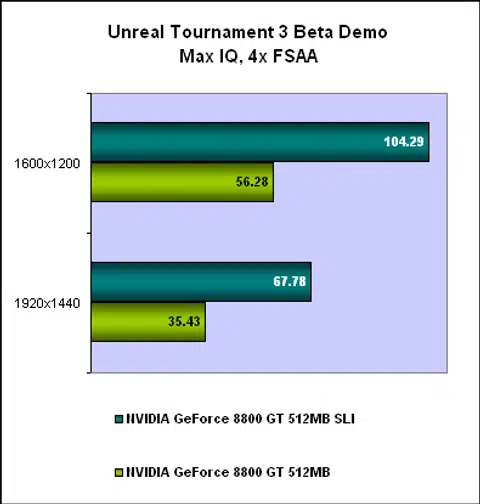
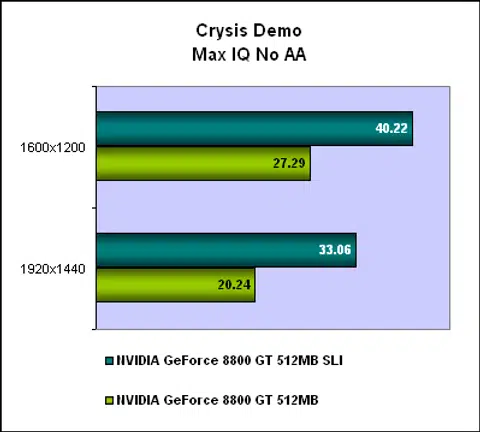
We tested both using built-in flyby benchmarking tools. NVIDIA has admitted that SLI performance is not supported in the Crysis demo, so while the benchmarks do return higher scores with SLI enabled, the actual game play is adversely affected by random stutters and jerks, making SLI not suitable for anything but the benchmarking flyby. Hence, we aren't too sure if these numbers returned by the demo is any valid but with a patch expected for the retail version of Crysis, these numbers could be what you'll be getting in-game with a GeForce 8800 GT SLI configuration a couple of weeks from now. So just take these figures as a rough reference point for now.
Power Consumption
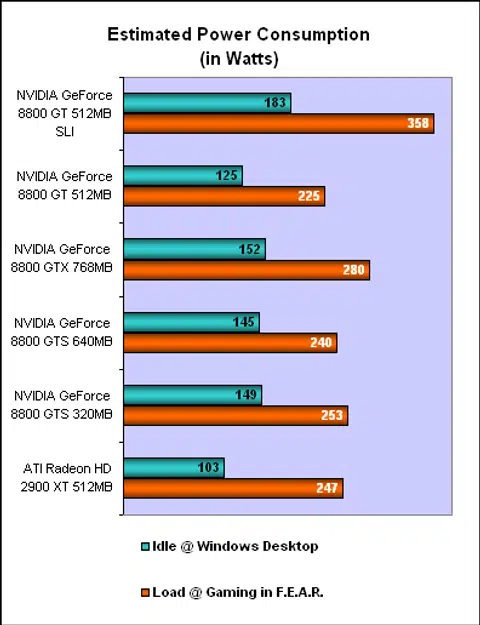
Obviously, one of the main drawbacks of having two graphics cards is the amount of power required to maintain them. Fortunately, while the GeForce 8800 GT SLI did not require twice as much power, it does need a fair amount and while running our benchmarks, it rose to 358W, making it the most power hungry choice. You can also expect temperatures to rise with two such cards in your system, even if individually, we don't anticipate any anomalies. However, the combined heat output should stress your chassis ventilation and that should be something to beware before embarking on this. Thankfully, noise should not be a problem, due to the small fan used on the GeForce 8800 GT.
Final Words
So is SLI with the GeForce 8800 GT a viable choice? From a purely performance (read: frame rates) point of view, it delivers the goods. However, at this moment, the drivers from NVIDIA don't seem up to the mark, with our 3D games experiencing horizontal flickering bands that seriously disrupted game play. We have seen this before and believe it to be a driver issue that hopefully will get addressed along with proper SLI support for Crysis. Although the SLI performance looks enticing, the various related issues, from the heat/power consumption to possible screen artifacts mean it's not as convincing as the scores suggest. For now, our advice is simply this: caveat emptor.
Our articles may contain affiliate links. If you buy through these links, we may earn a small commission.